




Table of Contents
Introduction
iContact is great for building campaigns and managing lists. But if you’re a Salesforce user, you’ve likely run into some common challenges and may be searching for an iContact alternative for Salesforce. These include manual data syncing, limited automation, and poor visibility across key workflows, such as lead management, opportunity tracking, and customer engagement.
Is there an iContact alternative built specifically for Salesforce that delivers automation, visibility, and scale without external syncs?
This is where MassMailer changes the game. Built natively on Salesforce, it removes the usual friction, eliminating connectors, export headaches, and automation gaps. The result is seamless, scalable email marketing directly within the CRM you already use.
In this guide, we’ll break down why iContact falls short for Salesforce users and why MassMailer is the alternative designed to fill the gaps iContact can’t.
Why Salesforce users look for an iContact alternative
“Some advanced features are limited compared to other tools, and email template customization could be more flexible. The reporting could also be more detailed, especially for deeper campaign insights,” says an iContact user on G2.
iContact works fine for standalone campaigns, but aligning email with real-time CRM data becomes complicated. Syncs start to lag. Lists go stale. You're running email on guesswork rather than on what’s happening in Salesforce.
Let’s look at why this disconnect happens and where iContact struggles to keep up.
How iContact’s limitations impact your team
iContact wasn’t built to work seamlessly with Salesforce. That’s where things start to fall short, especially for teams relying on real-time triggers, shared visibility, and scalable automation.
Here’s how those limitations show up in day‑to‑day execution:
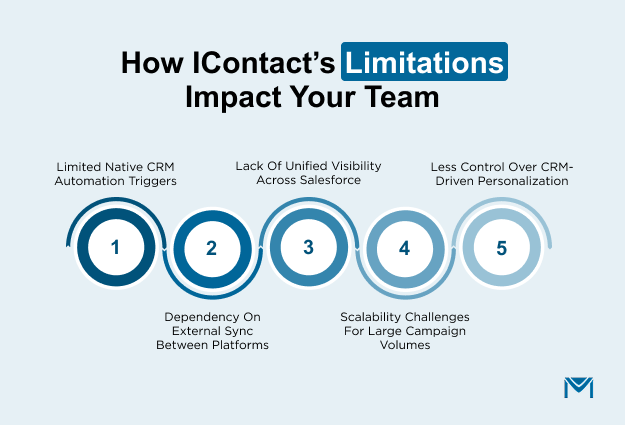
1. Limited native CRM automation triggers
iContact can’t respond to real-time CRM activity. You’re forced to sync data out and manage automation logic in a separate platform, adding delays and risks.
The impact:
- No real-time email triggers from Salesforce record updates
- Automation depends on scheduled campaigns or manual setup
2. Dependency on external sync between platforms
Every time you want to use Salesforce data in iContact, you have to sync it first. That sync doesn’t always run on time, which can result in outdated data driving campaigns.
The impact:
- Missed updates lead to mistargeted messaging
- Sync setup requires ongoing monitoring and troubleshooting to avoid data gaps
3. Lack of unified visibility across Salesforce
iContact keeps engagement data, such as opens, clicks, and bounces, within its own platform. Salesforce users don’t automatically see this information on Lead or Contact records.
The impact:
- Teams must switch platforms to access engagement insights
- CRM reports lack email performance data unless custom integrations are built
4. Scalability challenges for large campaign volumes
Salesforce enforces daily send limits, and iContact can’t override them. As your audience grows, iContact’s lack of native CRM integration becomes harder to work around.
The impact:
- High-volume campaigns require workarounds or third-party infrastructure
- Manual segmentation increases with campaign size, leading to sending errors
5. Less control over CRM-driven personalization
iContact supports basic personalization, such as inserting names or email addresses. But if you want to pull in dynamic Salesforce data, you're out of luck.
The impact:
- Can’t personalize emails with custom object or related record data
- Requires constant list preparation to maintain accuracy
These limitations aren’t just technical. They impact team collaboration, delay campaign execution, and weaken your confidence in the accuracy of CRM data.
That’s why many Salesforce-first organizations move to native tools like MassMailer. You send emails directly from Salesforce records, log every interaction on the timeline, and build campaigns around live CRM data.
Why MassMailer is a strong iContact alternative for Salesforce users
When teams start looking for an iContact alternative for Salesforce, the reason usually comes down to one thing: things start to break when email sits outside the CRM.
MassMailer solves that exact problem by operating directly within Salesforce, where your team already works. That means no sync delays, no separate automation logic, and no toggling between tools just to get a clear view of your outreach.
| Aspect | MassMailer | iContact |
|---|---|---|
| Salesforce Integration | Built natively in Salesforce. No connectors needed. | Requires sync. Operates outside Salesforce. |
| Audience Targeting | Uses live Salesforce records and reports. Real-time targeting. | Uses static lists synced from Salesforce. Targeting may lag behind CRM updates. |
| Deliverability Control | Dedicated IPs, warm-up control, and in-CRM bounce handling. | Shared IPs, platform-managed suppression. |
| Template Builder Location | Built into Salesforce. | External platform editor. |
| Pricing Model | Predictable cost based on volume and users. | Contact-based pricing. Costs rise with list size. |
| Primary Users | Ideal for cross-functional Salesforce teams (Sales, Ops, Service). | Suited for marketing-led, standalone teams. |
How Massmailer stands out - A detailed analysis of capabilities
Let’s take a closer look at how MassMailer handles the same sticking points that often push Salesforce users away from iContact.
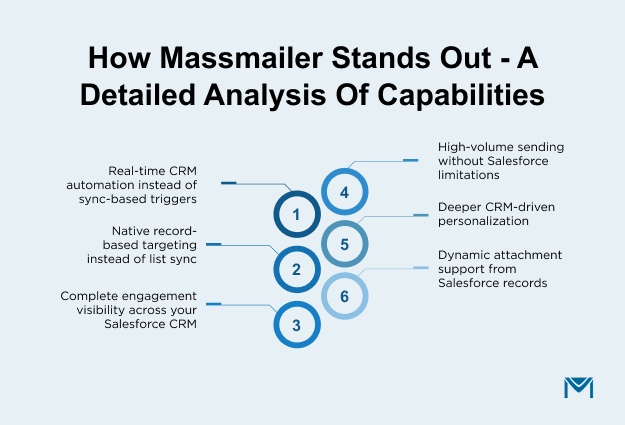
1. Real-time CRM automation instead of sync-based triggers
Unlike iContact, MassMailer allows you to trigger emails based on real-time CRM events.
MassMailer works directly with Salesforce Flow, so email becomes part of your CRM logic and not something you have to manage separately.
The result:
- You can trigger emails from changes to Leads, Contacts, or Opportunities.
- Automation flows are easier to build and maintain.
- Emails go out based on live CRM data, not scheduled syncs.
- No need to rebuild automation logic in two places.
This shift brings automation closer to how your sales and service teams already work.
2. Native record-based targeting instead of list sync
One of the biggest operational gaps with iContact is its dependence on list sync. MassMailer removes that dependency entirely by using Salesforce records as the audience source.
Instead of building static lists, you select recipients directly from:
- Leads, Contacts, and Campaign Members
- Custom Objects
- Salesforce Reports
- Real-time record filters and field criteria
The result:
- There is no re-sync process or list refresh cycle.
- No stale segments.
- Minimal maintenance effort.
- Campaigns always reflect live CRM data.
3. Complete engagement visibility across your Salesforce CRM
MassMailer records all engagement data directly on Salesforce records, so your teams can view everything without switching platforms.
The result:
- Sales reps can view email activity right on the record.
- Reports and dashboards include campaign performance.
- No extra integrations or exports needed to analyze outcomes.
It’s a big step up in terms of collaboration and accountability, especially for cross-functional teams that need context fast. According to the 2026 Salesforce State of Marketing Report, 84% of marketers use first‑party data for personalization and targeting, showing the value of unified, CRM‑sourced engagement data such as email opens and clicks.
4. High-volume sending without Salesforce limitations
Salesforce has daily send limits. iContact doesn’t solve for that, especially when campaigns are triggered from inside the CRM. MassMailer does.
Here’s how it supports high-volume email use:
- Uses dedicated IPs and IP pools to improve deliverability
- Allows full control over IP warm-up schedules
- Manages bounces and suppression lists directly in Salesforce
- Prevents duplicate sends automatically during execution
The result:
- Large campaigns can be executed directly from Salesforce without splitting audiences.
- Deliverability remains stable even as volume increases.
- Teams avoid manual segmentation to stay under limits.
For organizations running high-frequency or high-volume campaigns, this means growth without added complexity.
One example of this in action is how Retirement Planners of America (RPOA) used MassMailer to scale their weekly marketing emails. With over 100K messages going out every week, they needed a platform that wouldn’t buckle under Salesforce's native limitations, and MassMailer delivered.
5. Deeper CRM-driven personalization
iContact offers simple merge fields, such as first name or email address. But if you want deeper personalization tied to CRM objects or custom fields, it falls short.
MassMailer lets you personalize emails using:
- Opportunity fields such as stage or amount
- Custom object fields unique to your business
- Related records connected to the primary object
- Status-based conditions driven by Salesforce data.
The result:
- Emails stay relevant as records move through the pipeline.
- Follow-ups adjust automatically to lifecycle changes.
- Messaging reflects the real account or opportunity context.
- Teams spend less time preparing segmented lists.
- Personalization remains accurate without manual updates.
For Salesforce-centric teams, this level of CRM-driven personalization improves both engagement quality and operational efficiency.
6. Dynamic attachment support from Salesforce records
For teams that send proposals, invoices, or record-specific documents, the lack of dynamic attachment support is a major limitation.
MassMailer solves this problem by offering:
- Static attachments for all recipients
- Dynamic attachments personalized per record
- Seamless integration with Salesforce Files
- Automated document creation via MassMailer Docs
The result:
- Documents are sent automatically, tailored to each record.
- No manual downloading, renaming, or attaching files.
- Communication stays tightly connected to Salesforce data.
- Sales and ops teams can send transactional emails faster and more accurately.
- Reduces the risk of human error when sending critical documents.
7. In-CRM reporting and analytics
With iContact, most of your performance data stays within its platform. MassMailer changes that by logging all tracking and analytics directly to Salesforce records.
The result:
- Users can merge engagement metrics with pipeline or lead source data.
- Teams can build reports with standard Salesforce tools.
- Users can share campaign insights across teams without exporting data.
If your team relies on Salesforce dashboards to track performance, keeping email data there ensures complete visibility and unified insights.
Conclusion
Choosing an iContact alternative for Salesforce is not just about features. It is about architecture.
Choosing MassMailer helps your team respond in real time, target the right records without manual syncing, track engagement where decisions are made, scale campaigns confidently, and deliver the right messages.
Evaluate your workflow. Test the fit and move to a solution that keeps email aligned with your CRM from start to finish.
If you’re ready to bring email back inside Salesforce, book a personalized demo to explore how MassMailer streamlines CRM-triggered automation, real-time targeting, and full engagement tracking, without the integration headaches. Your smarter email solution starts here.
Frequently Asked Questions
1. Is MassMailer more cost-effective than iContact for Salesforce users?
2. Does MassMailer require additional integrations like iContact does?
3. How secure is MassMailer compared to iContact for handling Salesforce data?
4. Does MassMailer support compliance with email regulations like CAN-SPAM and GDPR?
5. Is there a learning curve when switching from iContact to MassMailer?
6. What kind of support and onboarding does MassMailer offer?
Start Your Free Trial Today
Experience MassMailer the easiest way to send personalized emails from Salesforce.
Related Blogs
Best Constant Contact Alternative for Salesforce (2026 Guide)

Best Pardot Alternatives for Smarter Marketing in 2025
MassMailer Resources

About the Author

Siva Devaki 

Siva Devaki is the founder of MassMailer Inc., a tool that helps Salesforce users optimize email marketing. A passionate advocate for email marketing, Siva writes and hosts podcasts on the topic, sharing insights to help businesses drive revenue and enhance customer engagement through Salesforce email automation and tracking.