





Table of Contents
Introduction
The choice between MassMailer and iContact is not about features. For Salesforce users, it is about where your team actually executes email.
Most comparisons treat this as a tool evaluation. In reality, you are choosing between two execution models: running campaigns directly inside Salesforce, or operating through an external platform connected by integrations.
MassMailer represents the Salesforce-native approach, while iContact follows the external platform model.
That decision shapes how your team works every time a campaign goes out:
- Where lists are created and updated
- Where emails are scheduled and sent
- Where engagement activity is recorded
- Where performance is reviewed and acted on
When execution stays inside Salesforce, these steps happen within a single system. When execution sits outside, Salesforce becomes a data source, while campaign work moves elsewhere.
As campaign volume increases, this difference becomes more visible. Teams begin coordinating across systems instead of operating in one place, and ownership shifts from a unified workflow to multiple tools.
In the sections that follow, we break down how MassMailer and iContact behave inside real Salesforce workflows so you can decide based on how your team actually runs email.
MassMailer vs iContact: Quick Answer for Salesforce Users
MassMailer is the better choice if your team executes email campaigns inside Salesforce. iContact fits teams that operate email in a separate platform and connect it through integrations.
The difference is where execution happens. MassMailer works natively within Salesforce, so your team uses CRM data directly at send time. iContact runs as an external email system, where data is synced from Salesforce before sending.
Choose based on how your team operates:
- Use MassMailer if Salesforce is where you build audiences, send emails, and track engagement
- Use iContact if your team manages campaigns in a standalone email platform and only pulls data from Salesforce
If Salesforce is central to how your team runs email, MassMailer fits. If Salesforce supports your email process but does not run it, iContact fits.
Next, we break down how both tools differ inside Salesforce-based operations.
MassMailer vs iContact: Key Differences for Salesforce-Based Teams
The MassMailer vs iContact difference comes down to system structure. MassMailer runs email operations inside Salesforce, while iContact executes them in an external platform connected to Salesforce.
1. Where email campaigns run and how that affects workflow control
MassMailer and iContact execute campaigns in different environments, which sets where teams handle setup, approvals, and sending.
- MassMailer: Teams create, approve, and send campaigns directly inside Salesforce using standard CRM objects and workflows
- iContact: Teams create and send campaigns inside a separate email platform, with Salesforce acting as a connected system
Campaign execution lives entirely in the platform where these actions take place.
2. How segmentation and personalization work with Salesforce data
Each platform uses a different data source at the time of segmentation and personalization.
- MassMailer: Uses live Salesforce records, including fields, filters, and related objects, during audience selection
- iContact: Uses data that has been synced or imported into the platform before campaign execution
The data available at send time depends on the platform performing segmentation.
3. What reporting and engagement visibility look like in each platform
Each platform records engagement activity in a different location.
- MassMailer: Logs opens, clicks, and replies directly on Salesforce records such as Leads, Contacts, and Campaign Members
- iContact: Stores engagement data within the external platform’s reporting system
Teams access engagement data in the platform where it is recorded.
4. How pricing, integrations, and maintenance affect total cost
Each platform uses a different setup to operate with Salesforce.
- MassMailer: Runs within Salesforce without requiring external connectors or middleware
- iContact: Connects to Salesforce through integrations that move data between systems
System structure defines how each platform connects to Salesforce and where email operations are executed.
Why iContact Becomes Harder to Manage as Salesforce Email Operations Grow
iContact becomes harder to manage as Salesforce email operations grow because campaign execution happens outside Salesforce while customer data continues to change inside it. This split creates dependencies between systems, where sending, targeting, and reporting rely on coordination instead of a single workflow.
1. External execution creates sync gaps and disconnected campaign workflows
Sending from iContact requires teams to move data out of Salesforce before launching a campaign. This introduces a timing dependency between data readiness and execution.
Before each send, teams must:
- Extract or sync the latest contact set from Salesforce
- Confirm the dataset is available inside iContact
- Decide whether to proceed if the records change after transfer
Campaign timing depends on when the data was last synced, not when the team is ready to send. Every campaign is tied to data movement, not just execution.
2. Limited access to live Salesforce data weakens targeting accuracy
Audience selection in iContact relies on a transferred dataset rather than direct access to Salesforce records. Targeting operates on a fixed snapshot instead of current CRM data.
During campaign setup:
- Filters apply only to data available inside iContact
- Recent Salesforce updates are not reflected unless the dataset is refreshed
- Personalization fields pull from stored record values
Targeting reflects the state of data at transfer time, not at send time.
3. Follow-ups and campaign setup require more manual coordination across tools
Campaign setup, follow-ups, and next actions are split between Salesforce and iContact. No single system manages the full execution flow.
To run and extend a campaign, teams must:
- Prepare audiences in Salesforce
- Align those audiences inside iContact
- Review engagement activity across both systems before acting
Execution becomes a handoff between systems instead of a continuous workflow.
4. Engagement reporting stays fragmented outside Salesforce
Campaign activity generated in iContact does not automatically live on Salesforce records. Engagement data and customer context exist in separate systems.
To evaluate performance, teams must:
- Review campaign metrics inside iContact
- Reference contact and campaign data inside Salesforce
- Combine both to understand engagement at the record level
Performance analysis becomes a reconciliation step because campaign metrics and CRM data are not stored together.
Why MassMailer Is a Better Fit for Salesforce Users
MassMailer fits Salesforce users because it removes the need to manage email as a separate system. Your team works directly inside Salesforce, where records, approvals, and automation already exist. Instead of coordinating between tools, outreach becomes part of your CRM workflow. This changes how teams operate, especially as campaign volume increases.
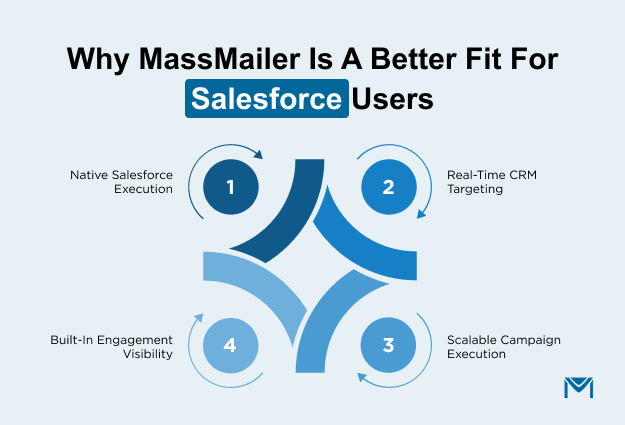
1. Campaigns run natively inside Salesforce without a connector dependency
MassMailer lets your team execute sends directly within Salesforce. Campaign setup, approvals, and sending happen in the same environment as your data.
- Build and launch mass email campaigns directly from CRM records
- Send messages through existing Salesforce workflows
- Use standard objects like Campaigns and Contacts without exporting data
- Control execution using Salesforce permissions and processes
Your team moves from managing integrations to executing campaigns within a single system.
2. Real-time CRM data improves targeting and personalization
MassMailer uses live Salesforce records at the moment of sending, so targeting reflects current CRM conditions.
- Apply filters directly on CRM data without preparing separate lists
- Personalize messages using up-to-date record fields
- Trigger outreach based on real-time changes in Salesforce
- Adjust targeting dynamically using related custom objects
Targeting becomes part of how your team uses Salesforce, not a separate preparation step.
3. Email activity stays visible across Salesforce records and reporting
MassMailer records engagement directly within Salesforce, keeping communication and customer data in one place.
- Track opens, clicks, and replies on Lead and Contact records
- Analyze campaign performance within Salesforce reporting
- View communication history alongside customer interactions
- Build dashboards using CRM data without external tools
Email engagement becomes part of your existing CRM visibility.
4. Teams scale execution without adding operational complexity
MassMailer supports higher campaign volume without introducing new tools or coordination layers.
- Increase sending volume without switching systems
- Operate within Salesforce processes as campaigns grow
- Maintain deliverability through consistent sending practices
- Keep execution aligned with existing workflows
As outreach scales, your process stays consistent. Teams expand within Salesforce instead of managing parallel systems.
Real-world example: moving email execution fully into Salesforce
A digital lending platform shifted its email operations from an external tool to Salesforce using MassMailer. Before the change, the team prepared data in Salesforce and executed sends in a separate system. That setup required constant coordination between platforms.
After moving to MassMailer, the team handled outreach directly inside Salesforce:
- Built and launched sends using CRM records
- Used Salesforce objects to manage targeting and approvals
- Tracked engagement directly on customer records
- Expanded outreach without adding new tools or processes
As a result, the team moved from managing integrations to executing campaigns within Salesforce itself. Email became part of their CRM workflow instead of a separate system they had to maintain.
MassMailer vs iContact Pricing: Cost, Overhead, and Long-Term Value
MassMailer delivers a lower long-term cost for Salesforce teams because it removes repeated execution work, while iContact increases cost through effort that repeats with every campaign.
Subscription pricing does not reflect actual spend. In practice, cost comes from how many steps your team must complete for every send. Each repeated step adds effort, and that effort compounds across every campaign.
What iContact costs beyond the base plan for Salesforce teams
iContact introduces cost through repeated actions your team performs for every campaign.
That effort shows up in routine execution work:
- Preparing and validating audience data before each send
- Repeating setup steps for recurring campaigns
- Checking configurations to maintain consistency
Each of these steps happens again for every campaign. As a result, the cost grows with usage because your team repeats the same work every time.
This cost does not appear in pricing plans, but it adds up with every campaign your team runs.
How native execution reduces maintenance and process overhead
MassMailer reduces cost by eliminating steps your team would otherwise repeat. Your team follows a consistent process instead of rebuilding execution for each campaign.
That changes how cost behaves:
- Fewer steps required before each send
- No repeated setup across recurring campaigns
- Reduced need for ongoing admin involvement
Because the process stays consistent, your team does not repeat the same work for every campaign.
That consistency removes recurring effort, which keeps execution cost stable over time.
Which platform delivers better long-term value inside Salesforce
Long-term value depends on how costs scale as your team runs more campaigns. The platform that removes repeated effort delivers better economics.
Here is how that difference shows up:
| Cost Driver | MassMailer | iContact |
|---|---|---|
| Effort per campaign | Fixed and repeatable | Recreated each time |
| Setup repetition | Minimal | Required for every campaign |
| Admin workload | Controlled | Expands with usage |
| Cost behavior | Stable over time | Increases with activity |
Every repeated step adds cost to every campaign. That is why the execution model directly determines long-term spend.
How to Move from iContact to MassMailer Without Disrupting Salesforce Workflows
You do not need to rebuild your Salesforce setup to move from iContact to MassMailer. Teams can shift execution into Salesforce gradually while keeping existing campaigns active. This allows you to adopt MassMailer without downtime, without data loss, and without interrupting ongoing outreach.
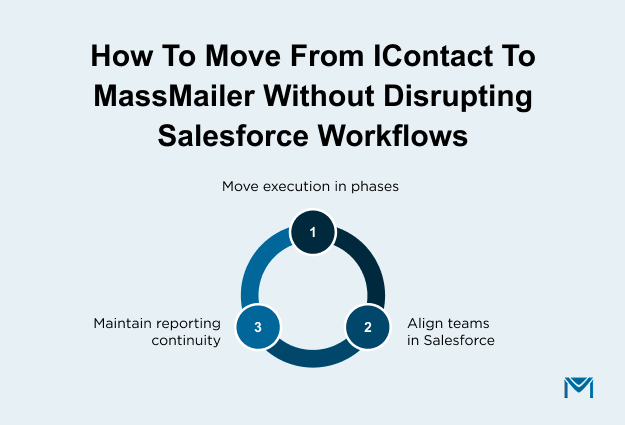
1. Move campaign execution into Salesforce in a phased way
Start by running new campaigns inside Salesforce while existing campaigns continue in iContact. This lets your team adopt MassMailer without pausing current programs.
A typical transition looks like this:
- Continue scheduled sends in iContact for active campaigns
- Launch new campaigns directly from Salesforce
- Move recurring sends into Salesforce as existing cycles complete
This approach keeps outreach running while shifting execution into Salesforce at a controlled pace.
2. Keep teams aligned around one system for data and sending
As more campaigns move into Salesforce, execution naturally consolidates into a single system. Teams no longer split actions between tools.
During transition:
- Salesforce becomes the default system for campaign setup and sending
- New campaigns follow Salesforce-based processes and records
- Fewer steps are required to switch between platforms
Over time, campaign execution, data, and reporting align within Salesforce, simplifying day-to-day operations.
3. Preserve reporting continuity during migration
You can maintain full visibility into campaign performance throughout the transition. Reporting continues across both systems without interruption.
To maintain continuity:
- Keep historical campaign data accessible in iContact
- Track new campaign activity directly within Salesforce
- Compare performance across both systems during the transition
This ensures teams retain visibility into past and current campaigns while transitioning execution into Salesforce.
Conclusion
The MassMailer vs iContact decision comes down to how you want to execute email inside Salesforce. If your team depends on Salesforce to run outreach, track activity, and act on engagement, MassMailer aligns with that model directly.
iContact works when the email stays outside the CRM. MassMailer fits when Salesforce drives how your team operates.
For Salesforce-based teams, this is not just a tool choice. It defines how consistently you can run campaigns, how quickly your team can act, and how much effort each send requires.
If your current setup feels disconnected or harder to manage as usage grows, it is time to evaluate a better approach.
Book a MassMailer demo and see how email execution works directly inside Salesforce before making your decision.
Frequently Asked Questions
1. Is MassMailer better than iContact for Salesforce users?
2. Can iContact fully integrate with Salesforce?
3. Does MassMailer require additional integration with Salesforce?
4. Can you run bulk email campaigns directly from Salesforce?
5. How does email tracking work in Salesforce with MassMailer?
6. What is the easiest way to switch from iContact to MassMailer?
Related Blogs
Salesforce vs ActiveCampaign: Which Platform Fits Your Business?
Salesforce Email Marketing Tool Comparison: Native vs Integrated Tools
10 Best Salesforce Apps for 2026 (Grouped by Use Case)
MassMailer Resources


MassMailer Glossary
About the Author

Siva Devaki 
Siva Devaki is the founder of MassMailer Inc., a tool that helps Salesforce users optimize email marketing. A passionate advocate for email marketing, Siva writes and hosts podcasts on the topic, sharing insights to help businesses drive revenue and enhance customer engagement through Salesforce email automation and tracking.