





Table of Contents
A 2024 Forrester study found that over a quarter of organizations lose more than$5 million a year to poor data quality, with 7% reporting losses above $25 million. Now, picture your Salesforce org showing 80,000 active contacts while only 55,000 of those emails actually reach an inbox.
You are making decisions on data that is lying to you. Your dashboards overcount, your pipeline forecasts miss, and every AI feature you turn on reads those same bad records as truth.
Salesforce data hygiene is how you fix that. This post walks you through four stages: audit what you have, cleanse what is broken, prevent bad data at entry, and keep it clean on a fixed schedule.
What is Salesforce data hygiene?
Salesforce data hygiene is the recurring practice of keeping CRM records accurate, complete, and current. That means deduplicating records, cleaning invalid emails, standardizing field values, and filling gaps that break segmentation and reporting.
A one-time cleanup is a project. Hygiene is what happens when you put that cleanup on a schedule so the mess does not come back.
How is data hygiene different from data quality and data governance?
These three terms describe different jobs, but they get mixed up constantly.
Data quality is the standard. It says "every Lead must have a valid email" or "every Opportunity needs a Stage before it moves to Closed-Won." It defines what good records look like.
Data hygiene is the work of meeting that standard. The quarterly dedup run, the monthly bounce cleanup, and the bulk update that backfills empty Country fields. Quality is the bar. Hygiene is how you clear it.
Data governance is the policy layer. It decides that only the RevOps lead can add picklist values, or only admins can bulk-delete records. Governance sets the rules. Hygiene carries them out.
A team with strong governance and weak hygiene still ends up with dirty data. The policy says emails must be valid, but nobody is actually checking them. Rules without execution do not fix records.
Why does Salesforce data hygiene matter for CRM health?
Salesforce data hygiene matters for CRM health because every report, campaign, forecast, and AI feature in your org reads from the same set of records. When those records are wrong, the damage shows up in all four places at once.
How does dirty data affect Salesforce reports and dashboards?
Duplicates inflate counts. Missing fields collapse segments. Inconsistent picklist values fragment groupings. Picture an "Accounts by Industry" dashboard showing 14 buckets instead of 9 because reps entered "Manufacturing," "Mfg," and "Mfg." as three separate values.
These distortions are invisible until someone audits the underlying data. The dashboard looks polished. The numbers just happen to be wrong.
How does dirty data hurt email deliverability and campaign performance?
Hard bounces from invalid addresses damage your sender's reputation with mailbox providers like Gmail and Microsoft. That reputation drop suppresses inbox placement on every future send, not just the campaign that caused it.
Google'sbulk sender guidelines cap spam complaint rates at 0.3% and recommend staying under 0.1%. You can check where you stand usingGoogle Postmaster Tools or Microsoft SNDS.
One thing hygiene cannot fix: infrastructure. Clean lists still bounce if SPF, DKIM, or DMARC records are misconfigured. Hygiene protects the channel. Authentication protects the delivery path.
How does dirty data slow down sales productivity and pipeline accuracy?
Duplicate leads route to two reps who work the same prospect without knowing it. Stale opportunities sit in the pipeline for months, inflating the forecast number that leadership plans around. Two opportunity records on the same deal means someone works it twice, or two reps argue over credit.
Not every duplicate should be merged, though. The same person at two companies is two legitimate records. Link them, do not collapse them.
How does dirty data break Salesforce AI agents and Einstein insights?
Salesforce's AI features, like Agentforce and Einstein, pull answers directly from your CRM records. They do not check whether those records are accurate. They just act on whatever they find.
If the same company exists as two separate accounts with six opportunities split between them, an AI agent counts all twelve and reports double the actual number.
A stale email triggers outreach to someone who left the company a year ago. An empty Industry field breaks any segment-aware logic.
AsSalesforce Ben has noted, building AI agents on top of dirty CRM data does not just produce wrong answers. It produces wrong actions. Every AI feature you turn on raises the cost of skipping hygiene, because mistakes now scale faster than a human could make them.
What does dirty data look like in Salesforce?
Dirty data in Salesforce shows up as duplicate records, empty fields, outdated contacts, invalid email addresses, and messy picklist values. Most orgs have all five, and each one breaks something different.
How do duplicate leads, contacts, and accounts form?
Duplicates show up when two records represent the same person or company but differ slightly in email, phone, name spelling, or company name. A lead for "John Smith" at "Apex Corp" with a Gmail address and a contact for "John Smith" at "Apex Corporation" with a work email are probably the same person, but Salesforce treats them as two separate records.
The hardest ones to spot sit across objects, where someone exists as both a Lead and a Contact. Salesforce's duplicate rules can flag these, but you cannot merge a Lead with a Contact directly. You have to convert the Lead and merge during conversion.
Track your duplicate rate by object every month. It is the single best indicator of how your hygiene is holding up.
What happens when required fields are incomplete or empty?
A record with empty key fields drops out of every list, campaign, and workflow that depends on those fields. Fields end up empty because they were never set as required, got skipped during an import, or the team added a new field, and nobody backfilled old records.
Not every field should be required at creation. Fields like Closed-Won reason on Opportunities should be enforced at that lifecycle stage, not upfront. Focus on the fields behind your top three reports and campaigns. Those are the ones worth enforcing.
What makes Salesforce records go stale?
Records go stale when contacts get promoted, switch companies, or leave the industry, but their Salesforce records sit untouched. Run a quick check: create a list view filtered by Last Modified Date older than 12 months. If a large share of your accounts show up, you have a staleness problem.
Set your threshold by segment, not as a blanket rule. A long-cycle B2B account might go quiet for a year and still be a real opportunity.
Why do email addresses and phone numbers become invalid?
Email addresses and phone numbers break faster than any other field on a record. According to Marketing Sherpa research cited by HubSpot, B2B data decays at roughly 2.1% per month, which adds up to about 22.5% per year.
Employees move on, domains shut down after acquisitions, and typos get submitted through forms without validation. When a send bounces, that bounce data often never makes it back to the original record. One distinction matters: a soft bounce (mailbox full) is not the same as a hard bounce (address does not exist). Treating both the same way permanently suppresses contacts that are still reachable.
What causes inconsistent picklist and free-text values?
Inconsistent values split your data into groups that should not exist. The most common cause is using an open text field where a picklist (a dropdown menu in Salesforce) belongs. Reps type "Mfg" instead of selecting "Manufacturing," or enter "Inbound - Website" one time and "Website Lead" the next.
Picklists with too many options cause the same problem. When a Lead Source field has 47 values, half of which are old or near-duplicates, reps pick the closest one they see, and any analysis built on that field falls apart. Trim every picklist to the values you actually make decisions on and lock it so new values need approval.
How Do You Run a Salesforce Data Hygiene Workflow?
You run a Salesforce data hygiene workflow in four stages: audit your records to find problems, cleanse the problems you find, set up prevention rules so bad data stops entering, and schedule regular reviews to catch what slips through. Here is how each stage works using native Salesforce tools.
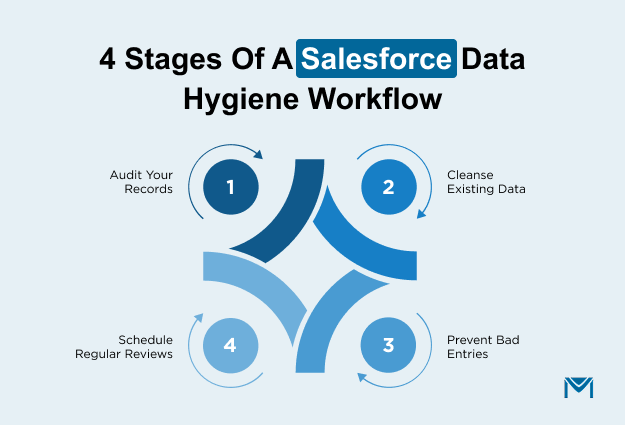
1. Audit Your Records First
Start by finding out where your data problems actually live. Three steps give you a clear picture:
- Run gap reports.Build a Salesforce report that filters for records where key fields like Email, Phone, or Mailing Address are blank. Group results by record owner or lead source to see which entry points produce the most incomplete records. If one web form or integration is responsible for most of the gaps, that is your first fix.
- Turn on Field History Tracking. Go to Setup > Object Manager > select your object > Fields & Relationships > select the field > check "Track Field History." Salesforce caps this at 20 fields per object, so pick the ones that directly affect your reporting and outreach: Email, Phone, Account Owner, Stage, and Lead Status are strong starting choices.
- Check your duplicate backlog. Open the App Launcher and search "Duplicate Record Sets." Salesforce shows every group of records flagged as potential matches. Sort by object type and count to see which objects have the worst duplication before you touch anything.
2. Cleanse What You Find
Work through your audit results in order of business impact. Start with records that affect pipeline reporting and activeemail campaigns, not with a bulk cleanup of every old record.
For duplicates, use the native merge tool under the object tab. Select up to three records, choose the surviving record, and Salesforce reparents all child records to the winner automatically. That includes open opportunities, cases, tasks, events, and campaign history. Chatter posts transfer from the master record only, so check whether the non-master records have conversation threads worth preserving before you merge.
Cross-object duplicates between Leads and Contacts cannot be merged directly. You need to convert the Lead first, then merge the resulting Contact with the existing one. If you skip this step and just delete the Lead, every activity logged against it disappears.
For missing or outdated field values, use Data Loader to export the affected records, clean them in a spreadsheet, and re-import with an update operation. Match on Salesforce Record ID to avoid creating new duplicates during the import.
If you are cleaning email addresses specifically, verify them before re-importing so you do not push bad data right back in.
3. Prevent Bad Data at Entry
Prevention saves more time than any cleanup cycle. Set up these three native controls:
Validation rules stop records from saving unless they meet your criteria. Go to Setup > Object Manager > select your object > Validation Rules > New.
For example, a rule using REGEX(Email, "[a-zA-Z0-9._%+-]+@[a-zA-Z0-9.-]+\\.[a-zA-Z]{2,}") rejects any email that does not follow a valid format. Apply similar rules to phone fields and required picklists.
Duplicate ruleswarn or block users when they create a record that matches an existing one. Go to Setup > Duplicate Rules > New Rule. Each duplicate rule can reference up to three matching rules, and Salesforce allows up to five active matching rules per object. Set the action to "Block" for objects where duplicates cause the most damage, like Contacts and Accounts.
Required fields on page layouts force users to fill in critical data before saving. Edit the page layout for each object and drag the fields you need into the required section. This works well for fields like Industry, Lead Source, and Company Name, where blank values break your segmentation andcampaign targeting.
Even with all three controls active, data still degrades over time. People change roles, companies rebrand, and integrations push records that bypass your page layout rules entirely. That is why the next stage matters just as much as prevention.
4. Schedule Regular Reviews
Cleanup without a recurring schedule is just a project that you will repeat in six months. Build the review cycle into your team's rhythm, so it runs whether or not someone remembers to start it.
Set a fixed cadence: run your audit reports weekly, do a focused cleanup monthly, and run a full duplicate scan quarterly. Assign a specific person or rotation to own each cycle so it does not become everyone's responsibility and therefore nobody's.
Use Salesforce's report subscription feature to automate delivery. Open the report, click Subscribe, set the frequency to weekly, and add the assigned owner as a recipient. Salesforce emails a snapshot of the report on schedule, so the data lands in their inbox every Monday without anyone needing to remember to pull it.
Track two numbers over time: your blank-field percentage across key objects, and yourbounce rate on outbound sends. If either plateaus or creeps back up, your prevention rules need tightening or your review cadence needs shortening. When both trend down quarter over quarter, your hygiene workflow is doing its job.
When Are Native Salesforce Hygiene Tools Not Enough?
Native Salesforce hygiene tools cover the fundamentals, but they hit a ceiling once your data problems grow in complexity or volume. Knowing where that ceiling sits helps you decide whether to work harder within Salesforce or bring in something purpose-built.
Where Do Native Salesforce Hygiene Tools Hit Their Limits?
Salesforce's standard matching rules compare records using a fixed method that works well for exact and near-exact matches. They struggle with the messier patterns that show up in orgs with years of accumulated data.
Consider a Contact entered as "John Smith" at "IBM" and a Lead entered as "Jon Smith" at "I.B.M." Default matching rules will not flag that pair because the name spelling differs, and the company name uses periods. Multiply that across tens of thousands of records, and the undetected duplicate count grows fast.
Beyond fuzzy matching, native tools have five structural constraints that affect how far you can go:
- Single-object scanning: Duplicate jobs only find matches within one object at a time. Overlap between Leads and Contacts will not surface in bulk scans. You would need to identify and resolve each cross-object match manually.
- Data Loader and API blind spot: Duplicate rules do not fire by default on records created through Data Loader or API integrations. Every bulk import and integration sync can bypass your prevention rules entirely. Enforcing them requires Apex code and developer involvement.
- Object coverage gaps: Standard matching rules cover only Accounts, Contacts, Leads, and Person Accounts. Custom objects need matching rules built from scratch, so in many orgs those records go unchecked.
- Merge UI bottleneck: The standard interface resolves three records per operation. If your audit uncovered thousands of duplicate groups, working through them one by one is not a realistic path.
- No cross-record validation: Validation rules check fields on a single record at save time. They cannot enforce logic that compares values across multiple records, like flagging two Contacts with the same email on different Accounts.
Some teams accept these ceilings and run quarterly cleanup passes using an AppExchange deduplication app rather than forcing native tools beyond what they were built for.
What Signs Show You Need Specialized Hygiene Tooling?
The limits above describe what native tools cannot do structurally. But even within the scenarios they do cover, three operational signals tell you native hygiene is no longer keeping pace.
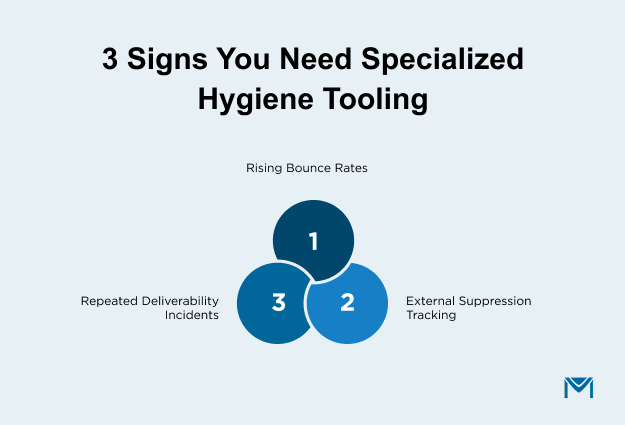
- Bounce rates trend up despite regular cleanup passes. Most email platforms flag campaigns that exceed 2% total bounces or 0.5% hard bounces. If you are running a consistent review cadence and your numbers still climb, your contact data is accumulating bad addresses faster than manual cycles can catch. That gap widens as your list grows.
- Suppression management lives outside Salesforce. Whenopt-outs, bounced addresses, and complaint-driven suppressions are tracked in spreadsheets because Salesforce does not capture every event natively, you have a sync problem that no validation rule can fix. Every hour spent reconciling those spreadsheets is an hour during which your active send list contains addresses it should not.
- The same segments trigger deliverability incidents repeatedly. If bounces concentrate on contacts that entered your org through a specific source or time period, the problem is structural, not random. Before investing in new tooling, confirm the root cause. A sudden spike after a list import is an import quality problem. But if the pattern recurs across organic list growth, your native review cycle cannot keep up with the volume.
What to Look for in a Salesforce-Native Hygiene Tool
If your org hits these limits, look for a solution that stays inside Salesforce rather than syncing to an external platform. External tools add a second database and a sync layer that can introduce the same data quality issues you are trying to fix.
A Salesforce-native tool likeMassMailer handles email verification, bounce tracking, and high-volume sends directly on your CRM records, keeping your hygiene workflow in one place instead of splitting it across systems.
Conclusion
Salesforce data hygiene comes down to four stages: audit your records to find the problems, cleanse what is broken, prevent bad data at entry with validation and duplicate rules, and maintain on a fixed cadence so the cleanup holds.
Native Salesforce tools handle most of this workflow. Where they fall short is email-side hygiene at send time, specifically verification, bounce tracking, and deliverability monitoring across high-volume sends.
See how MassMailer validates Salesforce contact data before every send.
Frequently Asked Questions
1. Who should own Salesforce data hygiene?
2. Can you automate Salesforce data hygiene?
3. How long does a Salesforce data cleanup take?
4. How do you measure Salesforce data hygiene success?
5. What is the 1-10-100 rule for data quality?
6. How do you get sales reps to follow data hygiene rules?
Related Blogs

MassMailer Resources


About the Author

Siva Devaki 
Siva Devaki is the founder of MassMailer Inc., a tool that helps Salesforce users optimize email marketing. A passionate advocate for email marketing, Siva writes and hosts podcasts on the topic, sharing insights to help businesses drive revenue and enhance customer engagement through Salesforce email automation and tracking.