




Table of Contents
Introduction
Do your Mailchimp campaign results ever look different once they hit Salesforce?
Do automation rules fire late because engagement data has not synced yet?
For Salesforce teams, these issues usually surface once scale sets in. What worked early on with an external email platform starts to strain when Salesforce becomes the system of record. Campaign members drift out of sync, fields go stale, and attribution gaps creep into reporting.
That is when teams begin evaluating a Mailchimp Salesforce alternative, not to get more features, but to remove the disconnect between email and Salesforce so targeting is accurate, automation runs on time, and reports finally match.
Why Mailchimp becomes a limitation for Salesforce teams
“I’m so tired of using Mailchimp. It’s so hard to do every little thing. I especially hate the design function. I’m tired of building the email somewhere else and transferring the HTML code to Mailchimp,” says a Mailchimp user on Reddit.
If you work in Salesforce every day, you see this quickly. Sending emails means switching tools, checking data, and fixing mismatched records. As volume grows, these small issues turn into bigger limitations.
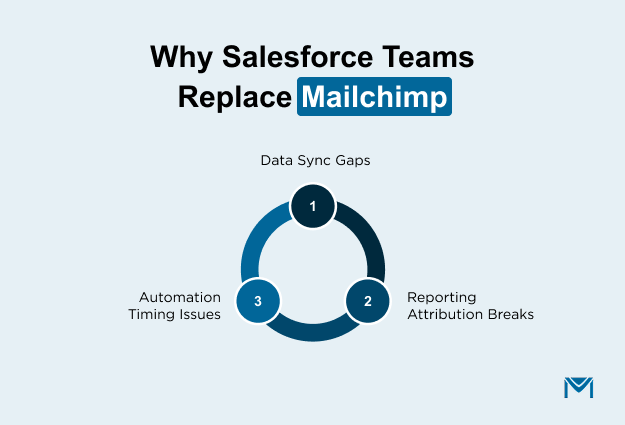
1. Mailchimp data falls out of sync with Salesforce
Because Mailchimp works on synced data instead of live Salesforce records, changes in Salesforce do not always reflect immediately in campaigns. A field updates in Salesforce, but Mailchimp still sends the email using the old data. Sometimes the same person appears twice because Mailchimp cannot match records correctly during sync.
Teams then spend extra time checking segments, reviewing reports, and explaining mismatched numbers instead of focusing on outreach.
2. Automation does not respond to Salesforce record changes
When a Lead status changes in Salesforce, Mailchimp does not automatically adjust the email sequence. Someone has to update the segment manually. This means teams manage automation rules in two systems.
Because of this, emails do not always go out at the right time. The next message may be delayed, sent too early, or not sent at all.
3. Reporting and attribution do not match CRM data
For example, a team sends an email about a webinar. Some people open the email and click the link. Later, a few of those same people became deals in Salesforce. In Mailchimp, you can see who opened and clicked. In Salesforce, you can see the new deals.
But when someone asks, “Did this email help create these deals?”, the team cannot answer clearly.
This is why teams start looking into Mailchimp Salesforce integration issues when reporting stops answering basic questions. When teams move to Salesforce-native email tools like MassMailer, opens, clicks, and campaign data become part of the same reporting model.
Why choose a Salesforce-native email tool over Mailchimp?
Salesforce teams start looking for a native solution to be a Mailchimp alternative because they want email to behave like Salesforce, not like a separate system bolted on later.
If Salesforce teams want email to use the same data, follow the same record changes, and show results in the same reports, they start looking at Salesforce-native tools like MassMailer.
MassMailer uses Salesforce records as the execution layer. That changes how email sending, automation, tracking, and reporting actually work day to day.
Here is how that shows up in practice.
1. Email sending that uses Salesforce data directly
You build audiences using Salesforce reports, contact lists, or custom objects. With MassMailer’s Salesforce email integration, emails are sent directly from live Salesforce records instead of copied lists stored in another system.
At the time you send the email, MassMailer reads the data directly from Salesforce. This means:
- If you update a contact five minutes before sending, the latest data is used
- If someone unsubscribes, that change applies immediately.
- If duplicate records are merged in Salesforce, emails are not sent twice
MassMailer runs inside Salesforce, so sending and recording updates happen in the same system. There is no separate email database that needs to sync.
As emails go out, Salesforce updates each contact record right away. You can see who received the email immediately. You do not need to compare lists between tools because the send and the data live in the same place.
2. Automation that follows Salesforce activity
Salesforce already updates records when something changes. MassMailer connects directly to those records and watches for specific field changes or status updates that you define.
You set a rule inside Salesforce. For example, when “Lead Status” becomes “Qualified,” or when “Stage” changes to “Proposal,” MassMailer detects that update and immediately sends the related email.
Technically, this works through native Salesforce automation frameworks such as Flow and Apex triggers. When a record is saved and meets defined conditions, the trigger executes inside Salesforce and calls MassMailer to send the email in the same transaction cycle. There is no polling or external listener checking for updates.
This is workflow-driven email automation built directly on Salesforce records.
There is no separate list to refresh. No external system checking for updates. The email is triggered by the same record change that sales sees.
You define the condition once in Salesforce, and the email follows that rule every time.
3. Email tracking that stays within Salesforce
MassMailer records email activity directly on Salesforce records.
Opens, clicks, bounces, replies, and unsubscribes are written to Campaign Members and related objects as standard Salesforce data. There is no need to map custom activity objects or reconcile partial syncs.
Because tracking is native:
- Open rates reflect real Campaign Member activity, not delayed sync data
- Bounces are logged immediately, making bounce management accurate.
- Campaign influence is visible in pipeline reports.
- Email engagement aligns with Opportunity activity.
This resolves a common Mailchimp limitation for RevOps teams: engagement data exists, but not where Salesforce reporting expects it. Teams stop asking where the data lives and start using it.
4. Deliverability and list quality are handled before sending
MassMailer helps Salesforce teams prevent delivery problems instead of reacting after campaigns fail.
- Salesforce email verifier checks email lists stored in Salesforce before sending, reducing bounces caused by invalid or risky addresses.
- Email Monitor surfaces sender reputation, bounce trends, and authentication health signals such as SPF, DKIM, and DMARC status alongside campaign activity, so teams can fix issues early.
Because list quality and deliverability tools run where emails are sent:
- Email lists stay healthier over time
- Bounce rates drop, protecting the sender's reputation.
- Consistent list hygiene and authentication monitoring protect sender reputation before volume increases create risk.
- Teams act early instead of reacting after the inbox placement suffers.
This closes a major external-platform gap: deliverability insight that lives outside the CRM and shows up too late to fix.
Also read: Our deliverability best practices guide on how Salesforce-native sending helps teams protect sender reputation at scale.
How to Evaluate a Mailchimp Salesforce Alternative
To evaluate a Mailchimp Salesforce alternative, focus on three things: where engagement data lives, how automation connects to Salesforce objects, and whether reporting stays fully inside your CRM.
A strong evaluation focuses on system behavior under load, not surface-level capabilities.
Evaluation criteria that matter in practice
When Salesforce teams evaluate a Mailchimp Salesforce alternative, these are the checks that tend to surface real risk early.
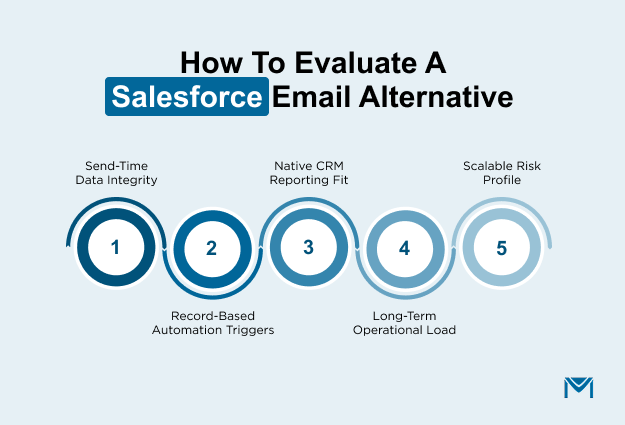
- Data consistency at send time: Can emails be sent directly from Salesforce records without exporting, syncing, or validating lists beforehand? If admins feel the need to preview or recheck segments, data ownership is already split.
- Event-driven automation alignment: Does email trigger from Salesforce events such as record updates, stage changes, or workflow executions, or does it rely on scheduled syncs and list refresh cycles? Delayed triggers are a sign that automation logic lives separately from Salesforce records.
- Native reporting compatibility: Does email engagement write to standard Salesforce objects in a way that supports Campaign Influence, Opportunity reporting, and activity timelines? If RevOps teams reconcile reports manually, the data model is misaligned.
- Operational effort over time: As contact volume and send frequency increase, does the system require additional monitoring, field remapping, or cleanup routines? Systems that scale cleanly do not introduce new maintenance paths.
- Risk profile at scale: As email volume grows, does the platform increase confidence through predictable behavior, or caution through workarounds and safeguards? Increased reliance on process checks usually signals architectural limits.
Together, these checks determine whether an alternative actually removes Mailchimp’s sync, automation, and reporting limitations. Salesforce-native tools like MassMailer solve these issues in practice by running email directly on Salesforce records instead of across disconnected systems.
How Advanced Portfolio Management validated the switch in real conditions
Advanced Portfolio Management (APM) did not move away from Mailchimp because of missing features. They moved because, as Salesforce became central to daily work, email stopped keeping up.
APM manages relationships for pension funds, foundations, and large institutions. Salesforce holds its contacts, accounts, and outreach history. Email supports that work by sharing research and driving follow-ups. For this to work, messages had to reflect Salesforce changes immediately, without extra review steps.
As the database grew beyond 70,000 contacts across 30,000 organizations, accuracy became non-negotiable. With Mailchimp, sends depend on synced audiences. Before each campaign, teams paused to confirm whether Salesforce or Mailchimp showed the latest data. That pause became normal.
When APM tested MassMailer, it disappeared. Emails were sent straight from Salesforce reports and Campaign Members. Any update in Salesforce affects targeting instantly. There were no exports, refresh delays, or record mismatches.
Timing was the next constraint. Follow-ups are needed to match record changes closely. Mailchimp relied on scheduled checks, which slowed execution. With MassMailer, emails are fired from Salesforce actions. Updates triggered outreach automatically, keeping sequences aligned without rebuilding rules elsewhere.
Visibility also improved. Engagement data appeared directly on Salesforce records, alongside account and pipeline activity. Teams no longer reconciled dashboards or explained gaps. Reporting moved from reconciliation-based reviews to direct Campaign Influence visibility inside Salesforce dashboards.
As volume increased, performance stayed consistent. There were no connectors to manage, no rising contact-based pressure, and no added upkeep as usage grew.
For APM, the outcome was clear. When email must operate at the same speed and accuracy as Salesforce, external platforms introduce friction. A Salesforce-native approach removed that friction and allowed the team to scale with confidence.
Conclusion
If you are searching for a Mailchimp Salesforce alternative, you already know the current setup is not scaling cleanly. At this level, staying with a connector model is a conscious decision to accept sync dependency, split reporting, and operational drag.
Teams like Advanced Portfolio Management already validated this shift under real database conditions, proving that when Salesforce becomes central, email must operate at the same speed and accuracy.
At this stage, staying put usually means accepting those tradeoffs.
MassMailer is built for teams that cannot afford that drag as Salesforce becomes more critical to revenue workflows. The question is not whether change is needed, but how soon.
Validate this model against your Salesforce data now, before another quarter closes with reporting gaps you already recognize.
Book a MassMailer demo and confirm the fit before these limits cost you another quarter.
Frequently Asked Questions
1. How hard is it to migrate from Mailchimp to a Salesforce-native email platform?
2. At what contact volume does Mailchimp become difficult to manage with Salesforce?
3. Can Salesforce-native email tools support high-volume sending?
4. Does switching from Mailchimp affect email deliverability?
5. How does pricing compare between Mailchimp and Salesforce-native email tools?
6. Why does Mailchimp reporting not match Salesforce?
Start Your Free Trial Today
Experience MassMailer the easiest way to send personalized emails from Salesforce.
Related Blogs
Best Constant Contact Alternative for Salesforce (2026 Guide)
iContact Alternative for Salesforce: Why MassMailer Fits Better

Best Pardot Alternatives for Smarter Marketing in 2025
MassMailer Resources



About the Author

Siva Devaki 

Siva Devaki is the founder of MassMailer Inc., a tool that helps Salesforce users optimize email marketing. A passionate advocate for email marketing, Siva writes and hosts podcasts on the topic, sharing insights to help businesses drive revenue and enhance customer engagement through Salesforce email automation and tracking.