

Table of Contents
Quick Answer
Salesforce Inbox is a Sales Cloud add-on that connects Gmail or Outlook to Salesforce. It gives reps CRM context and email productivity tools inside their inbox. Higher-tier editions include Inbox at no extra cost. Professional and Enterprise editions pay for the add-on.
Inbox handles individual rep email well. It does not support mass email or campaign-level tracking. For email at volume inside Salesforce, a native tool like MassMailer fills that gap.
Introduction
How much time does your sales team spend logging emails into Salesforce that should have been captured automatically?
Reps spend just 40% of their week selling, according to Salesforce’s 2026 State of Sales report. The rest goes to admin work, data entry, and app switching.
Salesforce Inbox targets that lost time. It connects Gmail or Outlook to Salesforce, so reps see CRM records in a side panel. It logs through Einstein Activity Capture (EAC). Scheduling and templates work in the same window. Depending on your edition, Inbox ships as a bundled feature or a paid add-on.
For 1-to-1 rep email, Inbox does the job. The limits show up when your org needs more. Inbox has no mass email. No list sends. No campaign-level tracking. Admins who need reliable sync or custom object support run into those walls fast.
Once your org outgrows individual rep outreach, the question changes. It moves from “should we enable Inbox” to “what else do we need alongside it.”
What Salesforce Inbox includes in 2026
Salesforce Inbox is a Sales Cloud feature that brings CRM data into Gmail and Outlook. Reps see Salesforce records in a side panel without switching tabs.
Here is what the current Inbox license unlocks:
| Capability | What it does |
|---|---|
| CRM side panel | Shows linked contacts, opportunities, and account history next to every email |
| Email and calendar sync | Logs emails and events to Salesforce records through Einstein Activity Capture |
| Templates | Lets reps send prebuilt messages personalized with Salesforce merge fields |
| Insert Availability | Drops calendar slots into an email so prospects pick a meeting time |
| Send Later | Schedules a message for a specific delivery window (now works with threaded replies) |
| Email tracking | Tracks opens and link clicks on individual emails |
Every feature on this list serves individual rep email. Inbox does not cover mass email or campaign-level sends.
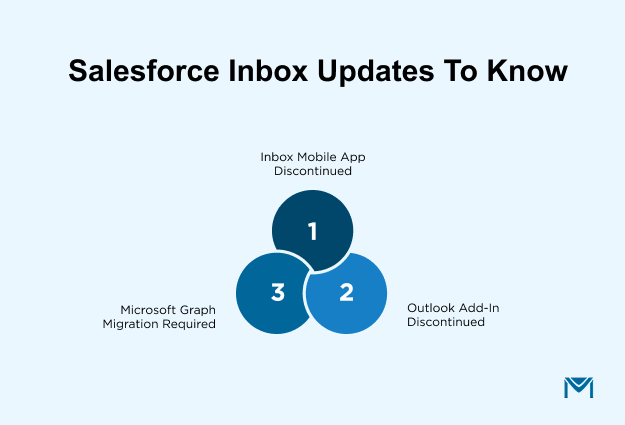
Three changes since 2024 affect current rollout decisions:
- Salesforce retired the standalone Inbox mobile app in February 2024
- Salesforce retired the legacy Outlook add-in and Chrome extension in March 2021
- Microsoft 365 users must migrate authentication to Microsoft Graph by October 2026
Inbox can also run without Einstein Activity Capture. Salesforce offers a separate permission set for manual email logging. Admins should confirm which setup fits before assigning licenses.
How much Salesforce Inbox costs in 2026
Salesforce Inbox pricing depends on your Sales Cloud edition. Higher-tier editions include Inbox. Lower-tier editions require a paid add-on or a bundle.
Here is a breakdown based on publicly available Salesforce pricing:
| Path to Inbox | Approx. cost | What you get |
|---|---|---|
| Included with Unlimited, Einstein 1 Sales, or Agentforce 1 Sales | No extra cost | Inbox features are part of the edition license |
| Inbox add-on for Professional or Enterprise | ~$25/user/month (historical, billed annually) | CRM side panel, templates, scheduling, email tracking, activity logging via EAC |
| Sales Engagement bundle | ~$50/user/month (billed annually) | Inbox features plus sales cadences, Einstein Activity Capture, and buyer assistant |
Salesforce reorganized editions and pricing in 2025 and 2026. The $25 add-on figure comes from older Salesforce materials and may have shifted. Confirm the current number with your account team before you finalize a budget.
Before committing, verify two things:
- Whether your edition already includes Inbox
- Whether a bundle covers more of what you need at a better per-user rate
Inbox pricing is only one part of the cost. The real expense shows up when your org hits a limit Inbox was never built to handle.
Where Salesforce Inbox falls short at scale
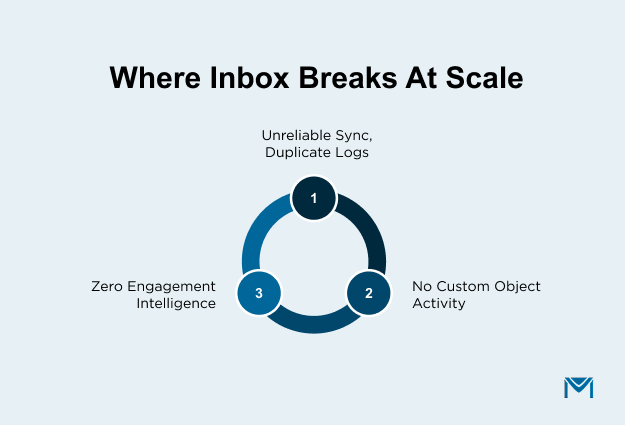
Salesforce Inbox falls short at scale in three areas. Sync breaks under volume. Custom objects get no activity data. Engagement tracking stops at basic opens.
Sync reliability and duplicate logging
Einstein Activity Capture does not sync in real time. Emails can land late in the activity timeline. Recurring meetings sometimes drop entirely. Duplicate entries appear when sync retries overlap.
The downstream effect hits admins directly. Once reps notice missing or doubled activity, they stop trusting the log. Manual updates creep back in, and the original reason for buying Inbox disappears.
Custom object gaps
Inbox logs activity to standard objects like Contacts and Opportunities. Custom objects receive no activity data from Inbox.
For orgs that track work in custom objects, this creates a blind spot. Inbox cannot link email activity to those records. Admins have no native workaround for this limitation.
No engagement intelligence beyond activity history
Inbox records that an email was sent and whether the recipient opened it. Nothing beyond that individual interaction is visible.
Admins cannot see which contacts are engaging across a deal. Reply rates by account stay hidden. Open and click data does not flow into reports anyone can act on.
Inbox creates a timeline of past activity. Deciding what to prioritize next still falls on the rep. For small marketing teams measuring outreach results, that gap is real. It means either manual reporting or anative Salesforce email tool that tracks engagement automatically.
The email gap Salesforce Inbox does not close
Salesforce Inbox cannot send email at volume or track campaigns. Admins who need to reach hundreds of contacts in a single send will not find that capability in Inbox.
No mass email or list email
Inbox gives reps templates and scheduling for individual sends. It does not extend to bulk sends of any kind.
Salesforce’s native mass email feature is capped at 5,000 emails per day per org. Inbox does not lift or extend that cap. Admins who need higher volume or better deliverability controls must look outside Inbox entirely.
No campaign-level tracking or reporting
Inbox tracks opens and clicks on individual emails. It does not roll those numbers up into campaign-level views.
Marketing teams cannot measure a product launch email across 3,000 contacts through Inbox. The data points campaign reporting requires are absent:
- Aggregate open rates
- Click maps
- Bounce reporting
- Unsubscribe handling
Admins cannot build Salesforce reports or dashboards from Inbox engagement data at volume. For orgs that treat email as a measurable channel, that gap forces a choice. That leaves two paths: track manually or add a tool built forSalesforce mass email campaigns.
How MassMailer closes the volume gap inside Salesforce
MassMailer is a Salesforce-native app that sends bulk email and tracks campaign-level engagement inside the CRM. It installs from the AppExchange. No external sync or API connector required. Data stays entirely inside Salesforce.
With that native architecture, admins send to thousands of contacts in a single campaign. MassMailer bypasses Salesforce’s 5,000-email daily cap. Theemail template builder personalizes each message using merge fields and CRM data the org already has.
Once emails go out, MassMailer captures opens and clicks on every send. It also logs bounces and unsubscribes. Every data point writes to the relevant Salesforce record. As a result, admins build reports and dashboards from engagement data that Inbox does not generate.
Sync delays and duplicate records disappear when everything runs natively inside one Salesforce org.
How to choose the right Salesforce email stack
Choose based on what your org sends. Inbox handles 1-to-1 rep email. MassMailer handles email at volume. Most growing orgs need both.
| Your situation | What fits |
|---|---|
| Small sales org where reps need CRM context in their inbox | Salesforce Inbox |
| Reps need inbox productivity plus automatic email logging | Inbox with Einstein Activity Capture |
| Marketing needs to send campaigns directly from Salesforce | MassMailer |
| Admins need both rep productivity and email at volume | Inbox + MassMailer |
Most orgs start with Inbox for rep productivity. The volume need surfaces later, once outreach grows past what individual sends can handle. At that point, anative email integration keeps everything inside one Salesforce org.
Send and Track Salesforce Email at Scale
Book a free demo to see mass email and campaign tracking running inside your Salesforce org.
Frequently Asked Questions
1. Is Salesforce Inbox the same as Einstein Activity Capture?
2. Does Salesforce Inbox automatically log emails?
3. How do I set up Salesforce Inbox?
4. Is there a Salesforce Inbox mobile app?
5. Can Salesforce Inbox log email attachments?
6. Is Salesforce Inbox being retired in 2026?
Start Your Free Trial Today
Experience MassMailer the easiest way to send personalized emails from Salesforce.
Related Blogs
6 Enterprise Email Marketing Platforms That Scale With Salesforce
How Much Does Email Marketing Cost? Build Your 2026 Budget
Email Deliverability Best Practices to Reach the Inbox
MassMailer Resources


MassMailer Glossary
About the Author

Siva Devaki 
Siva Devaki is the founder of MassMailer Inc., a tool that helps Salesforce users optimize email marketing. A passionate advocate for email marketing, Siva writes and hosts podcasts on the topic, sharing insights to help businesses drive revenue and enhance customer engagement through Salesforce email automation and tracking.