


Table of Contents
Quick Answer
For Salesforce organizations that need to send beyond the 5,000 daily email cap without leaving the CRM, a native AppExchange app like MassMailer is the most direct path. It sends from any standard or custom object without middleware, includes a dedicated IP, and starts at $219/month with unlimited sends. Salesforce Marketing Cloud fits orgs running omnichannel campaigns across email, SMS, and ads, starting at $1,250/month. Third-party connectors like HubSpot and ActiveCampaign sync data on a delay of 15 to 60 minutes.
Introduction
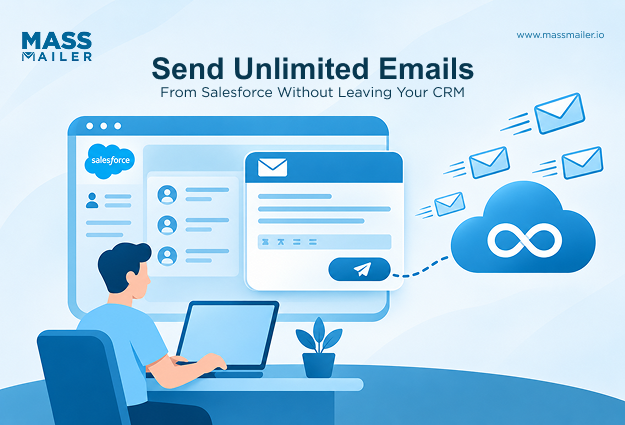
Salesforce caps outbound email at 5,000 per day on Enterprise Edition. Because of this, any organization sending at scale needs a dedicated email marketing platform. That platform either runs natively inside the CRM or connects through external integrations.
For most Salesforce buyers, the decision splits into three paths. Salesforce Marketing Cloud provides full omnichannel orchestration, starting at $1,250/month. Alternatively, third-party tools like HubSpot or ActiveCampaign sync data through connectors. A third option is native AppExchange apps like MassMailer, which send directly from Salesforce objects without middleware.
Each path trades off differently on cost, data freshness, and deliverability control.
How These 6 Enterprise Email Platforms Work With Salesforce
Email marketing platforms integrate with Salesforce in one of two ways: natively through AppExchange, or externally through API connectors. Native platforms send directly from Salesforce objects using live CRM data with no middleware, no data export, and no duplicate contact records.
Connector-based platforms pull CRM data through scheduled API syncs that run every 15 to 60 minutes, which means Salesforce records show outdated engagement data between cycles.
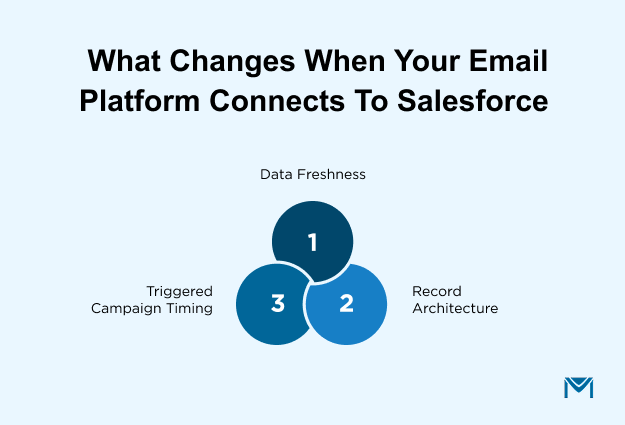
That architectural difference affects three things:
- Data freshness: Native platforms read and write to Salesforce records in real time. Connector-based tools display engagement data (opens, clicks, bounces) only after the next sync completes.
- Record architecture: Native platforms operate on a single database inside Salesforce. Connectors maintain a separate external database that requires field mapping and deduplication.
- Triggered campaign timing: Native platforms fire sends on Salesforce events as they happen. Connectors can miss real-time triggers that occur between sync cycles.
MassMailer and Salesforce Marketing Cloud run natively inside the CRM. HubSpot, ActiveCampaign, Brevo, and Klaviyo connect through external integrations.
| Platform | Native to Salesforce | Best For | Starting Price | Key Differentiator |
|---|---|---|---|---|
| MassMailer | Yes (AppExchange) | High-volume CRM email without Marketing Cloud complexity | $219/mo | Unlimited sends, dedicated IP, zero middleware |
| Salesforce Marketing Cloud | Yes | Omnichannel orchestration across email, SMS, and ads | $1,250/mo | Journey Builder + Einstein AI scoring |
| HubSpot Marketing Hub | No (connector) | B2B revenue attribution across a full sales cycle | $890/mo (Pro) | Native CRM ties email directly to pipeline |
| ActiveCampaign | No (connector) | Advanced automation with Salesforce sync | $15/mo (Starter) | 900+ workflow templates, predictive sending |
| Brevo | No (connector) | Large lists with moderate sending frequency | $9/mo | Volume-based pricing, unlimited contacts |
| Klaviyo | No (connector) | Ecommerce with Salesforce Commerce Cloud | $20/mo | Product-level personalization from store data |
The sections below break down each platform’s Salesforce integration depth, deliverability setup, and real cost at scale.
1. MassMailer
MassMailer is a 100% Salesforce-native email marketing app on AppExchange. It removes Salesforce’s 5,000 daily email limit and sends from any standard or custom object with a dedicated IP. Rated 4.6 on Capterra and 4.94 on Salesforce AppExchange.
What It Can Do Inside Salesforce
MassMailer sends email directly from Salesforce records. There’s no data export, no middleware, and no external database. It integrates with Salesforce Flow Builder for triggered sends. The template builder works inside the Salesforce interface with drag-and-drop editing. It also supports drip campaigns, workflow email alerts, and A/B testing natively.
If your campaigns need coordinated messaging across channels, consider Marketing Cloud instead.
Deliverability, Send Limits, and Real Cost
MassMailer starts at $219/month with a dedicated IP and 10,000 emails included. Beyond that base, it supports unlimited sends with no per-email overage. Built-inemail verification cleans lists before each send. A reputation monitoring dashboard tracks sender score in real time. It also handles SPF, DKIM, and DMARC authentication setup.
For comparison, Salesforce Marketing Cloud starts at $1,250/month. HubSpot’s Pro tier costs $890/month plus a mandatory $3,000 onboarding fee.
Best for: Salesforce-centric organizations that need enterprise-grade email without multichannel orchestration overhead.
Key differentiator: Unlimited sends with dedicated IP starting at $219/month.
MassMailer installs directly from AppExchange into any Salesforce Enterprise Edition org. You can test it with your own data through a free trial, or walk through your specific setup in a30-minute consultation.
2. Salesforce Marketing Cloud
Salesforce Marketing Cloud is the enterprise marketing suite built by Salesforce. It includes Email Studio, Journey Builder for multichannel automation, and Einstein AI for engagement scoring. Pricing starts at $1,250/month.
Marketing Cloud connects to Sales Cloud and Service Cloud through Marketing Cloud Connect. Once linked, it accesses contacts, leads, and campaign data across the org. Journey Builder automates email, SMS, push, ads, and social from a single canvas. However, it runs as a separate environment from core Salesforce. The data sync isn’t instant. Setup requires a certified administrator, and most deployments need a consulting partner. Implementation typically takes 8 to 16 weeks.
Dedicated IPs are available on Corporate and Enterprise tiers. Authentication covers SPF, DKIM, and DMARC. Pricing by tier:
- Professional: $1,250/month (email, analytics)
- Corporate: $4,200/month (adds Journey Builder, SMS, Einstein)
- Enterprise: custom quote
Salesforce consultants on Reddit report a consistent pattern. Organizations deep in the Salesforce ecosystem get real value. Everyone else, as one practitioner put it, ends up paying “enterprise prices for features they don’t use.”
Whether your orgneeds Marketing Cloud or a simpler email tool depends on how much of that orchestration you actually use.
Best for: Enterprises running omnichannel campaigns across multiple business units.
Key differentiator: Journey Builder + Einstein AI on the Salesforce CRM ecosystem.
3. HubSpot Marketing Hub
HubSpot Marketing Hub is a full-stack marketing and CRM platform. Email marketing sits inside Marketing Hub, tied to the same contact record as sales pipeline and service tickets. It connects to Salesforce through a native connector.
HubSpot works best when it IS the CRM. When bolted onto Salesforce as an email layer, sync problems dominate the experience. Field mapping conflicts, API rate limits, and data overwrites are well-documented issues. One verified mid-market user on G2 titled their review “the Salesforce sync isn’t production-ready,” reporting the integration “overwrote data in Salesforce, our system of record” on three separate occasions.
Pricing jumps sharply between tiers. Starter costs $15/month per seat. However, automation, A/B testing, and custom reporting require Professional at $890/month, plus a mandatory $3,000 onboarding fee.
Best for: B2B organizations where HubSpot is already the CRM, not a Salesforce add-on.
Key differentiator: Full-funnel revenue attribution from first touch to closed deal.
4. ActiveCampaign
ActiveCampaign is a marketing automation platform with a built-in CRM. It offers 900+ workflow templates, predictive sending, and lead scoring. Pricing starts at $15/month on Starter.
ActiveCampaign has the deepest automation builder in this list. However, itsSalesforce integration requires the Professional plan or higher, starting at $79/month for 1,000 contacts. Even then, the integration runs as a connector with sync cycles every 15 to 60 minutes. This means Salesforce displays outdated contact scores and engagement data between syncs. '
One G2 reviewer running multiple integrated sales channels reported that revenue data across those connections is “not easily distinguishable in reports or separately usable in automations.”
Best for: Organizations that prioritize automation depth over native Salesforce integration.
Key differentiator: 900+ pre-built workflow templates with predictive sending.
5. Brevo
Brevo is a multichannel marketing platform covering email, SMS, WhatsApp, and live chat. It charges by email volume, not contact count. This makes it one of the cheapest options for large lists with moderate sending frequency. Pricing starts at $9/month for 5,000 emails.
Brevo’s volume-based pricing is its standout strength. However, its native Salesforce integration is only available on the Enterprise tier, which requires a custom quote. Lower-tier users need third-party middleware like Zapier to connect the two systems. This adds cost, introduces sync lag, and creates one more tool to manage.
Capterra reviewers also flag inconsistent platform stability, noting “bugs and issues cause slow load times” and occasional plugin problems.
Best for: Budget-conscious organizations with large lists that don’t rely on tight Salesforce integration.
Key differentiator: Volume-based pricing with unlimited contacts on every plan.
6. Klaviyo
Klaviyo is a B2C marketing platform built around ecommerce data. It pulls purchase history, browsing behavior, and product interactions into one profile. Paid plans start at $20/month, priced by active profiles.
Klaviyo’s Salesforce connection is designed primarily for Commerce Cloud. Organizations using Sales Cloud or Service Cloud as their core CRM will find the integration limited in scope. On G2, reviewers consistently note that anything outside the Shopify ecosystem takes more work to connect and maintain. Pricing also scales aggressively with active profile count. At enterprise volume, costs climb fast, and unused SMS credits don’t roll over.
Best for: Ecommerce brands running Salesforce Commerce Cloud alongside a Shopify storefront.
Key differentiator: Product-level personalization from real-time store and browsing data.
Which Platform Fits Your Salesforce Org?
If your org runs omnichannel campaigns across email, SMS, and ads with a dedicated marketing ops team and a $1,250+/month budget, Marketing Cloud fits.
For high-volume email needs, without the complexity or cost of Marketing Cloud, a native AppExchange solution like MassMailer is the simpler path.
If your org already uses HubSpot or ActiveCampaign as the primary CRM and Salesforce is secondary, keep the existing tool and connect it via integration.
If your org runs Salesforce Commerce Cloud alongside Shopify, Klaviyo handles product-level personalization better than any general-purpose platform.
Still not sure which path fits?Walk through your setup with a Salesforce email specialist and get a recommendation based on your org’s data, volume, and budget.
Frequently Asked Questions
1. What is the daily email sending limit in Salesforce?
2. How much does enterprise email marketing software cost for Salesforce?
3. Can you send bulk email campaigns directly from Salesforce without an external tool?
4. Do all enterprise email platforms include a dedicated IP?
5. How do you prevent blacklisting when sending high-volume email from Salesforce?
6. What should you check before migrating to a new email platform in Salesforce?
Start Your Free Trial Today
Experience MassMailer the easiest way to send personalized emails from Salesforce.
Related Blogs
How Much Does Email Marketing Cost? Build Your 2026 Budget
Email Deliverability Best Practices to Reach the Inbox
Best Time to Send Marketing Emails (2026 Data)
MassMailer Resources


About the Author

Siva Devaki 
Siva Devaki is the founder of MassMailer Inc., a tool that helps Salesforce users optimize email marketing. A passionate advocate for email marketing, Siva writes and hosts podcasts on the topic, sharing insights to help businesses drive revenue and enhance customer engagement through Salesforce email automation and tracking.