Table of Contents
Do your sales and marketing teams ever send the same customer different messages?
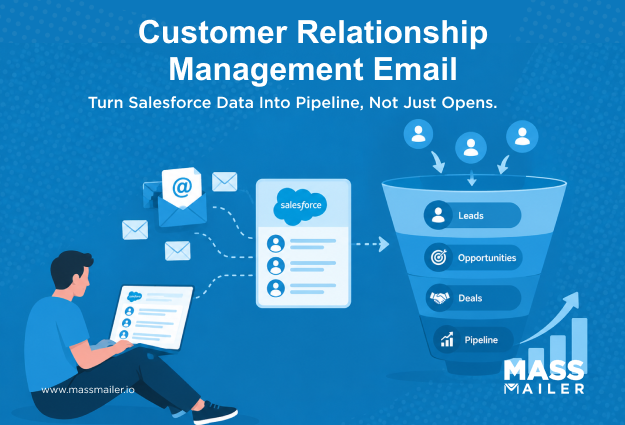
That happens when email runs in one tool and customer data sits in another. As a result, emails feel generic, and follow-ups get missed.
Customer relationship management email solves this by running every email on CRM data. The CRM picks the audience, and every reply goes back to the record. For Salesforce teams, the data is already in the system. So, the real question is how well email uses it.
This blog covers what CRM email is, how it differs from standard email marketing, and how it works. It then walks through the benefits, how to run campaigns in Salesforce, and what to look for in software.
What Is Customer Relationship Management Email?
Customer relationship management email, or CRM email, is personalized email driven by customer data in a CRM system. The CRM decides who receives each email, what it says, and when it goes out. It records every response on one unified customer record.
For an email to count as one, it has to do three things. First, it goes to Leads or Contacts stored in the CRM. Second, its content and timing come from CRM data. Third, it records the results back on the customer's record.
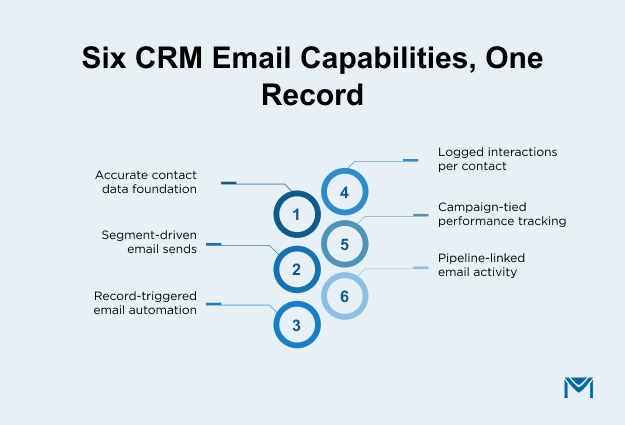
Because everything runs through one record, CRM email campaigns are only one part of the picture. The six areas below often sit in separate tools, but here they work together:
- Contact management: Lead and Contact data stays accurate and up to date.
- Email marketing: Targeted messages go to segments built from that data.
- Email automation: Record changes start and stop emails at the right time.
- Customer interactions: Every email and reply is logged on the record.
- Campaign tracking: Each send is tied to a Campaign, so results are easy to review.
- Sales pipeline: Email activity sits next to open deals, so reps see both together.
This also gives you a quick test for your own setup. Emails sent from a separate list, with results that never reach the CRM record, are not yet CRM emails.
How CRM Email Differs from Standard Email Marketing
CRM email differs from standard email marketing in where the data lives and who uses it. Standard email marketing runs on a separate list inside an email tool. In contrast, CRM email runs on live customer records. The table below shows the gap.
| Aspect | Standard email marketing | CRM-based email marketing |
|---|---|---|
| Data source | A separate, static list | Live records in the CRM |
| Personalization | Name-level, such as first name | Record-level, such as stage and history |
| Who sends | Marketing only | Both sales and marketing |
| Where results live | In the email tool | On the Lead or Contact record |
| Best for | Newsletters and broad announcements | Nurturing and follow-ups |
Hence, a team that only sends a monthly newsletter to a static list may not need CRM-based email at all.
For everyone else, the list itself is often the deciding factor. Anemail list built inside Salesforce can update as records change, while an exported list stays frozen.
Next, let's look at how that record data turns into an email, step by step.
How CRM-Based Email Marketing Works
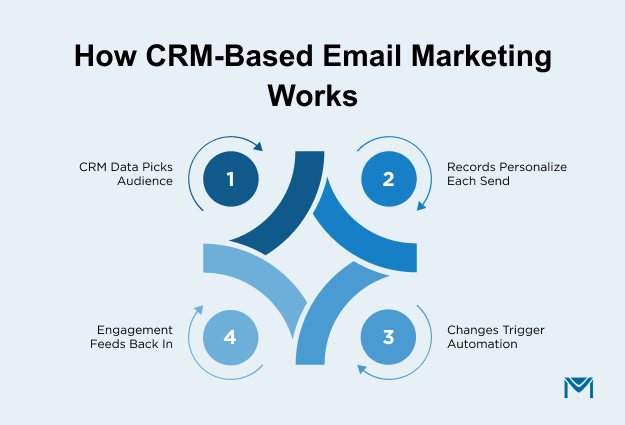
CRM-based email marketing works as a four-step cycle. First, CRM data picks the audience and shapes the message. Next, a record change triggers the send. Finally, engagement goes back to the record and shapes the next email. As a result, a break in any one step weakens everything after it.
Step 1: CRM email campaigns start with CRM data
The CRM already holds the fields needed to choose an audience. These include Lead Status, industry, region, company size, product interest, and last activity date.
The three segment types below cover most sends:
- Firmographic segments group by company traits, such as industry or size.
- Behavioral segments group by engagement, such as email opens or last activity date.
- Lifecycle segments group by stage, such as new Lead, qualified, or closed-won.
In Salesforce, these segments are built with List Views, Reports, or Campaign membership. Segments built on live data also update as records change.
Marketing usually owns this step, since most CRM email campaigns begin here. Examples include a webinar invite to one industry, a product update to customers, or a content offer by Lead Status. Each mass email campaign starts with fields already in Salesforce.
Step 2: Emails are personalized from the unified customer record
Personalization pulls data from the record through merge fields. It goes deeper when emails use related records, such as Account details or Opportunity stage.
Reps own the one-to-one sales emails at this step. Examples include a follow-up after a discovery call, a pricing reply, or a recap after a proposal meeting. Each one is written with the full record history in view.
Because both teams use one unified record, a customer never gets two versions of the truth.
Still, personalization is only as good as the data behind it. Salesforce's10th Edition State of Marketing report found that 98% of marketers hit barriers to personalization. Data issues were the most common cause. Blank fields also break the message, so set a default value for every merge field.
Step 3: Email automation is triggered by CRM changes
CRM email automation runs on changes to the record, not only on fixed schedules. In Salesforce, Flow or the email tool's own automation can pick up these changes.
Marketing usually owns early-stage lifecycle emails, such as a nurture series for each new Lead. Sales or customer success then owns the post-sale ones. These include a welcome email when an Opportunity closes and a renewal reminder before a contract ends. A check-in when an Account goes quiet also fits here.
The same record changes can also stop emails, and the how-to section covers those rules.
Step 4: Email engagement is recorded on the customer record
Opens, clicks, bounces, replies, and unsubscribes should land on the Lead or Contact record. A separate campaign report alone is not enough.
In Salesforce, this shows up in two places. First, the activity timeline on the record shows each email event. Second, Campaign Member Status on the Campaign shows progress across the full audience.
This step closes the cycle. For instance, a rep can see a pricing-link click before a call. Likewise, marketing can exclude people who have already replied.
However, reps often send one-to-one emails from their inbox without logging them in Salesforce. That leaves holes in the record that every later email depends on.
So, look at your own setup and find which step is weakest. Once all four steps hold, the benefits become easy to see.
Benefits of Using a CRM with Email Marketing
Using a CRM with email marketing gives teams four main benefits. Emails become more relevant, sales and marketing share one record, fewer follow-ups are missed, and reporting gets clearer.
More relevant, personalized email communication
Emails matched to stage, role, industry, or deal status feel useful rather than promotional. As a result, teams send fewer irrelevant emails, get more replies, and see fewer unsubscribes.
Relevant emails also build trust, so readers are more likely to open the next one.
However, relevance depends on record quality. If key fields are blank or out of date, the email performs no better than a generic one.
Sales and marketing alignment on one record
When both teams email from the same record, each team can see what the other has already sent. This prevents double-emailing, mixed messages, and nurture emails reaching people in an active deal.
That alignment is often missing. AGartner survey of B2B leaders found that 90% of marketing and sales executives say their priorities conflict. A shared record will not settle those priorities, but it does give both teams the same facts.
This benefit only holds if both teams use the same system. A rep who emails from a personal inbox without logging it leaves a gap for everyone else.
Fewer missed follow-ups with CRM automation
When follow-ups run on record changes, nobody has to remember who needs an email and when. Therefore, fewer leads are lost to a missed follow-up. Reps and marketers also spend less time on lists and status checks, and more on conversations with buyers.
That said, automation only helps when stop rules are clear. Without them, emails keep going after a deal closes, which creates a new problem.
Clearer reporting tied to the sales pipeline
Because engagement lands on the record, teams can see which emails led to replies, meetings, or new Opportunities. In addition, Campaign Influence in Salesforce connects campaign touches to Opportunities and revenue. Teams that want more detail can set upmulti-touch attribution in Salesforce.
This matters when budgets are decided. Sales leaders judge a program in pipeline terms, so email results should be shown the same way.
Still, reports are only as good as the tracking behind them. With the benefits clear, the next step is to set these emails up in Salesforce.
How to Run CRM Email Campaigns in Salesforce
To run CRM email campaigns in Salesforce, follow four steps in order. These are segments, start and stop rules, consent, and tracking.
Build clean segments from Lead and Contact fields
Start with a data check before building any segment. Remove duplicates, fix the fields used for personalization, and flag records with missing or invalid email addresses.
Next, pick two or three fields that change the message, such as Lead Status, industry, or product interest. Then save each segment as a List View or Campaign, so it can be reused and reviewed.
A common mistake is to segment only by job title or company size. Stage and activity data matter just as much, because two people with the same title can need different emails.
Set start and stop rules for each lifecycle stage
For each email, write down which record change starts it and which one stops it. Common stop conditions include a reply, a Lead conversion, a closed deal, or an opt-out. Otherwise, customers keep receiving prospect emails after they have bought.
Also, check for conflicts where one record could qualify for two sequences at once. In that case, decide in advance which sequence takes priority.
Honor opt-outs and sending limits
In Salesforce, consent is stored on the record. Therefore, every tool the team uses should check the Email Opt Out field before each send. Problems arise when an unsubscribe is recorded in one tool but not in Salesforce, or the reverse.
CAN-SPAM and GDPR may both apply, so confirm which rules cover your audience. In addition, Salesforce's native email features have daily sending limits that vary by edition. Check the current limits in Salesforce Help before planning send volume.
Track results on the Campaign and the record
The following three segment types cover most sends:
- Engagement covers opens and clicks.
- Progress covers replies and status or stage changes.
- Outcome covers Opportunities created and pipeline influenced.
Reliableemail tracking in Salesforce makes all three levels visible on the record. Then use Campaign Member Status and reports to review results by segment, not only in total.
When results are weak, the level points to the cause. Low opens usually point to timing or subject lines, and low clicks point to content. Low progress points to segmentation or stage targeting.
These steps apply to any setup, so the next question is which setup suits your team.
CRM Email Setup Options for Salesforce Teams
Salesforce teams do not need a new CRM for CRM-based email marketing. The real choice is how email connects to Salesforce, and there are five ways to do it. The following table compares them.
| Option | How it works | Best suited for | Main trade-off |
|---|---|---|---|
| Salesforce built-in email | List email, mass email, and email templates sent from inside Salesforce | Light, occasional sends by small teams | Daily sending limits and basic tracking |
| Salesforce marketing platforms | Marketing Cloud or Account Engagement connected to Salesforce CRM | Larger teams that need cross-channel automation and lead scoring | Higher cost and more admin effort |
| AppExchange email apps | Apps installed in Salesforce that send email using live Salesforce data | Teams that want more volume and tracking without leaving Salesforce | Fewer cross-channel features than full marketing platforms |
| External email platforms synced to Salesforce | A separate email tool that copies Salesforce data out and syncs results back | Teams that need advanced marketing features | Syncs can lag or drift, leaving data out of date |
| Inbox integrations | Einstein Activity Capture or Gmail and Outlook sidebars that log reps' emails | One-to-one sales emails | Not built for campaigns or bulk sends |
A Salesforce-native app runs inside the CRM, so no data is copied out or synced back. As a result, every send uses live data, and every result lands back on the record.
MassMailer is one suchAppExchange app, built to send mass emails beyond Salesforce’s daily limits. Opens, clicks, bounces, and unsubscribes are tracked inside Salesforce. Teams can also verify email addresses, send automated alerts, and build templates.
To choose, match the option to who sends most of the email and how often. Then weigh how important it is for data to stay live on the record.
Whichever option fits, the same checks apply when judging the software itself.
What to Look for in CRM Email Marketing Software
For Salesforce teams, the question is not which CRM to buy. It is whether the CRM email marketing software works well with Salesforce. The following seven questions help judge that during any demo:
- Does it use live Salesforce data? A synced copy can fall out of date, so ask how often it updates.
- Does it write engagement back to the record? Opens, clicks, and replies should appear as Salesforce email activity on Lead, Contact, and Campaign records. Ask what happens on the Contact record when someone replies.
- Does it respect the Email Opt Out field? The check should happen on every send, without manual steps.
- Does it support both sales and marketing users? Both teams should be able to send without switching tools.
- Does it handle your sending volume? Ask what the daily limits are and whether they cover your largest send.
- Does it support record-based triggers and stop rules? Ask how it handles a Lead conversion or a closed deal mid-sequence.
- Does it report results alongside pipeline data? Email results should connect to Opportunities, not sit in a separate report.
Every tool should also cover the basics. These are templates, merge fields with default values, segmentation, and open and click tracking.
Together, these answers show whether a tool keeps every email tied to the record.
Making Customer Relationship Management Email Work in Salesforce
Customer relationship management email works as a cycle. First, CRM data picks the audience and shapes the message. Next, automation times the send. Finally, engagement goes back to the record and shapes the next email.
In short, CRM-based email marketing is not a separate tool or tactic. It means keeping every customer email connected to one record that sales and marketing both use.
Want your emails to run on live Salesforce data? Request a demo to send, track, and record emails without leaving Salesforce.
Frequently Asked Questions
1. What is the best CRM for email marketing?
2. Can CRM emails be sent from a rep's name instead of a company address?
3. Does CRM-based email marketing help deliverability?
4. Can small teams use CRM email marketing software without a marketing team?
5. What happens to email history when a Lead is converted in Salesforce?
6. Can one CRM email campaign include both Leads and Contacts in Salesforce?
Related Blogs
Permission-Based Email Marketing: Keep Every Send Out of Spam

Lead-to-Account Matching in Salesforce: Match Faster, Route Smarter

MassMailer Resources