Table of Contents
How many of your Salesforce contacts actually asked to hear from you?
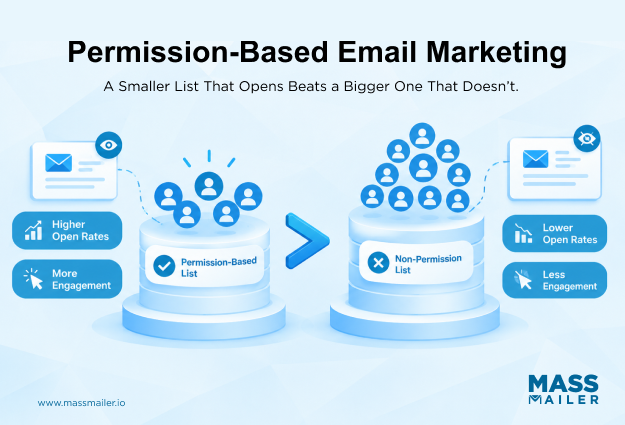
The answer matters because people who never asked often ignore your emails or mark them as spam. Worse, one careless campaign can hurt how inbox providers treat every email that follows.
Permission-based email marketing means sending only to people who agreed to receive your emails. It sounds simple, but many orgs cannot show when or how a contact gave consent. That gap puts every send at risk.
This guide covers what permission means, the main email laws, and how to build an opt-in list. It also shares best practices and a way to check your Salesforce list. Finally, you’ll get permission reminder examples you can copy and adapt.
What Is Permission-Based Email Marketing?
Permission-based email marketing is the practice of sending marketing emails only to people who have agreed to receive them. Each person opts in, can opt out at any time, and the sender keeps a record of that choice.
Real opt-in email marketing has three parts:
- The person agreed.
- They knew what they were agreeing to.
- The sender can show when and how it happened.
This matters because people who never asked for an email are the most likely to mark it as spam. Inbox providers such as Gmail use those complaints to judge your email sender reputation and inbox placement. According toGoogle’s email sender guidelines, spam rates should stay below 0.1% and never reach 0.3%.
Also, a “sent” status in Salesforce does not mean the email reached the inbox. If the Lead or Contact record cannot show how and when someone agreed, that permission is unproven. Memory and old spreadsheets don’t count as proof.
Express vs. Implied Email Consent
Express consent is a clear yes from the person, while implied consent is assumed from a business relationship. Here’s how they compare:
- How it is given: Express consent needs an action, such as ticking an unchecked box or submitting a signup form. Clicking a link in a confirmation email also counts. Implied consent comes from a recent purchase or inquiry, with no direct opt-in.
- B2B examples: A newsletter signup on your blog is express consent. A business card handed over at a trade show is implied consent at best.
- How safe it is to rely on: Express consent is simple to prove and accepted under every major email law. Implied consent is harder to document, and it expires under laws such as CASL.
However, a purchase or a sales call is not the same as agreeing to receive marketing email. So, rely on express consent wherever you can.
What Does Not Count as Permission Email Marketing
Emailing contacts who never took a clear opt-in step does not count as permission email marketing. Contacts from these sources usually fall into that group:
- Purchased or rented lists
- Addresses scraped from websites
- Forms with pre-checked consent boxes
- Old imported spreadsheets with no known opt-in source
- Badge scans at events
- People sales reps added after a call or meeting
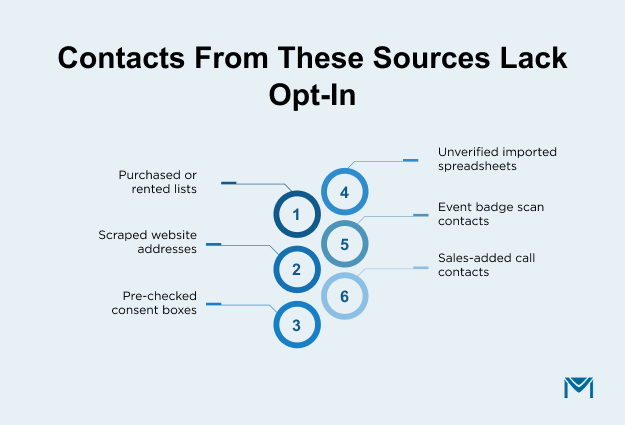
None of these people asked for your emails, so spam complaints are more likely. Each complaint also chips away at youremail sender reputation. The first step is simple: ask for their permission before adding them to marketing sends.
Of course, permission isn’t only about inbox placement, since email laws also shape what counts as valid consent.
Email Compliance Marketing Rules: CAN-SPAM, GDPR, and CASL
Each major email law sets its own rules for consent, unsubscribes, and what every email must include.
| Law | Where it applies | Is opt-in needed before sending? | What you must keep or include | Unsubscribe rule |
|---|---|---|---|---|
| CAN-SPAM | United States | No, it is an opt-out law | Honest sender details, accurate subject line, physical address | Honor opt-outs within 10 business days |
| GDPR | People in the EU | Yes, in most cases | Proof that the person consented | Opting out must be as easy as opting in |
| CASL | Canada | Yes, express or implied consent | Proof of consent and clear sender identity | Honor opt-outs within 10 business days |
Each region draws the line between opt-out and opt-in a little differently:
- United States: You can email people without prior opt-in. However, every email must still meet coreCAN-SPAM requirements, such as honest sender details and a working unsubscribe link.
- European Union: GDPR applies to people in the EU no matter where the sender is based. It expects you to show proof of email consent.
- Canada: CASL requires consent before you send. Even implied consent has a time limit, generally two years after a purchase and six months after an inquiry.
Getting this wrong can be costly. According to theFTC’s CAN-SPAM compliance guide, each violating email can cost up to $53,088 in penalties.
The law that applies follows the recipient’s location, not yours. For lists that span regions, either follow the strictest standard for everyone or split contacts by country. The Country field on the Lead or Contact record makes that easy. So, CAN-SPAM alone isn’t enough if your list includes EU or Canadian contacts. To be safe, confirm your own situation with a lawyer.
Whichever law covers your contacts, the safest base is a list built on clear opt-ins from the start.
How to Build an Opt-In Email Marketing List
Building a list for permission-based marketing comes down to three steps: ask clearly, confirm the signup, and record the consent. These steps apply to every way a contact joins your list, not only website forms.
Ask for Email Consent Clearly at Signup
A clear consent request is an unchecked box with one line saying what the person will receive and how often. For example, your line could read: “Yes, send me monthly product updates and tips by email.”
Also, keep marketing consent separate from accepting terms or requesting a demo. When one checkbox covers both, it’s unclear what the person actually agreed to.
You can ask for consent on website forms, gated content downloads, webinar registrations, and event signups.
Single Opt-In vs. Double Opt-In Email Marketing
Single opt-in adds a person to the list after one signup step. Double opt-in, on the other hand, adds them only after they click a link in a confirmation email.
Each method comes with trade-offs:
- List growth speed: Single opt-in is faster. Double opt-in adds a step that some people skip.
- List quality: Double opt-in builds a cleaner list, since each person confirms their own address.
- Proof of consent: Double opt-in creates a dated record. Single opt-in relies on the form submission alone.
- Protection from fakes: Double opt-in keeps out typos, bots, and fake signups. Single opt-in does not.
Double opt-in is not legally required in most countries. So, teams usually choose it for better list quality and stronger proof.
A good confirmation email keeps things simple. It needs a clear subject line, one sentence on what the person signed up for, and one confirmation button.
As a rule, use double opt-in for web forms and gated content. Single opt-in with clear wording works for lower-risk sources, such as existing customers. If someone never confirms, send one reminder and then leave them off marketing sends.
Record Email Consent on the Lead or Contact in Salesforce
For each person, store four details: consent status, the date it was given, the source, and the method used. These details should sit on the Lead or Contact record, so anyone sending email can see them.
However, the standard Email Opt Out field only shows who said no. It does not show who said yes, so you need to track both. Custom fields or the Contact Point Consent object can fill this gap.
The same applies to contacts who did not come through a form. Imports, event leads, and rep-added records should all have their source noted, too. Goodconsent management in Salesforce means no record is left without a known source.
Once consent is on the record, the next job is making sure it stays valid over time.
Permission-Based Email Marketing Best Practices
Getting permission is only the beginning, and four simple habits protect that email consent long after signup. Skip them, and even a fully opted-in list slowly turns into one that ignores you. Together, these habits keep your list willing and your spam complaints low. They cover the welcome email, unsubscribes, list cleaning, and a check on your existing records.
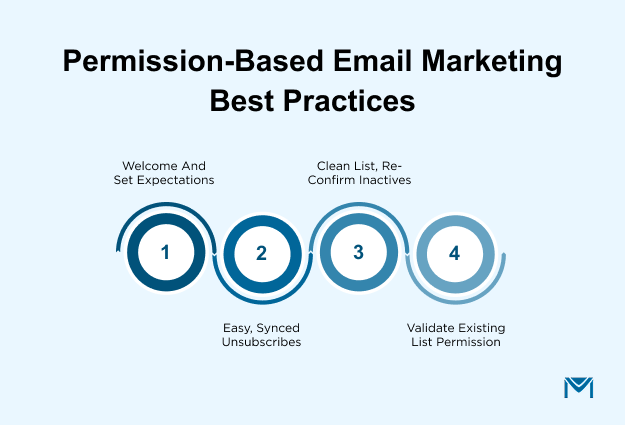
Welcome New Subscribers and Set Expectations
Send a welcome email soon after signup, while the person still remembers subscribing. Thank them, remind them what they signed up for, and set expectations for what to expect and how often.
After that, keep the promise you made at signup. Sending different content or more emails than promised can feel like a broken agreement. Also, make the first email helpful, not a sales pitch.
Make Unsubscribing Easy and Honor It Everywhere
Every marketing email should have a clear unsubscribe link that works in one or two clicks. People who cannot find it often mark the email as spam instead. That complaint does more harm than one lost subscriber.
An opt-out in one tool must also reach every other tool your team sends from. Otherwise, that person may get emailed again by mistake. A preference center helps, too, because it lets people choose fewer emails or topics instead of leaving completely.
A Salesforce-native app sends from inside your org, so unsubscribes land straight on the Lead or Contact record. MassMailer is one suchAppExchange app. It updates the Email Opt Out field the moment someone unsubscribes and includes a preference center.
Keep the List Clean and Re-Confirm Inactive Contacts
Remove hard bounces and invalid addresses on a regular schedule, since they add no value and hurt deliverability.
Permission also fades when people stop opening or clicking, even if they never unsubscribe. A simple rule works well: send one re-permission email after a set number of months without engagement. Contacts who do not confirm should then stay off future marketing sends.
However, Salesforce does not include full email verification on its own. Toverify email addresses in Salesforce, teams usually add a separate tool. MassMailer, for example, has verification built in.
Yes, your list will shrink, but a smaller, willing list is exactly the goal.
Validate Permission on an Existing Salesforce List
Most teams are not starting from zero. So, the first job is to check the list you already have:
- Run a report of Leads and Contacts grouped by Lead Source and created date.
- Sort the records into three groups: proven permission, unclear permission, and no permission.
- Ask the unclear group to confirm, using the same re-permission email described above.
- Stop marketing emails to the no-permission group, including any purchased lists.
A record has proven permission when it shows a known source, a date, and an opt-in action. Next, fix the entry points that caused the gaps, so the problem does not return. Finally, repeat this check every six months.
Even after a cleanup, people can forget why they signed up, and a short reminder line helps.
Email Permission Reminder Examples
A permission reminder is a short line in a marketing email that tells the reader why they are receiving it.
It usually sits in the email footer or as a short line near the top. This small detail matters because people who remember signing up are less likely to mark the email as spam.
Below are five examples, each matched to how the person joined:
- Website signup: “You’re receiving this email because you subscribed on our website.” Use this for contacts who filled out a form on a landing page or blog.
- Content download: “You’re receiving this because you downloaded our [guide name].” Use this for gated content leads who opted in during the download.
- Event or webinar: “You’re getting this email because you registered for [event name].” Use this for registrants who checked the marketing consent box.
- Existing customer: “You’re receiving this as a [product] customer.” Use this for current customers with ongoing email consent.
- Re-permission email: “It’s been a while. Do you still want to hear from us? Confirm here.” Use this for inactive contacts who have not engaged in several months.
When writing your own, follow three simple rules:
- Be specific about the source, such as the form, event, or download.
- Keep it to one sentence.
- Place the unsubscribe link right next to it.
However, a common mistake is using one vague line for everyone. For example, “You are receiving this because you are on our mailing list” tells the reader nothing new. As a result, it won’t help them remember signing up.
In Salesforce, a merge field can pull the Lead Source from the Lead or Contact record. That way, each reminder matches how the person actually joined.
Small lines like these keep every send tied to the permission behind it.
Make Permission-Based Email Marketing Your Default
Permission-based email marketing comes down to sending only to people who agreed to hear from you. Everything else builds on that. So, ask clearly, confirm the signup, and record the consent on the Lead or Contact. After that, make leaving easy and keep the list current.
Remember, permission is not a one-time checkbox. It is a fact on the record that your team can show when asked. In the end, fewer contacts who want your emails do more for deliverability than a bigger list that ignores them.
Want to send only to opted-in contacts, honor every unsubscribe, and keep your list verified without leaving Salesforce? Request a demo to see how it works inside your org.
Frequently Asked Questions
1. Does permission-based email marketing apply to B2B emails?
2. Can I email existing customers without asking for consent again?
3. Do transactional emails need permission?
4. Is a permission reminder required by law?
5. How do I know if permission-based email marketing is working?
6. What happens to email consent when a Lead is converted in Salesforce?
Related Blogs

Lead-to-Account Matching in Salesforce: Match Faster, Route Smarter

MassMailer Resources