





Table of Contents
Every commercial email you send from Salesforce is a legal document. Under the CAN-SPAM Act, each non-compliant email can cost you up to $53,088 in penalties. Not per campaign. Per email. Send 10,000 emails with a broken unsubscribe link, and the math gets ugly fast.
The thing is, Salesforce gives you tools to stay compliant. But the platform does not make you compliant by default. That responsibility sits with you, the sender. And with emails flowing out of Sales Cloud, Marketing Cloud, and Account Engagement, there are more places to make mistakes than most teams realize.
This guide walks you through what CAN-SPAM actually requires, how those rules apply inside Salesforce, and where most teams slip up without knowing it.
What CAN-SPAM Actually Covers (And Who It Applies To)
The CAN-SPAM Act is a US federal law that governs commercial email. It applies to any email whose primary purpose is advertising or promoting a commercial product or service. The law covers all commercial messages (not just bulk sends), makes no exception for B2B email, and applies on a per-email basis. The FTC is the primary enforcer, with state attorneys general and ISPs holding parallel authority.
Here is how CAN-SPAM requirements for email marketing break down by message type:
| Message type | CAN-SPAM status | Salesforce example |
|---|---|---|
| Commercial | All seven requirements apply | A Marketing Cloud campaign, an Account Engagement nurture email, or a Sales Cloud list email |
| Transactional | Mostly exempt, but headers and subject lines must be accurate | An order confirmation, a Service Cloud case update, or a password reset |
| Mixed purpose | Treated as commercial if promotional content dominates | An "invoice ready" email that includes an upsell banner or new pricing CTA |
The FTC evaluates mixed-purpose emails using a "primary purpose" test, looking at the subject line, opening content, and overall impression. An email marketing journey that starts with a transactional trigger but layers in a cross-sell block halfway through can flip into commercial territory. From that point, it needs full CAN-SPAM treatment.
Two things that catch teams off guard: there is no private right of action (recipients cannot sue you directly), but complaints feed into FTC investigations and ISP-level enforcement that can damage youremail deliverability across every Salesforce product. And nonprofits are not automatically exempt. The moment a nonprofit promotes a paid product or service, full requirements apply.
The legal duty sits with the entity whose product the email promotes, not the platform. If you hire an agency to run campaigns through your Salesforce instance, the FTC can hold both of you liable. "Salesforce handles compliance" is the most expensive assumption inemail campaigns.
The Seven CAN-SPAM Requirements Every Salesforce Email Must Meet
CAN-SPAM compliance comes down to seven specific rules. Every commercial email you send from Salesforce, whether it goes out through Sales Cloud, Marketing Cloud, or Account Engagement, must meet all seven. Missing even one on a single email is a separate violation.
Here is what each requirement means and where it maps to inside Salesforce.
Accurate From, To, and routing information
Your From name, Reply-To address, and routing information must accurately identify the person or business that sent the email. The FTC flags header falsification as one of the core CAN-SPAM violations.
Where does this live in Salesforce?
- In Sales Cloud, Organization-Wide Email Addresses control this. If your sales rep sends from a shared alias, the underlying user record needs to match.
- In Marketing Cloud, Sender Profiles manage this. A misconfigured profile with a stale employee name or deprecated domain puts you out of compliance silently.
- In Account Engagement, verified sending domains handle this. If domain verification lapses, your From information becomes technically inaccurate.
Watch for shared inbox aliases routed through a personal user account. If that user leaves and their record goes stale, every email through that alias carries false header info.
Truthful subject lines
Your subject line must accurately reflect the content of the email. This is a content discipline rule, not a platform feature. Salesforce cannot enforce subject-line honesty for you.
In August 2023, the FTC reached a $650,000 settlement with Experian Consumer Services over exactly this:
- Experian used subject lines designed to look transactional ("Confirm your [car brand]," "Your Dark Web scan is available") when the emails actually promoted paid products.
- The emails included footer text stating "This is not a marketing email" when the primary purpose was clearly commercial.
If your Account Engagement nurture sequence or Marketing Cloud journey blends educational content with a product pitch, the subject line needs to reflect that commercial intent. A/B testing subject lines is fine, but both versions need to pass the truthfulness test independently.
Clear identification as advertising
Every commercial email must clearly and conspicuously disclose that it is an advertisement. The FTC does not require specific wording or placement in the subject line. It just needs to be obvious to the reader.
One exception: if a recipient gave prior affirmative consent to receive your emails, this requirement drops away. Every other CAN-SPAM rule still applies.
Where Salesforce falls short:
- No Salesforce product flags or enforces ad identification automatically. Nothing checks whether your email properly discloses its promotional intent. Your team owns this entirely through copy review and approval workflows.
- Account Engagement and Marketing Cloud both offer Send Classifications, but those control deliverability settings, not content compliance. A "Commercial" send classification does not add disclosure language to your email.
Build ad identification into your campaign approval checklist before any send goes out.
A valid physical postal address in every email
Every commercial email must include a valid physical postal address. The FTC accepts a current street address, a registered PO box, or a private mailbox at a Commercial Mail Receiving Agency.
Salesforce supports this through:
- Compliance footer merge fields in Marketing Cloud that dynamically pull your business address
- Templated footers in Account Engagement and Sales Cloud
Remote-first companies without a headquarters still need a registered mailing address for compliance. A virtual mailbox qualifying as a CMRA under USPS regulations works.
The more common mistake is rendering. The address looks correct in the template editor but breaks in the final HTML, especially on mobile. Render-test every template in the delivered email, not just the preview.
A clear and easy opt-out mechanism
Every commercial email needs a clear way for recipients to opt out. The mechanism must keep working for at least 30 days after you send the email. You cannot charge a fee, ask for information beyond an email address, or put the opt-out behind a login wall.
How each Salesforce product handles this:
- Sales Cloud: The Email Opt Out field on Lead and Contact. When checked, the list emails and most native send paths suppress that record.
- Marketing Cloud: The built-in unsubscribe link, which writes back to the subscriber's status in the sending data extension.
- Account Engagement: The Email Preference Center, which lets recipients manage categories or opt out entirely.
"Reply to unsubscribe" technically satisfies CAN-SPAM but creates no audit trail and does not update any Salesforce field. If the opt-out does not write back to a tracked record, it does not count.
Honoring opt-out requests within 10 business days
Once someone opts out, you have 10 business days to stop sending them commercial email. You also cannot sell or transfer their address after they opt out.
In Salesforce, the HasOptedOutOfEmail field on Lead and Contact drives this. When it flips to true, most native send paths suppress that record automatically.
But here is the cross-product gap that bites teams:
- A contact opts out through Account Engagement. That updates their Account Engagement record.
- If Marketing Cloud does not sync to the same opt-out field, that contact can still receive Marketing Cloud sends.
- The same gap exists between Sales Cloud list emails and Marketing Cloud journeys unless you have explicitly unified suppression.
Build a single source of truth for opt-out status across every sending product. If opt-out lives in three places and only two are synced, you have a compliance gap.
Responsibility for third-party senders and partners
When an agency or partner sends an email on your behalf, the FTC can hold both parties liable. The compliance guide spells it out: the FTC can pursue both the company whose product the email promotes and the company that sends it.
What matters here:
- Sending agreements need named compliance ownership. Who manages suppression? Who handles unsubscribe processing? Who carries the penalty?
- Co-marketing campaigns where two brands share a list still require both to meet CAN-SPAM independently. Sharing a list does not share compliance responsibility. It doubles it.
- If your agency sends from your Salesforce org with a broken unsubscribe link, the FTC looks at whether you knew or should have known. Delegating the work does not delegate the liability.
Get a written sign-off on compliance ownership before any third-party send goes out.
Where CAN-SPAM Rules Show Up Across the Salesforce Ecosystem
CAN-SPAM rules apply across three Salesforce sending surfaces: Sales Cloud, Account Engagement, and Marketing Cloud Engagement. Each handles opt-out fields, footers, and suppression differently. Here is where the less obvious gaps hide.
Sales Cloud and Service Cloud
Messages sent from an Opportunity record through a connectedOutlook integration or Gmail bypass the opt-out check entirely. Salesforce never evaluates HasOptedOutOfEmail on that path.
The gap most teams miss: workflow-triggered email alerts also ignore the opt-out field. Salesforce fires the alert regardless of preference unless your criteria explicitly include HasOptedOutOfEmail = false. Add this filter to every email alert, and build a validation rule to catch any workflow that skips it.
Account Engagement (formerly Pardot)
Account Engagement tracks opt-out through three independent mechanisms: the Do Not Email flag (hard-blocks all outbound), the Opted Out flag (records unsubscribe clicks), and the Email Preference Center (granular category control).
All three block delivery on their own, but none of them automatically sync with each other or with Sales Cloud without correct field mapping.
Marketing Cloud Engagement
Auto-Suppression Lists automatically block specific addresses from every send within their scope. But a list assigned to one business unit does not protect sends from other units. If your org runs multiple units, assign suppression across all of them.
Marketing Cloud also uses merge fields like %%physicalmailingaddress%% to populate footers at send time. If the address field sits blank in the business unit profile, every outbound message ships without a physical address. No warning. Silent violation.
Native Salesforce Features That Support CAN-SPAM Compliance
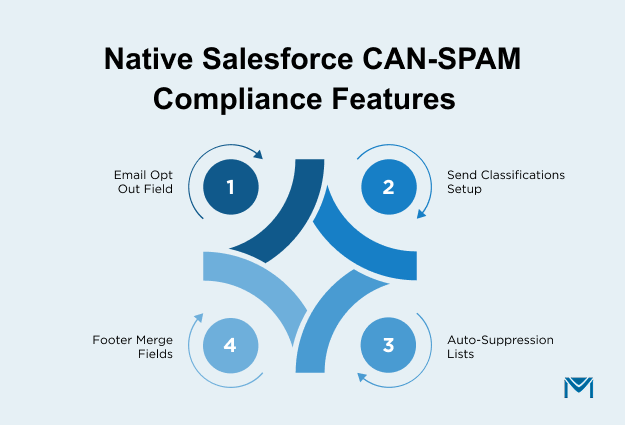
Salesforce offers four native features that directly support CAN-SPAM compliance: theEmail Opt Out field, Send Classifications, Auto-Suppression Lists, and footer merge fields. Each one handles a different piece of the puzzle, and none of them covers everything on their own.
The Email Opt Out field on Lead and Contact
HasOptedOutOfEmail is the standard opt-out checkbox on both Lead and Contact records. List Email and Apex-based methods check this field automatically and suppress flagged records.
Butworkflow-triggered email alerts ignore it entirely unless your criteria explicitly include HasOptedOutOfEmail = false. Add this filter to every alert criterion, and build a validation rule to flag any workflow that skips it.
Send Classifications and Sender Profiles
Send Classifications in Marketing Cloud bundle your sender identity and delivery settings into one object. Each carries a Commercial or Transactional flag that determines whether the unsubscribe link and physical address appear.
Where teams stumble:
- A Transactional label strips the unsubscribe link and address block by default. Correct for a genuine receipt. A violation if the message carries promotional content.
- Sender Profiles control your From name, From address, and reply handling. A profile tied to a former employee or deprecated domain quietly pushes inaccurate header info into every message that uses it.
Audit labels against actual content, not what someone assigned two years ago.
Auto-Suppression Lists
Auto-Suppression Lists automatically block specific addresses from every outbound message in their scope. You can populate them via file import, automation, or API, making them useful for capturing unsubscribes from external systems.
Scope them to every business unit in your org. A list assigned to one unit does not protect sends from others.
Footer and physical address merge fields
Marketing Cloud uses personalization strings like %%physicalmailingaddress%% and %%profile_center_url%% to populate legally required content at send time. Account Engagement and Sales Cloud use templated footers instead.
The risk: if someone leaves the address field blank in the business unit profile, the string resolves to empty on every send. No error, no warning. Account Engagement has a separate issue: footers pull from account-level settings. If your organization updates its mailing address but nobody updates that config, the old address persists.
CAN-SPAM vs GDPR vs CASL: What Changes When Your List Crosses Borders
CAN-SPAM, GDPR, and CASL govern commercial email in different ways. Here, CAN-SPAM (United States) is opt-out based: you can email until someone unsubscribes. GDPR (European Union) requires a lawful basis before you send anything. CASL (Canada) requires consent upfront, either express or implied, with time limits.
CAN-SPAM (United States) is opt-out-based
CAN-SPAM lets you send commercial email to US recipients until they tell you to stop. No upfront consent requirement. One thing teams miss: CAN-SPAM is not the only rule for US recipients. State laws can layer on top. California's Business andProfessions Code section 17529.5 restricts specific deceptive email practices beyond what federal law covers.
GDPR (European Union) requires a lawful basis
You need a lawful basis before your first marketing email reaches an EU recipient, almost always explicit consent or legitimate interest with strict guardrails.
What this means in Salesforce:
- A HasOptedOutOfEmail checkbox is not enough. GDPR expects records documenting what the person agreed to, when, and how. Build custom fields for lawful basis, consent source, and consent date on every Lead and Contact.
- An EU contact handled under legitimate interest retains the right to object at any time, which your system must honor immediately.
- Maximum fines reach€20 million or 4% of total global annual turnover, whichever is higher.
A single EU contact in your list shifts your baseline from opt-out to consent-driven for that individual.
CASL (Canada) requires consent
CASL requires either express consent or narrow implied consent before you message a Canadian recipient.
Key differences for your Salesforce setup:
- Express consent does not expire unless withdrawn. Implied consent is time-limited: two years from the last purchase, six months from an inquiry. Most orgs do not track these expiry dates, creating a ticking compliance gap.
- CASL requires consent type, source, and timestamp on every record for audit. Build custom fields for consent method, consent date, and expiry date.
- Maximum penalties reachCAD 10 million for organizations and CAD 1 million for individuals.
When one list falls under all three
Most orgs have US, EU, and Canadian contacts in the same data extensions. A contact who relocates from the US to Germany changes your obligations even if their record looks identical. The law follows the recipient, not the record. Use country or region fields to segment contacts and apply the right compliance framework to each audience.
CAN-SPAM Penalties and What Enforcement Actually Looks Like
CAN-SPAM penalties are calculated per email, not per campaign, and the FTC actively enforces them. Recent settlements have cost senders $2.95 million (Verkada, 2024) and $650,000 (Experian, 2023), with violations as basic as missing unsubscribe links and misleading subject lines.
The current per-email penalty amount
The FTC adjusts the maximum annually for inflation under 15 U.S.C. 2461. What shapes the actual number in any given case:
- The FTC scales fines based on willfulness, prior history, and volume. A company that ignored repeated complaints pays more than one that made a good-faith configuration error.
- Settlements rarely approach the statutory maximum multiplied across a full send list. But even a modest outcome plus legal fees and remediation dwarfs what a proper setup would have cost upfront.
Recent enforcement actions worth knowing
Two cases worth studying in detail:
- Verkada (2024): Sent over 30 million promotional emails across three years. The FTC cited four distinct violations: no working opt-out option, failure to honor unsubscribe requests, no physical postal address, and inadequate identification. The largest fine ever imposed under the law.
- Experian (2023): Disguised marketing emails as transactional messages with no opt-out mechanism. A permanent injunction required Experian to implement an Email Preference Center in all future campaigns.
The pattern: high volume, broken opt-out mechanics, and misleading framing. The basics done wrong at scale.
Why your ESP or AppExchange app does not shield you
The law holds the entity whose product the email promotes accountable. Not the platform. Not the app.
- ESP and AppExchange contracts almost always confirm that the customer carries sender responsibility. Read your terms.
- In both cases above, the FTC named the advertiser. The infrastructure provider was never part of the action.
- An ESP can face liability when it sends its own promotional messages or knowingly facilitates violations. In typical customer-through-platform scenarios, the sender carries the weight.
Your tools do not absorb your risk.
Common CAN-SPAM Compliance Gaps in Salesforce
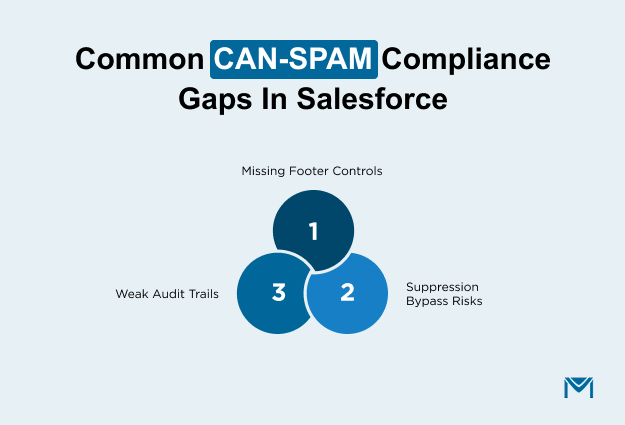
Salesforce leaves four main compliance gaps: template-dependent footers that vanish when copied incorrectly, suppression checks that do not every send path runs, custom Apex and AppExchange paths that bypass validation entirely, and audit trails too thin to defend in an enforcement inquiry.
Footer gaps
In Sales Cloud and Account Engagement, footer inclusion depends on whoever built the template. Copy a transactional template into a promotional send, and the address block vanishes.
Email notifications triggered by workflows do not include compliance footers by default. The Verkada case cited missing physical postal addresses among its four violations. A model that relies on every marketer editing every template correctly does not scale.
Suppression and Apex bypass gaps
Custom Apex using SingleEmailMessage can bypass opt-out validation entirely. If a developer adds recipients by email address instead of record ID, Salesforce never checks the preference field.
This is a blind spot in orgs that rely onemail services built through custom code. AppExchange apps must support standard compliance fields under security review, but an app that passed review can still allow custom callouts to skip validation.
Audit trail weakness
Without properemail archiving, the trail behind opt-out events is thin. Field History Tracking captures when the value changed, but not always the full source: which channel triggered the unsubscribe, or what the timestamp was before a bulk import overwrote it. Regulators ask for a complete unsubscribe timeline. Bulk updates that flatten individual timestamps make it harder to answer.
How MassMailer closes these gaps
Native tools rely on admin configuration: the right classification, the right template, the right field mapping. Miss one, and the gap is silent. MassMailer checks the opt-out field at runtime on every send it processes, without requiring additional setup. It also writes every unsubscribe event as a permanent, time-stamped record, strengtheningemail tracking for compliance documentation.
No tool transfers legal liability. But the right tool reduces the chance of a violation reaching your customers.
Conclusion
CAN-SPAM compliance in Salesforce comes down to four levers: the Email Opt Out field, Send Classifications, Auto-Suppression Lists, and the compliance footer. Salesforce gives you each one. Using them correctly across every send path, template, and automation is on you.
The gaps are predictable: template hygiene, suppression discipline, and audit trails. The FTC'senforcement library shows what happens when those gaps go unaddressed, with settlements ranging from six figures to mid-seven figures.
Ship your next commercial send with the footer, suppression, and audit trail handled. A clean send today is cheaper than a settlement next quarter.
If you want to see how runtime enforcement works across every Salesforce send path without the configuration overhead, explore how MassMailer handles CAN-SPAM compliance natively inside Salesforce.
Frequently Asked Questions
1. Can a contact who unsubscribed be re-added to a Salesforce email list?
2. Does CAN-SPAM apply to cold emails sent by sales reps from Salesforce?
3. Can Salesforce Flow or Process Builder trigger emails that violate CAN-SPAM?
4. Does CAN-SPAM require double opt-in?
5. What happens if my Salesforce unsubscribe link breaks after I send the email?
6. Are Salesforce email alerts and notifications considered commercial under CAN-SPAM?
Related Blogs
MassMailer Resources



About the Author

Siva Devaki 
Siva Devaki is the founder of MassMailer Inc., a tool that helps Salesforce users optimize email marketing. A passionate advocate for email marketing, Siva writes and hosts podcasts on the topic, sharing insights to help businesses drive revenue and enhance customer engagement through Salesforce email automation and tracking.