





Table of Contents
A new Lead enters Salesforce. Before routing it to a rep, there’s one question worth answering first: does this Lead already belong to an existing Account?

That’s the purpose of lead-to-account matching in Salesforce. It compares Lead details such as company name, email domain, website, phone, or address with existing Account data to identify the most likely relationship.
The workflow is simple: Lead data → Account match → downstream action. A reliable match gives routing and reporting the right Account context. A poor match can send the Lead down the wrong path.
This guide explains how Salesforce lead-to-account matching works, which matching options are available, and how matching connects with lead routing without confusing it with Lead Conversion.
What is lead-to-account matching in Salesforce?
Lead-to-account matching in Salesforce is the process of identifying whether a new Lead belongs to an Account that already exists in Salesforce. The match can use signals such as company name, website, email domain, phone number, and address to determine the most likely organizational relationship.
This matters because a Lead represents a prospect, while an Account represents a company or organization already stored in the CRM. Matching the Lead correctly gives downstream workflows access to existing Account context instead of treating the record in isolation.
It also helps to separate three connected Salesforce processes:
- Matching identifies the most likely Account.
- Routing determines who should receive the Lead.
- Lead Conversion: changes the Lead record state and can connect it to Account and Contact records.
A potential Account match does not automatically convert the Lead.
The practical risk appears downstream. A routing rule can be configured correctly and still assign a Lead to the wrong owner or territory if the Account match feeding that rule is wrong. A reliable lead-to-account matching process therefore depends on accurate CRM data and matching criteria strong enough to avoid forcing uncertain relationships.
How does lead-to-account matching work in Salesforce?
Lead-to-account matching in Salesforce compares an incoming Lead’s company information with existing Account records. Salesforce can evaluate company name, address, phone, website, and email domain using exact, normalized, or fuzzy matching methods to identify the most likely Account.
The key dependency is data quality. Missing websites, inconsistent company names, or incomplete contact details leave the matching logic with less evidence, which can turn an otherwise clear relationship into an ambiguous one.
Company name and account data matching
Salesforce’s standard Leads-on-Accounts matching logic can compare Lead Company with Account Name, then use Street, City, State, ZIP or postal code, and Phone as supporting signals. Company names can also be normalized and evaluated through exact, acronym, and edit-distance matching, allowing Salesforce to recognize naming variations rather than requiring identical text.
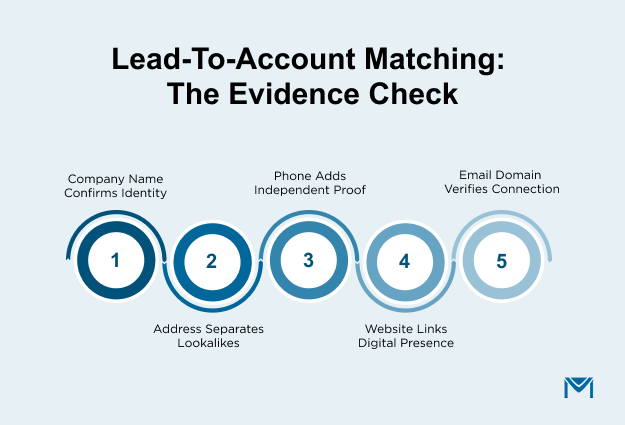
Think of the lead-to-account matching process as an evidence check:
- Company name indicates organizational identity.
- An address helps distinguish similar companies or locations.
- The phone adds another independent comparison.
- Website and email domains connect the Lead with the company’s digital identity.
These fields can also influence downstreamSalesforce CRM workflow automation, so an incorrect Account relationship can propagate into later automated actions.
Salesforce documents that some phone and address matching behavior works best with North American data. Teams handling records across regions should therefore test their actual field formats rather than assume every signal carries equal weight.
Email domain and account website matching
A Salesforce account match using email domain extracts the domain from the Lead Email and compares it with the Account Website. This path uses stricter domain logic than company-name matching and can provide a useful identity signal when company names vary.
Common personal domains such as Gmail and Yahoo are ignored because they do not identify an employer. When Account Website data is missing, Salesforce can also use email domains from related Contacts as a fallback signal. ReliableSalesforce email verification supports this workflow by helping ensure the email value being evaluated is usable in the first place.
Domain agreement should still be treated carefully. Multiple corporate domains, subsidiaries with separate websites, personal email addresses, and missing website data can all weaken the connection between a domain and a specific Account.
How Salesforce determines a match
Salesforce combines matching criteria, matching methods, algorithms, scores, and thresholds to decide whether records are similar enough to qualify as a match. Criteria determine which fields are evaluated; methods define whether comparisons are exact or fuzzy; normalization standardizes values before comparison; and thresholds determine the confidence required.
The practical tradeoff is straightforward. Looser criteria can increase match coverage but produce more questionable associations. Stricter criteria reduce false relationships but may leave legitimate Leads unmatched.
A dependable lead-to-account matching system should therefore support distinct outcomes for a clear match, multiple possible matches, and no match rather than forcing every Lead onto an Account. That decision becomes especially important when records enter Salesforce through automated capture processes such asSalesforce Email-to-Lead, where the captured Lead data becomes the input for later matching.
What lead-to-account matching options are available in Salesforce?
Salesforce supports three main approaches to lead-to-account matching: native Salesforce matching, custom logic with Flow or Apex, and third-party matching systems. The right option depends on your match complexity, exception handling, Account hierarchy, data volume, and downstream routing requirements.
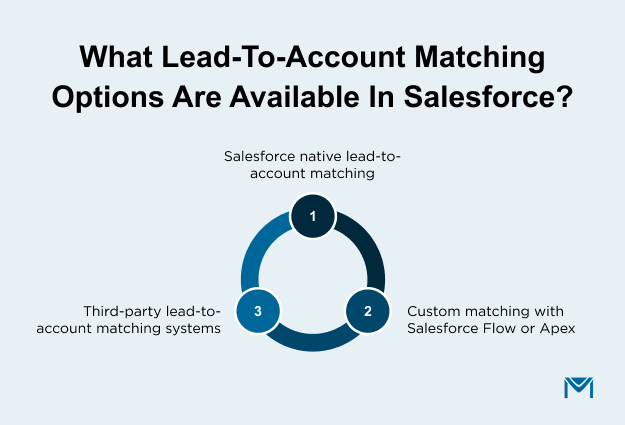
Salesforce native lead-to-account matching
Salesforce’s standard Matching Rule for Leads on Accounts can surface potentially related Leads and Accounts using predefined signals such as company name, address, phone, website, and email domain. Data 360 cross-object matching provides another Salesforce-native approach for identifying Lead-to-Account relationships.
Native matching is a practical starting point when your CRM data is consistent and Salesforce’s predefined logic covers the relationships you need to detect. Keeping the process inside Salesforce can also simplify downstreamSalesforce-native automation because matching results remain close to the workflows that use them.
The tradeoff is flexibility. If your process depends on layered fallback rules, complex Account hierarchies, or different actions based on match confidence, standard matching logic may not be enough.
Custom matching with Salesforce Flow or Apex
Custom lead-to-account matching in Salesforce gives you control over both the matching criteria and what happens after a result is found.
A typical Flow follows this sequence:
Lead created or updated → find candidate Accounts → evaluate criteria → classify the outcome → update the relationship or trigger the next action
The classification step matters most. Your lead-to-account matching process should handle one credible match, multiple possible matches, and no match separately. Associating a Lead because one weak signal matches, such as Company Name or email domain alone, can create a bad Account relationship that later affects routing and reporting.
Flow works well while the logic remains easy for Salesforce admins to understand and maintain. Apex becomes more appropriate when matching grows too complex or performance-sensitive for declarative automation. The same principle applies toSalesforce automation built with Flow: triggers, conditions, and outcomes should remain explicit enough to troubleshoot.
Third-party lead-to-account matching systems
A third-party lead-to-account matching system becomes worth evaluating when you need to handle larger datasets, parent-child Accounts, subsidiaries, multiple corporate domains, enrichment data, or advanced lead-to-account matching and routing requirements.
Do not judge a system only by whether it can return a match. Evaluate how it handles uncertainty:
- Can multiple fields contribute to confidence?
- What happens when more than one Account is plausible?
- Can it distinguish parent Accounts from subsidiaries?
- Is there a defined path for unmatched Leads?
- Can the matched Account feed directly into ownership and routing rules?
That last question is easy to overlook. A third-party matcher must return usable Account context to Salesforce so routing and ownership automation can act on it. That integration requirement should be part of your evaluation ofSalesforce integration options.
The best approach is the one that handles uncertain records safely, not simply the one that produces the most matches.
How does lead-to-account matching connect to lead routing?
Lead-to-account matching identifies which Account a Lead belongs to; lead routing uses that Account context to determine who should receive the Lead. In Salesforce, matching should happen before account-aware assignment when routing depends on fields such as Account Owner, territory, region, segment, customer status, or named-account status.
The technical sequence looks like this:
Lead enters Salesforce → Account is matched → required Account attributes are queried or copied into routing fields → assignment logic runs → Lead is assigned
This execution order matters. If your lead-to-account matching and routing workflow depends on Account-level data, those values must be available before the relevant assignment logic runs. A Flow can retrieve the matched Account, evaluate fields such as owner or territory, and then set Lead ownership or populate fields used by subsequent routing logic.
If the assignment runs before the Account match is resolved, the routing process may evaluate incomplete context even when the routing rules themselves are configured correctly.
Handling Different Match Outcomes
The workflow should also define what happens for each match outcome:
- One credible match: route using the matched Account’s ownership, territory, or segment context.
- Multiple possible matches: send the Lead through an exception path rather than routing from an uncertain relationship.
- No match: use the fallback assignment path for a net-new or unmatched Lead.
This is the hidden dependency in the lead-to-account matching process: routing cannot repair an incorrect organizational relationship upstream. If the wrong Account is selected, an Account-owner or territory rule can execute exactly as designed and still assign the Lead to the wrong rep.
Once Salesforce has established the Account and owner, the same CRM conditions can also determine what communication happens next.MassMailer can send emails from Salesforce Flow when record conditions change, keeping the outreach tied to Salesforce data rather than requiring a separate audience export.
A practical next step is to map the workflow one stage further: decide whether a successfully matched and routed Lead should receive an immediate message, wait for a status change, or enter a multi-step follow-up.Salesforce email sequences can use CRM triggers, schedules, and engagement signals to automate that follow-up while keeping the sequence connected to Salesforce records.
The design principle is straightforward: match first, expose the Account context, route second, then automate the appropriate follow-up. That order keeps Account identity, ownership, and communication working from the same Salesforce record logic.
How to Improve Lead-to-Account Matching in Salesforce
Reliable lead-to-account matching in Salesforce depends on clean CRM data, clear matching criteria, and a defined path for uncertain matches. The goal is to identify the right Account early enough that routing, ownership, reporting, and follow-up use trustworthy context.
Start by reviewing the Lead and Account fields your team relies on, then choose the approach that fits your workflow, whether that is native Salesforce matching, Flow, Apex, or a third-party system.
If you want to extend that workflow into Salesforce-based email follow-up,book a MassMailer demo to see how automated outreach can stay connected to your CRM data.
Frequently Asked Questions
1. Is lead-to-account matching in Salesforce available in every Salesforce org?
2. Does Salesforce lead-to-account matching create a permanent Account relationship on the Lead?
3. Can custom fields be used for lead-to-account matching in Salesforce?
4. How many matching rules can you create in Salesforce?
5. What is the difference between matching rules and duplicate rules in Salesforce?
6. How can you test whether lead-to-account matching in Salesforce is accurate?
Start Your Free Trial Today
Experience MassMailer the easiest way to send personalized emails from Salesforce.
Related Blogs
CRM Email Tracking: Why Engagement Data Stays Incomplete
Permission-Based Email Marketing: Keep Every Send Out of Spam
MassMailer Resources



MassMailer Glossary
About the Author

Siva Devaki 
Siva Devaki is the founder of MassMailer Inc., a tool that helps Salesforce users optimize email marketing. A passionate advocate for email marketing, Siva writes and hosts podcasts on the topic, sharing insights to help businesses drive revenue and enhance customer engagement through Salesforce email automation and tracking.