



Table of Contents
Introduction
Salesforce allows about 5,000 external emails per day, so most teams rely on batch sending, and that’s exactly where Salesforce email merge fields break in real execution.
In test emails, everything looks correct. But in real sends, bulk campaigns, or automated workflows, merge fields in Salesforce email templates don’t hold up. Fields come through blank, show outdated values, or behave differently across sends. The same template stops being reliable.
This is not a configuration problem; it’s how Salesforce executes email. Merge fields depend on when data is pulled, and in batch or triggered sends, that timing often misses live CRM data.
The impact is direct. Broken personalization reduces trust, hurts engagement, and forces teams to manually check every send, slowing down campaigns as volume grows.
This guide shows why Salesforce email merge fields fail in real use and what needs to change to make personalization reliable at scale.
Why Salesforce Email Merge Fields Fail in Bulk Campaigns
Salesforce email merge fields fail in bulk campaigns because they do not use live CRM data at the moment of sending. Instead, values are evaluated earlier in reports, lists, or workflows, which leads to blank, outdated, or inconsistent personalization during actual delivery.
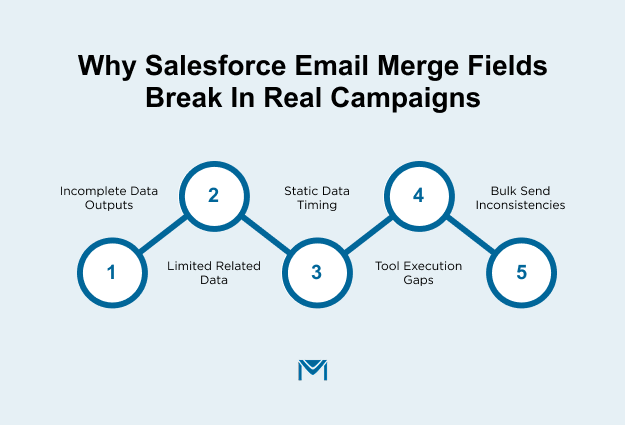
In real execution, this creates a clear mismatch:
- The record shows updated data inside Salesforce
- The email uses an earlier version of that data
- The delivered message reflects incorrect or missing values
This issue becomes more visible as volume increases. A test email may look correct, but bulk campaigns expose gaps because each record is processed based on when the data was captured, not when the email is sent.
The result is not just a formatting issue. It affects trust, reduces engagement, and forces teams to manually validate data before every campaign to avoid errors at scale.
What Accurate Salesforce Email Personalization Looks Like at Scale with MassMailer
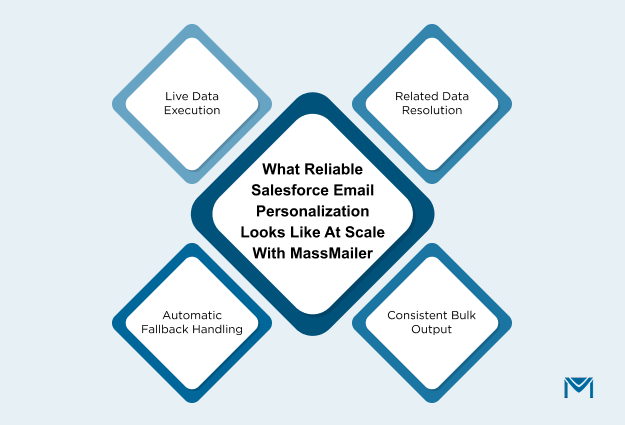
Accurate Salesforce email personalization at scale means every email uses current CRM data at send time, resolves all required records correctly, and delivers the same output quality to every recipient. That is the standard MassMailer enforces inside Salesforce.
In practice, this removes the failure points you have already seen. A last-minute field update shows up correctly in the email. Related data does not drop out during the send. Large campaigns do not produce mixed personalization results. Emails stay complete even when some records are missing values. The behavior remains stable across manual sends, automation, and bulk campaigns.
This shifts the workflow. Instead of validating data before every send, teams execute directly from Salesforce with confidence. Personalization becomes predictable, not something that needs to be checked every time.
1. Using live Salesforce data at the moment of sending
Personalization is only correct if the system reads data at the exact time the email is sent.
MassMailer evaluates field values during send execution. Any update made before launch is reflected in the email. Scheduled campaigns use the latest available record values at delivery. Workflow-triggered emails reference the current record state instead of an earlier version.
This removes timing-related errors completely. Data changes no longer force teams to pause campaigns or rebuild lists before sending.
2. Resolving merge fields across related objects
Useful personalization depends on accessing data beyond the primary record.
MassMailer resolves values across related objects during execution, including account-level details, opportunity data, and custom object records such as subscriptions or enrollments. Multi-level relationships are handled within the same send without breaking.
This enables full-context messaging. Campaigns can use real business data already stored in Salesforce instead of limiting personalization to basic fields.
3. Maintaining consistency across bulk email personalization
At scale, accuracy must remain identical for every recipient in the campaign.
MassMailer delivers uniform personalization across bulk sends. The same template produces consistent results for all records within the same campaign, regardless of volume.
This removes reliance on sample testing. Teams can send to large audiences without expecting variation in output.
4. Handling null values and fallback logic without manual fixes
Missing data should not result in incomplete emails.
MassMailer applies fallback values automatically during execution. Empty fields are replaced with defined defaults, ensuring the email remains readable and complete.
This removes the need to clean every record before sending. Campaigns can run without manual fixes while maintaining output quality.
This becomes especially important in mass email campaigns with dynamic personalization, where even a small percentage of missing data can break large-scale sends if not handled at execution time.
Why does this execution model change the decision?
The decision comes down to execution reliability, not feature availability.
MassMailer uses current data at send time, resolves all required records correctly, maintains consistent output across large audiences, and prevents visible gaps from missing values. This removes the operational effort and risk that typically come with Salesforce email merge fields.
With this setup, teams scale personalization without manual intervention and directly align with email deliverability best practices, where data accuracy and consistency improve inbox performance.
Salesforce Merge Fields vs External Tools vs MassMailer: What Should You Choose?
Choose MassMailer if your campaigns depend on accurate personalization at scale. Stay with native Salesforce email only for simple, low-volume sends. Pick external tools only when email runs outside Salesforce, and data timing does not matter.
The deciding factor is simple: how your system handles data at the moment of sending. If it relies on pre-built lists or synced records, personalization will fail as volume grows. If it reads live CRM data during execution, accuracy holds across every campaign.
Native Salesforce email: when it works and where it breaks
Native Salesforce email supports direct, one-to-one communication.
Send from a single record, and values populate correctly. Shift to campaign sends, and the system stops using the current data. List emails and workflows depend on earlier values, which creates mismatches between records and output.
Results vary across recipients. One contact sees the correct details, another sees missing or outdated values. Teams respond by reviewing data before sending, which slows execution and adds risk.
This option fits only when campaigns remain small and simple.
External tools: when flexibility introduces data and sync risks
External tools separate email execution from Salesforce.
They operate on copied datasets instead of current CRM records. Update a field after syncing, and the email still uses the old value unless another sync runs.
This introduces constant coordination. Teams manage sync timing, troubleshoot mismatches, and handle multiple systems for a single campaign. As campaign frequency increases, these gaps produce more errors.
This option trades control for flexibility and increases dependency on data movement.
MassMailer: when real-time execution and accuracy matter
MassMailer runs email execution directly inside Salesforce using live CRM data.
It reads values during sending, so emails reflect the latest record state. MassMailer pulls related and custom object data as part of the same process, enabling full-context personalization. It delivers consistent output across all recipients, even in high-volume campaigns.
No syncing, exporting, or pre-send fixes.
This is the only setup here that removes data timing issues, maintains accuracy under scale, and keeps execution inside Salesforce.
How to choose based on scale, reliability, and control
- Stay with native Salesforce email for low-volume, basic communication
- Use external tools when email operates outside CRM workflows and timing is not critical
- Move to MassMailer when campaigns depend on live CRM data, multiple objects, and consistent execution
If your team checks records, fixes fields, or manages sync cycles before sending, your current setup is already slowing you down and introducing risk.
Switch to MassMailer to remove those steps and run campaigns with reliable personalization from the start.
Conclusion
Merge fields are not the problem. Your execution model is.
If your campaigns send blanks, outdated values, or inconsistent personalization, templates are not the cause. Salesforce processes data before sending, which breaks accuracy in real campaigns.
Native Salesforce email fails under scale, timing pressure, and multi-object data. External tools create a different risk, data drift between systems. Both force teams into the same loop: check, fix, resend.
Only one approach removes this cycle: use live CRM data at the moment of sending.
MassMailer runs email directly inside Salesforce, reads current data during execution, and keeps personalization consistent across every recipient without manual effort.
If your team still validates records or manages sync timing before sending, you are already losing time on every campaign.
Test this on your next campaign. Run a MassMailer demo on your own Salesforce data and compare the output before you send another email.
Frequently Asked Questions
1. How do you test Salesforce email merge fields before sending a campaign?
2. Why do Salesforce email merge fields show blank values in bulk emails?
3. Why do Salesforce email merge fields return incorrect values during campaigns?
4. Do Salesforce email merge fields update automatically before sending?
5. Can Salesforce email merge fields pull data from related objects?
6. How do you fix inconsistent Salesforce email merge field output across recipients?
Start Your Free Trial Today
Experience MassMailer the easiest way to send personalized emails from Salesforce.
Related Blogs
MassMailer Resources


MassMailer Glossary
About the Author

Siva Devaki 

Siva Devaki is the founder of MassMailer Inc., a tool that helps Salesforce users optimize email marketing. A passionate advocate for email marketing, Siva writes and hosts podcasts on the topic, sharing insights to help businesses drive revenue and enhance customer engagement through Salesforce email automation and tracking.