




Table of Contents
Introduction
We know why you are here. You are looking for a clear Salesforce email marketing tool comparison because your current email setup is starting to feel out of place in Salesforce. Emails are sent, but reporting does not always line up. Campaign data sits outside the CRM. Automation feels harder to manage as your Salesforce usage grows.
At this stage, the decision is no longer about features. It is about where email should run. Should it operate directly inside Salesforce, or through an external platform that depends on syncs?
This guide compares Salesforce email tools based on architecture, reporting, automation, deliverability, and long-term effort, so you can make a confident decision.
Salesforce Email Tool Architecture: Native Execution vs Integrated Platforms
This Salesforce email marketing tool comparison begins with architecture because there are only two ways email can work with Salesforce. Email either runs inside Salesforce or it runs in an external tool that syncs data back. This choice decides how much effort, risk, and cleanup your team deals with later.
1. Salesforce-Native Email (Runs Inside Salesforce)
In a native setup, email activity lives on Salesforce records. Opens, clicks, bounces, and opt-outs update directly on Leads, Contacts, and Campaign Members. There is no second database.
- Campaigns use Salesforce Reports, List Views, or Campaign Members
- Emails trigger from Flow or field changes
- Data updates in real time, without waiting for syncs
This works best when Salesforce drives your pipeline and reporting. Teams in this situation often try MassMailer because it lets them run real campaigns inside Salesforce and confirm whether native execution removes ongoing sync and reporting issues.
2. Integrated Email Tools (Run Outside Salesforce)
With integrated tools, email runs in a separate platform. Salesforce sends data out, and engagement syncs back later.
- Campaigns run on copied contact lists
- Automation logic lives outside Salesforce
- Engagement data depends on API sync timing
This setup can work for list-based campaigns. Over time, teams notice delays, mismatched fields, or extra admin work as Salesforce usage grows. That is usually when teams start testing a native option like MassMailer to reduce moving parts instead of adding more integrations.
Once the execution model is clear, the next step is comparing how each approach affects reporting and pipeline attribution.
Reporting Accuracy and Pipeline Attribution in Salesforce Email Tools
In this Salesforce email marketing tool comparison, reporting is where the architecture choice becomes obvious. The question is simple: can you trust what you see in Salesforce without checking another dashboard?
1. How email engagement shows up in Salesforce reports
With Salesforce-native email tools, engagement data is saved directly on CRM records. Opens, clicks, bounces, and opt-outs appear immediately in Salesforce email activity and email reports. Dashboards update as actions happen, not hours later.
With integrated tools, engagement data is processed outside Salesforce first. Salesforce only sees updates after email sync jobs run. This often creates gaps when teams review Salesforce email reports or try to validate email activity during pipeline reviews.
This is where many teams start testing MassMailer. Because it runs natively, reporting works with standard Salesforce email reports and dashboards, without waiting on syncs or exporting data.
2. Campaign Influence and Opportunity Attribution
Native tools work directly with Salesforce Campaigns and Campaign Influence. Email touches connect to Opportunities using Salesforce’s own logic. Attribution updates automatically as deals move forward.
Integrated platforms rely on correct mappings and timely syncs. When those break, Campaign Influence may miss email touches or show them late. Teams often notice this when reviewing Salesforce email campaigns or validating Salesforce email tracking against revenue.
Buyers who depend on attribution clarity often evaluate MassMailer because it aligns email campaigns directly with Salesforce campaign data, without rebuilding influence models or fixing sync errors.
3. What happens when reporting depends on email syncs
Email sync works at first, but it adds uncertainty over time. Small delays turn into manual checks. Teams cross-verify Salesforce dashboards with external tools. Confidence drops, even when the numbers are close.
Native reporting avoids this. Salesforce stays the source of truth for email engagement, attribution, and revenue impact. That simplicity is why teams comparing tools like Mailchimp, Campaign Monitor, or Constant Contact integrations often trial MassMailer instead of adding another connector.
Once reporting is clear and trusted, the next decision point is how automation behaves as Salesforce processes grow and change.
Automation Capabilities in Salesforce Email Tools: Native vs External Platforms
Automation is where day-to-day effort becomes visible. You are deciding whether email automation should follow Salesforce logic or run in a separate system with its own rules.
1. How email automation is triggered in Salesforce-native tools
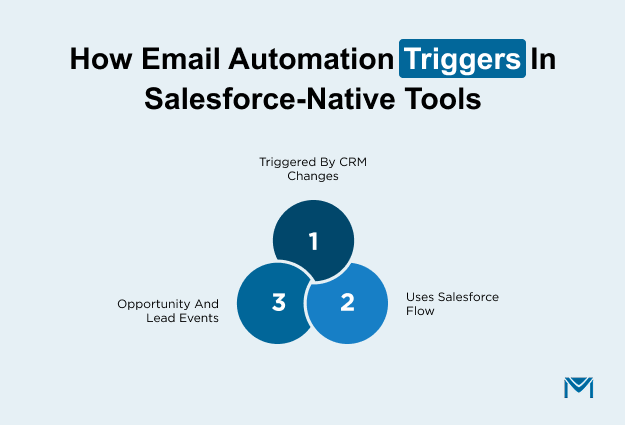
With Salesforce-native tools, automation starts from CRM activity. Emails trigger when Salesforce records change, not when a sync finishes.
- Emails can trigger from Opportunity stage changes, Lead updates, or custom fields
- Automation uses Salesforce Flow and workflow email alerts
- Logic stays close to your actual sales and service process
This model works well when your lifecycle lives in Salesforce. Many teams exploring MassMailer do so because it supports Salesforce email automation and workflow email alerts without rebuilding journeys elsewhere.
After setup, automation is easier to adjust. When Salesforce logic changes, emails follow automatically.
2. How automation works in integrated email platforms
With integrated platforms, automation runs outside Salesforce. Salesforce sends data out, and the external tool decides when to send emails.
- Triggers rely on synced fields or list updates
- Journeys live in a separate interface
- Changes in Salesforce often require matching updates in the email tool
This approach can work for long-nurturing programs or channel-led campaigns. Over time, teams notice more effort in maintaining Salesforce email sync and checking why certain emails did not trigger as expected.
This is why buyers comparing tools like Mailchimp, ActiveCampaign, or Campaign Monitor often test MassMailer instead of adding deeper automation layers through integrations.
3. Managing automation as Salesforce processes evolve
Automation rarely stays fixed. Sales stages change. Fields get added. Processes mature.
- Native automation adapts quickly because it runs on live Salesforce data
- Integrated automation needs updates in two systems
- Small changes create more testing and coordination work
When automation becomes harder to manage than the emails themselves, teams start looking for simpler execution. MassMailer is often used to confirm whether Salesforce-driven automation reduces ongoing adjustments while still supporting drip campaigns and CRM-based email flows.
Once the automation effort is clear, the next comparison is who controls deliverability, compliance, and sender reputation.
Deliverability, Ownership, and Compliance Control
Deliverability is not about who promises better inbox rates. It is about who owns the setup, who sees the problems first, and who can fix them without delays.
1. Who controls authentication, sender reputation, and bounces
With native email tools, authentication, and sender setup, stay aligned with Salesforce email infrastructure. SPF, DKIM, sender reputation, bounces, and opt-outs are handled in one place.
- Authentication is configured once and enforced consistently
- Bounce, and opt-out updates reflect immediately on records
- Sender reputation is easier to track and correct
With integrated platforms, these controls live in the external tool. Salesforce only receives the outcome later. This can slow down fixes when emails start failing or engagement drops.
Teams that want tighter control often evaluate MassMailer because it works with Salesforce email authentication, DKIM, SPF records, and bounce management without splitting responsibility across systems. This becomes critical when sender reputation issues appear.
2. Where suppression and compliance rules are enforced
Compliance depends on where opt-outs and suppression lists are managed.
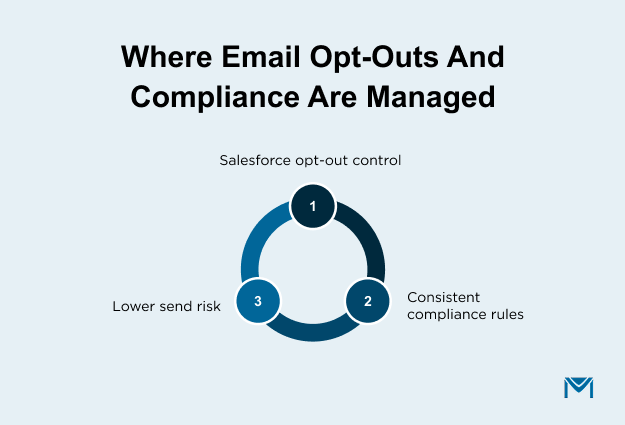
- Native tools tie suppression directly to Salesforce email opt-out fields
- Compliance rules apply consistently across campaigns
- There is less risk of sending to the wrong audience
Integrated tools manage suppression in their own databases. Salesforce reflects changes only after syncs. Over time, this can create mismatches, especially when contacts are updated frequently.
Buyers who have dealt with opt-out mismatches or email complaints often move toward MassMailer to keep Salesforce email opt-out logic and compliance rules enforced at the source.
3. Visibility when deliverability issues occur
When emails land in spam or get blocked, speed matters.
- Native tools surface issues through Salesforce email activity and reports
- Problems like blacklisting, bounce spikes, or low open rates are easier to trace
- Fixes can start without switching tools
With integrated platforms, troubleshooting usually starts outside Salesforce. Teams jump between dashboards, logs, and support tickets to find the cause.
This is why teams dealing with Salesforce email deliverability issues, blacklist warnings, or sender reputation drops often trial MassMailer. It simplifies monitoring and reduces blind spots when issues affect revenue communication.
Once deliverability ownership is clear, the final comparison is the total cost and effort required to maintain each model over time.
Total Cost of Ownership: Salesforce-Native vs Integrated Email Tools
Total cost is what you deal with after the tool is live. It includes how pricing grows, how much effort is needed to keep things running, and how easy it is to plan as email volume increases.
1. How pricing grows as your Salesforce data increases
Most integrated email tools charge based on contact count. As your Salesforce records grow, those contacts are copied into the email platform. Costs increase even when your actual sending stays the same. This is common in setups that rely on external integrations, such as VerticalResponse or Act-On.
Over time, teams realize they are paying for the same data twice. This is often when buyers start looking at a Salesforce-native option like MassMailer, especially after comparing different Salesforce email integrations and how they handle contact storage.
A native model avoids duplicate contact pricing and keeps cost growth tied to real usage, not data replication.
2. Effort required to maintain the setup over time
Subscription fees are only part of the cost. Integrated setups add ongoing work that is easy to miss during evaluation.
- Data changes require updates across tools
- Campaign issues take longer to diagnose
- Support often involves more than one platform
This effort increases as automation and reporting become more important. Teams that have managed integrations like Act-On or similar platforms often feel this first. Many then test MassMailer to reduce maintenance and keep email operations aligned with Salesforce workflows.
3. Planning stability as email becomes more important
As email becomes critical to revenue, predictability matters more than entry-level pricing.
Integrated tools introduce cost shifts tied to data growth and plan thresholds. Forecasting becomes harder, and teams spend more time managing email limits than improving campaigns.
Native tools scale along with Salesforce usage. Costs and effort grow at a steadier pace, which makes planning easier. This is why buyers focused on long-term stability often move toward MassMailer, not as a quick switch, but as a safer model for sustained growth.
Conclusion: Choosing the Right Salesforce Email Marketing Tool
Email performance directly impacts revenue. According to Litmus, 30% of companies earn $36–$50 for every $1 spent on email, and about 5% see returns above $50. That kind of ROI only works when email execution is reliable and measurable.
If Salesforce drives your pipeline and reporting, adding sync layers and duplicate systems increases risk as volume grows. Over time, those gaps reduce visibility and slow decisions.
A Salesforce-native approach removes those layers. Email works on the same data and logic you already rely on. That is why teams at this stage choose to validate MassMailer. It lets you run real campaigns with your live Salesforce data and see the difference immediately.
If you want fewer moving parts and clearer outcomes, the next step is simple: start with MassMailer and make Salesforce your single system for email.
Frequently Asked Questions
1. Can I try a Salesforce-native email tool without replacing my current email platform?
2. Does Salesforce-native email work with Opportunities and Campaign Influence?
3. Will switching to a Salesforce-native email tool affect my existing workflows?
4. How does a Salesforce-native email tool handle email limits and compliance?
5. Is a Salesforce-native email tool suitable for RevOps-led teams?
6. When does it make sense to choose MassMailer over integrated email tools?
Start Your Free Trial Today
Experience MassMailer the easiest way to send personalized emails from Salesforce.
Related Blogs
MassMailer Resources




About the Author

Siva Devaki 

Siva Devaki is the founder of MassMailer Inc., a tool that helps Salesforce users optimize email marketing. A passionate advocate for email marketing, Siva writes and hosts podcasts on the topic, sharing insights to help businesses drive revenue and enhance customer engagement through Salesforce email automation and tracking.