





Table of Contents
Your email list is now competing with some of the most aggressive spam-filtering systems ever built.
As per the Global Statistics 2025 report, modern spam filters now achieve over 99% accuracy while handling a global email ecosystem where nearly 45% of traffic is spam. That means even legitimate campaigns can struggle to reach the inbox as email list quality declines.
For Salesforce teams, the problem often builds quietly. Outdated contacts, invalid email addresses, and inactive subscribers gradually weaken deliverability, increase bounce rates, and hurt campaign engagement over time.
While Salesforce validation rules can check email formatting, they cannot confirm whether a mailbox actually exists before a campaign is sent.
This guide explains how to clean email lists in Salesforce, manage inactive contacts, and maintain better email deliverability over time.
What is Email List Cleaning?
Email list cleaning is the process of identifying and removing invalid, inactive, duplicate, or risky email addresses from your database. Inside Salesforce, this usually includes managing hard bounces, suppressing disposable emails, monitoring inactive contacts, and verifying whether email addresses are still safe to send to.
Why Email Lists Decay Over Time
Email lists naturally become outdated as people change jobs, abandon inboxes, or stop engaging with campaigns.
This creates two major issues inside Salesforce:
- Invalid email addresses that generate bounces
- Inactive contacts who reduce engagement rates
Over time, these problems weaken the sender's reputation and reduce inbox placement. The issue becomes worse when Leads, Contacts, and Campaign Members are updated by multiple teams without regular suppression or verification workflows.
How List Cleaning Differs From Unsubscribe Management
Email list cleaning focuses on data quality, while unsubscribe management focuses on consent.
For example:
- Invalid email addresses should be suppressed because they cannot receive emails.
- Unsubscribed contacts should be excluded because they no longer want communication.
Inside Salesforce, unsubscribe tracking usually relies on the Email Opt Out field. Bounce management and email verification require additional monitoring workflows.
Why Email List Hygiene Matters
Poor email list hygiene affects deliverability, sender reputation, engagement, reporting accuracy, and CRM reliability inside Salesforce.
As outdated and inactive contacts continue entering campaigns, the impact compounds over time and weakens overall campaign performance. Here are the biggest risks poor list hygiene creates:
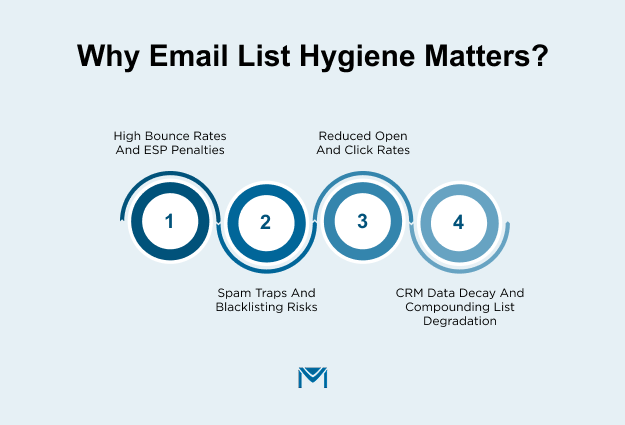
High Bounce Rates and ESP Penalties
High bounce rates are among the fastest ways to damage a sender's reputation.Google’s 2024 Email Sender Guidelines recommend keeping bounce rates below 2% and spam complaint rates below 0.1%.
That is why many teams now verify campaign lists before sending. It helps remove invalid emails before campaigns go live, ensuring daily sends are sent only to verified contacts.
Spam Traps and Blacklisting Risks
Spam traps are email addresses used by ISPs and anti-spam organizations to identify senders with poor list hygiene.
There are two common types:
- Pristine spam traps that were never used for real signups
- Recycled spam traps created from abandoned inboxes
Hitting spam traps can reduce inbox placement and damage sender reputation across future campaigns.
Reduced Open and Click Rates
Inactive contacts quietly reduce engagement rates across your entire database. In fact, email lists naturally shrink faster than most businesses realize.The Growth Navigate’s 2026 report states that in 2024, around 9% of subscribers unsubscribed, while another 7% became non-deliverable due to bouncing. That adds up to nearly 16% annual list decay before any new growth efforts even begin.
This creates a major deliverability problem. ISPs calculate engagement based on total emails sent, not just active subscribers. So when a large portion of your database never opens or clicks, your sender reputation gradually weakens.
Over time, it can push campaigns into the Promotions tab or the Spam folder, even for active subscribers.
CRM Data Decay and Compounding List Degradation
CRM decay happens when contact records become outdated, incomplete, or duplicated over time. In Salesforce, stale Leads and duplicate Contacts can quickly undermine segmentation, personalization, reporting accuracy, and campaign performance.
In fact, aSalesforce study found that nearly 20% of CRM records become unusable due to poor data quality, while more than 25% contain duplicate entries. In the long term, poor data quality turns into a deliverability and engagement problem.
Which Emails Should You Remove, Suppress, or Review
Not every problematic email address should be treated the same way. Some contacts should be removed immediately, while others may only need monitoring or re-engagement.
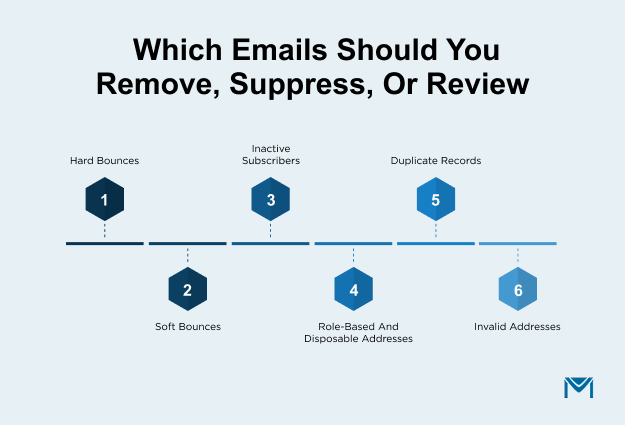
Hard Bounces: Remove Immediately
Hard bounces are email addresses that are permanently undeliverable. These usually happen when an address no longer exists, the domain is invalid, or the email was entered incorrectly.
Examples include:
- john@company.con instead of .com
- emails tied to closed companies
- deleted employee mailboxes
Continuing to send to hard-bounced addresses signals poor list hygiene to ISPs and can quickly damage the sender's reputation. These contacts should be automatically removed or permanently suppressed after the first confirmed hard bounce.
Soft Bounces: Monitor Before Suppressing
Soft bounces are temporary delivery failures. The email address may still be valid, but the message could not be delivered at that moment.
Common reasons include:
- The recipient's inbox is full
- Temporary server outages
- Oversized email attachments
- Sending limits exceeded
Instead of removing these contacts immediately, monitor bounce frequency over multiple campaigns. If soft bounces continue consistently over time, the address may need to be suppressed later.
Inactive Subscribers: Re-Engage Before You Remove
Not every inactive subscriber is a lost contact. Some users disengage temporarily because messaging becomes less relevant or email frequency feels too high.
Before suppressing inactive users, run a re-engagement campaign. This could include:
- A “Still want to hear from us?” email
- Updated content preferences
- Special offers or personalized recommendations
If engagement does not improve, suppression becomes the safer option for deliverability.
Role-Based and Disposable Addresses: Suppress at Entry
Role-based addresses are shared inboxes tied to functions rather than individuals. Examples include:
- info@company.com
- sales@company.com
- support@company.com
These addresses often result in lower engagement and higher spam complaints because multiple people use them.
Disposable email addresses create a different issue. These are temporary inboxes users create for short-term access, such as:
- tempmail.com
- 10minutemail.com
- guerrillamail.com
These contacts rarely provide long-term value and can later increase bounce or complaint rates. The safest approach is to detect and suppress both role-based and disposable email addresses during form submissions or CRM entries.
Duplicate Records: Merge, Don’t Delete
Duplicate records are common in CRMs like Salesforce, especially when contacts are entered through multiple forms, imports, or sales workflows.
For example, the same person may exist as:
- alex@company.com in Leads
- alexander@company.com in Contacts
- duplicated campaign member entries
Deleting duplicates carelessly can remove engagement history, lead ownership details, or valuable activity data. Instead, merge records carefully while preserving the strongest engagement and CRM history.
Invalid Addresses: Verify and Purge
Invalid email addresses are often caused by typos, fake submissions, formatting issues, or outdated imports. Unlike hard bounces, some invalid addresses may never even reach the sending stage if verification tools catch them early.
Examples include:
- gmial.com instead of gmail.com
- incomplete addresses like john@
- fake signups such as test@test.com
Using email verification tools during lead capture and before large campaigns helps identify these contacts before they hurt deliverability. Once confirmed invalid, these addresses should be purged from the database completely.
How to Clean Your Email List in Salesforce Step by Step
Effective email list cleaning in Salesforce is not just about deleting bad contacts. A strong email list hygiene process helps improve deliverability, reduce email bounce rate issues, protect sender reputation, and keep CRM reporting accurate over time.
Here is a practical framework:
Step 1: Audit List Health: Bounce Rate, Open Rate, Complaint Rate
Before cleaning anything, audit the current health of your database. This helps identify whether the biggest issue is invalid emails, disengaged subscribers, poor targeting, or broader CRM decay.
Focus on metrics like:
- Hard bounce rate
- Soft bounce rate
- Open rates
- Click-through rates
- Spam complaints
- Unsubscribe trends
If bounce rates are rising while engagement declines, your database likely needs cleanup. For deeper Salesforce-focused tracking and engagement visibility, consider relying on anemail analytics overview. It helps monitor deliverability trends and list health inside campaigns.
Step 2: Identify and Suppress Hard Bounces Immediately
Continuing to send emails to hard-bounced addresses weakens the sender's reputation and increases the risk of future inbox placement. One of the most important email scrubbing best practices is automatically suppressing hard bounces as soon as they occur.
You can also useSalesforce-native platforms like MassMailer to track bounce activity directly inside Salesforce Activity History for easier suppression management.
Step 3: Flag and Monitor Soft Bounces Across Campaigns
Soft bounces are temporary delivery failures and should be monitored before suppression decisions are made. These usually occur due to temporary server downtime, full inboxes, attachment size issues, or recipient mail server throttling.
For example, a prospect’s mailbox may reject emails temporarily during a company mail migration. Removing them immediately could mean losing an active sales opportunity.
Instead, flag soft-bounced contacts and monitor bounce behavior across multiple campaigns. If the same address repeatedly soft bounces over time, suppression may become necessary later.
In such scenarios, using email log errors can help diagnose recurring delivery failures. This also helps identify whether issues stem from mailbox problems, authentication gaps, or server-side throttling.
Step 4: Suppress Role-Based and Disposable Addresses
Role-based emails like “info@company.com” and disposable inboxes often reduce engagement quality and increase spam risks.
The best approach is to block or suppress these addresses during lead capture itself. Real-time email verification helps detect risky, disposable, or malformed addresses before they enter Salesforce and damage overall email list hygiene.
Step 5: Run Bulk Verification to Validate Mailbox Existence
Over time, even legitimate business emails become outdated as employees change jobs, companies shut down, or inboxes become inactive. This creates silent CRM decay that gradually hurts deliverability.
Running regular bulk email verification helps businesses:
- Remove invalid emails
- Validate mailbox existence
- Detect typo-based domains
- Identify dormant inboxes
- Reduce email bounce rate issues proactively.
For example, john@oldcompany.com may remain inside Salesforce for years after the company no longer exists. Verification tools help identify these hidden risks before campaigns are launched.
You can leverage email authentication to ensure that emails are properly authenticated before sending. In addition, improve sender reputation through proper email warm-up practices, especially when sending to newly cleaned or reactivated databases.
Step 6: Segment Inactive Subscribers and Run Re-Engagement
Inactive subscribers are not always lost contacts. Some users simply disengage temporarily because messaging becomes less relevant or email frequency feels too high.
- No opens in 90 days
- No clicks in 6 months
- No activity across multiple campaigns
Then run targeted re-engagement campaigns before suppression.
You can automate re-engagement workflows directly inside Salesforce withemail automation. Consider usingemail sequences to create structured nurture and reactivation campaigns.
These campaigns may include personalized offers or reduced-frequency options. This process helps recover engaged users while improving long-term email list hygiene.
Step 7: Archive or Suppress Unresponsive Contacts After Sunset
If subscribers remain completely inactive after multiple re-engagement attempts, it is safer to suppress or archive them. This process is often called a sunset policy. It’s a structured framework for gradually removing disengaged contacts from active sending lists.
For example, if a subscriber shows zero opens or clicks for 12 months despite repeated re-engagement campaigns, continuing to email them only weakens deliverability performance.
Archiving contacts instead of permanently deleting them helps preserve CRM history and campaign analytics. This becomes especially important when using email attribution reporting to measure long-term engagement and pipeline influence inside Salesforce.
What to Do If Your Email List Has Already Damaged Sender Reputation
If poor list quality has already hurt deliverability, stop sending to the full database immediately. Clean the list first, then rebuild trust gradually using engaged contacts. Issues like high bounce rates and spam complaints can quickly lead to email deliverability issues. Here are a few email scrubbing best practices:
Pause Large Sends and Clean the List First
Firstly, remove hard bounces, duplicate or invalid emails, role-based addresses, and contacts inactive for 6 to 12 months.
Repeatedly emailing inactive contacts can worsen inbox placement and increase spam complaints. You should implement proper email bounce handling workflows before restarting campaigns.
Restart With Your Most Engaged Contacts
After inactive subscribers cleanup, send first to your most active subscribers, like recent openers or clickers, new subscribers, and recent customers.
Positive engagement helps rebuildemail deliverability faster. Increase the sending volume gradually rather than emailing the entire database at once.
Track Bounce Rate, Complaint Rate, and Inbox Placement
Monitor these key deliverability metrics during recovery:
- Bounce rate: Ideally below 2%
- Complaint rate: Keep as low as possible
- Inbox placement: Check whether emails land in the inbox, not spam
To simplify the process, useemail deliverability monitoring to identify problems early and consistently measure recovery progress.
Email List Hygiene Best Practices for Salesforce Teams
Email list hygiene should be an ongoing process, not a one-time cleanup. Here are a few practices to include:
- Automatically suppressing hard bounces
- Removing inactive contacts regularly
- Validating email addresses at capture
- Syncing unsubscribe data across systems
- Using engagement-based segmentation
- Running regular duplicate checks
Pro tip: Review theemail bounce reasons regularly to identify recurring issues with list quality. Assign ownership of database quality and regularly monitor engagement trends. A smaller, engaged list usually performs better than a large inactive database.
Keep Your Salesforce Email Performance Healthy
Email list hygiene directly affects inbox placement, engagement, and sender reputation. Even strong campaigns can underperform when outdated or inactive contacts remain in your Salesforce database.
That is why email list cleaning should be an ongoing process, not a periodic one. As your database grows, consistent validation, suppression management, and engagement-based targeting become essential for maintaining deliverability.
For Salesforce teams, keeping email lists clean shouldn’t require manual exports or disconnected tools. MassMailer helps manage email verification, bounce handling, and suppression lists directly inside Salesforce.
Book a MassMailer demo to see how Salesforce-native email list hygiene works.
Frequently Asked Questions
1. How often should I clean my email list in Salesforce?
2. What is the difference between a hard bounce and a soft bounce?
3. What is a good bounce rate for email campaigns in Salesforce?
4. Can MassMailer verify emails directly inside Salesforce without exporting?
5. What happens to my sender reputation if my bounce rate exceeds 2%?
6. What is a spam trap, and how do I avoid hitting one?
Start Your Free Trial Today
Experience MassMailer the easiest way to send personalized emails from Salesforce.
Related Blogs

MassMailer Resources



About the Author

Siva Devaki 
Siva Devaki is the founder of MassMailer Inc., a tool that helps Salesforce users optimize email marketing. A passionate advocate for email marketing, Siva writes and hosts podcasts on the topic, sharing insights to help businesses drive revenue and enhance customer engagement through Salesforce email automation and tracking.