





Table of Contents
Introduction
Most teams expect stable inbox placement once authentication is in place. Then emails still reach spam, results change across sends, and no clear technical error explains the shift.
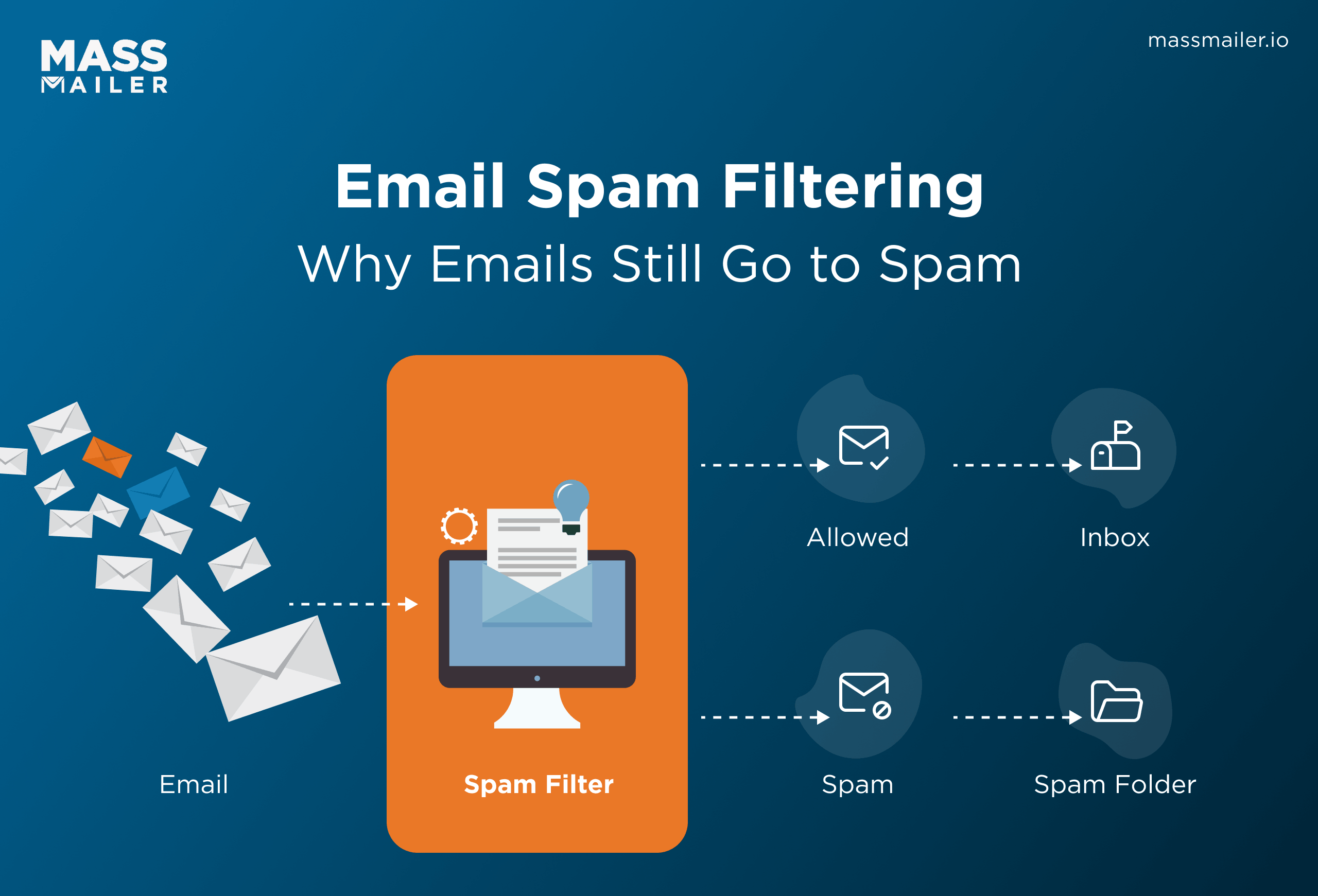
That gap causes most of the confusion around email spam filtering. Teams often treat it as a configuration problem they can finish once and then trust. But inbox placement does not follow that logic.
SPF, DKIM, and DMARC establish technical legitimacy. They do not lock in future inbox placement. Mailbox providers reassess trust on every send, so a valid setup can still produce inconsistent outcomes over time.
That changes how this problem should be read. If you assume one setup fix should solve it, you keep searching for a single fault. If you see filtering as repeated evaluation, the inconsistency stops looking random.
This guide is built around that reality. It starts with the checks people usually rush through, then moves into the deeper patterns that make inbox placement stay inconsistent even after setup looks complete.
How to Avoid Spam Filters When Sending Emails
To avoid spam filters when sending emails, protect your sending reputation, mail engaged recipients, keep volume steady, align your sending domain across tools, and send messages the audience expects.
The 5 factors that determine whether your email reaches the inbox
Five signals drive inbox placement:
- Sender reputation: Based on past complaints, bounces, and engagement trends
- Engagement signals: Opens, clicks, replies vs ignores and deletes
- Sending behavior: Volume consistency, cadence, and growth patterns
- Domain alignment: Consistent identity across all sending systems
- Content relevance: Whether the message matches the recipient's expectations
Filters do not evaluate these in isolation. They combine them into a pattern. That is why results vary between campaigns from the same sender.
What to fix first if your emails are going to spam
Start by removing negative signals:
- Stop sending to inactive or unengaged contacts
- Stabilize send frequency and cadence
- Check domain consistency across all tools
- Reduce sudden volume spikes
Do not try to optimize everything at once. First, stop reinforcing patterns that reduce trust.
What Are the Main Types of Spam Filtering?
The main types of spam filtering are content-based, reputation-based, authentication-based, engagement-based, and behavior-based filtering.
- Content-based filtering: checks subject lines, copy, links, images, and formatting for risky or misleading patterns.
- Reputation-based filtering: evaluates sender history using complaints, bounces, and past trust tied to the domain or IP.
- Authentication-based filtering: verifies sender identity through SPF, DKIM, and DMARC to confirm the email is legitimate.
- Engagement-based filtering: measures opens, clicks, replies, and complaints to assess whether recipients want the email.
- Behavior-based filtering: reviews sending patterns such as volume spikes, irregular cadence, and sudden list growth.
Why Are My Emails Going to Spam? (Fast Diagnosis)
If your emails are going to spam, classify the pattern before you try to fix it. In most cases, the visible pattern points to one of four issue categories: a recent sending change, a slow engagement decline, a provider-specific filtering issue, or a fragmented sending setup.
1. Identify if the problem is sudden or gradual
Start with timing. If inbox placement dropped suddenly, look first at recent changes in send volume, sending frequency, tool usage, or domain setup. If inbox placement weakened gradually, treat it first as an engagement or list-quality pattern.
The timeline gives you direction fast. A sudden drop usually points to a recent shift. A gradual decline usually points to a pattern that has been building across multiple sends.
2. Compare Gmail vs Outlook vs other providers
Next, compare providers. If Gmail drops while Outlook stays steady, or the reverse happens, classify it first as a provider-specific issue. If Gmail, Outlook, Yahoo, and other providers decline at the same time, classify it first as a sender-level issue.
This step narrows the scope quickly. One affected provider suggests a narrower problem. Broad decline across providers suggests a broader one.
3. Check engagement vs send volume imbalance
Then compare volume against response. If send volume rises while opens, clicks, and replies stay weak, classify it as a volume-to-engagement mismatch. If send volume stays stable but engagement keeps falling, classify it first as an audience or list issue.
This is where teams often misread the pattern. They blame copy or subject lines when the clearer signal is the gap between how much they send and how little recipients respond.
4. Detect multi-tool or domain inconsistency signals
Finally, look for inconsistency across tools and domains. If different platforms send under the same brand, domains vary between workflows, or similar campaigns get uneven placement, classify it first as a system-level issue.
This pattern often appears when one sending path performs normally, and another does not. When results are split by tool, domain, or workflow, the sending ecosystem itself belongs in the diagnosis.
At this stage, do not look for the full answer yet. Look for the right bucket. Sudden change points to recent execution shifts. Gradual decline points to engagement decay. One-provider impact points to provider-specific filtering. Split results across tools or domains point to a fragmented sending setup.
Why Legitimate Emails Get Filtered Despite Correct Setup
Legitimate emails can still get filtered because email spam filtering does not work like a one-time pass or fail. A message can be properly authenticated, successfully delivered, and still miss the inbox.
1. What email spam filtering actually means in real sending environments
In real sending environments, email spam filtering is a placement decision, not a permanent sender status. Mailbox providers do not treat every campaign from one sender the same way. They evaluate each message separately, and placement can vary by provider and by recipient.
That is why the same email can land in different places for different people. One recipient may see it in the inbox, another may see it in promotions, and another may never notice it because it lands in spam. When teams expect one campaign to produce one universal outcome, they misread how filtering behaves in practice.
This point matters because inconsistent placement does not automatically mean something is broken. It often means the message was not treated the same way across the full audience. That is a normal part of real-world filtering, not proof that the setup alone failed.
2. Why authentication alone does not guarantee inbox placement
Authentication confirms that the sender's identity is valid. It does not guarantee inbox placement.
This is where many assumptions go wrong. Teams pass SPF, DKIM, and DMARC, then expect email spam filters to treat future messages as trusted by default. But authentication only proves identity. It does not act as a reward that pushes a message into the inbox.
That is why authenticated emails can still be filtered. A correct setup is necessary, but it only establishes a baseline. It shows the message is legitimate at the identity level, not that it will receive visible placement.
3. The difference between spam blocking and inbox filtering
Spam blocking and inbox filtering are different outcomes. Blocking means the message does not reach the mailbox. Filtering means the message reaches the mailbox but lands somewhere the recipient is less likely to see.
This distinction matters because many teams look only at delivery status. If the platform reports the message as delivered, they assume deliverability is fine. But in many real email spam filtering problems, the issue is not delivery. The issue is placement.
That difference changes how the result should be interpreted. A delivered email can still fail if it lands outside the main inbox and goes unseen. In practice, visibility matters more than delivery alone.
What Signals Email Spam Filters Actually Evaluate
Email spam filters evaluate combined patterns, not isolated details. They look at sender reputation, recipient engagement, sending behavior, and message context together, then make a placement decision based on the overall trust picture.
1. The simplified filtering model (how decisions are actually made)
A simple way to understand email spam filtering is to think in weighted signals, not fixed rules. Filters do not rely on one factor and stop there. They read multiple inputs together and judge whether the message fits a trustworthy sending pattern.
Those inputs usually fall into four groups: reputation, engagement, behavior, and context. Reputation reflects recent sending history. Engagement reflects how recipients respond. Behavior reflects sending consistency. Context reflects whether the message fits the audience and timing. Filters combine those inputs rather than treating any one of them as the full answer.
That is why filtering works as a pattern-based system, not a rule-based checklist. A sender can look strong in one area and still face tighter placement on a specific campaign if the overall pattern looks weaker than usual. The decision comes from the mix, not from one isolated signal.
2. Why filtering decisions vary across mailbox providers and campaigns
Filtering decisions vary because mailbox providers do not apply a shared formula. Gmail, Outlook, Yahoo, and other providers can review the same sender and still reach different placement decisions because they do not weigh the same inputs in the same way.
Variation also happens across campaigns from the same sender. The sender may stay the same, but the campaign conditions do not stay identical. So the filtering outcome can change even when teams expect consistency.
This is why there is no universal sender score that guarantees inbox placement everywhere. Filters keep reassessing the current trust pattern, and each provider interprets that pattern through its own model.
3. Why most spam filtering guides fail to explain real delivery issues
Most spam filtering guides fail because they explain isolated checks instead of decision logic. They treat deliverability like a list of separate items to verify, which leaves readers with an incomplete view of how filtering actually works.
That framing creates confusion when legitimate emails still get filtered after the obvious checks look correct. The problem is not always one missing element. In many cases, the real issue is that guides explain pieces of the system without explaining how those pieces work together.
A more useful way to read email spam filtering is to treat it as pattern evaluation. Once that becomes clear, inconsistent outcomes stop looking random, and the rest of the diagnosis becomes easier to understand.
How to Diagnose and Stabilize Spam Filtering Issues Quickly
To diagnose and stabilize email spam filtering issues quickly, follow these three steps: classify the dominant issue, confirm it with controlled testing, and make short-term changes that reduce risk without creating new instability.
1. Identify root cause (reputation vs behavior vs system)
Start by choosing one primary cause category. Most spam placement issues present as a mix of symptoms, but one pattern usually drives the decline.
Treat it as a reputation issue when performance weakens over time across multiple sends without a clear operational cause. Consider it a behavior issue when decline follows inconsistent sending, sudden volume spikes, or abrupt cadence changes. Identify it as a system issue when similar campaigns perform differently across tools, domains, or sending paths.
This classification step matters because a mixed diagnosis leads to mixed recovery. If you treat a behavior problem like a reputation problem or a system problem like a behavior problem, you usually prolong the instability instead of narrowing it.
2. Validate the issue through controlled testing
Once you have a primary hypothesis, confirm it with isolation testing. Change one variable at a time, or the result will not tell you which factor actually mattered.
Send the same content to different audience segments to test whether the issue follows audience quality. Send to the same audience through different tools or sending paths to test whether the issue follows the sending environment. Compare performance across different mailbox providers to confirm whether the issue is broad or provider-specific.
Controlled testing removes guesswork because it separates the signal you want to test from everything around it. Without that separation, teams often mistake coincidence for proof and lock onto the wrong root cause.
3. Safe stabilization actions that do not worsen deliverability
After confirmation, stabilize first. Do not try to recover everything at once. When filtering is already tightening, aggressive changes often make the pattern less predictable and harder to improve.
First, reduce send volume to a level your recent performance can support. Then prioritize your most engaged recipients so the next sends go to the part of the audience most likely to respond. After that, normalize cadence so timing stays steady instead of swinging between long gaps and heavy bursts.
These actions work because they reduce avoidable risk while giving the sending pattern a more stable shape. Recovery in email spam filtering is usually gradual. Pushing harder during a weak period often extends the problem instead of correcting it.
Avoid sharp corrective moves that distort the pattern further. Sudden audience expansion, rushed sending-path changes, or heavy catch-up campaigns can make short-term stabilization harder, not easier. The goal at this stage is simple: confirm the dominant issue, remove avoidable volatility, and restore steadier sending conditions.
For teams running email from Salesforce, a Salesforce-native tool like MassMailer can help keep audience selection, sending cadence, and sender identity more controlled during recovery.
How to Avoid Spam Filters with Consistent Email Execution
To avoid spam filters over time, keep sending behavior predictable, keep sender identity consistent, send to engaged audiences, and match each campaign to the right segment. Inbox placement improves when your email program produces stable patterns across sends, not one-off wins.
1. Standardize sending behavior across campaigns and tools
Consistent sending behavior builds long-term trust. When frequency, volume, and targeting rules change from one campaign to the next, mailbox providers see a less reliable sender pattern.
That is why prevention starts with execution rules. Set a defined cadence, control how fast volume can increase, and apply the same audience standards across campaigns. If different teams or tools follow different sending habits, the brand stops looking consistent.
The goal is not to send less by default. The goal is to send in a way that looks controlled. Predictable behavior makes future placement easier to sustain because the sending pattern does not keep resetting mailbox expectations.
For teams running campaigns from Salesforce, a Salesforce-native tool like MassMailer can help enforce that consistency by keeping audience selection, sending cadence, and execution more centralized.
2. Align domains and authentication across all email sources
Long-term prevention also depends on identity consistency. Your visible from-domain, authenticated domain, and sending paths should stay aligned across every email source tied to your brand.
Problems build when marketing emails use one domain path, sales emails use another, and operational messages use a third. Even if each path works individually, the brand stops building one clear sender identity over time.
The practical standard is simple: reduce identity variation wherever possible. The more your email sources reinforce the same sender identity, the easier it becomes to build a consistent reputation pattern.
3. Prioritize engagement and audience quality over send volume
Higher volume does not always create higher reach. In email spam filtering, weak audience quality often turns broader sending into weaker visibility.
This is the tradeoff many teams resist. When engagement drops, they try to recover by sending to more people. But larger sends to inactive recipients usually increase ignored mail faster than they increase real reach. A smaller campaign sent to active contacts often reaches more real inboxes.
Long-term prevention depends on segment discipline. Suppress inactive users, keep audience criteria tight, and treat engagement history as a sending condition. That may reduce short-term list size, but it often protects a more usable reach.
4. Improve email relevance by fixing targeting, not just content
Many teams try to solve filtering issues through copy changes alone. But better copy cannot rescue poor targeting.
That is why targeting matters more than superficial personalization. A personalized email sent to the wrong recipients still produces weak interaction. A simpler email sent to the right group usually performs better because the relevance is real.
The operational shift is to build campaigns from segment intent first. Decide who should receive the message before refining the message itself. When audience fit improves, response quality usually improves too, and stronger response quality helps protect future inbox placement.
Conclusion
Email spam filtering is not just a setup issue. It reflects how consistently you send, how recipients respond, and how clearly your email program signals trust over time.
That is why legitimate emails can still go to spam even when SPF, DKIM, and DMARC are in place. Better inbox placement comes from stable sending behavior, cleaner audience targeting, aligned sender identity, and stronger engagement patterns.
For teams running email inside Salesforce, that consistency is easier to maintain when execution stays centralized. A Salesforce-native platform like MassMailer can help reduce fragmentation across campaigns, audiences, and sending workflows. If you want to improve inbox placement over time, the goal is not one quick fix. It is a more controlled and consistent email execution model.
Frequently Asked Questions
1. How do email spam filters decide whether to put a message in the inbox or filter it?
2. What are the most common email spam filtering triggers?
3. Does sending to inactive contacts increase spam filtering risk?
4. Can low engagement cause legitimate emails to go to spam?
5. Does email frequency affect spam filtering?
6. What is the best long-term way to avoid spam filters when sending emails?
Start Your Free Trial Today
Experience MassMailer the easiest way to send personalized emails from Salesforce.
Related Blogs

How to Fix Salesforce Emails Going to Spam (2026)
How to Improve Email Deliverability in Salesforce in 2026
How to Avoid Spam Filters in 2026
MassMailer Resources




MassMailer Glossary
About the Author

Siva Devaki 
Siva Devaki is the founder of MassMailer Inc., a tool that helps Salesforce users optimize email marketing. A passionate advocate for email marketing, Siva writes and hosts podcasts on the topic, sharing insights to help businesses drive revenue and enhance customer engagement through Salesforce email automation and tracking.