





Table of Contents
Introduction
“Campaigns don’t sync 1:1 between HubSpot and Salesforce. What works for most teams is: keep analytics in HubSpot, but track ‘initiative’ in Salesforce Campaigns,” says a Reddit user describing their HubSpot Salesforce integration setup.
That is not a fix; it is the operating model of the HubSpot Salesforce integration email.
HubSpot Salesforce email sync does not bring execution into Salesforce. Emails are created, sent, and tracked in HubSpot, while Salesforce relies on pushed updates and mapped fields to reflect engagement.
This creates risk at the moment of action. A rep cannot confirm if the latest email activity is fully visible. HubSpot Salesforce email campaigns live in one system, while follow-ups, reporting, and automation depend on another, leading to delayed actions, missed timing, and unreliable decisions.
The issue is the execution location. When email runs outside Salesforce, the CRM becomes a partial system, not a reliable place to act.
Can HubSpot Salesforce integration support email marketing execution inside Salesforce?
Can HubSpot Salesforce Integration Email Data Be Fully Used Inside Salesforce?
No. HubSpot Salesforce integration email data cannot be fully used inside Salesforce for follow-ups, reporting, or workflows because email execution happens in HubSpot, not in Salesforce.
HubSpot Salesforce email sync brings engagement data into Salesforce after emails are sent. Salesforce shows opens, clicks, and activities, but it does not control or capture the full execution context. What appears depends on sync timing and mapping, which means data can be delayed, partial, or out of date when decisions are made.
This breaks execution in day-to-day workflows:
- A sales rep cannot confirm the latest email engagement before a follow-up
- Marketing teams rely on HubSpot, not Salesforce, to evaluate campaign performance
- Workflow triggers in Salesforce fail or misfire due to delayed or incomplete data
Salesforce displays email activity, but it is not the system where that activity happens. You cannot rely on it alone to decide when to act, how to segment, or how a campaign is performing.
Connecting HubSpot email to Salesforce creates visibility, not control. As long as email runs outside Salesforce, the CRM holds a copy of engagement, not a system you can trust for real-time decisions.
How HubSpot Salesforce Integration Email Actually Works
HubSpot Salesforce integration email works as a two-system flow. HubSpot runs every email. Salesforce only receives selected activity after HubSpot has already executed and processed it.
This is not a setup issue; it is how the integration is built. Email campaigns, sequences, and one-to-one emails are created, sent, and tracked in HubSpot. Salesforce does not execute email. It stores a synced version of what already happened.
Where emails are created, sent, and tracked
All email operations are handled in HubSpot. Teams build templates, launch campaigns, and run automations there. Engagement opens, clicks, and replies are captured in HubSpot first and become the source record.
Salesforce does not see this activity as it happens. It reflects it after processing. Teams must check HubSpot to confirm real engagement before acting, because Salesforce does not hold the source data.
How engagement data syncs into Salesforce
The flow is fixed: email action in HubSpot → processing in HubSpot → sync to Salesforce → storage on records.
What appears in Salesforce depends on:
- Field mapping (what data is allowed to sync)
- Object mapping (where the data is stored)
- Sync timing (when the data becomes visible)
Salesforce does not generate or validate this data. It accepts what HubSpot sends after execution. Any follow-up, task, or workflow in Salesforce depends on this synced state, not the original event.
What data is delayed, partial, or excluded
Salesforce does not store the full execution layer of HubSpot email. It holds a filtered version.
In practice:
- Engagement can appear after a delay, not at the moment it happens
- Only mapped fields are available; unmapped data remains in HubSpot
- Campaign-level insights and deeper engagement stay in HubSpot
- Salesforce activity can differ from HubSpot reporting at the same time
This is not a sync gap; it is a structural limitation. HubSpot controls execution. Salesforce stores a reduced copy. Every decision made in Salesforce depends on data that was created, processed, and filtered in another system.
If follow-ups, reporting, and workflows need to run on live CRM data, execution has to move inside Salesforce. That is why teams start evaluating Salesforce-native options like MassMailer; not as an add-on, but as a shift from synced visibility to in-CRM execution.
Running Email Directly Inside Salesforce Without HubSpot Dependencies (Using MassMailer)
Running email directly inside Salesforce with MassMailer removes the need for HubSpot Salesforce integration email and eliminates reliance on synced data. Email execution, engagement tracking, and CRM actions happen in one system, so Salesforce becomes the system where teams act, not a place to verify data after the fact.
With MassMailer, emails are created, sent, and managed directly on Salesforce records. Engagement is generated and stored in the same environment. Follow-ups, reporting, and workflows use that same data without delay or cross-checking another tool.
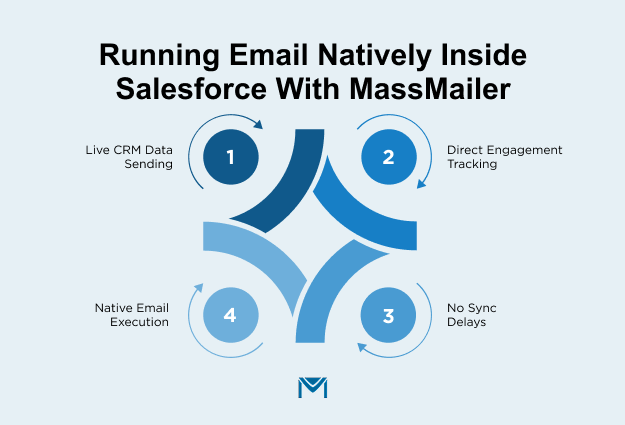
1. Using live CRM data at the moment of sending with MassMailer
MassMailer uses Salesforce data at the exact moment emails are sent. Field values are pulled in real time, so any update made before sending is reflected immediately.
This makes merge fields in Salesforce email templates reliable during execution. Segmentation for email marketing runs on current CRM conditions, not previously synced data. Scheduled and triggered emails use the latest record state.
This removes pre-send validation. Teams send with confidence that personalization matches the actual CRM data at that moment.
2. Tracking engagement directly on Salesforce records with MassMailer
MassMailer records engagement directly on CRM records as activity happens. Opens, clicks, and responses are visible without delay.
This enables accurate email tracking and consistent activity tracking across teams. A sales rep sees the latest engagement before reaching out. A marketing team reviews campaign performance directly within the CRM.
There is no need to verify engagement in another system. Salesforce becomes the single source for interaction history.
3. Eliminating sync dependencies and delays with MassMailer
MassMailer removes dependence on HubSpot Salesforce email sync, field mapping, and timing gaps. Email activity is available in Salesforce as soon as it occurs.
Teams trigger follow-ups instantly using workflow email alerts. Automation runs on live engagement data, not delayed updates. CRM admins no longer maintain sync rules or troubleshoot missing activity.
This improves execution speed. Actions happen when engagement happens, not after another system processes and sends data.
4. How MassMailer enables native email execution inside Salesforce
MassMailer enables teams to run mass email campaigns directly from reports, list views, or record-level actions. Email execution stays within Salesforce, so segmentation, sending, and tracking all operate on the same data.
It improves email deliverability in Salesforce by keeping sending and data aligned within the CRM instead of moving records between platforms. Reporting and workflows use the same engagement data created during execution.
This is where the workflow changes. Email, engagement, and follow-ups happen in one system. There is no dependency on sync, no delay in visibility, and no need to switch tools. Salesforce becomes the system teams act from, not just where they look.
Where HubSpot Salesforce Integration Email Workflows Break in Real Execution
HubSpot Salesforce integration email workflows break during real execution because Salesforce relies on delayed and partial data synced from HubSpot, not live interaction data. This means users cannot reliably act inside Salesforce at the moment decisions need to be made.
A sales rep opens a contact expecting to confirm recent interaction before reaching out. What appears is either delayed or incomplete. Salesforce becomes a place to review history, not a system to act from. The breakdown happens exactly at the point of decision.
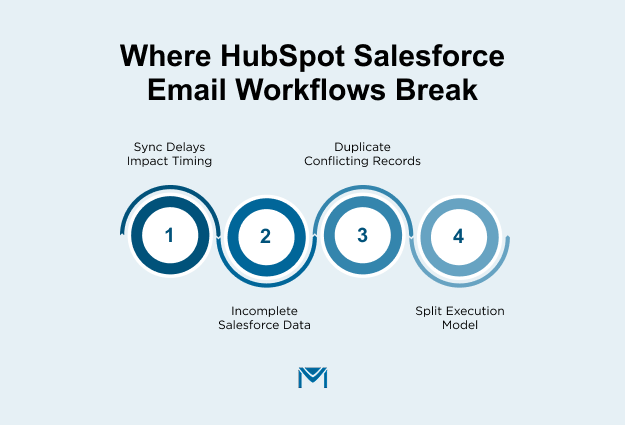
1. Sync delays that slow down follow-up timing
User actions, such as opens or link clicks, are processed in HubSpot first and reflected in Salesforce later.
This gap shifts timing. A rep waits to confirm interest before reaching out, but by the time the signal appears, the opportunity has passed. Outreach happens hours after intent is shown.
Response timing becomes inconsistent because visibility depends on sync intervals, not actual user behavior. This reduces responsiveness and weakens conversion outcomes.
2. Missing or incomplete data inside Salesforce (activity and fields)
Salesforce does not contain the full interaction history generated in HubSpot. It stores only a subset of signals based on what is transferred.
A user reviewing a record sees fewer signals than what actually occurred. Repeated interactions or deeper actions may not be visible. Field values can also differ across systems.
This creates blind spots. Users cannot assess intent confidently within Salesforce and must switch systems to confirm what actually happened.
3. Duplicate and conflicting records across systems
Contacts and leads can exist in multiple versions across HubSpot and Salesforce, each holding different attributes and interaction histories.
One version may reflect recent behavior while another does not. Campaigns can reach the same person more than once due to duplication. Updates can overwrite values differently across systems.
There is no single, reliable record to act on. Teams verify data across both systems before making decisions, which slows execution and introduces risk.
4. Why do these issues occur in integration-based setups
These issues persist because execution and CRM data are split between systems. HubSpot generates interaction data. Salesforce receives a processed subset after transfer.
Each system maintains its own state. What appears in Salesforce depends on sync timing and mapping rules, not on when the user action actually occurred. Salesforce does not control or validate the source data.
This separation creates gaps at the point of action. Adjusting sync settings may reduce friction, but it does not remove the dependency between systems.
How these issues show up in campaigns, reporting, and workflows
These limitations surface directly in execution. Campaign reports in Salesforce do not match HubSpot because they rely on partial or delayed inputs.
Automation rules do not trigger when expected because conditions depend on data that arrives late or is incomplete. Targeting includes contacts who have already interacted because the system has not updated in time.
Teams end up validating results in HubSpot before acting in Salesforce. Decision-making slows down, automation becomes unreliable, and execution shifts outside the CRM.
This is the inflection point. When action depends on transferred data, Salesforce cannot function as the system of execution. That is when teams move to Salesforce-native approaches like MassMailer, so actions run on live CRM data, not on delayed copies.
Should You Continue Using HubSpot Salesforce Integration Email?
You should continue using the HubSpot Salesforce integration email only if email execution stays in HubSpot and Salesforce is used only for reference, not for real-time decisions, follow-ups, or reporting.
Continue using this setup if:
- Your team runs campaigns and reviews performance inside HubSpot
- Sales reps check HubSpot before taking action
- Salesforce is used only to store records, not to guide next steps
Reconsider this setup if:
- Your team opens Salesforce first to decide when to follow up
- Automation or reporting depends on synced email data
- You need accurate, up-to-date interaction data inside Salesforce
- Your team switches between HubSpot and Salesforce to confirm what happened
If execution and decision-making happen in different systems, delays and gaps are unavoidable. As email volume increases, this split slows response time and reduces accuracy.
If HubSpot remains your system of execution, this setup works. If Salesforce is where decisions happen, this model will continue to limit speed, accuracy, and control. That is when teams start moving toward Salesforce-native email execution with tools like MassMailer, so actions run on live CRM data, not on delayed copies.
Conclusion
HubSpot Salesforce integration email works only when your team runs campaigns and evaluates results in HubSpot, not when Salesforce is expected to guide next steps.
If your team checks Salesforce before acting, this setup will continue to create delays, gaps, and extra validation work. The issue is not configuration; it is where email is executed and where decisions are made.
The decision is direct. Stay with HubSpot if your team operates there. Move to a Salesforce-native model if your team depends on CRM data for follow-ups, automation, and reporting.
MassMailer enables this shift by letting teams create, send, and track emails directly inside Salesforce using live CRM data. Follow-ups, workflows, and reporting run on the same data without sync delays.
If Salesforce drives your next step, run email there. Book a MassMailer demo to see how teams execute, track, and act, without leaving Salesforce.
Frequently Asked Questions
1. Can HubSpot Salesforce integration handle high-volume email campaigns reliably?
2. Does HubSpot Salesforce email sync support real-time workflow triggers in Salesforce?
3. Can you run Salesforce email automation without relying on HubSpot?
4. How does HubSpot Salesforce integration impact email reporting accuracy?
5. Is it possible to improve email deliverability in Salesforce without external tools?
6. What is the biggest limitation of connecting HubSpot email to Salesforce?
Related Blogs
MassMailer Resources


MassMailer Glossary
About the Author

Siva Devaki 
Siva Devaki is the founder of MassMailer Inc., a tool that helps Salesforce users optimize email marketing. A passionate advocate for email marketing, Siva writes and hosts podcasts on the topic, sharing insights to help businesses drive revenue and enhance customer engagement through Salesforce email automation and tracking.