





Table of Contents
Salesforce's 2025 native records migration was supposed to fix Einstein Activity Capture's reporting gap. It didn't. Historical email data older than 180 daysremains trapped in EAC's legacy layer, invisible to reports, flows, and APIs. If you're already looking for an Einstein Activity Capture alternative, that gap is probably why.
Here's what makes it frustrating: the activity timeline looks fine. But the moment you need that email data in a Salesforce dashboard, a Flow trigger, or a compliance audit past six months, you hit a structural wall that no tier upgrade resolves.
This post covers EAC's actual storage model, the limitations that matter beyond the obvious ones, and a stay-or-switch filter so you don't replace something that's genuinely working. It also compares the tools that fill each specific gap. By the end, you'll know which category of alternative fits your workflow.
What Is Einstein Activity Capture and How Does It Work?
Einstein Activity Capture is a Sales Cloud feature that automatically syncs email, calendar, and contact data from Gmail or Outlook into Salesforce. It is included with Sales Cloud Enterprise, Performance, Unlimited, and Einstein 1 editions at no extra cost.
How EAC syncs email and calendar, and where it stores the data
EAC connects to a user's Gmail or Outlook account via OAuth, then captures emails and calendar events server-side. Salesforce matches each email by address. If a matching Contact or Lead exists, the email appears on that record's activity timeline automatically.
The catch is where that data lives. Historically, EAC stores captured emails in a separate layer on AWS, outside the standard Salesforce database. The data does not exist as a queryable Task or EmailMessage record. It only shows up on the timeline, invisible to reports, flows, Apex triggers, and APIs.
Salesforce'sSummer '25 release introduced "Sync Email as Salesforce Activity," which writes newly captured emails as native EmailMessage records. But the migration is irreversible, and historical data older than 180 days stays in the legacy layer. Storage location is what limits EAC for everything beyond basic timeline visibility.
What's included in the free vs. paid EAC tiers
EAC Standard is free on qualifying Sales Cloud editions. It syncs email and calendar to timelines, retains data for up to 6 months, and is capped at 100 users. The Sales Cloud Einstein add-on (~$50/user/month) extends retention up to 24 months and removes the user cap.
However, the paid tier does not fix the structural gap. Extended retention does not retroactively make historical data queryable in reports or flows. Emails captured before enabling native sync remain in the legacy layer regardless of tier. If EAC is disabled for a user or org settings change, previously captured activity may disappear entirely.
The free tier covers timeline visibility. Beyond that, the limitations are architectural, not a pricing problem.
Key Limitations of Einstein Activity Capture
The four key limitations of Einstein Activity Capture are: data retention caps that delete email history after 6 to 24 months, non-native storage that hides activity from reports and automation, no support for custom objects or granular filtering, and limited admin controls that create compliance gaps.
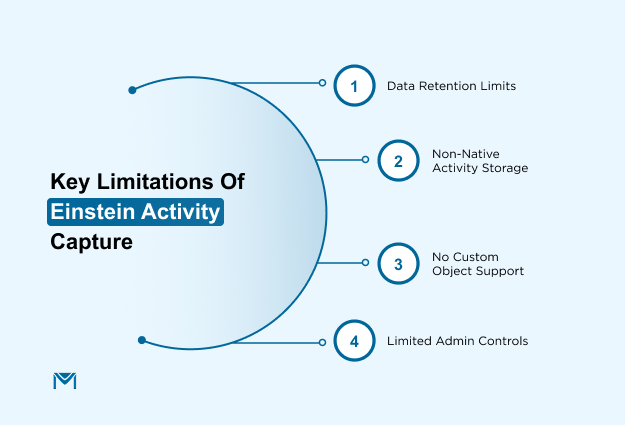
Data retention limits and what happens when they expire
EAC Standard retains captured activity for up to 6 months. Higher-tier licenses extend that to 24 months. After the window closes, the data ispermanently deleted, no automatic archive, no export path.
Consider a rep who closed a deal 18 months ago and then left the company. If the EAC Standard were the only capture method, that entire email history would be gone before the new rep even opens the account. For teams with long sales cycles orretention compliance requirements, even the 24-month ceiling is an active risk.
Non-native storage and what it means for reporting
Until your org enables Salesforce's Summer '25 "Sync Email as Salesforce Activity" feature, captured emails do not exist in reports, dashboards, list views, or Flow automation. They appear on the timeline but are not queryable EmailMessage or Task records.
A rep who logs an email manually via "Log a Call" creates a reportable Task. A captured EAC email does not. That distinction breaks every dashboard, forecast model, and automation that depends on email activity data.
And even after enabling native sync, pre-migration data is not retroactively converted, so the gap stays open for anything captured before the switch.
No support for custom objects or advanced filtering
EAC only syncs to standard objects like Contacts, Leads, Accounts, and Opportunities. Custom objects get nothing. Filtering is equally rigid: all emails to matched addresses get captured, with no rules for subject lines, keywords, or folders.
That means sensitive emails like HR, legal, and finance can land in Salesforce automatically if a matching Contact exists.
Limited admin control and data privacy risks
Admins cannot see which emails EAC captured for a specific user. There is no audit trail and no granular sync log. That makes GDPR and CCPA compliance difficult because you cannot query a Salesforce object to find every email tied to a contact if the data sits outside the database.
On top of that, EAC can create duplicate activity records when used alongside tools like Outreach or Salesloft, because those platforms log emails through their own sync methods.
When You Should Keep EAC vs. When You Need an Alternative
Keep EAC if your team only needs timeline visibility. Look for an alternative if you need reporting, retention beyond 24 months, or native Salesforce records. Choose a Salesforce-native email tool if the real problem is email execution, not activity capture.
Keep EAC if basic timeline visibility is enough
EAC works fine when your team's only requirement is seeing email history on a contact or lead record. If nobody is building reports or flows off that activity data, there is nothing to replace.
This fits a specific team profile: small sales teams on Sales Cloud Enterprise, using Salesforce primarily as a contact and deal tracker, with no RevOps reporting requirements against email activity. EAC Standard costs nothing extra on these editions. For timeline-only use cases, paying for a third-party tool is hard to justify.
One thing worth checking first. If your org has enabled the Summer '25 "Sync Email as Salesforce Activity" feature and the migration is complete, newly captured emails now sync as native EmailMessage records. That addresses the reporting limitation for emails going forward. Some teams discover they no longer need an alternative after enabling this.
The decision to switch is not about EAC being bad. It is about whether your use case has outgrown what EAC was designed to do.
Look for an alternative if reporting, retention, or native records matter
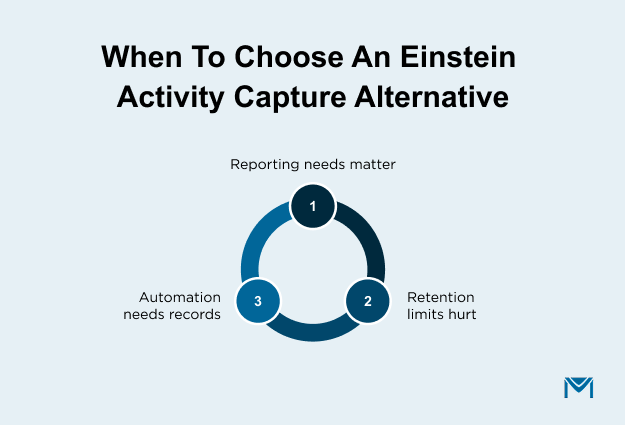
Three conditions signal it is time to move on: your team reports on email or meeting activity in Salesforce, you need activity data older than 24 months, or your automation depends on email data as a trigger.
The reporting limitation is the most common EAC limitation that pushes teams toward an alternative. If your sales manager needs a dashboard showing which reps sent the most email outreach last quarter, and that data comes from EAC, the dashboard simply does not work.
EAC data is not in the Salesforce report builder unless the Summer '25 migration is complete.
Retention is the second trigger. If your average sales cycle runs longer than six months, or you operate under compliance requirements around email records, EAC's retention limits are an active risk, not a theoretical one. And if you need historical continuity, a third-party tool with backfill capability is the only clean path forward because older data is not retroactively converted.
Use a Salesforce-native email tool if email execution is the bigger problem
EAC captures email activity passively. If your team needs to send tracked emails from Salesforce, build sequences, or manage deliverability, that is a different category of tool entirely.
This looks like teams that send marketing or sales emails directly from Salesforce records, track opens and clicks against those records, and have that activity logged natively without a separate sync step.
Tools like Cirrus Insight and Riva sync email captured outside Salesforce back into it. A Salesforce-native email tool likeMassMailer originates and logs emails inside Salesforce.
EAC has no email sending capability at all. If a rep wants to send a tracked email from a Salesforce record and have the response logged automatically, EAC does not handle any part of that workflow. Knowing which problem you are solving changes which tool you should be looking at.
Best Einstein Activity Capture Alternatives Compared
The five most common Einstein Activity Capture alternatives are Match My Email, Cirrus Insight, Riva, Revenue Grid, and Weflow. Each one fixes a different EAC limitation, so the right choice depends on which gap you are trying to close.
Which alternative fixes which EAC limitation?
Not every alternative solves the same problem. The table below maps each tool to the specific EAC limitation it addresses.
| Tool | Data Storage | Retention | Native Salesforce Records | Pricing Direction | Best For |
|---|---|---|---|---|---|
| Match My Email | Salesforce-native | Permanent | Yes | Quote-based | Email logging and reporting without retention limits |
| Cirrus Insight | Salesforce-native | Permanent | Yes (Task and Event) | From $14/user/mo | Inbox productivity with native activity logging |
| Riva | Salesforce-native | Permanent | Yes (including custom objects) | From $25/user/mo | Enterprise compliance and custom object mapping |
| Revenue Grid | Salesforce-native | Permanent | Yes | ~$30/user/mo | Pipeline visibility and deal-level activity reporting |
| Weflow | Salesforce-native | Permanent | Yes (Task, EmailMessage, Event) | From $19/user/mo | Reporting and historical backfill from EAC |
By the end of this table scan, you should be able to narrow your shortlist to one or two tools. The H3s below go deeper on each.
If your gap is not inbox sync but email execution from Salesforce, sending tracked emails, managing deliverability, and logging activity natively, that is a different category.
1. Match My Email
Match My Email stores every captured email permanently as a native Salesforce record.
- Works with Gmail, Outlook, Office 365, Yahoo, and any IMAP server, giving it broader email system compatibility than most alternatives
- Fixes two EAC limitations directly: retention and native storage. All emails live permanently in the same data layer as the rest of your CRM
- Not a fullemail sending or sequence automation tool. Best for logging and reporting, not execution
Strong choice if your primary complaint about EAC is data retention limits and the inability to report on captured emails.
2. Cirrus Insight
Cirrus Insight syncs email and calendar from Gmail or Outlook to Salesforce via a browser sidebar, storing activity as native Task and Event records.
- Includes scheduling automation, meeting AI, and engagement tracking on top of basic sync
- Fixes the native records and reporting limitation. Captured activity is immediately queryable and available for Flow automation
- The sidebar model requires rep engagement. It is not fully passive like EAC. Reps who skip the sidebar will have logging gaps
Good fit for teams who want richer inbox productivity features alongside reliable activity logging. Less suited for orgs that need fully automated capture with no rep action.
3. Riva
Riva is an enterprise-grade sync platform built for orgs that need granular control over what gets captured, how it maps to Salesforce, and who can see it.
- Supports custom object mapping, configurable capture rules, and detailed privacy controls
- Fixes the admin control, custom object, and compliance limitations that EAC cannot address
- Pricing starts at $25/user/month, with enterprise deployments scaling significantly higher. Not a practical fit for small or mid-market teams
Best for financial services, healthcare, legal, or any org where data handling requirements make EAC's capture approach a compliance risk.
4. Revenue Grid
Revenue Grid is a revenue intelligence platform that includes activity capture, not the other way around. Captured emails and meetings link to opportunities, not just contacts.
- Gives managers visibility into deal engagement and forecasting inputs. Pricing around $30/user/month
- Fixes the reporting limitation with a specific focus on deal and pipeline analytics rather than general CRM activity logging
- Overkill for teams that only need basic email logging. If you do not need pipeline visibility, simpler tools are more cost-effective
Best for RevOps and sales leadership teams that want activity data connected to forecast accuracy and deal health.
5. Weflow
Weflow writes emails as Task or EmailMessage records and meetings as Event records, putting captured activity inside the standard Salesforce data model from day one.
- Offers a24-month historical backfill add-on. Teams switching from EAC can recover up to two years of captured activity as native records
- Fixes the reporting and historical data continuity problem that makes most EAC migrations messy
- The broader product includes pipeline management and conversation intelligence, so activity capture is part of a larger platform investment. Pricing starts at $19/user/month
Best for teams where the 24-month backfill matters for migration continuity, and who also want pipeline visibility in one tool.
When MassMailer Is the Right Einstein Activity Capture Alternative for Email Logging
MassMailer replaces EAC's email execution layer, not its sync layer. If your problem is sending campaigns from Salesforce and keeping native records of every send, MassMailer covers that. If you need Gmail or Outlook threads synced automatically, you still need a dedicated sync tool from the list above.
The core difference is storage. MassMailer writes every open, click, and bounce directly to the Lead or Contact record as a native Activity. No AWS middle layer, no retention countdown. That means you can build Salesforce reports on campaign performance, trigger Flows based on click behavior, and pull email metrics into dashboards without a connector.
It also bypasses Salesforce's daily sending limit with dedicated infrastructure, supports merge-field personalization on custom objects, and retains email records with no expiration. EAC blocks all three.
If your team sends campaigns from Salesforce and needs every email record to stay native, reportable, and permanent,start a free MassMailer trial orbook a walkthrough with the team.
How to Choose the Right EAC Alternative for Your Salesforce Workflow
Start with one question: where does your email originate, and what do you need Salesforce to do with it? The answer points you to a specific tool category.
If you need native Salesforce reporting
Shortlist tools that write to EmailMessage or Task records. Before switching, check whether your org has enabled the Summer '25 "Sync Email as Salesforce Activity" feature. If the migration is complete, EAC may already handle new emails natively. If not, Match My Email and Riva both write native records by default.
If you need Gmail or Outlook activity sync
Shortlist server-side sync tools. Ask each vendor whether captured emails land as native Salesforce records or a separate data layer. Cirrus Insight and Revenue Grid handle this with sidebar and server-side options. If the answer is a separate layer, you have moved the reporting gap, not fixed it.
If you need enterprise-grade sync controls
Shortlist tools that let admins configure which emails sync, which objects they map to, and which users are included. Riva is built for this. If your org operates under GDPR or CCPA, confirm the vendor's audit trail and erasure handling before evaluating features.
If you need Salesforce-native email sending and logging
This is a different category entirely. You need an email execution tool that writes tracking data as native records on send. MassMailer handles this inside Salesforce with no separate sync step.
Conclusion
EAC works for timeline visibility. Once you need email data in Salesforce reports, retained beyond six months, or sent from inside the CRM with full tracking, it stops being the right tool.
The decision path is short. If basic inbox sync covers your workflow, keep EAC. If reporting on email activity matters, switch to a sync tool that writes native Salesforce records. If the gap is sending tracked emails from Salesforce itself, that is a different category, and MassMailer is built for it.
If Salesforce-native email logging and reporting are what you need,try MassMailer. Your email activity will be in Salesforce reports on day one.
Frequently Asked Questions
2. What happens to EAC data when a user leaves the organization?
3. Does Einstein Activity Capture count against Salesforce API limits?
4. Can Einstein Activity Capture sync email attachments?
5. Is Einstein Activity Capture compliant with HIPAA?
6. Can you use Einstein Activity Capture with shared or group mailboxes?
Start Your Free Trial Today
Experience MassMailer the easiest way to send personalized emails from Salesforce.
Related Blogs
MassMailer Resources


About the Author

Siva Devaki 
Siva Devaki is the founder of MassMailer Inc., a tool that helps Salesforce users optimize email marketing. A passionate advocate for email marketing, Siva writes and hosts podcasts on the topic, sharing insights to help businesses drive revenue and enhance customer engagement through Salesforce email automation and tracking.