

Table of Contents
Quick Answer
The best B2B email marketing software depends on your CRM. MassMailer sends and tracks email natively inside Salesforce starting at $219/month, with real-time engagement data on the contact record. HubSpot Marketing Hub offers the same native advantage for HubSpot CRM users. ActiveCampaign has the deepest automation builder but syncs to Salesforce on a 15- to 60-minute delay. Brevo costs the least for large contact databases.
Introduction
You lost a deal last quarter because your sales rep called a warm lead cold. The lead had opened three emails and clicked through to pricing. Your b2b email marketing software caught every click and open. Salesforce never saw any of it. The feature page says “CRM integration,” but the sync breaks, runs late, or skips engagement data entirely.
Your marketing team sees a strong campaign while your sales rep stares at an empty contact timeline. This guide covers 8 b2b email marketing platforms compared by CRM connection type, pricing at real B2B contact tiers, and whether engagement data actually reaches your Salesforce records.
8 B2B email marketing platforms compared
The right b2b email marketing software depends on your CRM. If your team runs Salesforce, MassMailer sends and tracks email natively inside the platform. If you use HubSpot CRM, HubSpot Marketing Hub keeps engagement data on contact records without sync.
For everyone else, ActiveCampaign offers the deepest automation. Brevo costs the least for large databases. Mailchimp has the easiest builder.
| Platform | CRM Connection | Engagement Data to Sales | Pricing Model | Starts From | Free Plan |
|---|---|---|---|---|---|
| MassMailer | Native (Salesforce) | Real-time on contact record | Per email volume | $219/mo (Basic) | 15-day trial |
| ActiveCampaign | Integrated (API sync) | Syncs on schedule | Per contact | $15/mo (Starter, 1K contacts, annual) | 14-day trial |
| HubSpot Marketing Hub | Native (HubSpot CRM) | Real-time on contact record | Per seat + contacts | $15/user/mo (Starter, 1K contacts) | Yes (2K emails/mo) |
| Brevo | Integrated (API/Zapier) | Syncs on schedule | Per email volume | $9/mo (Starter, 5K emails) | Yes (300/day) |
| Mailchimp | Integrated (marketplace) | Syncs on schedule | Per contact | $13/mo (Essentials, 500 contacts) | Yes (under 250 contacts) |
| GetResponse | Integrated (API/Zapier) | Syncs on schedule | Per contact | $19/mo (Starter, 1K contacts) | 14-day trial |
| Constant Contact | Standalone + Zapier | Manual export | Per contact | $10/mo (Lite) | No (30-day money-back) |
| Moosend | Integrated (Zapier only) | Syncs via Zapier | Per subscriber | $9/mo (Pro, 500 subs) | 30-day trial |
1. MassMailer — best for Salesforce-native email at scale
MassMailer runs inside Salesforce as a managed package. Your sales rep sees opens and clicks on the contact timeline within seconds of the interaction.
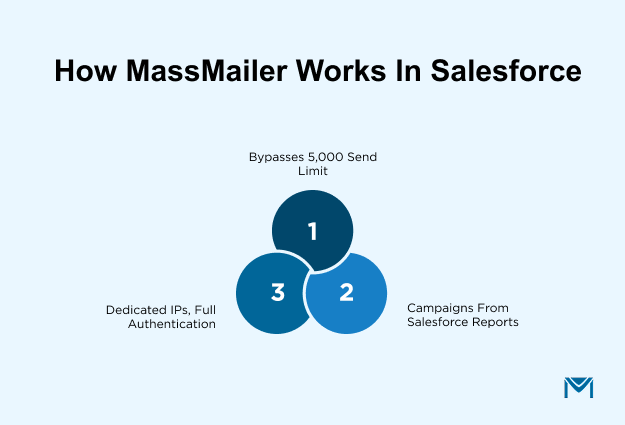
- The platform bypasses Salesforce’s 5,000 daily email limit through its own sending infrastructure. A 10,000-contact campaign goes out in one batch without workarounds.
- Campaigns build directly from Salesforce reports. Filter by lead score, last activity, or any custom field, and the send list stays current without manual exports.
- Pro and Premier tiers add dedicated IPs and full email authentication (SPF, DKIM, DMARC) for corporate mail servers that filter aggressively.
The email builder is simpler than standalone ESPs, but you trade design flexibility for zero data lag between marketing and sales.
2. ActiveCampaign — best for automation-heavy B2B workflows
Most teams pick ActiveCampaign for one reason: conditional branching. Branch a nurture sequence by whether a contact opened email three, clicked pricing, or hit a landing page.
- Starter limits automation to 5 actions per workflow. Full branching and split-testing entire paths require Plus, so budget for that tier from the start.
- The Salesforce connector syncs data on a schedule. A contact clicks your pricing link at 9am. Your rep might not see it until lunch.
- Site tracking tags pages a contact visits before they enter a workflow. You can trigger a sequence based on someone viewing your case studies page three times in a week.
The automation depth is unmatched on this list. The learning curve is real.
3. HubSpot Marketing Hub — best for teams already on HubSpot CRM
HubSpot’s email tool shines when your team already uses HubSpot CRM. Lifecycle stages, deal data, and contact properties personalize emails without any field mapping.
- The Salesforce connector exists, but the sync adds delay and limits which properties transfer cleanly. If your CRM is Salesforce, HubSpot loses its native advantage.
- Starter caps email automation at 10 actions per workflow. Professional unlocks full automation, but it requires a 12-month contract. The gap between those two tiers is the widest in this comparison.
- Smart content blocks swap sections of an email based on a contact’s lifecycle stage. A lead sees a case study. An opportunity sees a pricing comparison. Same email, different content.
If you only need email marketing, the full suite adds cost that is hard to justify.
4. Brevo — best budget option with multi-channel reach
Brevo bills by emails sent. Most competitors bill by contacts stored. A team with 20,000 contacts sending twice a month needs 40,000 emails. Per-contact platforms charge for all 20,000 records even if you never email them.
- Starter has zero automation, so most B2B teams need Standard from day one. Standard adds workflows, A/B testing, and send-time optimization.
- Sequences combine email, SMS, and WhatsApp in one flow. Send email first, then follow up via SMS if the email goes unopened after 48 hours.
- The built-in CRM covers pipeline basics for teams that don’t have Salesforce or HubSpot yet. It handles deals and tasks for a team of five.
Volume pricing keeps costs predictable for large databases with uneven send frequency.
5. Mailchimp — best for small B2B teams getting started
Mailchimp’s drag-and-drop editor is the fastest to learn on this list. A non-designer can build a clean newsletter in under 20 minutes without touching code.
- Mailchimp bills for unsubscribed and inactive contacts. A 10,000-contact list with 2,000 dead records charges you for all 10,000.Clean your list quarterly or the pricing compounds.
- Generative AI drafts subject lines and email body copy on Standard at no extra charge. The AI analytics summary translates campaign performance into plain-English recommendations.
- The Content Optimizer scores a draft email before you send it. It flags readability, link density, and subject line length against industry benchmarks.
Automation depth is limited compared to ActiveCampaign or Moosend. For simple welcome sequences and re-engagement flows, it handles the job.
6. GetResponse — best for content-led lead nurturing
GetResponse is the only platform on this list with built-in webinar hosting. If your B2B lead gen depends on webinars and gated content, the entire funnel lives in one tool.
- Host live webinars for up to 1,000 attendees with screen sharing, interactive polls, and automatic recording. No separate Zoom or GoToWebinar subscription needed.
- Conversion funnels combine landing pages, email sequences, and payment processing into a single drag-and-drop flow. Build a webinar registration funnel from signup to follow-up in one place.
- Creator tier adds online course creation and paid newsletter subscriptions. If your B2B model involves selling educational content, GetResponse is the only ESP here that supports it natively.
Starter allows one automation workflow. Most B2B teams will need Marketer for unlimited workflows and advanced segmentation.
7. Constant Contact — best for low-volume, high-touch B2B
Constant Contact works best for B2B teams that run events and want phone support from a real person.
- Build a registration page, send invitations, sell tickets, and track RSVPs from inside the email platform. No separate Eventbrite or Luma subscription needed.
- Phone support connects you to a marketing advisor during business hours. For a three-person team without a marketing hire, the advisor fills a gap that self-serve documentation cannot.
- The social media posting tool schedules and publishes to Facebook, Instagram, and LinkedIn. It runs from the same dashboard as your email campaigns.
Automation is limited. Lite offers one template. Standard adds three. Full custom automations require Premium.
8. Moosend — best for mid-size B2B on a tight budget
Moosend’s automation builder supports conditional branching, trigger-condition-action logic, and multi-path workflows. It costs a fraction of what ActiveCampaign charges for the same depth.
- Each subscriber counts once regardless of how many lists they appear on. A contact on your newsletter list and your product update list counts as one subscriber. Most per-contact platforms count duplicates.
- The visual workflow builder includes pre-built recipe templates for cart abandonment, re-engagement, and lead scoring. Drag one in and customize it instead of building from scratch.
- No native Salesforce or HubSpot connector. Zapier handles CRM sync, which adds a processing delay and a dependency on a third-party tool that bills separately.
Moosend discontinued its free plan. A 30-day trial gives full access before committing.
The right platform depends on where your CRM data lives, how many emails you send each month, and whether your sales team needs engagement data in real time.
Which Platform Fits Your Setup
MassMailer fits Salesforce orgs where sales needs real-time email data on the contact record. HubSpot Marketing Hub gives the same native advantage for teams on HubSpot CRM. The rest depends on how you send and what you spend.
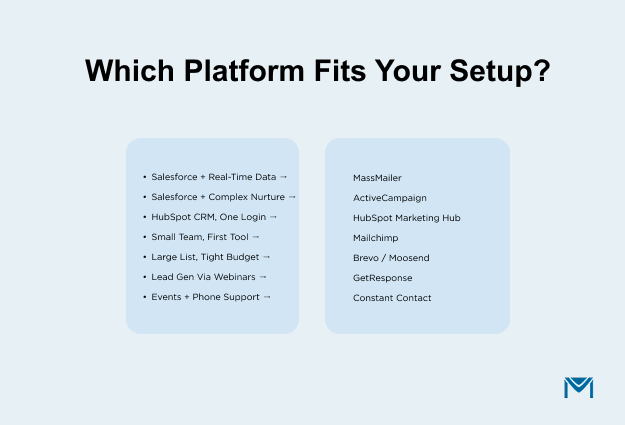
- Salesforce org, sales needs real-time email data. MassMailer writes opens and clicks to the contact timeline instantly. Everything stays inside Salesforce.
- Salesforce org, complex nurture workflows. ActiveCampaign has the deepest automation builder on this list. The Salesforce sync runs on a schedule, so expect a delay before sales sees the data.
- HubSpot CRM, want one platform. HubSpot Marketing Hub keeps everything under one login. Budget for Professional if you need full automation.
- Small team, first email tool. Mailchimp’s editor is the fastest to learn. Start on Essentials and move to Standard when you need branching.
- Large database, tight budget. Brevo charges by emails sent. Moosend charges per subscriber. Both keep costs low for teams that send monthly.
- Lead gen runs on webinars. GetResponse hosts live webinars for up to 1,000 attendees and connects them to email follow-up sequences.
- Events and phone support. Constant Contact includes registration pages, ticket sales, and a live marketing advisor on the phone.
The right tool is the one that fits where your data already lives and how your sales team works today.
Choosing the Right B2B Email Marketing Software
The right platform connects to your CRM and puts engagement data where sales already works. If your team runs Salesforce and your reps check the contact timeline before every call, real-time engagement data is a requirement. Sync delays cost deals.
MassMailer runs natively inside Salesforce. Your sales rep sees opens and clicks on the contact record the moment they happen. No sync job, no second dashboard, no CSV export.
Book a walkthrough with the MassMailer team and see how it works with your live Salesforce data.
Frequently Asked Questions
1. What is the difference between B2B and B2C email marketing software?
2. Do I need a separate email marketing tool if I already use Salesforce?
3. Can I use B2B email marketing software without a CRM?
4. What happens to my email data if I switch platforms?
5. Is a free email marketing plan good enough for B2B?
6. Do I need email marketing software or marketing automation?
Start Your Free Trial Today
Experience MassMailer the easiest way to send personalized emails from Salesforce.
Related Blogs
Salesforce Inbox: Pricing, Limits, and the Gap It Leaves Open
6 Enterprise Email Marketing Platforms That Scale With Salesforce
How Much Does Email Marketing Cost? Build Your 2026 Budget
MassMailer Resources


About the Author

Siva Devaki 
Siva Devaki is the founder of MassMailer Inc., a tool that helps Salesforce users optimize email marketing. A passionate advocate for email marketing, Siva writes and hosts podcasts on the topic, sharing insights to help businesses drive revenue and enhance customer engagement through Salesforce email automation and tracking.