





Table of Contents
"Which one is better?" is the wrong question. Campaign Monitor and Mailchimp aren't competing for the same job, so a straight feature-for-feature scorecard won't settle much.
What actually separates a Campaign Monitor vs. Mailchimp decision is not demo polish, but the job each platform was built to do. Campaign Monitor is built for agencies and brand-heavy teams that live by template control. Mailchimp is built for small businesses that want email, landing pages, and ads under one login.
That difference shows up in everything that matters when you actually have to choose: design, automation, segmentation, analytics, integrations, AI, support, and what you'll really pay at your list size.
According to Salesforce's 2026 Cost of Disconnected Data research, only 27% of organizations say their customer data is fully unified across sales, service, marketing, and commerce teams. That gap shows up fast the moment your contacts live in Salesforce, but your email tool doesn't.
This guide works through all eight areas above, then adds one more path built specifically for that situation, where neither Campaign Monitor nor Mailchimp fits as cleanly as either vendor would like you to believe.
Campaign Monitor vs Mailchimp: quick verdict
Here’s the short version before we get into the details.
| Category | Campaign Monitor | Mailchimp | Winner |
|---|---|---|---|
| Templates and design | 100+ templates, section locking for brand control | Larger, more themed library, less brand enforcement | Campaign Monitor |
| Automation | Simpler prebuilt journeys, easier for standard flows | Deeper multi-branch Customer Journey builder | Depends on use case |
| Contact management and segmentation | One subscriber counted once across all lists | More field types, predictive segmentation | Depends on use case |
| Analytics and reporting | Real-time engagement view (Worldview) | Revenue attribution, predictive metrics | Depends on use case |
| Integrations | 250+, CMS and CRM-weighted | 300+, deeper Shopify and e-commerce stack | Mailchimp |
| AI features | Marketing Studio suite, design-adjacent | Intuit Assist across more surfaces | Mailchimp |
| Customer support | Business hours for Premier phone support | 24/7 email and chat on paid plans | Depends on use case |
| Pricing | Cheaper entry tier, no permanent free plan | Free tier available, similar cost at scale | Mailchimp at entry |
If your team lives and dies by brand consistency and template control, Campaign Monitor wins the argument before you look at anything else. If you're running email as one piece of a broader small-business or e-commerce marketing stack, Mailchimp earns its price with everything bundled around it.
The four categories above come down to "depends," and that's the real answer for most teams, though the answer shifts for teams running on Salesforce; more on that later. The sections below walk through exactly what each platform does differently in those categories.
Campaign Monitor and Mailchimp: what each platform is built for
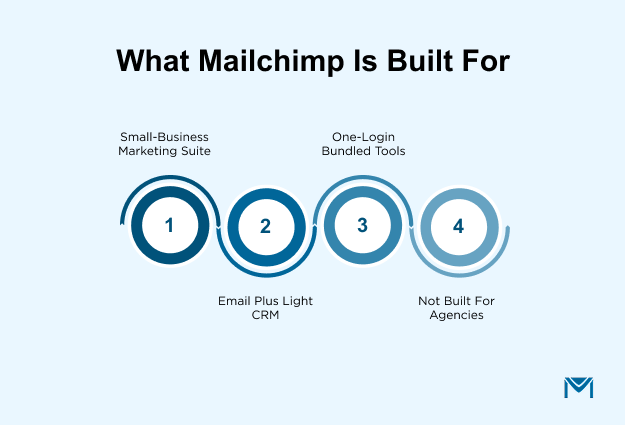
Campaign Monitor is built for agencies and brand-heavy teams that live by template control. Mailchimp is built for small businesses that want email, landing pages, ads, and a light CRM under one login.
That difference explains why Campaign Monitor deliberately skips landing pages, e-commerce, and ad management, while Mailchimp bundles them in.
Ownership reinforces the split: Marigold shapes Campaign Monitor around brand and agency workflows, while Intuit shapes Mailchimp around the QuickBooks small-business ecosystem.
Campaign Monitor: design-first email for agencies and brand-heavy teams
Campaign Monitor runs underMarigold, the parent that absorbed the old CM Group umbrella. That ownership shows up in the product itself: strong brand controls, template locking, and multi-client account management built for agencies sending on behalf of other brands. Its customer base leans toward publishing, universities, sports teams, and agencies managing multiple client accounts at once.
What it deliberately skips matters just as much. Campaign Monitor has no landing page builder, no e-commerce module, and no ad management. If you're evaluating it for anything beyond sending on-brand email, rule it out now instead of finding out three steps into a trial.
Mailchimp: all-in-one marketing platform for small businesses
Intuit bought Mailchimp in 2021 for $12 billion, and that ownership explains the product direction: deeper bundling into the QuickBooks small-business ecosystem and a steady push into tools beyond email.
One login now spans email, landing pages, forms, ads, e-commerce integrations, and a light CRM, making Mailchimp a practical fit for teams that want one platform rather than several specialized tools. That setup differs from anall-in-one Salesforce email tool because Mailchimp’s CRM is a separate lightweight system rather than Salesforce itself.
Another thing worth flagging directly: Mailchimp cut its Free tier in early 2026, down to 250 contacts and 500 sends a month, with a 250-per-day cap. A lot of comparison content still floats around citing the old 500-contact limits. Check Mailchimp pricing directly before you plan around any number here.
Mailchimp is not designed for agency use, as it lacks true white-label capabilities, client account portals, and reseller pricing. Broad feature coverage does not necessarily translate to agency readiness.
Campaign Monitor vs Mailchimp: feature comparison
Seven categories decide most Campaign Monitor vs. Mailchimp purchases. Here's how each one actually plays out. Most Campaign Monitor specifics below come from itspricing page, which lays out feature availability by tier, so it's only linked here once.
Email templates and design
Campaign Monitor ships 100+ responsive templates plus custom HTML imports, with section locking on Premier for teams that need to control what junior staff can touch.
On the other hand, Mailchimp's library is bigger and leans more seasonal and thematic: holidays, e-commerce, events. But it gives up some of that brand-enforcement control in exchange for variety.
Designers who care about final output tend to land on Campaign Monitor; teams that just need to ship a campaign fast lean on Mailchimp.
Campaign Monitor vs Mailchimp automation workflows
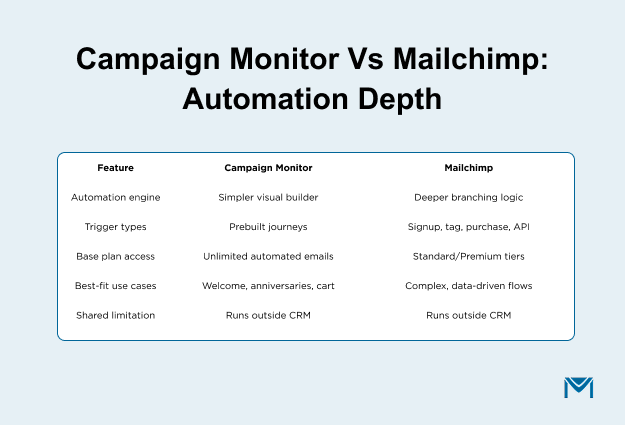
Mailchimp has a deeper automation engine, but you have to pay for access to it. Its Customer Journey builder supports signup, tag, purchase, segment, date, and API triggers with visual branching, while fuller automation flows sit on Standard and Premium.
Campaign Monitor takes the simpler route. Essentials includes unlimited automated emails and prebuilt journeys for use cases such as welcome series, anniversaries, and abandoned carts. Its visual builder makes straightforward workflows easier to set up, even though it doesn't match Mailchimp's branching depth.
Complex, data-driven journeys have more room to grow inside Mailchimp. But both platforms share the same underlying limitation: automation runs on contact data sitting outside the CRM. That's a different model entirely fromSalesforce email sequences, which run directly on live records with no export step required.
Contact management and segmentation
Mailchimp can make duplicate contacts an expensive mistake. A contact that appears in two Audiences counts as two billable contacts, while Campaign Monitor's single-list structure avoids that issue. Mailchimp also offers predictive segmentation on Standard and above, including lifetime value and purchase likelihood.
Campaign Monitor doesn't offer that layer, but its single-list structure can be more cost-efficient for teams managing multiple newsletters. Mailchimp is the stronger choice when segmentation depends on deeper behavioral and purchase data.
Analytics and reporting
The analytics choice comes down to what you want to understand after the send: engagement or revenue. Both platforms cover opens, clicks, bounces, and device or geo splits, but they take the next step in different directions.
Campaign Monitor adds Worldview, a real-time subscriber activity map, plus AI-driven Marketing Monitor benchmarks. Mailchimp focuses more heavily on revenue attribution and predictive metrics on paid tiers.
If you want to see how subscribers are engaging with a campaign in real time, Campaign Monitor has the edge. If connecting email activity to revenue matters more, Mailchimp is the stronger fit.
Integrations
Mailchimp's integration partner program page confirms 300+ native integrations, weighted heavily toward Shopify, WooCommerce, and Zapier. Campaign Monitor lists 250+ integrations, with a stronger mix of CMS platforms, e-commerce, and CRM tools.
Both connect to Salesforce at the Audience or list level rather than the Campaign level. That distinction matters if Salesforce is your system of record: neither platform operates natively inside the Salesforce org, so data and sending typically rely on a connector or themass email API.
Retirement Planning and Outreach Association (RPOA), a retirement planning firm, encountered this limitation when it needed to send weekly campaigns to more than 9,000 clients from Salesforce. Moving to a native sending tool addressed the daily volume constraint that an external ESP connector could not solve on its own.
For Shopify-heavy marketing stacks, Mailchimp may be the more natural fit. But for a Salesforce-first stack, neither Mailchimp nor Campaign Monitor provides a truly native solution.
AI features
Campaign Monitor keeps AI closer to email creation, design, and segmentation through tools such as AI Email Booster, Segment Mapper, and AI Writer. Mailchimp spreads Intuit Assist across more of its broader marketing suite, including subject lines, content generation, and send-time optimization.
Both can help teams generate or refine email content, but Mailchimp reaches further across the overall marketing workflow. Campaign Monitor keeps its AI capabilities more tightly focused on email.
Customer support
Support comes down to depth versus availability. Mailchimp offers 24/7 email and chat on paid plans, with phone support reserved for Premium. Campaign Monitor uses a tiered model, with business-hours email on Lite, priority email on Essentials, and phone support through Premier.
That makes the better choice depend on how your team wants support to work. Agencies that need named, high-touch support are better served by Campaign Monitor Enterprise. Teams that mainly want reliable access whenever an issue comes up may prefer Mailchimp's 24/7 model.
Campaign Monitor pricing vs Mailchimp pricing
Here's what each platform actually costs at 500, 5,000, and 10,000 contacts, verified live and date-stamped since both vendors reprice often.
| Factor | Mailchimp Free | Mailchimp Essentials | Campaign Monitor Lite |
|---|---|---|---|
| Monthly cost | $0 | From $13/mo | From $11/mo |
| Contact limit | 250 | 500, scales with list | 500, scales with list |
| Monthly send limit | 500 (250/day cap) | 10x contacts | Capped, scales with list |
| Free vs. trial | Permanent free plan | N/A | No permanent free plan; 30-day trial only, capped at 500 contacts / 500 sends |
Under 250 contacts, Mailchimp's Free tier still works. Campaign Monitor has no permanent free plan; Lite is the true entry point from day one.
Pricing at 5,000 and 10,000 contacts
At 5,000 contacts, Mailchimp costs $75/mo on Essentials and $100/mo on Standard. At 10,000, that rises to $110/mo on Essentials, $135/mo on Standard, and $350/mo on Premium. The entry price is attractive, but the monthly bill climbs quickly as your list grows.
Campaign Monitor starts at $11/mo for Lite, $19/mo for Essentials, and $149/mo for Premier at the 500-contact entry tier. Beyond that, pricing depends on list size, so the live calculator is the safer reference for larger lists than cached third-party figures.
The important point isn't just which platform has the lower starting price. It's how quickly your cost changes as your contact list grows, so compare both at the list size you actually expect to manage.
Overage fees and hidden costs
Mailchimp bills for unsubscribed and non-subscribed contacts until you manually archive them. Automation, A/B testing, and advanced segmentation are also limited by the plan. The Free plan lost automation entirely when Mailchimp retired the Classic Automation Builder on June 1, 2025.
The cost concerns become more significant for Salesforce users because some negative reviews focus on the integration itself, not just pricing. Sync failures, duplicate contact creation, and field-mapping conflicts appear repeatedly in reports ofintegration issues.
The Bay Club, a fitness and lifestyle club operator, encountered integration challenges before moving to a native Salesforce sending tool.
Campaign Monitor removes one of those automation gates: its Essentials tier includes unlimited sends and unlimited automated emails, although costs rise sharply with larger contact lists once you pass 500 contacts. Campaign Monitor also offers a 15% nonprofit discount and 10% off annual billing.
Mailchimp's nonprofit and annual-billing discount percentages should likewise be confirmed on its own pricing page, since neither G2 nor Capterra reliably lists those discount terms.
The Real Decision
Neither Campaign Monitor nor Mailchimp is the universal winner. They were built for different jobs.
A design-first or agency team gets more out of Campaign Monitor. A small business or e-commerce team gets more out of Mailchimp. If your contacts already live in Salesforce, a native Salesforce email marketing tool may be the better fit because it removes the need to move campaign data between systems.
Go back to the job you're buying the platform to do: brand control, broader marketing, or Salesforce-native sending. That will unstick the decision.
If Salesforce is where your contacts already live,book a demo to see how MassMailer sends directly from your CRM instead of a synced copy of it.
Frequently Asked Questions
1. Can I switch from Mailchimp to Campaign Monitor easily?
2. Can I switch from Campaign Monitor to Mailchimp?
3. What happens if I exceed my contact or send limit on Mailchimp or Campaign Monitor?
4. Which platform is easier to use for beginners, Campaign Monitor or Mailchimp?
5. Does choosing Campaign Monitor or Mailchimp affect email deliverability?
6. Do Campaign Monitor and Mailchimp charge extra for additional team members?
Start Your Free Trial Today
Experience MassMailer the easiest way to send personalized emails from Salesforce.
Related Blogs
HubSpot vs Mailchimp: CRM Depth, Pricing, and Fit
Brevo vs Constant Contact: Pick the Pricing Model Before the Features

MassMailer Resources

About the Author

Siva Devaki 
Siva Devaki is the founder of MassMailer Inc., a tool that helps Salesforce users optimize email marketing. A passionate advocate for email marketing, Siva writes and hosts podcasts on the topic, sharing insights to help businesses drive revenue and enhance customer engagement through Salesforce email automation and tracking.