




Table of Contents
Introduction
If you are using Salesforce to manage distributor or dealer communication, scaling email across partner networks can quickly become difficult.
Salesforce email for manufacturing sales refers to how manufacturers manage distributor, dealer, and B2B communication directly within Salesforce.
As the business grows, distributors receive inconsistent updates, dealers miss important product or supply chain emails, and quote follow-ups depend on individual reps instead of a system.
Salesforce email for manufacturing sales does support logging emails and triggering basic sends. However, it does not give you a clear way to manage distributor communication or run B2B sales email automation across regions, products, and partner tiers.
Because of this, teams miss follow-ups, send uneven messages, and lose visibility into engagement.
So, instead of scaling communication, complexity increases. This is why many teams extend Salesforce with tools like MassMailer to run structured email workflows inside their CRM.
In this guide, you’ll see where Salesforce breaks for manufacturing email, and how teams fix it to improve distributor outreach, automate follow-ups, and gain clear visibility into engagement. This is where Salesforce email for manufacturing sales starts to fall short.
Why Salesforce email for manufacturing sales breaks at scale (and how teams fix it)
Salesforce email for manufacturing sales breaks at scale because it is built primarily for one-to-one communication, while manufacturing teams need to manage high-volume distributor and dealer communication across networks.
As communication grows, teams rely on manual emails, fragmented workflows, and inconsistent messaging across regions and partner groups. This leads to missed updates, delayed follow-ups, and limited visibility into engagement.
To fix this, teams shift from record-level emails to structured, data-driven communication inside Salesforce, often using tools like MassMailer to manage campaigns, automate outreach, and maintain consistency across their network.
1. Distributor and dealer communication becomes inconsistent
One of the biggest challenges in Salesforce email for manufacturing sales is managing communication across distributor and dealer networks.
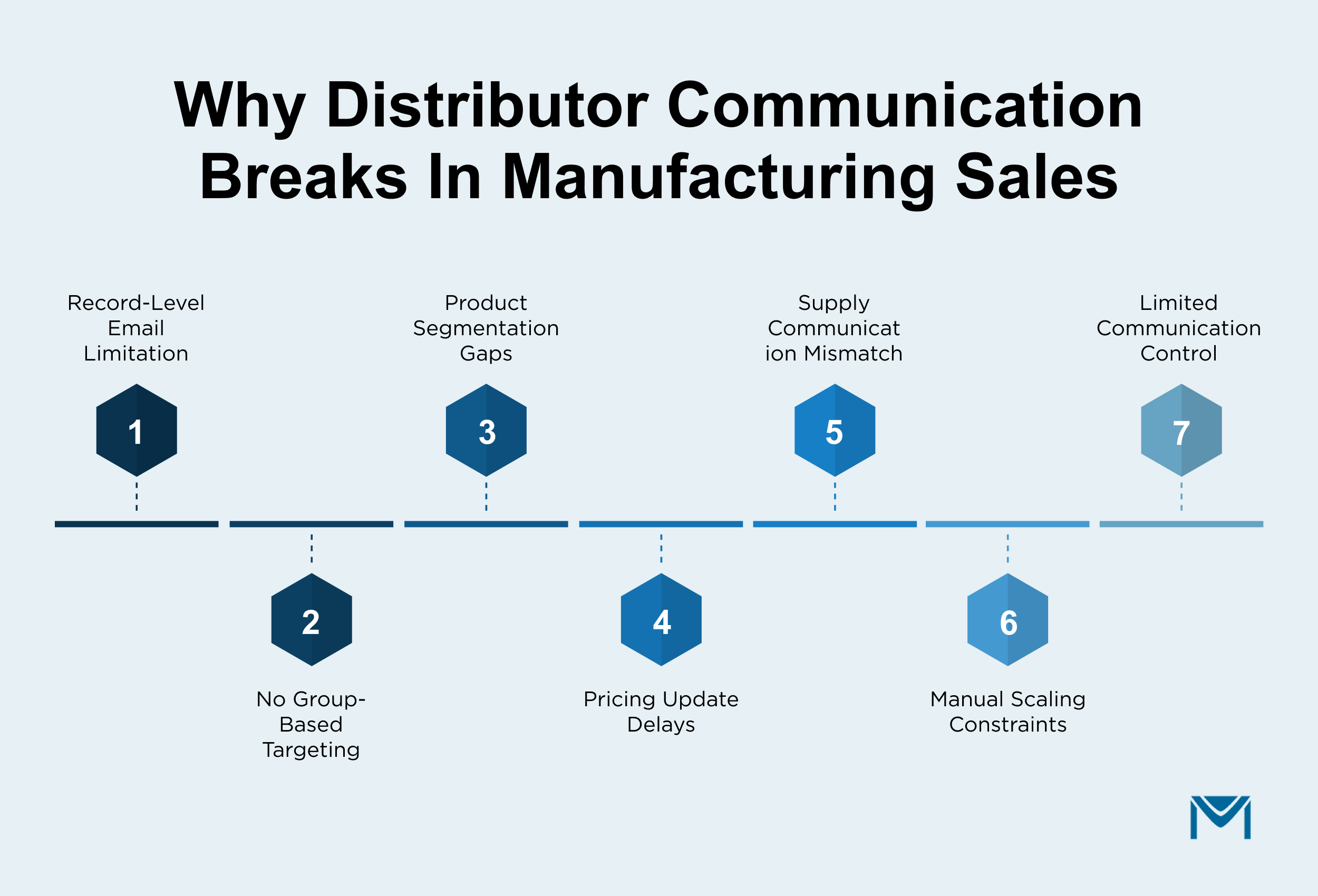
Most teams still send emails from individual records. A rep opens a distributor account, reviews activity, and sends an update. This works for one-to-one communication, but manufacturing sales rarely operate that way.
In practice, communication is tied to shared business conditions:
- A pricing revision applies to distributors under the same agreement or margin tier
- A product update affects dealers handling a specific product line or SKU group
- A supply delay impacts distributors with open orders in a region
These updates apply to groups of partners, not individual records.
Salesforce still handles email at the record level. When teams try to scale this manually or through disconnected tools, communication becomes uneven and often leads to issues like email deliverability and limited visibility into partner engagement.
Some distributors receive updates during active deal stages, while others are informed late or miss changes completely. This affects quote discussions, order planning, and overall partner coordination.
The problem is not sending emails. It is controlling communication across distributor relationships.
How manufacturing teams standardize partner communication with MassMailer
Teams solve this by aligning communication with product, pricing, and partner data.
Instead of sending updates one by one, they define the audience once and execute communication in a single step.
A typical setup looks like this:
- Distributors are grouped using fields like product line, pricing tier, region, or active opportunities
- A single template is used for updates such as pricing changes or product announcements
- Emails are sent with account-level personalization across all relevant partners
- Each interaction is recorded against the correct Contact or Account
MassMailer enables this by executing targeted communication using live CRM data.
This improves how teams manage mass email campaign workflows while maintaining visibility through email activity and structured email report insights.
For manufacturing teams, this creates a reliable way to manage distributor communication as deal volume and partner networks grow.
2. B2B Email Automation in Salesforce Breaks Across CPQ and Quote Workflows
Salesforce email struggles most during CPQ-driven deal cycles in manufacturing sales.
Most deals move through structured steps such as quote creation, pricing approvals, revisions, and distributor follow-ups. However, email communication across these steps is not tied to how deals actually progress.
A typical scenario looks like this:
- A rep generates a quote using CPQ and sends it to a distributor
- Follow-up depends on the rep remembering to check back
- Pricing is revised after approval, but the update is not sent immediately
- The deal progresses, but confirmation or next-step emails vary across reps
Salesforce captures this data across Opportunities and Quotes. But email execution does not follow these events.
As a result, quote follow-up emails and Salesforce workflows become inconsistent. Some distributors receive timely updates, while others experience delays or missed communication.
The issue is not missing data. It is because CPQ events and email actions are not connected.
How manufacturing teams automate quote communication with MassMailer
Teams fix this by linking the quote activity directly to email execution. Instead of relying on reps, communication is triggered based on deal movement.
A typical setup looks like this:
- A quote email is sent automatically when a CPQ record is created or updated
- Follow-ups are scheduled if no response is received within a defined time
- Pricing or approval changes trigger updated communication
- Emails adjust as the opportunity stage moves forward
MassMailer enables this by connecting CPQ data with email logic using Salesforce Flow.
This improves how teams run email automation tied to deal stages and aligns with broader workflow automation practices. It also strengthens email outreach by ensuring every distributor receives consistent communication based on real-time activity.
For manufacturing teams managing multiple quotes across distributors, this creates a reliable system for handling follow-ups, revisions, and deal progression without manual effort.
3. Product and Supply Chain Emails in Salesforce Lack Segmentation
Salesforce email for manufacturing sales often breaks when communication needs to align with product lines, inventory, and distributor relationships.
Manufacturing teams do not send the same message to every partner. Communication depends on what each distributor sells, where they operate, and what inventory or orders are affected.
In practice, this creates segmentation gaps:
- A product update is sent to all distributors, even though only some carry that SKU or product family
- A supply delay affects specific items, but the message reaches unrelated partners
- A regional inventory issue requires targeted outreach, but identifying the right distributors takes time
These messages depend on precise targeting. When segmentation is not applied correctly, communication becomes noisy.
Distributors start ignoring updates that do not apply to them. Over time, this reduces response during critical moments like pricing changes or supply issues.
Salesforce stores product data, account relationships, and order details. But turning that data into usable segments for bulk communication is not straightforward. This is where manufacturing CRM email segmentation becomes difficult to execute consistently.
How manufacturing teams segment product and supply chain communication with MassMailer
Teams fix this by defining segmentation rules based on product, inventory, and partner data.
Instead of rebuilding lists for every campaign, they create reusable audience logic tied to Salesforce fields.
A typical setup looks like this:
- Distributors are filtered using product category, SKU association, region, or active orders
- Segments update automatically as product or account data changes
- Campaigns such as product updates or supply alerts are sent only to relevant distributors
- Each interaction is tracked against the correct Contact or Account
MassMailer enables this by using live CRM data to drive segmentation at send time.
This improves how teams manage email list creation and execute targeted campaigns through Salesforce email marketing. It also supports better visibility into engagement through email tracking across distributor groups.
For manufacturing teams handling large catalogs and complex partner networks, this creates a reliable way to send relevant communication without rebuilding audiences for every update.
4. Manufacturer rep outreach stays manual
In manufacturing sales, follow-ups often depend on individual reps instead of a defined system.
After a quote is shared, the next step depends on the distributor. They may review pricing, request revisions, or delay based on inventory or internal approvals. During this time, reps manage multiple deals across accounts and regions.
This creates gaps:
- Some distributors receive timely follow-ups after a quote is sent
- Others are contacted after the deal has already slowed down
- Messaging varies based on how each rep manages their pipeline
Salesforce records these interactions, but it does not control how outreach happens across deals. It captures activity, yet it does not ensure consistent industrial sales email communication across distributor relationships.
As a result, follow-ups become reactive. Deals stall between quote stages, and distributor engagement drops. This is often visible when reviewing email activity or trying to understand performance through an email report.
The issue is execution at scale.
How manufacturing teams scale rep outreach with MassMailer
Teams fix this by aligning outreach with deal progression instead of rep-driven follow-ups.
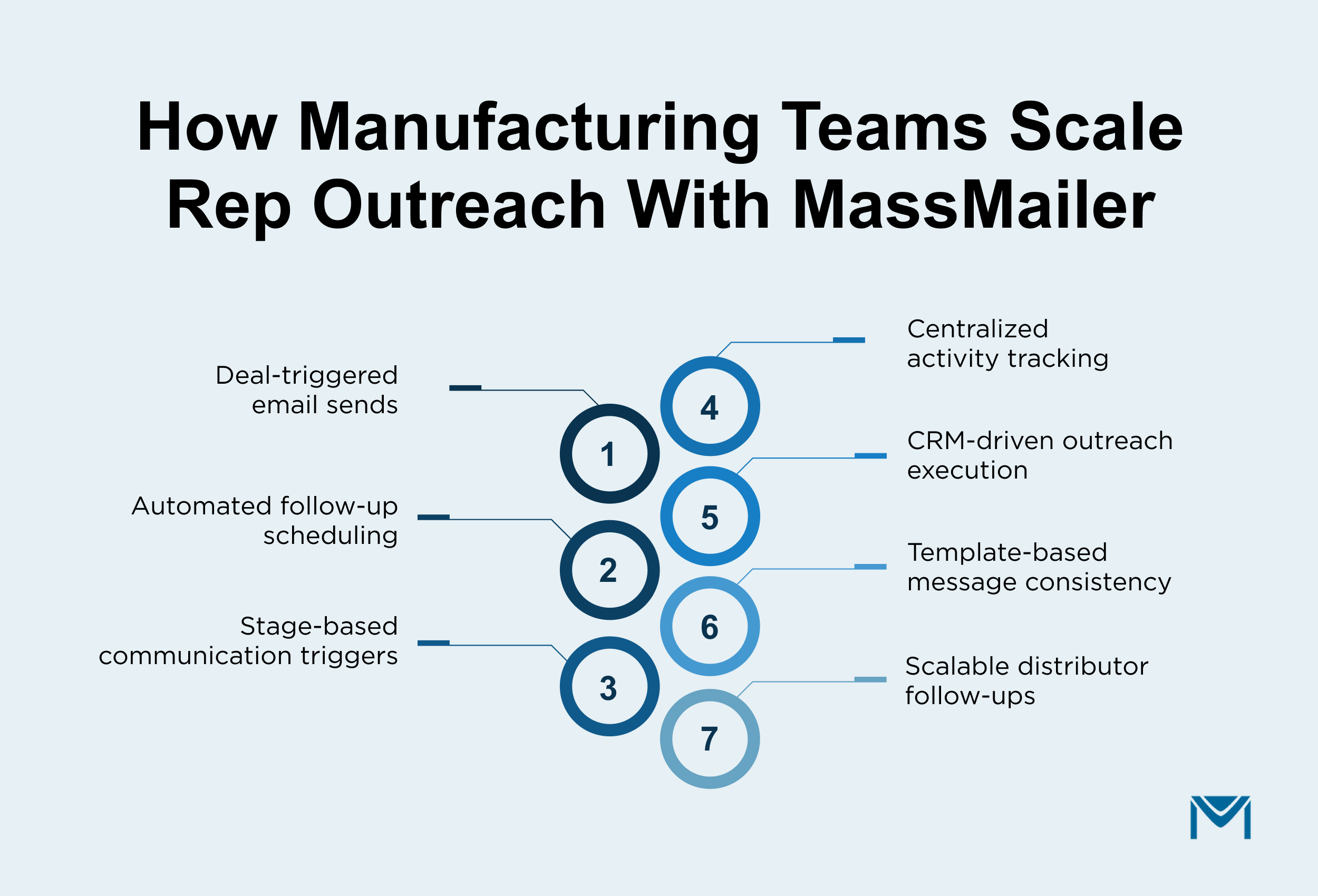
Instead of relying on memory, communication is triggered based on quote activity and opportunity stages.
A typical setup looks like this:
- A manufacturer rep email is sent when a quote is created or updated
- Follow-ups are scheduled if no response is received within a defined timeframe
- Pricing updates or stage changes trigger additional communication
- Each interaction is recorded against the correct records for visibility
MassMailer enables this by using Salesforce data to drive outreach tied to deal activity.
This improves how teams execute email outreach while maintaining consistency through Salesforce email templates and structured drip campaign logic.
For manufacturing teams managing long sales cycles and multiple distributor relationships, this creates a reliable way to maintain consistent follow-ups without increasing manual effort.
5. Limited Visibility into Email Engagement in Salesforce for Manufacturing Sales
Manufacturing teams rely on email to move distributor deals forward, but they often lack clear visibility into how partners engage with that communication.
In practice, this creates gaps:
- A distributor receives a quote, but the rep cannot confirm if it was reviewed
- A product update is sent, but there is no clear view of which dealers engaged
- A supply chain notification goes out, yet follow-ups happen without knowing who saw it
Salesforce logs email activity, but the data is spread across records and is not easy to analyze across distributor groups or deal stages.
As a result, teams cannot answer key questions:
- Which distributors opened a quote but did not respond?
- Which partners ignored a pricing or inventory update?
- Which accounts consistently engage during active deals?
This limits how teams prioritize follow-ups and identify at-risk deals.
The issue becomes more critical at scale, where reviewing activity manually is not practical. It is also affected by tracking limitations, where open data alone is unreliable due to client-side privacy changes and broader email deliverability best practices.
How manufacturing teams improve email visibility with MassMailer
Teams fix this by shifting from record-level checks to campaign-level visibility tied to distributor activity.
Instead of guessing, they track how partners interact with communication across quotes, product updates, and ongoing deals.
A typical setup looks like this:
- Engagement signals, such as opens, clicks, and replies, are captured for each distributor
- Performance is grouped across campaigns for easier analysis
- Teams filter engagement by product line, region, or partner type
- Follow-ups are prioritized based on engagement behavior
MassMailer enables this by centralizing visibility across campaigns and accounts.
This improves how teams monitor performance alongside Salesforce, manage risks like emails going to spam, and maintain data quality through processes such as email verification.
For manufacturing teams managing large distributor networks, this creates a clearer way to identify engaged partners, prioritize follow-ups, and move deals forward with better insight.
How Manufacturing Teams Use MassMailer in Daily Workflows
Manufacturing teams use MassMailer to turn Salesforce data into structured email execution across distributor networks.
- They trigger quote follow-ups automatically based on CPQ activity and deal stages.
- They send product and pricing updates only to distributors tied to specific SKUs or regions.
- They notify partners instantly when inventory or supply chain conditions change.
- They track distributor engagement across campaigns to prioritize follow-ups and improve response.
Instead of relying on manual emails, teams build repeatable workflows that run directly inside Salesforce and scale with their pipeline.
Conclusion
If your team still manages distributor emails, quote follow-ups, and partner updates manually in Salesforce, you are already losing speed and consistency across deals.
Salesforce holds the data, but it does not control how communication runs across your pipeline.
MassMailer closes that gap inside your existing setup. It connects your data with structured email execution, so follow-ups, product updates, and distributor communication run automatically in your current workflows.
See how MassMailer runs distributor communication directly inside Salesforce, without changing your current workflows.
Frequently Asked Questions
1. How do manufacturers automate distributor emails in Salesforce?
2. Can Salesforce send bulk emails to distributors without losing personalization?
3. How do you send product-specific emails to distributors in Salesforce?
4. How can sales teams track distributor engagement in Salesforce?
5. What is the best way to manage quote follow-ups in Salesforce?
6. How do manufacturing teams scale email communication across distributor networks?
Start Your Free Trial Today
Experience MassMailer the easiest way to send personalized emails from Salesforce.
Related Blogs




MassMailer Glossary
About the Author

Siva Devaki 

Siva Devaki is the founder of MassMailer Inc., a tool that helps Salesforce users optimize email marketing. A passionate advocate for email marketing, Siva writes and hosts podcasts on the topic, sharing insights to help businesses drive revenue and enhance customer engagement through Salesforce email automation and tracking.