





Table of Contents
Salesforce feels too expensive, complex, or restrictive, but replacing your CRM is not always the right move.
The best Salesforce alternative depends on what is actually slowing your team down. You may need a simpler CRM, lower operating costs, or stronger support for specific workflows.
Comparing Salesforce alternatives only by features or price can lead to the wrong decision. You first need to identify which capabilities matter, what switching would change, and whether Salesforce itself is the problem.
This guide compares leading Salesforce CRM alternatives by business need and shows how to evaluate them against your current setup. You will also see when replacing Salesforce makes sense and when fixing one capability may be enough.
How to evaluate Salesforce CRM alternatives
Evaluate Salesforce CRM alternatives by assessing workflow fit and whether switching improves your operating model without adding new complexity. Review capabilities, administration, integrations, data ownership, and migration risk before choosing a replacement.
CRM capabilities, automation, and admin fit
Start with the workflows your team cannot afford to lose. Map account and contact management, pipeline stages, automation, reporting, dashboards, and approvals against daily Salesforce use.
Then separate essential capabilities from features that exist but rarely support real work. This prevents feature-count comparisons from driving the shortlist.
A capable CRM still creates friction if every change requires heavy administration. Check how much configuration, customization, training, and administrator involvement each option requires.
Pay attention to the people using the CRM every day:
- Can sales update records without extra steps?
- Can marketing work with the data it needs?
- Can RevOps maintain automation without creating another heavy admin burden?
The right CRM alternative should support critical workflows while making the system easier to operate. If complexity remains unchanged, switching may solve little.
Integrations, data ownership, and migration risk
Before replacing Salesforce, map every system and process that depends on it. Your CRM may anchor custom objects, historical records, AppExchange apps, reporting, permissions, and third-party integrations.
Include vendors, middleware, and internal processes tied to those dependencies.
For each dependency, ask what happens if Salesforce stops being the system of record. You may need to rebuild, replace, reconnect, or retire parts of the stack.
Focus on the dependencies that can change switching cost:
- Which integrations depend on Salesforce objects or fields?
- Which historical records must remain accessible?
- Which AppExchange apps support critical workflows?
- How much retraining and implementation work will your teams absorb?
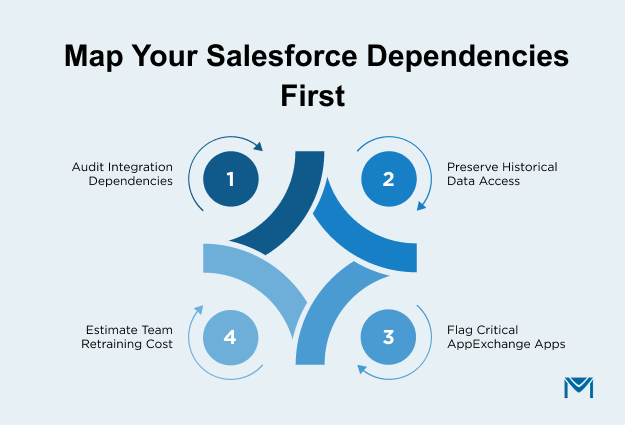
An affordable alternative can still become expensive when migration creates operational disruption. Choose a replacement only when the architectural improvement justifies those costs and risks.
Best Salesforce alternatives by business need
The best Salesforce alternative depends on the business need you prioritize. Compare options by sales and marketing alignment, cost, pipeline focus, enterprise depth, and simplicity.
The table below compares buyer fit, regular starting price, platform scope, and key tradeoffs. Use it to narrow your shortlist before reviewing each option in context.
| Salesforce alternative | Best for | Regular starting price (USD) | Why consider it | Main tradeoff |
| HubSpot | Connecting CRM, sales, and marketing | $20/seat/month regular Starter price | Brings CRM, sales, marketing, and service capabilities into one connected platform | Costs and requirements can increase as you need more advanced capabilities |
| Zoho CRM | Cost-conscious small and growing businesses | $14/user/month, billed annually | Provides broad CRM functionality, automation, reporting, and customization at a lower entry price | You should assess ecosystem fit and administration needs as requirements become more complex |
| Pipedrive | Sales-focused pipeline management | $14/seat/month, billed annually | Offers a focused workspace for managing leads, deals, contacts, and pipelines | Its narrower CRM scope may not replace broader Salesforce workflows |
| Microsoft Dynamics 365 Sales | Enterprise environments built around Microsoft | $65/user/month for Sales Professional, paid yearly; | Combines sales automation, Microsoft 365 interoperability, reporting, and enterprise CRM capabilities | Enterprise depth can retain the complexity you may be trying to reduce |
| Freshsales | Startups and SMBs seeking a focused sales CRM | $9/user/month, billed annually | Covers core sales CRM needs with contact management, communication, and sales workflows | Advanced Salesforce configurations may require greater workflow and feature depth |
These five options represent the main paths you can take when replacing Salesforce. They cover broader platforms, lower-cost CRMs, sales-focused tools, enterprise suites, and lighter-weight systems.
1. HubSpot: Salesforce alternative for sales and marketing
If you want CRM, sales, and marketing workflows connected within one platform, HubSpot can be worth shortlisting. It can fit when you need closer alignment across lead capture, pipeline activity, campaigns, and customer interactions.
Compare the HubSpot tools you need with the Salesforce processes your business already depends on. Reporting, automation depth, permissions, and specialized workflows deserve particular attention.
Your evaluation should focus on whether consolidation actually simplifies daily operations. If important Salesforce processes require workarounds or extra tools, the platform may not reduce complexity as expected.
2. Zoho CRM: Affordable Salesforce alternative
You may shortlist Zoho CRM when cost control matters but broad CRM functionality remains important. It can fit when you need contacts, automation, reporting, and configurable sales workflows in one CRM.
Evaluate pricing alongside the edition and capabilities your Salesforce setup currently requires. Automation, permissions, integrations, reporting depth, and support can materially affect operating cost.
As usage expands, consider how much administration and configuration your team will need. Lower software costs work best when the operating model also fits your long-term requirements.
3. Pipedrive: Simpler Salesforce CRM alternative
For a sales-led team, Pipedrive can make sense when pipeline management is the main CRM requirement. It keeps your focus on leads, deals, contacts, and sales activity.
Before switching, identify which Salesforce processes go beyond pipeline management. Reporting, approvals, service workflows, and complex automation may require broader functionality.
A narrower platform can reduce CRM overhead when Salesforce mainly supports sales. If several departments rely on Salesforce, confirm where those workflows will move.
4. Microsoft Dynamics 365: Enterprise Salesforce competitor
If your organization relies heavily on Microsoft tools, Dynamics 365 Sales may fit naturally into that environment. It supports enterprise sales operations where governance, reporting, automation, and customization still matter.
Assess whether enterprise depth addresses your current problems or preserves unwanted complexity. Compare administration, licensing, customization, and cross-team requirements against your reasons for leaving Salesforce.
Microsoft alignment can strengthen the case when your workflows already depend on that ecosystem. A move makes less sense when reducing enterprise complexity is your main objective.
5. Freshsales: Lower-complexity Salesforce alternative
When your team needs a more focused sales CRM, Freshsales may be worth adding to the shortlist. It can fit smaller or growing operations centered on contacts, communication, pipelines, and core sales workflows.
Compare those capabilities against the Salesforce processes you use today. Reporting, permissions, automation, custom workflows, and cross-team requirements can expose important gaps.
For sales-first operations, a narrower CRM may reduce unnecessary overhead. If your Salesforce setup supports complex processes, validate workflow depth before treating Freshsales as a replacement.
Do you need a Salesforce alternative or a workflow fix?
You need a Salesforce alternative when core CRM problems affect multiple teams, workflows, or business processes. If one capability causes the issue, keep Salesforce and replace or extend that workflow instead.
Keep the current CRM when it still supports your core operations without creating friction.
When a Salesforce CRM replacement makes sense
A full Salesforce CRM replacement is justified when problems affect everyday operations across several teams. Persistent admin burden, weak adoption, excessive customization, or poor process fit can signal a broader platform mismatch.
Look for problems that continue despite configuration changes. If sales, marketing, service, or RevOps repeatedly work around the CRM, the issue may be structural.
If one marketing workflow, integration, or execution layer causes friction, replacing Salesforce can create unnecessary cost and disruption. Extending or replacing that capability may solve the issue while preserving your system of record.
Use the scope of the problem as your decision test:
- Replace Salesforce when core CRM processes consistently fail your requirements.
- Keep Salesforce when the constraint stays isolated, and the wider platform still supports your business.
Treating an isolated limitation as a CRM-wide problem can turn a focused fix into a larger migration.
When to keep Salesforce CRM
Keep Salesforce when your existing setup still supports the workflows your business depends on. Custom objects, automation, reports, AppExchange apps, and governance can represent significant operational value.
A lower-priced CRM can still increase switching costs through rebuilding, retraining, integration work, internal support, and change management.
Compare those costs with the savings you expect from moving. Salesforce pricing varies by edition and package, so usecurrent Salesforce pricing when calculating the difference.
Migration makes sense when expected operational gains justify the effort required to recreate your current environment. If Salesforce supports critical processes reliably, staying may produce the stronger business outcome.
| Situation | Best-fit direction |
|---|---|
| Core CRM no longer fits business requirements | Replace Salesforce CRM |
| One workflow or capability is causing the problem | Keep Salesforce and replace or extend that capability |
| Salesforce still supports required workflows effectively | Keep the current Salesforce stack |
Are Salesforce email limits the real problem?
You can address Salesforce email limits without replacing the CRM when Salesforce still supports your core operations. Identify whether sending volume, email integration, or execution is the specific constraint.
Fixing the email layer can resolve that problem while preserving the Salesforce environment your business already uses.
Salesforce email limits and daily sending caps
Salesforce Support lists defaultDaily Mass Email limits by edition. Professional Edition has a 1,000-email daily default. Enterprise, Performance, and Unlimited Editions have a 5,000-email daily default.
Salesforce’sMass Email Limitations separately cap mass and list email at 5,000 external addresses daily per licensed org. Duplicate addresses count toward that daily allocation. These figures cover different scopes, so confirm your edition’s active org limit before planning campaign volume.
If email volume is the recurring constraint, replacing the CRM may create unnecessary disruption. Evaluate the sending cap at the email layer first.
Native Salesforce app vs. external email platform
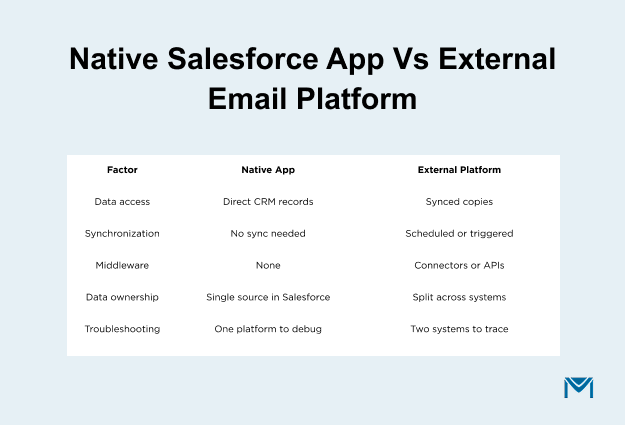
A native Salesforce app keeps email operations closer to CRM records and workflows. An external email platform depends more heavily on integration design.
Compare data access, synchronization, middleware, ownership, and troubleshooting. For external platforms, confirm which system owns each field and how quickly updates return.
Identify who maintains the connection when mappings, permissions, or workflows change. A native approach can reduce some integration dependencies.
Your governance and sending requirements still determine whether that architecture fits. ASalesforce email integration should keep data movement and ownership clear.
Where MassMailer fits in Salesforce email marketing
MassMailer fits when you want Salesforce to remain the system of record while changing email execution. With MassMailer, you can use aSalesforce-native email marketing solution within your existing Salesforce-centered operating model.
Evaluate it against your sending requirements, governance model, workflow ownership, and existing Salesforce processes. Use this path when Salesforce still fits your business overall.
An email-specific constraint does not need to become a broader CRM migration.
Make the right Salesforce move
Your best Salesforce move depends on the scope of the problem. Replace Salesforce when the CRM no longer supports core workflows. Keep Salesforce when one capability causes friction and the broader environment still works well.
If email execution is the constraint, evaluate that layer separately. MassMailer runs inside Salesforce and sends from live CRM records without daily volume caps. It tracks engagement on the contact record and handles suppression, bounce management, and verification natively.
Before making a broader switch, compare the expected operational gain with migration cost and disruption. Make the change that directly addresses the constraint you identified.
If Salesforce still fits your CRM needs,evaluate your email setup with MassMailer.
Frequently Asked Questions
1. Can Salesforce and a replacement CRM run in parallel during migration?
2. How long does a typical Salesforce CRM migration take?
3. Should Salesforce contract renewal dates influence migration timing?
4. How much does it cost to migrate away from Salesforce?
5. Can Salesforce reports and dashboards be exported to another CRM?
6. Do Salesforce admin skills transfer to other CRM platforms?
Start Your Free Trial Today
Experience MassMailer the easiest way to send personalized emails from Salesforce.
Related Blogs
Marketo vs Salesforce Marketing Cloud: Which One Fits Your Team?
HubSpot vs Mailchimp: CRM Depth, Pricing, and Fit
Brevo vs Constant Contact: Pick the Pricing Model Before the Features
MassMailer Resources


About the Author

Siva Devaki 
Siva Devaki is the founder of MassMailer Inc., a tool that helps Salesforce users optimize email marketing. A passionate advocate for email marketing, Siva writes and hosts podcasts on the topic, sharing insights to help businesses drive revenue and enhance customer engagement through Salesforce email automation and tracking.