





Table of Contents
"Salesforce says all 10,000 emails got delivered. So why are only a handful of people replying?"
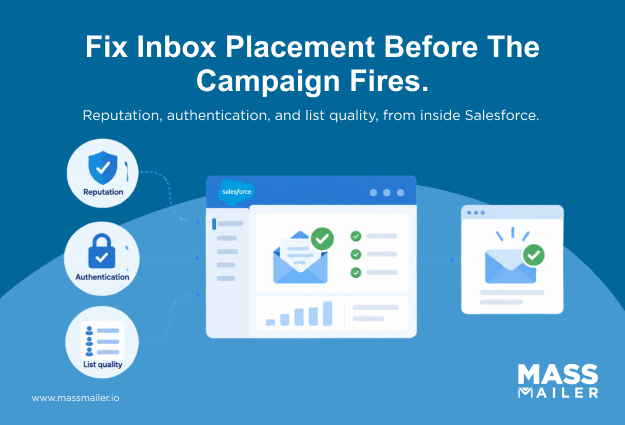
If that question sounds familiar, inbox placement rate is what you are missing. A delivered status only confirms that a mailbox provider accepted the email. It does not confirm the email reached the primary inbox.
Inbox placement rate measures what happens after acceptance, so you can see whether the email landed where recipients actually read it, or slid into spam, promotions, or junk. Most Salesforce dashboards stop at delivery, so the gap stays invisible until engagement drops. Before you rewrite subject lines or blame the copy, check where your emails are actually landing.
This guide covers what inbox placement rate means, how to calculate it, how it differs from delivery rate, the benchmark worth targeting, the factors that shape it, and how Salesforce teams protect visibility.
What is inbox placement rate?
Inbox placement rate is the percentage of successfully delivered emails that land in the recipient's primary inbox instead of spam, promotions, junk, or any other filtered folder. It measures what happens after a mailbox provider accepts your email, which is the part your Salesforce delivery report never shows.
Every accepted email gets sorted into one of these destinations:
- Primary inbox: where recipients actively read and engage
- Promotions or updates tabs: where Gmail parks bulk commercial mail
- Spam or junk folder: where filtering algorithms send anything they distrust
- Blocked or quarantined: where the message never reaches the recipient view at all
Only the first destination gives your campaign a real shot at engagement. That is why placement, not delivery, maps to actual outcomes. A 98% delivery rate confirms the receiving server accepted your email. It does not confirm a human saw it. Two campaigns with identical delivery rates can produce very different open and reply rates, and the gap almost always sits inemail deliverability at the placement layer.
How do you calculate inbox placement rate?
Inbox placement rate is calculated by dividing the number of emails that landed in the primary inbox by the total number of emails delivered, then multiplying by 100.
| Inbox placement rate = (Emails in primary inbox ÷ Emails delivered) × 100 |
If you send 10,000 emails, 9,800 get delivered, and 8,500 of those land in the primary inbox, your inbox placement rate is about 86.7%.
The denominator is where most teams get this wrong. Inbox placement uses delivered emails, not sent. Hard bounces and blocked messages are already gone by the time placement gets decided. Counting them would deflate the number and mix two different problems into one metric.
One catch is that your Salesforce dashboard cannot fill in the top number on its own. The real inbox count has to come from seed testing or a placement monitoring tool. Without that, the formula is sound, but the number you plug in is a guess.
Inbox placement rate vs email delivery rate
Delivery rate measures whether the receiving server accepted your email. Inbox placement rate measures where it landed after acceptance. Both are percentages, both look like success metrics, and only one tells you whether a human actually saw the message.
| Metric | What it measures | Where it stops |
|---|---|---|
| Email delivery rate | Whether the receiving mail server accepted the email | Server acceptance. No visibility into folder placement. |
| Inbox placement rate | Whether delivered emails reached the primary inbox | Full folder-level visibility across mailbox providers. |
The two metrics can move in opposite directions and often do. You can hold a strong delivery rate for months while your placement rate quietly drops because engagement dipped or your domain reputation drifted. Nothing in the delivery report flags it. Campaigns still show as sent and delivered. Only the reply and click numbers slide, usually weeks after the actual problem started. ReliableSalesforce email deliverability monitoring depends on watching both numbers side by side, not treating one as a proxy for the other.
Lead with inbox placement rate and treat delivery rate as the safety check underneath.
What factors affect inbox placement, and how do you improve it?
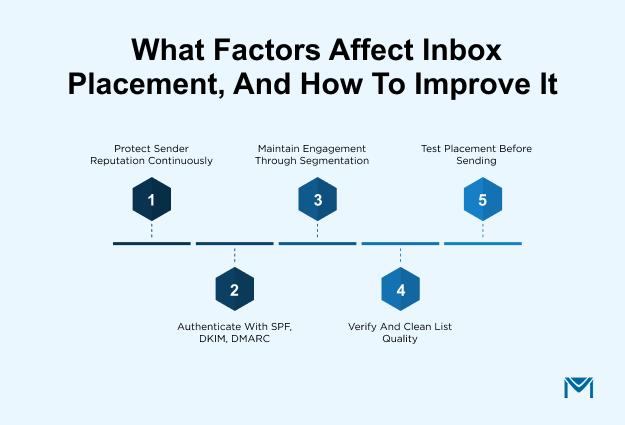
Inbox placement is shaped by four factors: sender reputation, email authentication, engagement metrics, and email list quality. Mailbox providers weigh all four together when deciding whether an accepted email lands in the primary inbox, promotions tab, or spam folder. Improving placement means working on each factor directly, so this section covers both what each one signals and what you can actually do about it.
The factors do not work in isolation. Weak authentication drags reputation down. Poor list quality pulls engagement down. Low engagement erodes reputation further. One weak factor pulls the others with it, which is why placement problems rarely trace back to a single cause. Fix them in parallel, and the numbers move within a few send cycles.
Sender reputation and how to protect it
Sender reputation is the score mailbox providers assign your sending domain and IP based on history. Spam complaints, hard bounces, spam trap hits, and inconsistent sending patterns all pull it down. A domain with strong reputation gets the benefit of the doubt on borderline sends. A weak one gets filtered even on clean campaigns.
Two moves protect it. First, remove contacts who mark your emails as spam immediately, no matter how they got on the list. Even one complaint per thousand sends is enough to move the needle. Second, keep sending patterns steady. Sudden volume spikes read as suspicious activity, so ramp new domains gradually and avoid dumping full-list sends after weeks of silence.
Reputation damage builds for weeks before it shows up in your placement numbers. By the timeSalesforce emails start going to spam, the score has already been slipping. Protect it continuously, not reactively.
Email authentication with SPF, DKIM, and DMARC
Email authentication proves your emails actually come from the domain they claim. Without it, mailbox providers have no way to verify the sender and filter conservatively. Publishing the right records earns your domain the baseline trust it needs to reach the inbox.
Three protocols do the work:
- SPF record publishes which servers are allowed to send email for your domain
- DKIM adds a cryptographic signature that proves the email was not altered in transit
- DMARC ties the two together with a policy that tells providers what to do when an email fails either check
Setup is a one-time DNS task, usually handled by whoever manages your domain records. The catch is alignment. SPF and DKIM records can pass individually and still fail DMARC if they do not align with the visible From domain.
Providers treat misalignment as a red flag, and placement drops without any visible bounce. Review your DMARC reports for the first few weeks after setup to catch alignment issues before they hit your numbers.
Engagement metrics and how to maintain them
Engagement metrics show mailbox providers whether recipients actually want your emails. Opens, clicks, replies, and how quickly recipients delete or archive all feed into the provider's decision on where to place your next send. Strong engagement pushes emails toward the primary inbox. Weak engagement pushes them toward spam and promotions, even when everything else is clean.
Three moves protect engagement:
- Segment before you send. A single blast to your full list rarely fits every recipient. Split by role, industry, or lifecycle stage so each send is relevant to the person opening it.
- Personalize past the first name. Recipients ignore emails that read like they were built for a list. Reference the recipient's use case, their recent activity, or the reason they signed up.
- Sunset the unengaged. Contacts who have not opened in six months are dragging your engagement rate down and eroding reputation with every send. Move them to a re-engagement flow, then remove the ones who still do not respond.
The common mistake is optimizing for open rate alone. Providers weigh negative signals too. A recipient who opens the email and immediately deletes it without reading tells the provider your content missed the mark, and that reads as spam-adjacent behavior over time. Chase meaningful interaction, not surface metrics.
Email list quality and hygiene
List quality is the foundation every other factor sits on. A list full of invalid addresses, role-based contacts, and inactive subscribers guarantees hard bounces, wasted sends, and eventually spam trap hits. Each one erodes sender reputation, and no amount of authentication or content polish makes up for a list that mailbox providers already distrust.
Two moves keep list quality strong:
- Verify addresses at capture. Real-time verification on signup forms and lead capture flows blocks bad data before it enters Salesforce. Catching a typo at the point of entry costs nothing. Catching it after a hard bounce costs reputation.
- Run periodic hygiene passes. Remove hard bounces immediately, sunset contacts who have not opened in six months, and check your list against known spam trap patterns before high-volume sends.
Email list hygiene is not a one-time cleanup. Lists decay at roughly 2% per month through job changes, abandoned addresses, and disengagement. A list that was healthy last quarter is not healthy today unless someone kept it that way.
Test inbox placement before you send
Inbox placement testing sends a copy of your campaign through seed addresses at Gmail, Outlook, Yahoo, and other providers, then reports where each one landed. Run it before the campaign goes out, and you see real placement data instead of guessing from delivery reports.
Three options give you visibility:
- Seed list testing. A third-party tool sends your email to monitored addresses across major providers and reports which folder each one hit.
- Google Postmaster Tools. Free reporting from Google on your domain's reputation and delivery health at Gmail. Partial visibility, but useful for Gmail-heavy lists.
- Ongoing monitoring. Continuous placement tracking across providers, so you catch reputation drops as they happen instead of quarters later.
The window to act on a placement problem closes at send. A pre-send test gives you time to fix subject lines, review authentication, or hold the campaign. Once the emails go out, the reputation hit is already logged.
How Salesforce teams strengthen inbox placement
Salesforce teams strengthen inbox placement by treating CRM data quality, workflow checks, and native monitoring as part of the sending process, not separate tasks. General deliverability advice assumes a clean list and a standalone ESP. Salesforce sending works differently, and the placement gaps come from the seams.
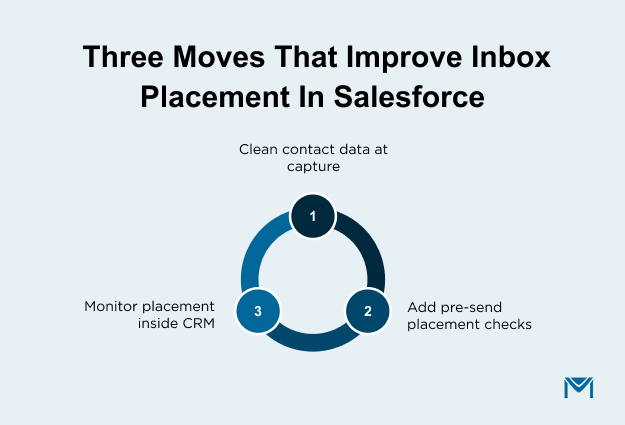
Three moves matter inside a Salesforce environment:
- Keep contact data clean at the source. Sales reps add contacts, forms create leads, integrations sync records, and each entry point is a chance for bad data to enter the CRM. A singleSalesforce email verification check at capture stops most invalid addresses before they ever reach a campaign send.
- Add placement checks to email workflows. Before a campaign fires from Salesforce, the workflow should validate contact quality, confirm authentication is aligned, and flag segments with weak engagement history. Building these checks into the send process catches problems earlier than reviewing bounce reports after the fact.
- Monitor placement inside the CRM. Placement data that sits in a separate tool gets checked once a quarter. Placement data surfaced next to campaign performance inside Salesforce gets acted on the same week the drop starts. A Salesforce-native email platform like MassMailer keeps verification, monitoring, and campaign performance in the same view, which shortens the distance between a placement drop and a fix.
Salesforce teams that treat placement as a CRM operations problem, not just a marketing metric, catch reputation drift weeks earlier than teams relying on delivery reports alone. The visibility gap between the two approaches is where most avoidable placement problems live.
Make inbox placement rate your primary email metric
Delivery rate confirms the pipes are working. Inbox placement rate confirms your audience is receiving. The gap between them is where campaign performance quietly slips, sometimes for weeks, before anything shows up in your reports.
The fix is a discipline, not a one-time cleanup. Track placement by mailbox provider, work the four factors together, test before high-volume sends, and treat CRM data quality as part of your sending workflow. Salesforce teams that build these habits catch placement drops early, protect sender reputation, and keep pipeline moving without waiting for the delivery report to lie to them.
If your current Salesforce setup gives you delivery data but nothing on placement, that visibility gap is worth closing.Explore how your Salesforce team can build stronger email deliverability workflows with MassMailer.
Frequently Asked Questions
1. What's a good inbox placement rate?
2. Does a high open rate mean your inbox placement is good?
3. Is a low inbox placement rate the same as being blacklisted?
4. Does inbox placement rate vary by mailbox provider like Gmail versus Outlook?
5. How is inbox placement rate different from email deliverability?
6. How long does it take to improve inbox placement after fixing the factors?
Related Blogs

How To Remove Your IP From Gmail’s Blacklist?
MassMailer Resources



MassMailer Glossary
About the Author

Siva Devaki 
Siva Devaki is the founder of MassMailer Inc., a tool that helps Salesforce users optimize email marketing. A passionate advocate for email marketing, Siva writes and hosts podcasts on the topic, sharing insights to help businesses drive revenue and enhance customer engagement through Salesforce email automation and tracking.