

Table of Contents
Quick Answer
HubSpot CRM is the best CRM for email marketing for most teams, with email, forms, and one automation free. ActiveCampaign leads in workflow depth. Zoho CRM offers the best budget option free for three users. Brevo costs the least for large lists. For Salesforce orgs, MassMailer adds native bulk email and engagement tracking without the 5,000 daily cap.
Introduction
Most CRM platforms advertise “built-in email marketing” as a feature. What they actually ship is a send button and a basic editor. The best CRM for email marketing includes automation, segmentation, and campaign reporting from day one. Most do not.
Instead, these capabilities sit behind paid upgrades or separate add-ons. Choosing the wrong platform means paying twice: once for the CRM, again for the email. This guide covers 7 platforms, comparing what their email marketing actually delivers at each pricing tier, and what Salesforce users should consider instead of adding a second CRM.
Best CRM for Email Marketing at a Glance
HubSpot CRM ranks as the strongest all-around CRM for email marketing, with ActiveCampaign leading on automation depth and Zoho CRM offering the best value for small teams on a budget.
| Platform | Best for | Starting price | What email marketing includes | What’s locked or missing |
|---|---|---|---|---|
| HubSpot CRM | Free start with room to scale | Free; paid from $20/mo | Email, forms, landing pages, 1 automated workflow | A/B testing, smart send, custom reports: $100/mo+ |
| ActiveCampaign | Complex automation and scoring | $15/mo (1,000 contacts) | Visual workflow builder, branching logic, A/B testing | CRM pipelines are a $50/mo add-on |
| Zoho CRM + Campaigns | Budget CRM with email | Free for 3 users; paid from $20/user/mo | 2,500 workflow rules, 6,000 free emails/mo via Campaigns | Auto-responders: Enterprise only ($50/user/mo) |
| Brevo | Large lists, small budget | Free (300 emails/day) | Unlimited contacts, email + SMS, automation for 2,000 contacts | Landing pages: Business plan ($15/mo) |
| Freshsales Suite | AI lead scoring with email | Free for 3 users; paid from $11/user/mo | Freddy AI scoring, email campaigns, journey builder | Rigid email editor, attribution only via Shopify |
| Pipedrive + Campaigns | Pipeline-first, email second | $24/user/mo + $16/mo | Email segmented by deal stage, CRM-driven targeting | No A/B testing, limited templates |
| Salesforce + Marketing Cloud | Enterprise-grade email | $25/user/mo; Marketing Cloud from $1,250/mo | Deepest CRM personalization, AI journeys, multi-channel | Complex setup, needs a dedicated admin |
Each platform is covered in detail below, with a closer look at what the email marketing actually delivers at each pricing tier.
7 Best CRM Platforms With Email Marketing
HubSpot CRM, ActiveCampaign, and Zoho CRM consistently rank as the top CRM platforms with built-in email marketing. Each one takes a different approach to combining contact management with campaign tools, and the right pick depends on whether you prioritize automation depth, pricing, or native CRM integration.
1. HubSpot CRM
HubSpot CRM packs email marketing, forms, landing pages, and one automated workflow into its free plan. No other CRM on this list offers that range at zero cost.
You cansegment contacts by lifecycle stage or deal status and send targeted campaigns from the CRM itself. HubSpot also logs every open, click, and reply on the contact timeline. That means sales reps see exactly how a lead engaged before calling. However, the free plan caps sends at 2,000 per month and limits you to one automation. Meanwhile, A/B testing, send-time optimization, and custom reporting all sit behind the Professional plan at $100/month per seat.
A small-business founder on G2 rated HubSpot 4 out of 5 after using it for three years. He runs sequences and landing pages on the free tier without issues. Still, he warned that the moment you outgrow it, pricing jumps and previously free features get gated.
If your list stays small, the free plan delivers real value. Once you need more than basic automation, plan for the upgrade early.
2. ActiveCampaign
ActiveCampaign offers the most advanced email automation builder on this list. Its visual workflow editor supports triggers, branching logic, and A/B tests on entireautomation sequences from one canvas.
You get dynamic content, predictive sending, and segmentation by contact behavior or deal stage. ActiveCampaign also scores leads based on engagement, so sales teams know who to call first. However, the CRM is not included. Pipelines and deal tracking require a separate add-on at $50/month.
A marketing automation specialist on Capterra rated it 5 out of 5 for its drip campaign builder, saying it saved her hours of manual follow-ups. On the other hand, a CEO who rated it 4 out of 5 called the service quality great but the pricing draining enough to consider switching.
ActiveCampaign works best when automation is the priority. However, the CRM add-on and rising costs add up fast at renewal.
3. Zoho CRM + Zoho Campaigns
Zoho CRM paired with Zoho Campaigns gives budget-conscious teams a full CRM and email marketing setup. The free plan supports up to three users.
The CRM itself is highly customizable. You get 2,500 workflow rules even on the free plan, along with contact management, deal pipelines, and reporting. For email marketing, Zoho Campaigns plugs in as a separate but connected app. It adds drag-and-drop email design, list segmentation, and up to 6,000 free emails per month. However, the two apps require separate setup. Also, auto-responders only unlock on the Enterprise plan at $50/user/month, capped at three.
Zoho CRM holds a 4.3 rating across 7,008 reviews onCapterra. A senior BDR rated it 4 out of 5 for its wide range of functionality but noted the interface feels busy, and workflows could be more streamlined.
Zoho CRM delivers strong value for its price. Expect to invest setup time before the customization starts working for you.
4. Brevo
Brevo lets you store unlimited contacts on every plan, including the free plan. Most CRMs charge by contact count, so this is a real cost advantage for large lists.
The free plan includes email, SMS, and automation for up to 2,000 contacts at 300 sends per day. Brevo also charges by send volume rather than list size. That keeps costs predictable as your database grows. However, the CRM module requires manual setup. You need to create company records and link contacts before deal tracking works. Also, landing pages only unlock on the Business plan at $15/month.
Brevo holds a 4.6 rating across 3,526 reviews on Capterra. A senior CRM specialist called it a good middle ground between basic email tools and enterprise platforms. A general manager praised affordability but found segment creation and contact export confusing.
Brevo fits teams with large lists and tight budgets. The CRM side works, but it takes effort to configure.
5. Freshsales Suite
Freshsales Suite combines CRM, email campaigns, and AI-powered lead scoring in one platform. Its Freddy AI scores contacts based on engagement and flags which leads to prioritize.
The free plan supports up to three users with contact management, deal pipelines, and email campaigns. Freddy AI also powers a visual journey builder for multi-step sequences. However, the email builder is rigid compared to other tools on this list. Revenue attribution works only through Shopify. The Pro plan at $47/user/month unlocks deal insights and multiple pipelines.
Freshsales holds a 4.5 rating across 1,243 reviews on G2. An accounting operations manager rated it 4.5 out of 5 for automated workflows that saved him roughly five hours a week. Still, he flagged rigid reporting and restrictive file storage as consistent pain points.
Freshsales fits sales-led teams that want AI scoring without a separate add-on. The email side works, but it is not the platform’s strength.
6. Pipedrive
Pipedrive is built for sales teams that manage deals visually and want email campaigns tied to their pipeline. Its Campaigns add-on connects email marketing directly to CRM contact data and deal stages.
The core CRM starts at $24/user/month with a visual Kanban pipeline, activity tracking, and workflow automation. Campaigns costs an additional $16/month and adds a drag-and-drop email builder with CRM-based segmentation. You can trigger emails when a deal moves to a specific stage. However, the add-on lacks A/B testing and offers limited templates. You also cannot edit emails once they are linked to an automation.
Pipedrive holds a 4.5 rating across 3,064 reviews on Capterra. A sales manager at a mid-market company rated it 5 out of 5 for pipeline clarity and automated follow-up emails. Still, she noted that reporting falls short for complex analytics and deeper automations take time to configure.
Pipedrive suits sales-first teams that need basic email tied to deal stages. For anything beyond simple campaigns, the add-on falls short.
7. Salesforce + Marketing Cloud
Salesforce paired with Marketing Cloud delivers the deepest CRM-to-email personalization on this list. No other platform matches the volume of customer data you can feed into email campaigns.
The CRM starts at $25/user/month for contact management, pipelines, and reporting. Marketing Cloud is priced separately and starts at $1,250/month. It adds Journey Builder for multi-step email sequences, AI-driven send-time optimization, and multi-channel campaigns. However, the setup is complex. Most teams need a dedicated admin or an implementation partner.Marketing Cloud pricing also scales unpredictably as you add features or contacts.
Salesforce Marketing Cloud holds a 4.0 rating across 4,852 reviews on G2. A Marketing Cloud architect rated it 4.5 out of 5 for depth and flexibility. Still, he was blunt: the platform is sold as marketer-friendly. In practice, it requires SQL and AMPscript to unlock real value.
Salesforce fits enterprise teams with dedicated marketing ops. For small or mid-sized teams, the cost and complexity rarely justify the capability.
CRM With Email Marketing vs. Native Email Marketing Inside Your CRM
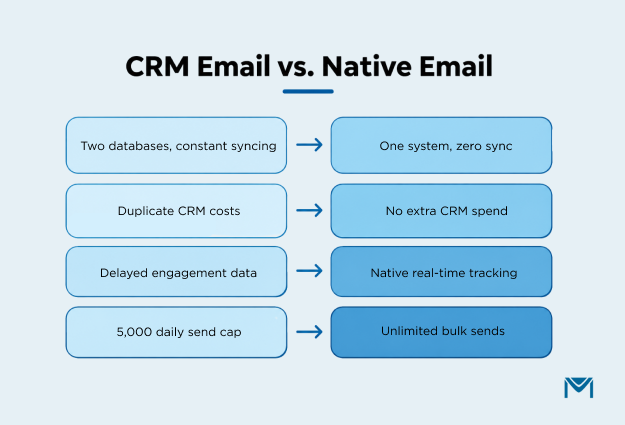
A CRM with email marketing bundles contact management and campaigns into one new platform. In contrast, native email marketing adds campaign tools directly inside a CRM you already use.
For Salesforce users, this distinction drives the decision. Buying a separate CRM means maintaining two contact databases and syncing data between them. On top of that, you pay for CRM features you already have. Anative email marketing app for Salesforce removes that overhead. Your contacts, deal stages, reports, and campaigns stay in one system. Nothing to sync. Nothing to duplicate.
MassMailer works exactly this way. It runs inside Salesforce as a native AppExchange app. You send bulk campaigns, set up automation, and track engagement without leaving the CRM. It also bypasses Salesforce’s daily sending limits, which cap most orgs at 5,000 mass emails per day.
If your data already lives in Salesforce, adding another CRM adds cost without a clear return. Start with a free trial of MassMailer to see how native email marketing compares.
How to Choose the Right CRM for Email Marketing
The right CRM for email marketing depends on one thing: where your sales and marketing workflow starts today.
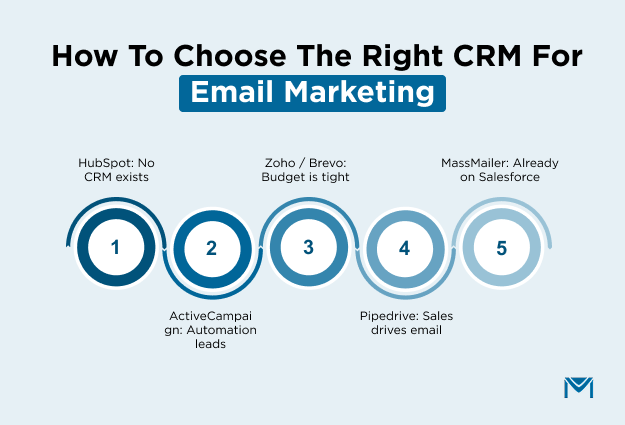
- Starting from scratch with no CRM: HubSpot gives you the most complete free plan with email, forms, and one automation included.
- Need advanced automation above all else: ActiveCampaign offers the deepest workflow builder. Just budget separately for the CRM add-on.
- Running a small team on a tight budget: Zoho CRM paired with Zoho Campaigns starts free for three users. Brevo works better for large lists with volume-based pricing.
- Sales-first team that needs basic email: Pipedrive keeps the pipeline front and center. Its Campaigns add-on covers simple deal-stage emails.
- Already on Salesforce: Every platform above requires you to move data out of Salesforce or maintain two systems. MassMailer runs natively inside Salesforce, sends bulk campaigns without the 5,000 daily cap, and keeps your contact data exactly where it is.
If your CRM is already Salesforce,book a quick demo to see how MassMailer handles email marketing natively before paying for a second platform you may not need.
Frequently Asked Questions
1. Can I use a separate email marketing tool instead of a CRM with built-in email?
2. Which CRM has the best email deliverability?
3. Is a free CRM good enough for email marketing?
4. How much should I budget for a CRM with email marketing?
5. Can a CRM with email marketing replace a dedicated marketing automation platform?
6. What happens to my email data if I switch CRMs later?
Start Your Free Trial Today
Experience MassMailer the easiest way to send personalized emails from Salesforce.
Related Blogs
B2B Email Marketing Software: 8 Platforms Compared by CRM Fit
Salesforce Inbox: Pricing, Limits, and the Gap It Leaves Open
MassMailer Resources


About the Author

Siva Devaki 
Siva Devaki is the founder of MassMailer Inc., a tool that helps Salesforce users optimize email marketing. A passionate advocate for email marketing, Siva writes and hosts podcasts on the topic, sharing insights to help businesses drive revenue and enhance customer engagement through Salesforce email automation and tracking.