


Table of Contents
Quick Answer
A bulk email sender delivers one campaign to thousands of recipients through sending infrastructure built for volume. Brevo fits teams that want email and SMS in one free dashboard. Sender offers the most generous free plan at 15,000 emails per month. Mailchimp has the largest integration ecosystem but charges for unsubscribed contacts. SendGrid scales to millions of sends but needs developer setup. MassMailer runs natively inside Salesforce and logs every engagement event on the CRM record.
Introduction
Gmail gives you 500 sends a day. Outlook gives you even fewer. Neither one tracks opens, handles bounces, or manages unsubscribes. If your contact list has outgrown your inbox, you already know the ceiling is real.
A bulk email sender removes that ceiling. It’s dedicated software that delivers campaigns to hundreds or thousands of recipients through sending infrastructure built for volume, not for one-to-one replies.
The problem is picking the right one. A bad choice lands your campaigns in spam, burns your sender reputation, and splits engagement data across tools that don’t talk to each other. What separates a good bulk email sender from a bad one comes down to deliverability, sending limits, automation, CRM integration, and how it handles compliance.
Brevo, Sender, Mailchimp, SendGrid, and MassMailer are five of the most compared options right now. Here’s how they stack up.
How Top Bulk Email Senders Compare for High-Volume Campaigns
Choosing a bulk email sender comes down to what infrastructure it runs on, how it handles your CRM data, and whether automation is included or paywalled. Here’s how five of the most evaluated tools compare across the factors that matter for high-volume sending.
| Tool | Capterra Rating | Salesforce Integration | Sends from CRM Records | Campaign Attribution in CRM | Automation on Entry Plan |
|---|---|---|---|---|---|
| MassMailer | 4.6 / 5 | Native (AppExchange) | Yes | Yes | Yes |
| Brevo | 4.6 / 5 | Connector (third-party) | No | No | Yes (capped at 2K contacts) |
| Sender | 4.7 / 5 | None | No | No | Yes (unlimited) |
| Mailchimp | 4.5 / 5 | Connector (delayed sync) | No | No | No (removed from free tier) |
| SendGrid | 4.2 / 5 | API-only (custom dev) | No | No | No |
Choosing a bulk email sender comes down to what infrastructure it runs on, how it handles your CRM data, and whether automation is included or paywalled. Here’s how five of the most evaluated tools compare across the factors that matter for high-volume sending.
1. Brevo
Brevo is a multi-channel marketing platform used by over 600,000 businesses. It combines email, SMS, and WhatsApp into one dashboard with a built-in CRM. The free plan gives you 300 emails per day with unlimited contact storage.Paid plans start at $9/month for 5,000 emails. Pricing scales by send volume rather than contact count.
That 300-per-day free cap is the main constraint. If your list hits 2,000 contacts, one campaign takes nearly a week to complete. Upgrading removes the cap, but costs climb with volume. Brevo’s Salesforce connector is available only on the Enterprise plan. Lower tiers need Zapier or third-party middleware.
- Built-in AI assistant generates subject lines on any plan
- SMS and WhatsApp campaigns available on higher-tier plans
- 99.98% of emails deliver in under 20 seconds
- Double opt-in confirmation included by default
2. Sender
Sender is built for small marketing teams that need a full-featured bulk email tool on a tight budget. Over 180,000 businesses use it. The free plan is the most generous in this group. You get 2,500 subscribers and 15,000 emails per month. No credit card required.Paid plans start at $9/month.
The builder loads fast. Pre-built workflows for welcome sequences and abandoned carts work out of the box. Support is available 24/7 even on the free plan. The main gap is reporting depth. Campaign analytics lack the granularity that growing marketing teams need. Sender has no native Salesforce connection. It syncs through Zapier only.
- Email heatmap shows exactly where subscribers click in each campaign
- Signup forms and popups built in for list growth
- Integrates with Shopify, WooCommerce, and WordPress natively
- SMS campaigns available on paid plans
3. Mailchimp
Mailchimp has the largest integration ecosystem of any bulk email sender. Over 300 third-party connections and AI-powered content tools. The free plan gives you 250 contacts and 500 emails per month. That contact cap was 500 until Mailchimp cut it in early 2026. Mailchimp also removed automation from the free tier in mid-2025.Paid plans start at $13/month.
Two things catch users off guard as they scale. First, Mailchimp charges for unsubscribed contacts still sitting on your list. Second, pricing jumps sharply once your contact count grows. The free tier keeps shrinking with each update. Mailchimp’s Salesforce connector syncs contacts hourly and delivers engagement data with a delay.
- A/B testing on subject lines, send times, and content on paid plans
- Customer journey builder supports branching logic with conditional splits
- Send-time optimization predicts the best delivery window per subscriber
- Free plan support ends after 30 days, then community forums only
4. SendGrid
SendGrid, owned by Twilio, is an API-first email platform built for developer teams. It handles transactional and marketing email through REST API and SMTP relay. There’s no permanent free plan. A 60-day trial gives you 100 emails per day.Essentials starts at $19.95/month for 50,000 emails. Pro runs $89.95/month and includes a dedicated IP.
The platform scales to millions of emails per day. The REST API ships with client libraries in seven languages. The tradeoff: SendGrid is built for developers rather than marketers. The visual campaign builder is basic. If your team doesn’t write code, daily use will be a challenge. Salesforce integration requires SMTP relay or custom Apex callouts, both developer-dependent.
- Email validation API cleans lists before sending to reduce bounces
- Real-time event webhooks push delivery data to external systems
- IP warm-up tools gradually increase volume on new dedicated IPs
- No built-in signup forms or landing page builder for list growth
5. MassMailer
MassMailer is a 100% native Salesforce AppExchange app, listed since 2016. It runs entirely inside Salesforce with no external platform or middleware. A free trial is available on the AppExchange.Basic starts at $219/month, Pro at $279/month, and Premier at $409/month.
The core difference: MassMailer sends bulk email from any Salesforce object, including custom objects. It bypasses Salesforce’s 5,000-per-day email limit through its own sending infrastructure. Every engagement event logs as an Activity on the Salesforce record in real time. The price is higher than standalone senders. The tradeoff is that one subscription replaces a separate email tool, a connector, and the manual data work between them. No integration needed because MassMailer is a Salesforce app.
- Deliverability scoring rates inbox placement risk before each send
- Email reputation monitor tracks sender score and flags blacklist issues
- Sends to parent or child records without custom lookup configuration
- Built-inemail verification cleans lists before campaigns
A bulk email sender that works well on its own can still create problems when your CRM holds the data it needs. The next section covers why that gap matters more than most comparison pages let on.
Why CRM Integration Is the Factor Most Comparisons Miss
CRM integration controls whether your campaign data stays inside your sales pipeline or fragments across two systems that never fully sync. Pricing tables and feature checklists don’t surface this problem. The consequences only show up after you start sending.
When your bulk email sender operates outside your CRM, three things break.
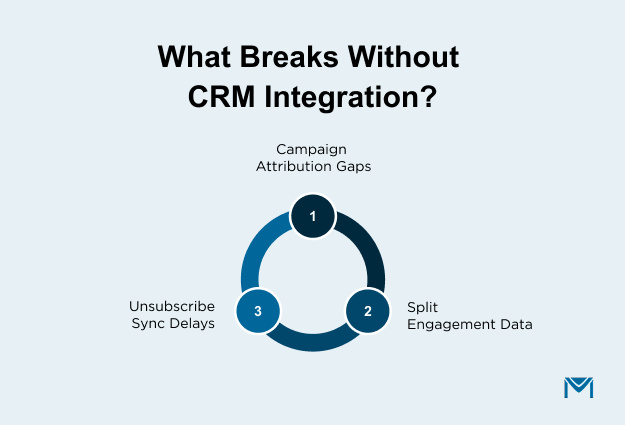
- Campaign attribution gaps. External senders don’t write send data back to your CRM’s campaign records. Marketing sees email performance in one dashboard. Sales sees pipeline in another. Influence reports that tie revenue to a specific campaign lose accuracy because half the touchpoints live outside the CRM.
- Split engagement data. Opens, clicks, and bounces live in the sender’s dashboard. None of it appears on the Contact or Lead record in your CRM. A sales rep following up on a warm lead has no way to see which emails that person opened. Every follow-up starts with a tool switch instead of a record check.
- Unsubscribe sync delays. When someone opts out through the external sender, that status syncs back to your CRM on a schedule. During the gap, your CRM still shows that contact as eligible. Outreach sent during that window risks a CAN-SPAM or GDPR violation.
A bulk email sender with nativeSalesforce email integration eliminates all three problems. Sends, engagement, and opt-outs stay in one system with zero sync delay.
How MassMailer Sends Bulk Email Natively Inside Salesforce
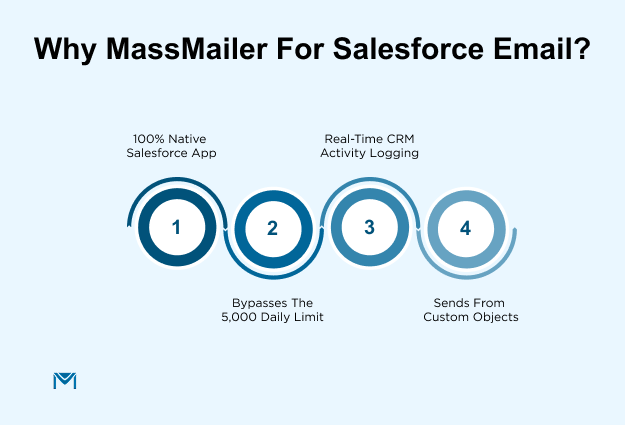
MassMailer operates as a 100% native Salesforce AppExchange app. It doesn’t sync data between platforms. It runs where your data already lives.
Send from Leads, Contacts, and Custom Objects Without Exporting
MassMailer sends bulk email directly from any Salesforce object. Standard objects like Leads and Contacts work by default. Custom objects work the same way. If your org stores student records, patient data, or event attendees in a custom object, MassMailer reaches them directly. No export. No middleware.
External senders only access Contacts and Leads through connector sync. Custom objects stay invisible to them.
Bypass Salesforce’s Daily Email Limits Through External Sending Infrastructure
Salesforce caps org-wide email output at 5,000 per day. MassMailer routes sends through its own infrastructure instead. Your emails go out authenticated with SPF, DKIM, and DMARC. They don’t count against your org’s daily cap.
A Salesforce admin can send 10,000 or 50,000 emails in a single day. No platform limit blocks the send.Sender reputation monitoring tracks IP health and flags blacklist issues before they affect delivery.
Track Every Open, Click, and Bounce on the Salesforce Record
Every engagement event logs as an Activity on the Salesforce record in real time. Opens, clicks, bounces, and unsubscribes all appear on the Contact or Lead. Campaign influence reports reflect actual email performance without manual imports.
Sales reps see engagement data on the record before they call. Marketing managers pull reports from Salesforce without switching to a second tool.
If your organization doesn’t use Salesforce, standalone senders like Brevo or Sender cover the basics well. If you need SMS and WhatsApp bundled with email, Brevo handles that.
For Salesforce teams ready to see how native bulk email works, walk through a live demo with the MassMailer team.
Frequently Asked Questions
1. What is a bulk email sender?
2. Is sending bulk emails legal?
3. What is the difference between bulk email and transactional email?
4. How do you send bulk emails without landing in spam?
5. How many emails per day counts as bulk sending?
6. Do you need to warm up a new domain before sending bulk email?
Related Blogs
7 Best CRMs for Email Marketing in 2026 (Ranked by Real Fit)
B2B Email Marketing Software: 8 Platforms Compared by CRM Fit
Salesforce Inbox: Pricing, Limits, and the Gap It Leaves Open
MassMailer Resources


About the Author

Siva Devaki 
Siva Devaki is the founder of MassMailer Inc., a tool that helps Salesforce users optimize email marketing. A passionate advocate for email marketing, Siva writes and hosts podcasts on the topic, sharing insights to help businesses drive revenue and enhance customer engagement through Salesforce email automation and tracking.