





Table of Contents
Marketing teams often reach a point where their Salesforce email strategy needs a clearer direction, but choosing the right campaign approach is not always straightforward. Understanding the difference between an email newsletter and a drip campaign helps teams decide how to organize communication, engage contacts, and support different marketing objectives.
Without a clear understanding of how these approaches work, teams may struggle to match the right message with the right audience, timing, and business purpose.
This guide explains what newsletters and drip campaigns are. It covers how they differ across automation, targeting, personalization, and conversion goals. It also clarifies when each approach fits best.
Beyond that, it shows how these email strategies support different stages of the customer journey. Salesforce teams can use this to plan communication more effectively.
What Is an Email Newsletter?
An email newsletter is a recurring communication sent to a broad subscriber audience on a planned schedule, built around a fixed content calendar rather than an individual contact action. It helps businesses maintain subscriber engagement by sharing updates, curated resources, company announcements, industry insights, or educational content across multiple touchpoints.
In a Salesforce workflow, you typically create an email newsletter from planned content. You then distribute it to a prepared audience, such as a list view, report, or campaign member group. Marketers follow a scheduled cadence. They decide when to send each issue and which audience should receive it. It does not depend on a workflow condition to start communication. This approach supports teams managingemail newsletter distribution in Salesforce as part of their ongoing communication strategy.
The purpose of newsletter marketing is to maintain a consistent relationship with subscribers rather than push one immediate conversion action. Consistent value, relevant content, and regular communication help teams sustain engagement over time. Industry benchmark research fromDMA’s Email Benchmarking Report 2025 provides email performance data that teams use to evaluate engagement trends and improve future communication.
A new content alert you send whenever you publish a blog may look event-driven. But it's still a newsletter if you base the message on published content. You're delivering it to a subscriber list, not reacting to an individual action. That's the key distinction. Planned content distribution drives the send, not a subscriber's behavior.
What Is an Email Drip Campaign?
In an email drip campaign, you prebuild a sequence of emails. The system automatically sends them to contacts based on a defined schedule, action, or status change. It guides an individual contact through a planned communication path based on their stage, activity, or progress.
You create a drip email campaign once, mapping each email, timing step, and message purpose in advance. Enrollment and pacing run through rules like status field changes, form submissions, or list membership updates. This allows automated drip emails to continue without manual sending.
For example, a lead who downloads a pricing guide can enter a five-email sequence spaced across several days, with each message designed to move the contact toward a specific next action, such as requesting a demo.
The core of a drip email definition is that the sequence supports a defined communication goal for a specific contact journey. In Salesforce, teams can structure adrip campaign workflow around planned communication steps and contact progression rules.
A campaign called a drip sequence but released only on a fixed calendar without meaningful enrollment logic does not operate like a true drip campaign. The automation structure and enrollment rules determine how the sequence functions.
How Drip Sequences Trigger and Run
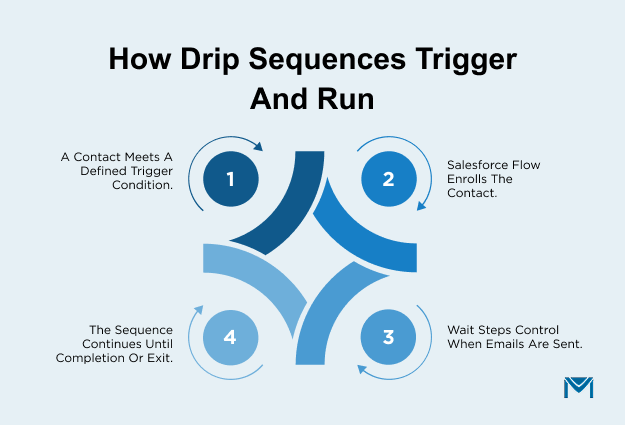
A drip sequence starts when a defined condition places a contact into the communication path. It continues through planned steps until the contact completes the sequence or exits. Two common trigger types drive these sequences. Action-based triggers fire when a contact takes an action. Status-based triggers fire when a Salesforce field changes to meet a defined condition.
In Salesforce, a workflow or Flow can monitor a field or event and enroll a contact when the required condition is met. For example, a custom field such as Drip_Stage__c can indicate where a contact is within a sequence, allowing teams to track progression through planned steps. Once a contact enrolls, wait steps control when the system sends the next email. You don't need to manually schedule each contact.
Re-entry rules are also important when managing automated sequences. If a workflow unintentionally resets a trigger field, a contact may enter the same sequence again and receive duplicate emails. Reviewing enrollment conditions and suppression rules helps prevent unwanted communication and protects the contact experience.
This type oftrigger-based email communication helps teams create structured email automation based on contact actions and status changes while maintaining control over communication flow.
Email Newsletter vs. Drip Campaign: Key Differences
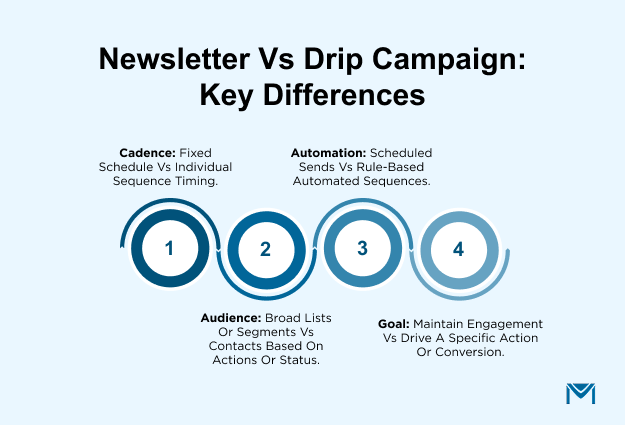
The difference between an email newsletter and a drip campaign becomes clearer when you compare them side by side. Look at how each handles timing, audience, personalization, automation, and goals. You design a newsletter for planned communication with an audience. You build a drip campaign around a contact's progression through a specific journey.
| Comparison Factor | Email Newsletter | Drip Campaign |
|---|---|---|
| Cadence | Fixed schedule based on a content calendar | Individual timing based on enrollment and sequence steps |
| Audience | Broad list or selected segments | Specific contacts based on actions or status |
| Personalization | Content adapted for audience groups | Messaging tailored to individual contact context |
| Automation | Scheduled sends requiring issue preparation | Rule-based sequences that continue automatically |
| Goal | Maintain engagement and share updates | Drive a specific action or conversion outcome |
These differences help teams evaluate which communication model fits their workflow. Understanding howemail sequences are structured makes it easier to plan communication that matches the intended audience, timing, and business outcome.
Timing and Frequency
A newsletter has one send date, while a drip campaign can have different send dates for every contact entering the sequence. This difference in cadence changes how teams schedule communication and measure timing effectiveness.
Newsletter timing is set once per issue based on a shared calendar, such as a weekly update or monthly company communication. Every subscriber receives the message according to the same schedule, regardless of when they joined the audience. A drip campaign follows an individual contact timeline that begins at enrollment, with each email scheduled using wait steps from that starting point.
For example, a monthly B2B newsletter may reach subscribers during the first week of every month. An email sequence works differently. It may send follow-ups three days after enrollment and continue with longer intervals.
A quarterly newsletter can create a cadence mismatch when a new subscriber joins after an issue has already been sent and waits months for the next update. The sending model determines whether communication arrives at a useful moment for the recipient.
Audience Targeting and Personalization
The audience approach determines how closely communication reflects a contact’s situation. A newsletter typically groups subscribers based on shared attributes, while a drip campaign uses the specific context that caused a contact to enter the sequence.
Newsletters usually rely on broad lists or light segments based on attributes such as industry, role, location, or customer category. The content may be adjusted for groups, but the message is generally created for a wider audience.
Drip campaigns connect personalization to a specific behavior or status. Instead of only adding a name, the message can reflect the action that caused enrollment, such as downloading a resource or reaching a particular stage.
For example, a newsletter may target contacts in a specific industry with general updates, while a drip email can reference the exact whitepaper a contact downloaded and guide them toward the next relevant step. Effectivecontact segmentation helps teams organize audiences without creating unnecessary complexity.
However, over-segmenting newsletter audiences can create dozens of micro-groups that function like separate sequences, increasing management effort without always improving relevance.
Automation and Trigger Logic
The level of automation differs based on what happens after a communication is created. A newsletter automates the delivery of a prepared message, while a drip campaign automates the process of deciding when contacts receive each step in a sequence.
A newsletter can be scheduled in advance, but every issue still requires fresh content, review, approval, and preparation. The automation mainly controls when the completed message is delivered.
A drip campaign uses standingemail automation that continues working after the sequence is built. New contacts can enter the workflow, move through planned steps, and receive scheduled messages without someone manually restarting the process.
For example, a drip sequence created in Flow Builder can continue running for new contacts over time while tracking their progression through the workflow. Teams also need to consider Salesforce record structure, because a custom object may require a different automation approach compared with standard Lead or Contact records.
Automation reduces manual effort, but the workflow design determines how reliably communication operates.
Conversion Goals and Metrics
The right measurement depends on what the communication is designed to achieve. You evaluate a newsletter through ongoing engagement trends. You measure a drip campaign by whether contacts complete the action the sequence was built to support.
Newsletter performance is usually reviewed across multiple sends, including opens, clicks, and subscriber interaction over time. These metrics help teams understand whether content continues to provide value to a wider audience.
A drip campaign is measured against a specific outcome, such as completing onboarding, requesting a demo, or progressing to the next stage of a customer journey. Comparing both approaches using the same metric can create misleading conclusions. Trackingemail metrics helps teams connect email activity with the outcomes each communication type is designed to achieve.
McKinsey research on personalized marketing draws a similar line, separating upstream engagement metrics like opens and clicks from downstream outcome metrics like conversions and ROI. It finds that behavior-triggered, personalized communication can lift revenue by 5 to 15 percent and marketing ROI by 10 to 30 percent over generic, one-size-fits-all messaging.
That gap is the reason a drip campaign's conversion goal needs its own measurement lens rather than the engagement metrics built for a newsletter. A drip campaign with strong opens but no downstream conversions may appear successful while failing its actual purpose.
When to Use a Newsletter vs. a Drip Campaign
The right choice depends on whether you want to maintain ongoing audience communication or guide contacts toward a specific next step. A newsletter supports continued engagement with a broader audience, while a drip campaign helps move contacts through a defined stage of their customer journey.
Understanding where a contact is within thecustomer journey helps teams decide which communication approach fits the intended outcome.
When a Newsletter Fits Best
If you would send the same message to everyone on the list regardless of what they have done, that is a newsletter. It works best when the goal is to maintain visibility with an audience over time through company updates, product announcements, curated resources, or educational content.
A newsletter fits when communication is genuinely one-to-many and does not depend on an individual contact’s recent behavior or status. Teams can prepare content in advance and distribute it to an active Salesforce Campaign audience without creating separate communication paths for each recipient.
For example, you can send a monthly product update newsletter to all active contacts in a Salesforce Campaign. Previous interactions don't matter here. However, a newsletter isn't the right tool to close a specific deal or push one contact toward a defined action. You haven't built the message around that individual situation, so the communication feels irrelevant.
When a Drip Campaign Fits Best
If the message only makes sense because of something a specific contact just did, that is a drip campaign. It fits when there is a clear starting point, a defined next step, and a reason to tailor communication based on contact behavior or status.
A drip campaign works well for processes such as moving a trial user toward activation, following up after a demo request, or guiding a lead through a structured journey. The communication is designed around a specific outcome rather than general awareness.
For example, a five-email onboarding drip can begin when a Lead’s status changes to “Trial Started” and continue until the contact converts or completes the sequence. Building this type of structured communication aroundlead nurturing helps teams align messages with the stage a contact has reached.
However, running a drip against an inactive list without a meaningful recent trigger can reduce relevance and create unnecessary outreach.
Running Both Newsletters and Drip Campaigns from Salesforce
The moment you run a newsletter and multiple drip campaigns in the same week, they begin competing for the same Salesforce email capacity. Managing both successfully requires planning around shared sending limits, workflow timing, and how email activity remains connected to CRM records.
Salesforce’s native email sending limit allows up to 5,000 external emails per day. This means a large newsletter send and several active drip sequences can quickly consume available capacity. For example, say you send a 4,000-contact monthly newsletter on the same day your drip sequences generate another 2,000 emails. You'll exceed the native limit unless you coordinate the sends.
Some teams handle this by manually staggering newsletter deliveries and drip schedules across different days. While this avoids immediate send collisions, it creates additional operational effort because teams must continuously monitor timing across multiple campaigns.
For organizations managing higher-volume email programs, aSalesforce email marketing solution can help remove sending-limit constraints while keeping engagement activity connected to CRM records in real time. This allows teams to manage newsletters and automated communications without separating email performance data from Salesforce.
The main challenge is not choosing between newsletters and drip campaigns. It's ensuring both can operate together. That means no delivery conflicts, no manual scheduling overhead, and no disconnected reporting.
Choosing the Right Email Approach for Your Salesforce Workflow
The right approach depends on whether you need ongoing reach or a specific next step. A newsletter supports continued audience communication, while a drip campaign guides contacts through a defined journey.
For many Salesforce teams, the practical answer is to use both. The key is aligning each communication type with the right workflow, audience, and business goal.
A Salesforce-native email marketing solution likeMassMailer helps teams manage newsletters and automated email journeys while keeping communication connected to Salesforce. This approach helps teams maintain consistent communication across different customer interactions.
Explore how MassMailer helps bring these workflows together in Salesforce, andbook a demo to see how your team can manage email communication more efficiently.
Frequently Asked Questions
1. Can a newsletter and a drip campaign run for the same contact at the same time?
2. How long should a drip campaign run before a contact goes back to the regular newsletter?
3. Do drip campaigns hurt deliverability more than newsletters?
4. What’s the difference between a drip campaign and a nurture campaign?
5. Can a newsletter issue double as the first email in a drip sequence?
6. How do you know a drip campaign should switch over to a newsletter cadence instead?
MassMailer Resources


MassMailer Glossary