




Table of Contents
Introduction
Salesforce email for event management works for basic communication, but starts to break when events scale.
You can send confirmations, reminders, and follow-ups using standard objects like Contacts and Campaign Members. But event data, registrations, sessions, and attendance live in custom objects. That disconnect makes automation harder, delays communication, and limits how precisely you can target attendees.
As a result, teams rely on Flows, manual list building, and workarounds just to keep event emails running.
This guide breaks down where Salesforce email workflows fail for event management, and how teams fix them by running communication directly from event data instead of routing everything through Contacts.
How to Manage Event Emails in Salesforce (Quick Answer)
Salesforce email for event management involves sending confirmation, reminder, and follow-up emails using CRM data. While Salesforce supports email through Contacts and Campaigns, it becomes difficult to manage event communication when registration and session data live in custom objects.
To manage event emails effectively in Salesforce, teams should run email workflows directly from event data instead of relying only on Contact-based automation.
Best practices include:
- Send confirmation emails directly from event registration records
- Segment attendees using session, ticket type, and event data
- Automate reminders based on event timing and attendee time zones
- Trigger follow-ups based on attendance and participation status
- Track email engagement alongside attendee activity
While this approach improves how event emails are managed in Salesforce, most teams don’t start here. They begin with standard workflows using Contacts, Campaigns, and Flows, and only encounter limitations as event complexity increases.
To understand why these challenges show up, it’s important to look at how Salesforce email workflows are structured today and where they break for event management use cases.
5 Areas Where Salesforce email for event management falls short and how teams fix it at scale
Salesforce email for event management falls short because email actions do not work directly with event registration data. Instead, teams must rely on Contacts, Campaign Members, and Flow-based automation to send emails. This creates delays, broken workflows, and limited control over attendee communication as events scale.
To solve this, teams move email execution closer to the event data layer. Instead of routing everything through Contacts, they use Salesforce-native tools that can trigger emails directly from event-related objects and workflows.
The gaps become clear across each stage of event communication, starting with registration confirmations.
1. Event registration confirmation emails are hard to automate reliably in Salesforce
When an attendee completes an event registration in Salesforce, the system should send a confirmation email immediately with the correct session and event details. However, this rarely happens in practice.
The problem starts with how Salesforce stores data. Registration details sit in a custom object, while email actions work only with Contacts or Campaign Members. Because of this, Salesforce cannot send emails directly from the registration record.
So, teams build a registration workflow using Salesforce Flow. First, they detect a new registration record. Then, they map that data to a Contact or Campaign Member. Finally, they trigger a Salesforce flow email alert to send the confirmation.
However, this extra layer creates problems.
- Confirmation emails get delayed because the Flow does not run instantly
- Session or ticket details do not always pass correctly into the email
- Even small changes in the registration workflow can break the setup
As a result, attendees may not receive the right information at the right time, which directly affects their event experience.
How teams automate event registration confirmation emails in Salesforce using custom objects
To fix this, teams stop routing registration data through Contacts. Instead, they send emails directly from the registration record.
With MassMailer, teams trigger confirmation emails from the same object used for event registration. This keeps the data and email in one place.
- Send event registration email and Salesforce confirmations directly from the registration record
- Use session, ticket, and event campaign fields in the email without mapping
- Trigger emails immediately when the registration status updates
Because this setup works at the data source, it fits naturally into Salesforce email automation without relying on Flow-based workarounds.
Also, unlike many external Salesforce email integration tools, this approach does not require syncing event data into Contacts before sending emails.
As a result, confirmation emails go out instantly, include the correct details, and stay reliable even as events scale.
2. Attendee segmentation and targeting are difficult to manage at scale
In event workflows, segmentation depends on how attendees register. Each registration record contains details like selected sessions, ticket category, event campaign, and sometimes region or time zone. This data lives in custom objects tied to attendee management.
Salesforce does not segment directly from this layer. Instead, teams must convert event data into list views using Reports or Campaign Members before sending emails.
This creates a disconnect between registration and targeting.
- Session-based targeting requires rebuilding reports for each event and each session track
- Ticket-level segmentation (VIP vs general) depends on manual Campaign assignment
- Time zone filtering for reminders is not native and requires additional fields or logic
- Updates in registration data do not automatically reflect in Campaign Members used for Salesforce email campaigns
As a result, targeting becomes static. Emails often go to the wrong audience or miss important attendee groups, especially in multi-session conferences or large-scale events.
How teams segment event attendees in Salesforce using registration and session data
Teams solve this by segmenting directly on event data instead of converting it into Campaign-based lists.
With MassMailer, segmentation runs on the same custom objects used for event registration and attendee management, so targeting reflects real-time event data.
- Filter recipients using fields like session selection, ticket type, event campaign, and attendee status directly from the registration object
- Build dynamic segments without creating separate Salesforce email list reports or Campaigns
- Send targeted emails using Salesforce mass email campaign logic from filtered event data
- Ensure segmentation updates automatically when registration details change
Because this approach works inside native Salesforce email marketing workflows, teams do not need to rebuild segmentation logic for every event.
Unlike external setups that rely on Salesforce email sync or third-party tools, this keeps segmentation tied to the actual registration layer.
In practice, this means every email aligns with what the attendee selected, without manual effort or repeated setup for each event.
3. Event reminder sequences lack flexibility and timing control
In event operations, reminder emails follow a fixed sequence tied to the event timeline. Most teams use a structure like: registration confirmation → 7-day reminder → 1-day reminder → same-day reminder. These emails must adjust based on session timing, attendee time zone, and registration status.
In Salesforce, teams build this using Salesforce workflow automation with multiple Flows. Each step in the reminder sequence becomes a separate Flow or scheduled action tied to the event date.
This approach breaks as events scale.
- Each event requires its own set of Flows for T-7, T-1, and day-of reminders
- Time zone handling depends on custom fields and manual logic
- Reminder timing does not adjust easily when session schedules change
- No built-in way to trigger reminders based on attendee engagement within Salesforce email campaigns
As a result, reminder sequences become rigid and difficult to manage across multiple events or webinars. Attendees receive emails at the wrong time or miss them entirely, which directly impacts attendance.
How teams automate event reminder sequences in Salesforce based on timing and attendee behavior
Instead of maintaining separate Flows for every event, teams shift reminder logic closer to the event data itself.
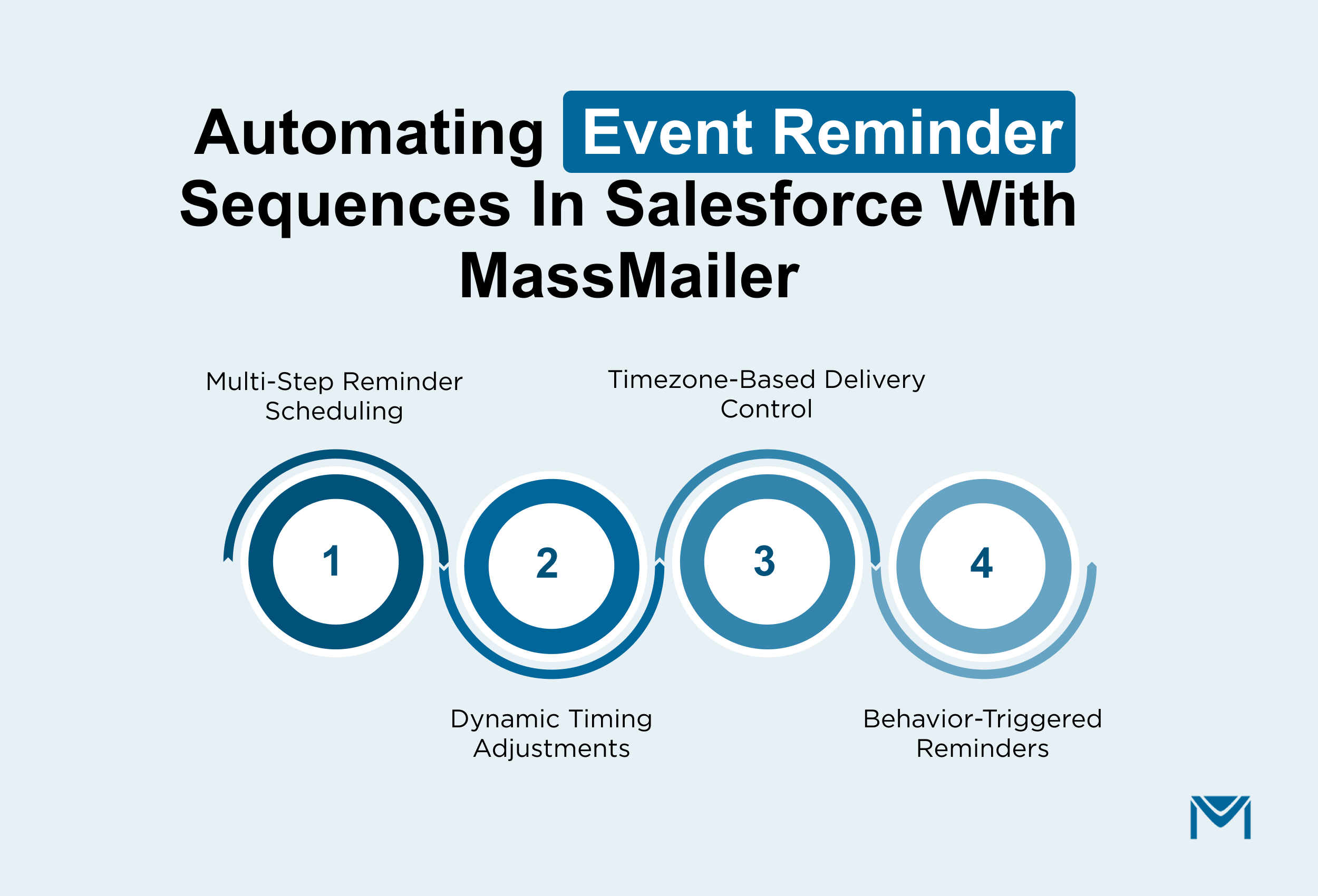
With MassMailer, reminder sequences are configured using event and session fields, so timing and delivery stay aligned with how the event is structured.
- Define reminder steps (T-7, T-1, same-day) using event date and session timing fields
- Adjust send timing automatically when event schedules change
- Use attendee-level fields like time zone to control delivery timing
- Trigger follow-up reminders based on engagement signals captured through Salesforce email tracking
MassMailer runs this logic directly within Salesforce, so reminder execution stays connected to the registration data instead of being split across multiple Flows.
In practice, this means teams can reuse the same reminder setup across events, adjust timing without rebuilding logic, and ensure attendees receive reminders when they are most likely to attend.
4. Post-event follow-up emails and surveys require manual effort
Once an event ends, the next step is to engage attendees while interest is still high. Teams typically send thank-you emails, feedback surveys, session recordings, and invites to upcoming programs.
In Salesforce, this stage becomes manual because communication depends on how data is structured. Attendance status and session participation sit in custom objects, while email actions rely on Contacts or Campaign Members. Because of this, teams cannot trigger messages directly from attendee activity.
So, teams rely on reports and manual segmentation after the event. Even when using Salesforce outbound email, the logic is not tied to real participation.
- Teams build reports for attendees, no-shows, or session-specific groups after the event
- Lists are created manually and used to send post-event emails
- Messages go out late instead of immediately after the session ends
- Session recordings and surveys are not aligned with actual participation
This delay reduces response rates and weakens engagement, especially for multi-session conferences.
How teams manage post-event follow-up emails in Salesforce at scale
Instead of rebuilding lists after every event, teams connect communication directly to attendee activity stored in event records.
With MassMailer, emails run from the same objects used for event registration and attendance tracking, so communication reflects actual participation.
- Trigger emails based on attendance status stored in the event object (attended, no-show, partial attendance)
- Send session-specific content using fields linked to session participation
- Automatically send survey emails when event status updates using Salesforce email services
- Maintain engagement visibility through Salesforce activity tracking without separate reporting setups
Because this setup works within Salesforce, teams avoid rebuilding lists and reduce dependency on manual steps after every event.
In practice, this means attendees receive relevant communication immediately after the session ends, surveys reach the right audience at the right time, and teams keep engagement active without extra effort.
5. Limited tracking reduces visibility into attendee engagement
After a conference or webinar ends, teams need clear answers. Which reminders drove registrations to attendance? Which attendees dropped off after registering?
In Salesforce, this level of insight is difficult to achieve. Email performance and attendee activity live in separate layers. Email data is stored as activity records, while session participation and attendance are tracked in custom objects.
Because these systems are not connected, teams cannot easily measure how communication influenced actual participation.
- No direct way to compare reminder performance with the final show-up rate
- Session attendance is not linked to email interactions or send timing
- Difficult to identify where attendees drop off between registration and live participation
- Engagement insights are spread across Salesforce email analytics, dashboards, and custom reports
Even when teams build reports using a Salesforce dashboard, they still rely on stitched data from multiple sources. This makes it hard to answer simple questions like: which reminder sequence actually improved attendance?
As a result, decisions around timing, session promotion, and audience targeting are based on assumptions instead of data.
How teams track attendee engagement and event performance in Salesforce
To get meaningful insight, teams need to connect communication data with attendee behavior at the record level.
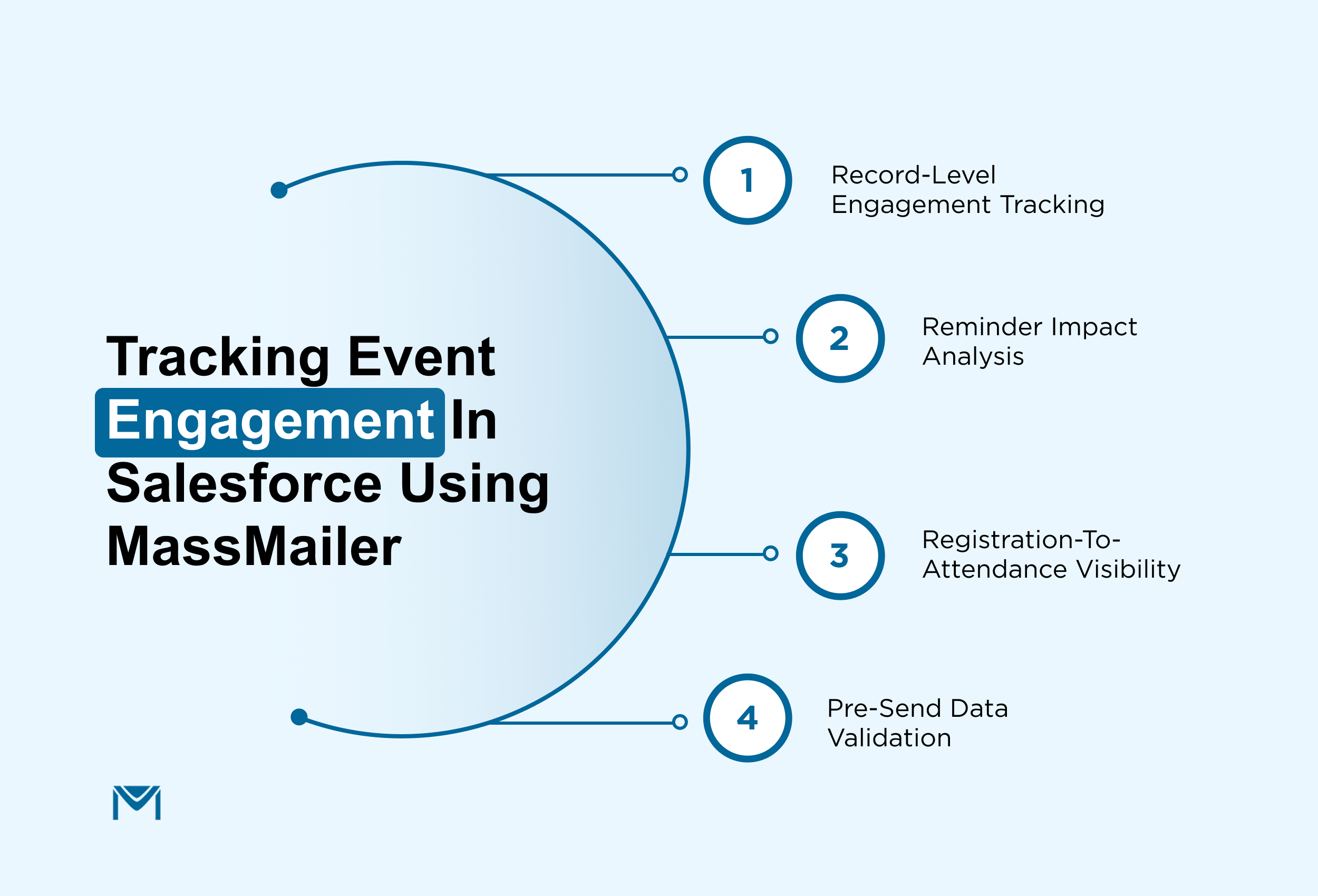
With MassMailer, email engagement is tied directly to the same records used for event registration and session participation. This allows teams to evaluate performance across the full event lifecycle without combining multiple reports.
- Track how each email interaction relates to attendee behavior using Salesforce email tracking at the record level
- Analyze how different reminder timings impact attendance using structured Salesforce email open rate insights
- Monitor drop-offs between registration and participation without building separate reports
- Maintain clean and reliable data by validating contacts through MassMailer email verifier before sending
Because this setup works inside Salesforce, teams do not need external tools or manual data stitching.
In practice, this means:
- Teams can identify which reminders actually improve attendance
- Session-level engagement becomes measurable and actionable
- Future events can be optimized using real participation data
This shifts event reporting from basic metrics to actionable insight. This is where most teams start evaluating Salesforce-native email solutions built specifically for event workflows.
How Opal Group improved event email workflows in Salesforce with MassMailer
Opal Group manages multiple large-scale conferences, where attendee communication is tightly tied to registration data, session schedules, and event timelines. Every stage, from confirmation to reminders to post-event emails, depends on accurate, timely communication.
As their events scaled, their Salesforce setup started to break at the execution layer.
Registration and attendee data lived in custom objects, but email sending depended on Contacts and Campaign Members. This meant their team had to move data out of the registration layer before sending any communication.
At the same time, they were hitting Salesforce email limits during peak registration and reminder periods. Even when emails were sent, they lacked clear visibility into how those emails influenced attendance or session engagement.
This created real operational friction:
- Confirmation and reminder emails depended on manual steps or Flow workarounds
- Bulk sends were restricted during high-volume registration windows
- Event communication was disconnected from actual attendee data
- Campaign performance could not be tied to attendance or session participation
As a result, their team spent more time managing workflows than improving event outcomes.
What changed with MassMailer
Instead of pushing event data into Contact-based workflows, Opal Group shifted email execution to the same layer where event data already existed.
MassMailer allowed them to run communication directly from their event registration and attendee objects inside Salesforce.
- Emails were triggered from custom objects tied to event registration, eliminating the need for Flow-based mapping
- High-volume sends ran without hitting standard Salesforce daily limits during critical event windows
- Confirmation, reminder, and post-event communication followed a single, consistent workflow across events
- Email engagement could be reviewed alongside attendee data, making it easier to understand what drove attendance
This changed how their team worked day to day.
They no longer needed to rebuild email logic for every event or maintain multiple Flows to keep communication running. Instead, communication stayed aligned with attendee data from registration through post-event engagement.
Most importantly, the system fits into their existing Salesforce setup. Their event workflows, objects, and processes remained unchanged, while email execution became more reliable and easier to manage.
For teams running multi-session conferences or high-volume webinars, this is often the turning point: moving from patching email workflows to running event communication directly from the data that drives the event.
Conclusion
If you’ve worked on event workflows in Salesforce, you’ve likely felt this gap. The data is there, registrations, sessions, and attendee activity, but email communication doesn’t naturally follow it. So teams end up patching things together, and over time, it starts affecting attendance, engagement, and overall event outcomes.
The shift isn’t about adding more automation. It’s about running communication from the same place where your event data already lives.
That’s where teams start seeing fewer workarounds, more reliable execution, and clearer insight into what actually drives attendance.
If you want to see how this works inside your Salesforce setup, the fastest way is to evaluate it directly.
Book a MassMailer demo and see how your event workflows can run without breaks, delays, or rebuilds.
Frequently Asked Questions
1. Can Salesforce send event registration confirmation emails automatically?
2. How do you send event reminder emails in Salesforce based on time zones?
3. How can you segment event attendees in Salesforce more effectively?
4. Why is post-event follow-up difficult to automate in Salesforce?
5. How do you track event email performance in Salesforce?
6. What should you look for in a Salesforce email solution for event management?
Start Your Free Trial Today
Experience MassMailer the easiest way to send personalized emails from Salesforce.
Related Blogs
MassMailer Resources

MassMailer Glossary
About the Author

Siva Devaki 

Siva Devaki is the founder of MassMailer Inc., a tool that helps Salesforce users optimize email marketing. A passionate advocate for email marketing, Siva writes and hosts podcasts on the topic, sharing insights to help businesses drive revenue and enhance customer engagement through Salesforce email automation and tracking.