Table of Contents
Your CRM tracks every lifecycle change and engagement signal. Why are your email campaigns still ignoring that data?
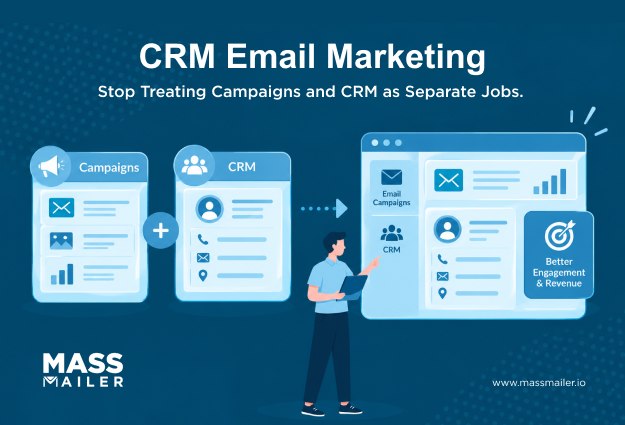
CRM email marketing closes that gap by turning CRM data into decisions you can act on. When customer information and campaign execution stay disconnected, relevance suffers, and follow-up becomes harder to coordinate.
CRM-driven email connects segmentation, personalization, automation, tracking, and follow-up through one data flow. This helps you use current customer context instead of treating every email campaign as a separate task.
In Salesforce, campaign activity, customer context, and sales follow-up can all draw from the same CRM data.
This guide shows how the model works and how CRM data improves execution. It also explains how to evaluate your setup and apply the workflow in Salesforce.
How does CRM email marketing work?
CRM email marketing uses CRM data to decide your audience, timing, message, and follow-up. Email activity returns engagement signals to your CRM, keeping campaign and customer context connected.
CRM vs email marketing comes down to role. Your CRM holds relationship context, while email marketing handles execution and engagement capture.
| Area | CRM | Email marketing |
| Primary role | Organizes customer relationship data | Executes email communication |
| Data used | Contact, account, lifecycle, pipeline data | Audience and campaign data |
| Automation | Supplies conditions and triggers | Executes triggered or scheduled messages |
| Tracking | Connects activity to customer records | Captures campaign engagement |
| Main value | Customer context and relationship visibility | Campaign execution and communication |
Salesforce explains how CRM data can support segmentation, personalization, automation, nurturing, and campaign measurement.
Before the send, your CRM provides customer context. Afterward, engagement adds fresh information to the same record. Campaign decisions stay tied to the customer relationship instead of becoming separate streams of email activity.
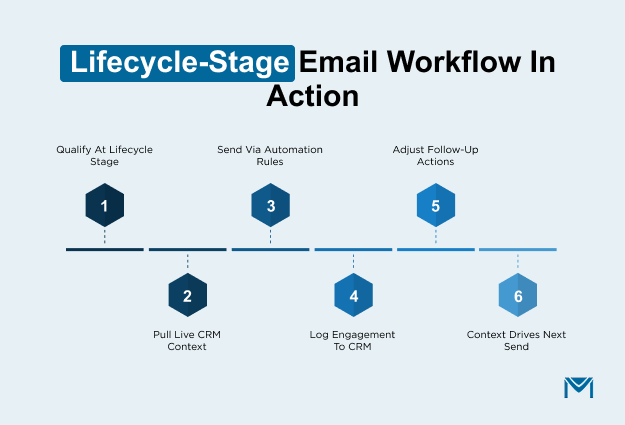
A lifecycle-stage change shows how the workflow can operate:
- Qualify a contact when the CRM record reaches a defined lifecycle stage.
- Use current CRM details to determine the audience and provide context for the message.
- Send the campaign according to the automation rules already in place.
- Record clicks, replies, or other engagement signals in your CRM.
- Use that activity to adjust follow-up or future campaign eligibility.
- Let customer context guide each send, while response data shapes the next action.
Keeping engagement tied to your customer records also reduces reliance on separate campaign reporting.
In Salesforce, you can connect campaign activity with the records your sales and marketing teams already use. You can give both teams shared context without separating campaign activity from CRM records.
How does CRM data improve email marketing?
CRM data improves email marketing by guiding audience, timing, relevance, eligibility, and follow-up with current customer information in your CRM.
| CRM data type | Examples | Email marketing decision |
|---|---|---|
| Contact and account data | Role, industry, geography, account | Who you should include |
| Lifecycle and pipeline data | Lead status, score, opportunity stage | When you should communicate |
| Engagement and transaction data | Clicks, purchases, prior activity | What message or follow-up you should use |
| Consent and data quality | Opt-out status, valid email, suppression | Whether you should include the contact |
Eligibility also depends on consent and data quality before a commercial send. FTC's CAN-SPAM Compliance requires that every commercial email include a working opt-out mechanism.
Recipients must be able to unsubscribe for at least 30 days after you send. You must honor opt-out requests within 10 business days. You also cannot require personal information beyond an email address to process the request.
CRM data for segmentation and personalization
CRM data sharpens segmentation by keeping audience rules tied to current customer information. You can build segments around details that reflect each relationship today.
Useful inputs include:
- Contact context: role, geography, industry, account type, or relationship status.
- Lifecycle context: lead status, lifecycle stage, lead score, opportunity stage, or customer status.
- Engagement context: recent clicks, replies, purchases, event activity, or other recorded interactions.
- Account context: company size, account ownership, segment, or commercial relationship.
Together, these fields help you decide who belongs in an email campaign. You can also exclude records that no longer fit.
Static exports can become inaccurate as CRM records change. Your export can become outdated when role, stage, ownership, or engagement status changes. Using current CRM data keeps audience decisions aligned with the latest record.
The same CRM context can shape personalization in several practical ways:
- Lifecycle stage: adjust messaging for evaluation, onboarding, retention, or another relationship stage.
- Account context: tailor relevance using industry, account type, or the current commercial relationship.
- Recent engagement: reflect meaningful activity when it changes what your contact needs next.
For example, you may target prospects entering evaluation differently from existing customers. Shared industry or location does not erase different lifecycle needs.
You can also combine several fields when one attribute provides too little context. Role, lifecycle stage, and recent engagement can narrow your audience.
Consistent field definitions matter as well. If your teams interpret a status differently, the same record can enter conflicting segments. Shared definitions keep targeting consistent.
A unified customer view helps you make those combinations consistently across campaigns and teams. Use only fields that improve relevance, timing, or message usefulness within each email campaign.
CRM email automation and sales follow-up
CRM email automation can use meaningful CRM changes to control send timing and follow-up.
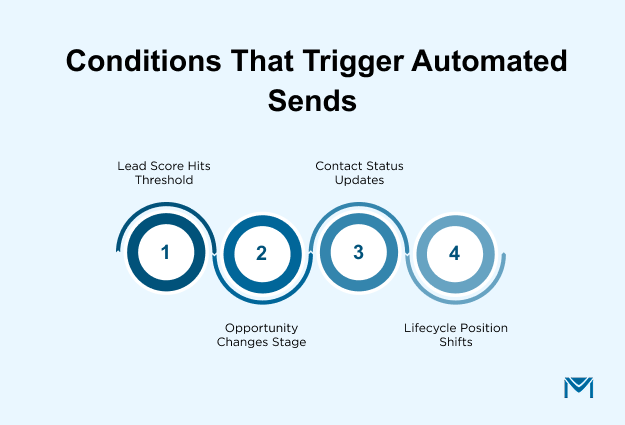
Useful conditions can include:
- Your lead score reaches a threshold that changes the appropriate message.
- One of your opportunities moves to a different sales stage.
- Your contact status changes after a meeting, form submission, or qualification step.
- You record a customer action that changes the current lifecycle position.
These conditions help your automation workflow respond as the relationship changes. Your message can stay aligned with the current customer position.
Engagement adds another layer of context. A reply may justify direct sales follow-up, while a relevant click may support another nurture path.
If engagement remains limited, keep the contact in the current journey until another meaningful change occurs. Repeated activity can influence future campaign eligibility or sales attention.
A practical response flow looks like this:
- Capture the engagement signal against the contact record.
- Check the CRM context around lifecycle, account, or pipeline status.
- Choose the next action, such as continued nurture or direct sales follow-up.
- Use the outcome to refine future campaign eligibility or follow-up.
Email tracking supports this flow by keeping activity tied to your contact record. Review engagement alongside the context behind the original send.
Campaign attribution gains context when you connect email activity with later pipeline movement. This helps you judge how campaign engagement relates to customer progress.
Follow-up intensity should match the strength of the signal. One click does not automatically indicate purchase intent or sales readiness.
Use engagement with lifecycle, account, and pipeline context before changing the follow-up path. This keeps automated actions proportionate to what you know.
When you share activity history across marketing and sales, handoffs become easier to interpret. Your sales team can approach outreach with recent campaign context.
Is your CRM ready for email marketing?
Your CRM is ready for email marketing when your setup supports real campaign needs without creating operational gaps. The table helps you identify where your current setup holds up and where gaps may appear.
| Capability | What to evaluate |
|---|---|
| Campaign execution | Audience size, templates, scheduling, sending requirements |
| Automation | Triggers, branching, lifecycle workflows, maintainability |
| Tracking and attribution | Contact-level engagement, pipeline visibility, reporting |
| Data architecture | Data freshness, synchronization, source of truth |
| Deliverability and consent | Suppression, bounce handling, list quality controls |
Start with campaign execution because workload exposes limitations quickly. Review whether your setup handles required audience sizes, campaign types, scheduling, templates, and sending frequency.
Include peak periods and recurring sends in that review. Your setup may handle occasional campaigns yet require heavy manual work at higher frequency. Measure how easily you can repeat campaign processes without rebuilding steps for every send.
Also measure the effort behind each campaign. Your email CRM system should not require repeated manual fixes for routine sends. If scale is your main concern, assess whether yourSalesforce mass email marketing setup matches the workload you expect.
Automation readiness depends on flexibility and maintenance. Your setup should let you adjust triggers, branching, lifecycle workflows, and exceptions as processes change. Also consider how much administrator effort those changes demand.
Tracking should support decisions beyond campaign-level metrics. You should be able to view engagement beside CRM records, pipeline activity, and campaign reporting. Reporting should remain consistent when campaign ownership, fields, or workflow logic changes.
CRM email marketing data and deliverability requirements
Your data architecture determines whether campaign decisions use current CRM information. Email execution should work from live CRM data or a clearly governed synchronized copy.
If your setup depends on synchronization, review four areas:
- Ownership: Which system controls each important field?
- Freshness: How quickly do updates reach the email workflow?
- Reporting: Do both systems produce consistent campaign and CRM views?
- Administration: Who monitors sync failures, mappings, and workflow changes?
Unclear ownership can create conflicting values and inconsistent reporting. You also take on extra maintenance whenever fields, mappings, or processes change.
Your deliverability and consent controls deserve the same scrutiny. Review whether your setup supports suppression, opt-out handling, bounce management, and list-quality controls.
Confirm that failed addresses are suppressed before future sends. Make sure opt-outs apply reliably across workflows and campaign audiences.
Build these controls into your campaign processes so routine sends do not depend on repeated manual cleanup. Extra handoffs can also create more opportunities for data or reporting inconsistencies.
Before choosing CRM email marketing software or extending your existing setup, review these capabilities together. A serious gap can disrupt data, compliance, reporting, or campaign operations.
How does CRM email marketing work in Salesforce?
CRM email marketing in Salesforce uses record data to build audiences, personalize messages, control workflows, and retain context. Your Salesforce records guide campaign decisions, while email activity stays connected to customer and pipeline context.
Start audience selection with Leads or Contacts, then narrow records through criteria relevant to your campaign. Account context, lifecycle fields, ownership, geography, and Campaign Member information can refine eligibility when your setup supports those criteria.
A practical Salesforce workflow can look like this:
- Start with Lead or Contact records that fit your campaign purpose.
- Apply CRM criteria to include qualified records and exclude contacts who no longer fit.
- Use record values to shape message content where added context improves relevance.
- Let meaningful CRM changes influence whether communication starts, continues, pauses, or changes direction.
- Keep engagement associated with the CRM context used by your sales and marketing teams.
This approach keeps contact segmentation anchored to Salesforce records instead of rebuilding audiences from exported lists. Current record values can support personalization using account, lifecycle, ownership, or other maintained context.
For automation, a changed record value can alter the communication path when your workflow rules use that field. This keeps automation aligned with CRM data your teams already maintain.
Salesforce Campaign Members associate Leads and Contacts with campaigns, while campaign reports can connect participation with opportunity reporting. Salesforce uses these relationships to review email activity alongside CRM and pipeline context.
Keeping campaign decisions close to source records gives you a clearer path from audience selection through engagement.
When does Salesforce need an additional email layer?
You may need an additional email layer when campaign requirements exceed what your current Salesforce setup can support efficiently.
Look for gaps in these areas:
- Campaign scale: Larger audiences or frequent sends can make manual steps harder to sustain.
- Automation complexity: Branching, exceptions, or lifecycle logic may outgrow your current workflow.
- Tracking depth: You may need engagement connected with CRM records, reporting, or pipeline activity.
- Deliverability controls: Suppression, bounce handling, verification, and reputation monitoring may require stronger support.
- Administration: Repeated workarounds can make maintenance harder.
Your requirements set the threshold. If Salesforce handles these needs reliably, another email layer may add unnecessary complexity.
If gaps remain, compare CRM email marketing software against those limitations. Focus on workflow fit, CRM data use, tracking, deliverability, and administration.
Use those gaps to evaluate whether aSalesforce-native email marketing approach fits your requirements.
Your email setup should support how your teams work in Salesforce. Add another layer only when it solves an operational problem.
Make CRM the decision layer for email marketing
Your next step is to audit where your email setup creates friction against CRM data. Check audience building, automation, tracking, deliverability, and administration for manual workarounds.
Those gaps define what an additional email layer needs to solve. Evaluate the email layer separately from the broader CRM decision.
MassMailer runs inside Salesforce and uses live CRM records for audience selection, personalization, and send logic. It bypasses daily sending limits and tracks engagement directly on the contact record. Suppression, bounce management, and verification run natively without syncing data to an external platform.
If Salesforce remains the right CRM,evaluate your CRM-driven email workflow with MassMailer.
Frequently Asked Questions
1. Who should own CRM email marketing workflows in Salesforce?
2. How often should you review CRM email automation rules?
3. How can you prevent duplicate emails from overlapping CRM workflows?
4. When should you use scheduled campaigns instead of CRM email automation?
5. What should you test before launching a CRM-triggered email campaign?
6. How do you stop CRM email automation from re-enrolling contacts who already converted?
Related Blogs
8 Salesforce Marketing Cloud Alternatives Worth Your Budget
B2B Email Marketing Examples That Actually Work
How to Build Salesforce Drip Campaigns That Nurture and Convert
MassMailer Resources