




Table of Contents
Introduction
Sales teams working in Salesforce face a daily decision problem. Which emails signal real interest, and which ones can wait? Opens, clicks, and replies exist across activities and reports, but Salesforce does not surface a simple Salesforce email score to guide action. As a result, follow-ups often depend on manual checks or gut feel.
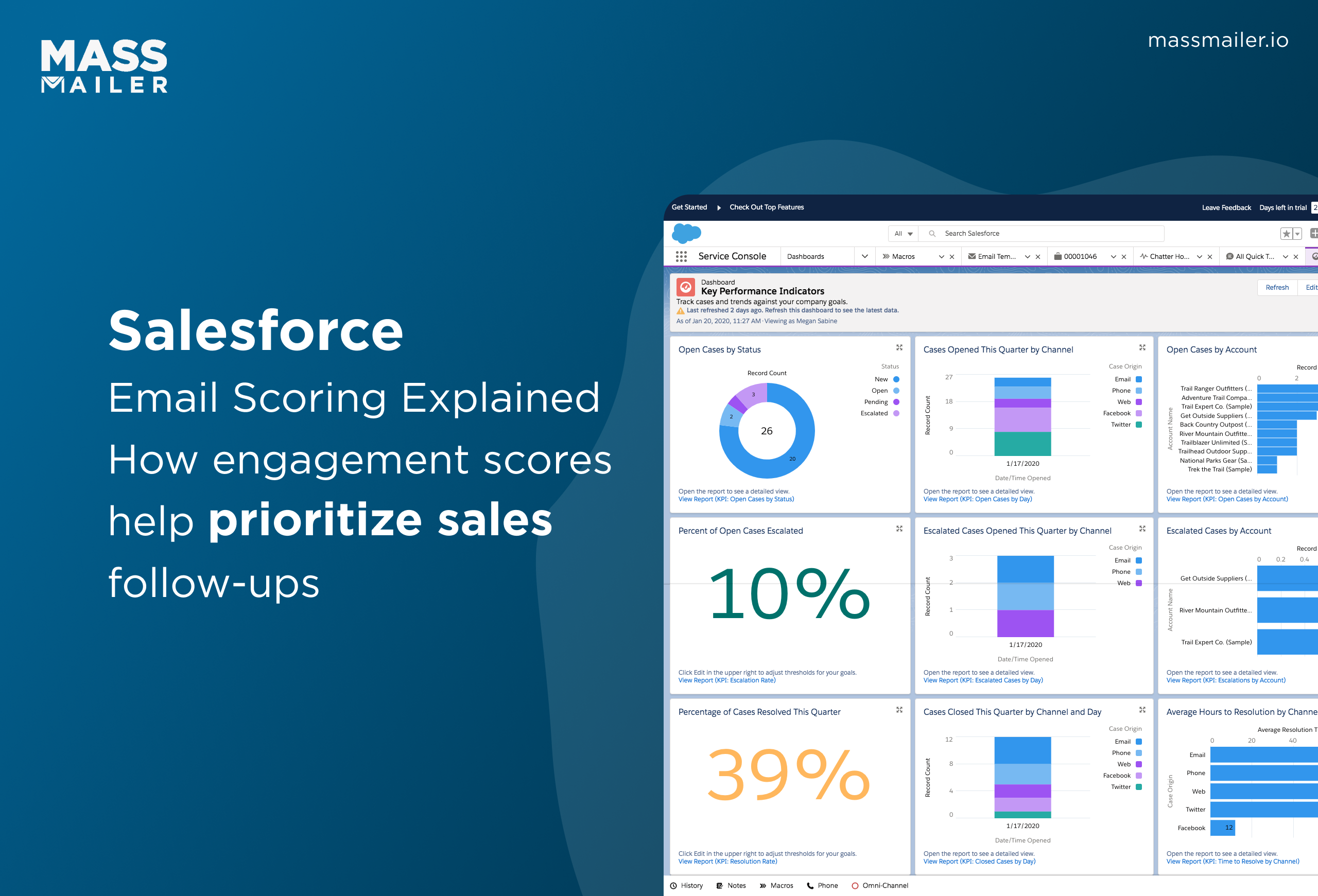
This gap explains why many teams search for Salesforce email scoring. They want a reliable way to prioritise leads and contacts using engagement signals, not just activity volume. Some expect a clear Salesforce engagement score. Others look for a practical Salesforce email scoring example they can apply to sales workflows.
This guide explains how email engagement actually works in Salesforce, how engagement scores are derived, and how sales teams use them to prioritise outreach with clarity and consistency.
What does “Email scoring” mean in Salesforce
Email scoring in Salesforce means prioritising leads and contacts based on engagement signals, not scoring individual emails. Salesforce tracks opens, clicks, replies, and email activity, but it does not generate a standalone Salesforce email score at the email level.
Salesforce does not score individual emails. It scores leads and contacts based on engagement signals.
1. How Salesforce defines email engagement
Salesforce treats email engagement as activity data. These signals indicate interest and responsiveness, not email quality or campaign performance. Teams use them to understand which conversations show momentum and which ones do not.
Common engagement signals Salesforce tracks include:
- Email opens and link clicks
- Email replies and response timing
- Recent activity across emails and tasks
- Interaction patterns tied to a lead or contact
These signals exist across activities and reports, not as a single score attached to an email.
2. How email engagement is used for scoring and prioritisation
Engagement data feeds into reports, list views, and predictive models, such as engagement or lead scores. Scoring happens at the lead or contact level, not per email. This is why a Salesforce email scoring example usually appears as prioritised records rather than a numeric email score.
In practice, teams use engagement signals to:
- Identify leads and contacts showing active interest
- Decide which conversations need faster follow-up
- Focus sales effort on records with recent engagement
Because this approach depends on clean data, deliverability and activity logging matter; if emails do not reach inboxes or fail to log correctly, engagement signals lose value. If you want clearer guidance on how emails reach inboxes and how engagement signals, such as opens and replies, stay accurate, tools like MassMailer support better email deliverability by helping teams send and track emails reliably within Salesforce.
With this foundation set, the next section explains how Salesforce tracks email engagement and where these signals appear inside the platform.
How Salesforce tracks email engagement
Salesforce tracks email engagement by logging email activity and capturing signals, such as opens, clicks, replies, and timing, against leads and contacts. These signals do not appear as a single Salesforce email score. Instead, Salesforce records them as activities and engagement data that teams review through timelines, reports, and views.
Here is how Salesforce captures email engagement in practice:
- Email sends and replies log as activities on lead and contact records when emails sync correctly
- Email opens and link clicks are recorded as engagement events when tracking is enabled
- Engagement timing, such as recent replies or last open, helps show momentum
- Engagement data links to people, not individual emails, which shapes prioritisation
Where teams often struggle is with visibility and accuracy. Engagement signals depend on inbox placement, tracking settings, and consistent activity logging. If emails land in spam or fail to log in, opens and replies never reflect real buyer interest. To keep email open signals accurate inside Salesforce, platforms that handle Salesforce-native email sending and logging, such as MassMailer, help maintain consistent engagement visibility across outbound sales emails.
Once these engagement signals are captured reliably, Salesforce can use them in broader models. The next step is understanding how Salesforce turns engagement data into an engagement score, and what that score actually represents.
How the Salesforce engagement score works
Salesforce engagement score predicts how likely a lead or contact is to engage again, based on past email and activity signals. It does not score individual emails. Instead, Salesforce looks at engagement patterns across interactions to help teams prioritise follow-ups.
The score is built using a focused set of inputs:
- Email interactions, including opens, clicks, and replies, captured over time
- Activity history, such as logged emails, meetings, and tasks
- Engagement recency, where recent responses carry more weight
- Behaviour consistency, which reduces the impact of one-off actions
Salesforce applies predictive logic to combine these signals into a relative score. Sales teams use it to compare leads or contacts and decide where attention matters most. The score indicates the likelihood of engagement, not buying intent, deal readiness, or email performance.
Because the model depends entirely on underlying signals, data quality matters. If open or reply data is incomplete, the engagement score becomes less reliable. To keep email tracking accurate for opens, replies, and logged activity in Salesforce, tools like MassMailer use email monitoring to ensure outbound emails and responses are consistently captured on lead and contact records.
With this in mind, the next section explains how engagement scores differ from email-level scoring, and why the two should not be treated as the same thing.
Salesforce engagement score vs email-level scoring
Salesforce engagement score and email-level scoring are different, and Salesforce supports only engagement scoring. It assigns an engagement score at the lead or contact level to estimate future interaction. It does not score individual emails based on performance.
| Aspect | Salesforce engagement score | Email-level scoring |
|---|---|---|
| What is scored | Leads or contacts | Individual emails |
| Purpose | Predict the likelihood of future engagement | Measure email response or content impact |
| Data used | Patterns across emails and activities | Opens, clicks, replies per email |
| Native to Salesforce | Yes | No |
| Used for | Sales prioritisation and follow-up focus | Campaign or message analysis |
This difference shapes how sales teams work in Salesforce. Teams searching for a Salesforce email score often expect to rank emails by response. Salesforce instead helps teams decide who to contact next, not which email performed best.
This is where execution gaps appear. When teams send high volumes of emails, missing activity logs or inconsistent tracking can weaken engagement signals and reduce the usefulness of engagement scores.
Tools like MassMailer address this by ensuring outbound emails log correctly to Salesforce records and by maintaining consistent tracking across sales workflows. This helps engagement scores reflect real activity, not partial data.
With this distinction clear, the next section explains how teams use engagement scores for prioritisation in real sales workflows.
How teams use engagement scores for prioritization
Teams use engagement scores in Salesforce to decide who to contact next, when to reach out, and where to focus sales efforts.
The score helps teams prioritise based on recent and consistent engagement, rather than raw activity volume.
Prioritising sales follow-ups using engagement tiers
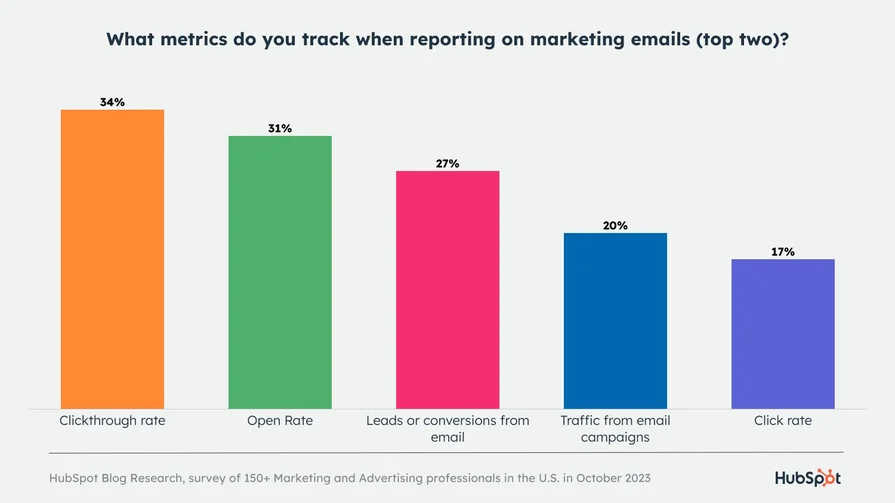
Engagement signals like opens and clicks shape prioritisation logic in Salesforce. According to industry research, 34% of teams track clickthrough rate and 31% track open rate as their top metrics, highlighting the importance of these signals before scoring.
Sales teams convert engagement scores into simple tiers to guide daily follow-ups.
- High engagement indicates recent replies or repeated interactions and requires immediate follow-up.
- Medium engagement shows some interaction and supports scheduled check-ins or targeted nudges.
- Low engagement reflects limited or outdated activity and should not take priority in daily outreach.
This tiering helps reps act consistently even as email volume grows.
Identifying accounts and contacts showing buying intent
Engagement scores surface intent patterns that single activities often miss.
- Engagement from multiple contacts within the same account suggests shared interest across stakeholders.
- Repeated engagement across emails, meetings, and tasks indicates sustained attention over time.
- Recent engagement carries more weight than historical activity when assessing readiness to engage.
These signals help teams focus on accounts showing coordinated interest, not isolated actions.
Aligning sales outreach timing with engagement signals
Engagement scores also inform when outreach is most effective.
- Recent replies or opens signal a higher response likelihood in the near term.
- Long gaps since the last interaction indicate the need to pause or adjust messaging.
- Consistent engagement supports faster follow-ups with relevant context.
All of this depends on accurate activity data. If emails or replies fail to log, prioritisation breaks. Tools like MassMailer support this through email alerts, which notify sales teams when prospects open or reply, helping them act on engagement at the right moment.
With prioritisation covered, the next section looks at the limitations of Salesforce engagement scores and where teams should rely on judgment instead of the score alone.
Limitations of Salesforce engagement score for email scoring
Salesforce engagement score helps rank leads and contacts, but it has clear limits when used for email scoring.
It predicts future engagement at a record level. It does not validate email data quality, explain intent, or assess individual email performance.
Important limitations to account for:
- No email-level scoring: Salesforce does not score individual emails by opens, clicks, or replies.
- Data quality dependency: Invalid or outdated email addresses reduce opens, replies, and overall engagement accuracy.
- Predictive, not intent-based: High engagement does not always indicate buying intent or deal readiness.
- Delayed signal impact: Past engagement can continue to influence scores even after interest drops.
- Limited diagnostic insight: The score shows likelihood to engage, not why engagement changed.
Because of these gaps, engagement scores work best as a prioritisation signal, not a decision engine. Email hygiene plays a direct role here. If messages bounce or hit inactive inboxes, engagement signals weaken before scoring even begins.
This issue shows up clearly in the A Digital Lending Platform’s Salesforce Email Transformation podcast. The team found that outdated and poorly segmented email lists were suppressing opens and replies inside Salesforce, which weakened engagement signals used for prioritisation.
By cleaning and managing lists directly within Salesforce using MassMailer, they restored deliverability and improved response visibility. As a result, engagement data became reliable enough to support accurate follow-ups instead of misleading low engagement scores caused by list decay.
Tools like MassMailer help address this through email verification and bounce management, which reduce delivery failures and keep engagement data tied to valid recipients.
With these limits clear, the conclusion brings together when Salesforce engagement scores add value and how teams should use them responsibly in real sales workflows.
Conclusion
Salesforce engagement scores help sales teams focus effort, but they work only as well as the data behind them. They do not score individual emails or confirm buying intent. Instead, they act as a prioritisation signal built on opens, replies, and activity history. When tracking breaks or email data degrades, the score loses value quickly.
This is why many teams look beyond native Salesforce features to strengthen email execution. On G2, users often point out that tools like MassMailer stand out because they work natively inside Salesforce and help bypass common email limitations, making engagement data easier to trust at scale.
If engagement scores drive your follow-ups, improving how emails are sent, tracked, and maintained is the logical next step. See how MassMailer can help you turn engagement signals into reliable sales priorities.
Frequently Asked Questions
1. Does Salesforce have built-in email scoring?
2. What is Salesforce engagement score based on?
3. Is Salesforce email scoring the same as lead scoring?
4. Can Salesforce score individual emails by opens or replies?
5. How do sales teams prioritize emails in Salesforce without email scoring?
6. How can email tracking affect Salesforce engagement scoring accuracy?
Start Your Free Trial Today
Experience MassMailer the easiest way to send personalized emails from Salesforce.
Related Blogs
Salesforce Email Marketing Tool Comparison: Native vs Integrated Tools
Salesforce Platform Overview: How It Works and When It Fits
Salesforce Sales Email Best Practices That Drive Results
MassMailer Resources


MassMailer Glossary
About the Author

Siva Devaki 

Siva Devaki is the founder of MassMailer Inc., a tool that helps Salesforce users optimize email marketing. A passionate advocate for email marketing, Siva writes and hosts podcasts on the topic, sharing insights to help businesses drive revenue and enhance customer engagement through Salesforce email automation and tracking.