




Table of Contents
Introduction
If you’re trying to send patient emails from Salesforce, the real question is simple: Is it actually HIPAA compliant?
The short answer is no. Salesforce email is not HIPAA compliant by default. While the platform is secure, sending protected health information (PHI) requires specific safeguards like encryption, access controls, and a signed Business Associate Agreement (BAA).
Without these in place, even a routine patient email can create compliance risk.
In this guide, you’ll see exactly what makes Salesforce email HIPAA compliant, what must be configured, and how to safely send PHI without exposing your organization to violations.
Can Salesforce email be HIPAA compliant?
Yes, Salesforce email can be HIPAA compliant, but only when strict legal and technical safeguards are enforced. By default, Salesforce email is not HIPAA compliant for sending protected health information (PHI).
Under the HIPAA Security Rule, organizations must implement safeguards to protect electronic PHI during storage and transmission.
To meet HIPAA requirements in Salesforce, you must ensure:
- A signed Business Associate Agreement (BAA) with Salesforce
- Encryption at rest for PHI (commonly AES-256 via Shield Platform Encryption)
- Encryption in transit for all outbound emails (TLS 1.2 or higher)
- Role-based access controls to restrict PHI visibility
- Audit logs and monitoring to track access and email activity
If any of these safeguards are missing, sending PHI through Salesforce email creates compliance risk and potential regulatory exposure.
Practical compliance breakdown:
| Control Layer | What It Does |
|---|---|
| Preventive | Limits who can access or send PHI |
| Detective | Logs activity and surfaces anomalies |
| Corrective | Triggers alerts or review processes |
Salesforce enables email sending, but it does not automatically block unencrypted workflows, restrict PHI in subject lines, or prevent users from transmitting sensitive data without safeguards. Compliance must be configured deliberately and validated continuously.
If your team sends lab results, treatment updates, or patient records, you need an encrypted, logged, and auditable transmission built into the workflow, not dependent on individual judgment.
This is where many healthcare organizations layer in a Salesforce-native solution like MassMailer. It adds encryption policies, structured patient communication workflows, and audit visibility inside Salesforce, reducing reliance on manual user judgment.
The next step is understanding the exact HIPAA Security Rule requirements that apply to PHI transmission, so you can evaluate whether your current setup meets them.
Why HIPAA compliance often fails in Salesforce email setups
In most Salesforce healthcare implementations, compliance does not fail at the platform level, it fails at the email layer.
Teams often assume that because Salesforce is secure, outbound email automatically inherits that security. In practice, email workflows sit outside core data protections and must be configured separately.
Common real-world failure points include:
- Encryption is enabled for storage but not enforced for outbound email
- Users can bypass secure delivery methods when sending PHI
- Email templates include sensitive data without restriction
- Audit logs exist but are not reviewed or validated regularly
This creates a gap where PHI is technically stored securely but transmitted in ways that violate HIPAA safeguards.
The shift from “configured” to “compliant” happens only when these controls are enforced systematically, not left to user behavior.
What HIPAA actually requires for email compliance
HIPAA does not certify tools as “compliant.” Instead, it requires organizations to implement administrative, physical, and technical safeguards to protect PHI.
For email specifically, this means:
- Ensuring PHI is encrypted during transmission
- Controlling who can access and send sensitive data
- Maintaining audit trails for every interaction
- Preventing unauthorized disclosure of patient information
Compliance is determined by how these safeguards are applied—not by the platform alone.
HIPAA requirements for sending patient emails in Salesforce
To support HIPAA-compliant email in Salesforce, you must protect PHI at three levels: transmission, storage, and access. HIPAA does not regulate the platform name. It regulates how you handle protected health information.
If you cannot control how PHI is encrypted, who can access it, and how it is logged, your Salesforce patient email workflow is not compliant.
Let’s break down what that means in practice.
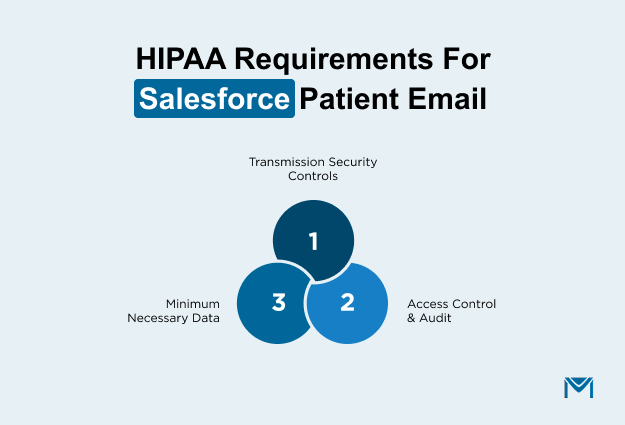
1. HIPAA Security Rule and PHI transmission safeguards
When you send PHI through Salesforce email, you are transmitting electronic protected health information. The HIPAA Security Rule requires technical safeguards to protect the transmission.
In simple terms, PHI must be encrypted while it travels and while it is stored.
Encryption in transit protects email from interception. This usually means enforced TLS or secure portal delivery. Encryption at rest protects PHI stored in Salesforce fields and email logs, often through Shield Platform Encryption.
Here’s the decisive compliance test:
- Is encryption enforced automatically for every PHI email?
- Can users bypass it?
- Can you prove it is working through documentation or system logs?
If encryption depends on users choosing the “right” method, you do not have a technical safeguard. You have a policy gap.
Many healthcare teams move toward MassMailer at this stage because it embeds mandatory encryption inside Salesforce workflows instead of relying on user behavior. That shift changes compliance from optional to systematic.
2. Access controls and audit trails
HIPAA compliant email in Salesforce also requires strict control over who can see and send PHI.
Role-based access control must limit PHI visibility. Field-level security must restrict sensitive data to authorized users. Broad profile permissions create exposure, even if email encryption is strong.
Equally important, you must log activity.
You should be able to answer:
- Who accessed this patient record?
- Who sent this email?
- What PHI was included?
- When did it happen?
These controls fall into three layers:
| Control Layer | What It Does |
| Preventive | Limits who can access or send PHI |
| Detective | Logs activity and surfaces anomalies |
| Corrective | Triggers alerts or review processes |
If your current Salesforce setup does not clearly connect email events to audit trails, your healthcare CRM email compliance posture is weak.
MassMailer strengthens this layer by tying email activity directly to Salesforce records, improving traceability without forcing teams into external systems.
3. Minimum necessary standard and data exposure limits
HIPAA requires you to use the minimum necessary PHI for any communication.
For Salesforce patient email, that affects how you design templates and workflows.
Avoid putting PHI in subject lines. Limit sensitive data in the message body. Control attachment exposure. Mask or restrict fields where possible.
Overexposure often happens through:
- Broad report access
- Export permissions
- Templates that include full clinical summaries by default
The safer model uses data minimization and controlled disclosure. You design email templates that limit PHI automatically, restrict who can edit them and document patient consent for certain communication types.
This is another decision point.
Solutions like MassMailer help enforce these email limits directly inside Salesforce, which reduces accidental PHI exposure as email volume increases.
At this point, the next logical step is implementation. You need to know exactly how to configure Salesforce to support HIPAA-compliant email from a technical standpoint.
Step-by-step setup for HIPAA-compliant email in Salesforce
To configure HIPAA-compliant email in Salesforce, you must secure the full lifecycle of protected health information. That means you must formalize legal responsibility, encrypt PHI at rest, require encrypted transmission in transit, restrict access, log activity, and continuously validate controls. Compliance is not achieved through one setting.
Here is how healthcare organizations implement this correctly, especially when they standardize on MassMailer to operationalize controls inside Salesforce.
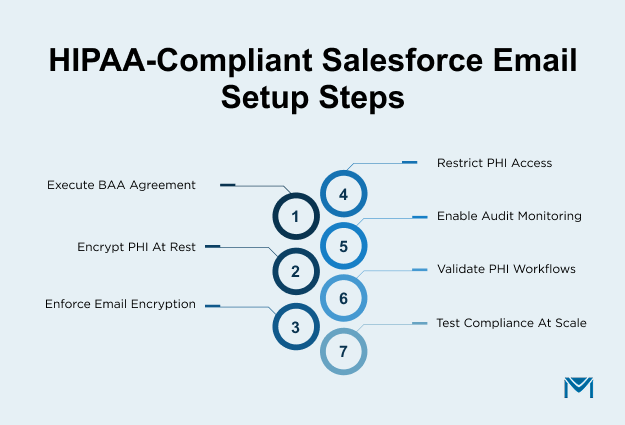
Step 1: Execute a Business Associate Agreement
Salesforce offers HIPAA compliance and BAA support for covered entities and business associates. You cannot legally send PHI through Salesforce without a signed Business Associate Agreement. The BAA defines responsibility boundaries. Salesforce protects its infrastructure, but you remain responsible for how your users store, access, and transmit patient information.
If PHI moves into external marketing platforms through sync-based setups, your compliance surface expands. Each additional system introduces new exposure. This is why many healthcare teams move away from traditional multi-platform Salesforce email integration models and prefer solutions that operate natively inside Salesforce.
MassMailer runs entirely within Salesforce, which helps limit PHI movement outside your controlled CRM environment. If your email workflow requires exporting patient data to another platform, reassess that architecture before proceeding.
Step 2: Enable Shield Platform Encryption for PHI fields
A HIPAA-compliant email in Salesforce requires encryption at rest. Begin by identifying every field that contains PHI. Diagnosis details, treatment notes, medical identifiers, lab results, and uploaded clinical documents must be encrypted using Shield Platform Encryption.
After enabling encryption, validate coverage carefully. Confirm that encrypted fields do not appear in unsecured reports. Review whether email activity records store PHI in plain text. Ensure encrypted data is not exposed through exports or API access.
Many organizations encrypt primary record fields but overlook stored email content and attachments. That creates hidden compliance gaps. A strong email security posture requires verifying that PHI remains protected across records, activities, and stored communications.
MassMailer reduces risk at this stage by controlling how PHI is inserted into outbound templates and by keeping communication tracking inside Salesforce instead of replicating patient data across external systems.
Step 3: Configure healthcare email encryption
PHI must be encrypted while in transit. Enforced TLS is the baseline. Encryption must occur automatically, not optionally. If users can choose whether to send securely, your compliance model depends on behavior rather than system enforcement.
If you use email relay, confirm it preserves encryption and does not downgrade security settings. Review your Salesforce email encryption configuration carefully and test real outbound messages. Inspect message headers to confirm that TLS is active and functioning correctly.
MassMailer strengthens this layer by enforcing secure outbound delivery rules within Salesforce workflows. Instead of relying on users to select secure options, encrypted transmission becomes part of the sending logic. This significantly reduces accidental exposure during high-volume patient communication.
Step 4: Restrict PHI access using roles and field-level security
Encryption alone does not satisfy HIPAA. You must also implement minimum necessary access. Define a clear role hierarchy and apply field-level security to every PHI field. Remove unnecessary export privileges and restrict bulk email permissions.
Ask direct questions during review. Who can access diagnosis fields, send patient communication at scale and download attachments? If access extends beyond operational necessity, reduce it.
MassMailer respects Salesforce’s native permission model. You control who can send encrypted patient emails, who can access email templates containing sensitive merge fields, and who can view engagement logs. This alignment allows you to strengthen healthcare CRM email compliance without creating parallel access structures.
Step 5: Configure audit trails and event monitoring
HIPAA requires traceability. You must be able to demonstrate who accessed PHI, who transmitted it, and when the event occurred. Enable event monitoring and login history tracking inside Salesforce.
Review your Salesforce email logging configuration to confirm that outbound communication is tied directly to patient records. During an audit, you should be able to reconstruct a PHI email event quickly and accurately.
MassMailer enhances audit defensibility by attaching delivery events, transmission status, and engagement activity directly to Salesforce records. This keeps compliance evidence centralized instead of fragmented across external dashboards.
Step 6: Validate PHI transmission workflows
Configuration must be tested under real conditions. Send controlled test emails containing sample PHI and verify encryption headers. Confirm that activity logs capture the event. Ensure attachments remain protected and that subject lines do not expose sensitive data.
Simulate common healthcare scenarios such as appointment summaries, billing notices, and lab result notifications.
MassMailer allows teams to validate outbound email behavior directly inside Salesforce, which reduces blind spots that often appear in disconnected email systems.
Step 7: Test compliant Salesforce patient email scenarios at scale
Finally, test performance under volume. Send a controlled batch of patient emails and verify that encryption, logging, and permission controls hold consistently. Compliance must remain intact when volume increases.
If your workflow requires manual review before each send, it will eventually fail at scale. If it's enforced automatically within Salesforce, your HIPAA-compliant email Salesforce setup becomes operational rather than theoretical.
This is where many healthcare organizations make a clear decision. They move to a Salesforce-native layer like MassMailer because it works directly inside the CRM, reducing human error and simplifying audit readiness.
The next step is to examine common compliance mistakes that break otherwise well-configured systems.
Common compliance mistakes when sending PHI from Salesforce
Even when Salesforce is configured for healthcare use, most compliance failures happen due to gaps in how email workflows are enforced, not limitations in the platform itself.
1. Sending PHI without enforced encryption
HIPAA requires technical safeguards for transmitting electronic PHI. If encryption is not enforced at the system level, emails may be sent in plain text, exposing sensitive data during transmission.
2. Assuming Salesforce Health Cloud guarantees compliance
Salesforce provides a secure infrastructure, but HIPAA compliance depends on how organizations configure encryption, access controls, and monitoring. Health Cloud alone does not enforce compliant email workflows.
3. Over-permissioning access to PHI
HIPAA’s “minimum necessary” standard requires restricting access to only what is needed. Broad permissions increase the likelihood of accidental exposure or misuse of patient data.
4. Storing PHI in unencrypted email content or logs
Even if PHI fields are encrypted at rest, sensitive data copied into email bodies, notes, or activity logs may remain unprotected unless encryption policies extend to those layers.
5. Failing to validate encryption and audit controls
HIPAA compliance is not a one-time setup. Organizations must regularly test encryption, review logs, and confirm that safeguards are functioning as expected.
The consequences are serious. A single exposed email can trigger breach notification requirements, civil penalties, regulatory review, and long-term loss of patient trust.
MassMailer reduces these risks by enforcing encrypted outbound delivery, aligning with Salesforce permission controls, centralizing email logging, and keeping PHI communication inside Salesforce rather than spreading it across external systems. Instead of relying on users to “remember” compliance steps, the system enforces them by design.
Choosing a HIPAA-compliant email solution for Salesforce
At this stage, the question is not whether Salesforce can support HIPAA. The question is whether your email process truly enforces it.
When selecting a HIPAA-compliant email solution for Salesforce, focus on what reduces compliance risk in real operations.
Look for:
- Automatic encryption: PHI must be encrypted every time it is sent. Users should not control whether encryption applies.
- Encryption at rest: Stored email content, attachments, and logs containing PHI must remain encrypted.
- BAA alignment: The solution must operate within your compliance structure without expanding PHI exposure into unnecessary systems.
- Native Salesforce operation: The fewer external platforms that store or sync patient data, the lower your compliance surface area.
- Role-based controls: You must control who can send PHI and who can access sensitive templates and logs.
- Audit-ready logging: You should be able to prove who sent what, when it was sent, and how it was protected.
- Scalability under volume: Controls must hold when sending increases. Manual oversight does not scale safely.
Here is the deciding question: if an auditor requested proof tomorrow that every patient's email was encrypted and logged properly, could you provide it immediately?
If that answer feels uncertain, your setup depends too heavily on configuration discipline.
This is where many healthcare organizations standardize on MassMailer. It strengthens email authentication so your outbound patient emails are verified and trusted by receiving servers. It also supports sender reputation and deliverability best practices, which help ensure important patient messages reach inboxes instead of spam folders.
If you’re uncertain whether your patient email process is fully defensible, schedule a MassMailer compliance walkthrough. We’ll evaluate your current setup and pinpoint gaps that could weaken audit readiness.
That difference is often what moves teams from “configured” to “defensible.”
Conclusion
When you send PHI from Salesforce, “mostly compliant” is not enough. You need a process that holds up under scrutiny, scales without breaking, and does not rely on constant manual oversight.
MassMailer helps healthcare teams standardize patient communication so compliance is built into daily operations, not reviewed after the fact. Instead of patching settings and rechecking configurations, you create a repeatable, defensible workflow that works the same way every time.
If you cannot immediately prove that every patient email is encrypted, logged, and access-controlled, it’s time to fix that gap.
Schedule a MassMailer demo and see how compliant patient communication should work inside Salesforce.
Frequently Asked Questions
1. Can patients legally consent to receive unencrypted PHI email from Salesforce?
2. Does enabling TLS alone make Salesforce email HIPAA compliant?
3. Is storing PHI in Salesforce email attachments compliant?
4. How do I verify that the PHI email from Salesforce is actually encrypted?
5. Are third-party marketing tools connected to Salesforce automatically HIPAA compliant?
6. What is the safest way to send PHI from Salesforce at scale?
Start Your Free Trial Today
Experience MassMailer the easiest way to send personalized emails from Salesforce.
Related Blogs
MassMailer Resources



MassMailer Glossary
About the Author

Siva Devaki 

Siva Devaki is the founder of MassMailer Inc., a tool that helps Salesforce users optimize email marketing. A passionate advocate for email marketing, Siva writes and hosts podcasts on the topic, sharing insights to help businesses drive revenue and enhance customer engagement through Salesforce email automation and tracking.