




Table of Contents
Salesforce sales emails perform best when outreach is relevant, timely, and aligned with CRM insights. Strong personalization, clear messaging, and stage-appropriate follow-ups help improve engagement and replies. Applying structured best practices enables sales teams to turn Salesforce data into more effective conversations and measurable pipeline impact in 2026.
Introduction
Pipeline reviews often give us confidence. Opportunities are updated, activities are logged, and Salesforce shows steady sales motion across accounts. But when we step back and evaluate sales email performance, the results often fall short. Open rates are inconsistent, replies are limited, and many emails fail to move conversations forward.
This gap is not caused by a lack of data. Salesforce provides rich insight into contacts, accounts, opportunities, and buyer activity. The challenge is how that data gets translated into email messaging, timing, and follow-up. When emails rely on surface-level personalization or ignore sales stage context, they quickly feel generic and easy to ignore.
The value of relevance is widely recognized. Research from McKinsey & Company shows that strong personalization efforts can increase revenue by approximately 5 to 15 percent, while irrelevant or poorly targeted outreach has the opposite effect, weakening engagement and credibility. In B2B sales, this gap becomes visible in lower reply rates, stalled conversations, and slower pipeline progression.
This guide outlines Salesforce sales email best practices that help teams turn CRM data into relevant, timely, and effective outreach that consistently drives engagement and results.
What is a sales email?
A sales email is a targeted message sent to prospects or customers with the goal of generating interest, building relationships, or driving a specific action such as booking a meeting, requesting a demo, or making a purchase. It is a core part of modern outbound and inbound sales strategies.
Unlike generic marketing emails, sales emails are typically more personalized and action-focused. They are often sent by sales representatives through CRM platforms (like Salesforce) and are designed to start conversations rather than simply broadcast promotions.
A well-written sales email usually includes:
- A compelling subject line that encourages opens
- Personalization based on the recipient’s role, company, or behavior
- A clear value proposition that explains the benefit to the reader
- A concise, conversational tone
- A strong call to action (CTA) such as scheduling a call or replying
Sales emails can be used at different stages of the sales funnel, from cold outreach to follow-ups and customer nurturing. When done correctly, they help improve engagement, increase reply rates, and move prospects closer to conversion.
What makes a Salesforce sales email effective?
A sales email becomes effective in Salesforce when it reflects real CRM context and supports where the buyer is in their journey. Effectiveness is not driven by clever wording or higher send volume. It comes from relevance, timing, and clear alignment with Salesforce data and sales stages.
When emails are built around accurate CRM insights, they feel less like interruptions and more like helpful touchpoints. The recipient quickly understands why the message exists, why it matters to them, and what the next step is. This clarity is what drives stronger engagement and helps deals move forward naturally.
This distinction is also highlighted in a MassMailer article on when Salesforce email outreach works and when teams need to upgrade. It explains that scaling outreach often creates challenges with personalization, follow-up consistency, and performance tracking.
MassMailer helps address these gaps by enabling structured cadences, Salesforce-based personalization, and centralized visibility directly within Salesforce. This allows teams to scale email outreach while keeping messaging relevant and aligned with sales stages.
Salesforce sales email data and its impact
Salesforce captures several layers of context that directly influence email relevance. Account data provides industry, size, and strategic importance. Contact records clarify role, seniority, and responsibilities. Opportunity data highlights the buying stage, priorities, and urgency. Activity history shows what the buyer has already engaged with and what they have ignored.
When sales emails reflect this information, outreach becomes more precise. Emails arrive at the right time, focus on the right issue, and avoid repeating information the buyer already knows. This is the point where Salesforce shifts from being just a sending platform to a system that actively supports meaningful sales conversations.
Generic sales emails vs Salesforce-driven sales emails
Not all sales emails fail because of poor writing. In many cases, the problem lies in how little context is carried into the message. Two emails may be sent from Salesforce, yet one feels relevant and timely while the other feels easy to ignore.
The difference becomes clear when we compare generic outreach with emails that are truly driven by Salesforce data and sales stage alignment.
| Aspect | Generic sales emails | Salesforce-driven sales emails |
|---|---|---|
| Use of data | Minimal or surface-level personalization, such as first name or company | Uses Salesforce account, contact, opportunity, and activity data for real context |
| Relevance | Broad and role-agnostic, often feels automated | Role-specific and tied to known priorities or initiatives |
| Timing | Sent on fixed schedules without buyer signals | Timed based on engagement history and sales stage |
| Messaging focus | Product- or company-centric | Buyer-centric and aligned with the recipient’s responsibilities |
| Call to action | Same CTA for all recipients | CTAs adapted to Salesforce sales stages |
| Engagement outcome | Low replies and quick disengagement | Higher-quality replies and more productive conversations |
| Pipeline impact | Limited influence on deal progression | Supports natural movement through the pipeline |
Once this difference is clear, the next step is understanding how to translate Salesforce context into an email that is easy to read and quick to act on. That starts with structure and messaging fundamentals that help recipients immediately grasp relevance and intent.
Email structure and messaging fundamentals for Salesforce sales emails
Salesforce sales emails work best when they are simple, focused, and easy to scan. Even highly relevant emails can underperform if structure and messaging are not clear from the start.
A consistent structure helps buyers quickly understand why the email matters and what action is expected, which directly impacts replies and pipeline movement.
As outreach scales, maintaining this clarity becomes harder. Different writing styles and inconsistent formatting dilute effectiveness. Tools like MassMailer’s Salesforce Email Template Builder help teams standardize clean structure, stage-aligned messaging, and Salesforce-based personalization directly inside the CRM, making it easier to scale without losing relevance.
Recommended structure for a high-performing Salesforce sales email
A strong Salesforce sales email follows a simple structure that mirrors CRM context and buyer intent. Each part of the email has a clear role and supports fast comprehension.
- Start with a Salesforce-based relevance cue: Reference a known insight such as the recipient’s role, a recent interaction, a documented initiative, or the current sales stage to establish intent immediately.
- Focus on one clear problem or opportunity: Align the message with what Salesforce indicates about the buyer’s responsibilities or buying stage instead of covering multiple ideas.
- Add brief context or credibility: Use one or two short lines to clarify why the issue matters or to reference outcomes seen by similar teams, without overwhelming the reader.
- End with one clear, stage-aligned next step: Whether it is a quick reply, a resource share, or a short call, a single CTA reduces decision fatigue and increases response likelihood.
Common messaging mistakes that reduce replies
Many sales emails fail not because of intent, but because of avoidable messaging mistakes. These issues often cause disengagement even when emails are opened.
- Emails that are too long or dense: Large blocks of text reduce scannability and cause recipients to disengage before reaching the call to action.
- Ignoring Salesforce context: Emails that fail to reflect known role details, opportunity stage, or recent activity feel automated and irrelevant.
- Asking for meetings too early: Calls to action that do not match the Salesforce sales stage create friction and lower reply rates.
- Product-focused messaging: Emails centered on features or company details tend to underperform compared to messages focused on buyer priorities and challenges.
7 Salesforce sales email best practices that drive opens and responses
Salesforce sales email best practices work when teams apply them consistently and intentionally. Each practice below addresses common reasons sales emails fail and shows how Salesforce data can be used more effectively to improve engagement and pipeline impact.
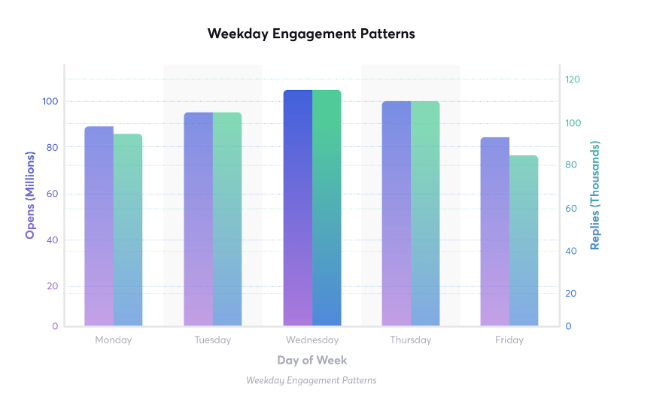
Cold-email-benchmark-report-2026 shows that timing plays a major role in reply rates. Campaigns that launch on Monday, follow up on Wednesday when engagement peaks, and triage Friday auto-replies see stronger conversation momentum. Teams that align send to weekly engagement patterns, compound replies across the week. The data reinforces that send timing can be nearly as influential as email copy.
 Personalize Salesforce sales emails with data
 Personalize Salesforce sales emails with data
Personalization is most effective when it reflects real buyer context rather than surface-level details. Salesforce provides enough insight to tailor messages in a way that feels intentional and relevant.
- Use the buyer’s role, team, and responsibilities to frame the message around what they actually own, helping the email feel immediately relevant instead of generic.
- Weave in account-level context, such as industry, company size, or known initiatives, to ground the message in reality without overwhelming the reader.
- Adjust personalization based on opportunity stage so messaging supports the current conversation rather than pushing the buyer ahead prematurely.
Segment contacts before sending emails
Segmentation ensures each email has a clear purpose and reaches the right audience. Without it, even strong messaging can feel misaligned.
- Separate contacts by lifecycle stage so early-stage prospects are not treated the same as active opportunities, reducing friction and disengagement.
- Segment by persona and buying role to ensure decision-makers, influencers, and users receive messaging aligned with their perspective.
- Use account attributes such as industry, region, or tier to make outreach more specific and relevant to each segment’s challenges.
Write insight-driven subject lines
Subject lines determine whether emails are opened at all. Salesforce insights help create subject lines that feel timely and specific.
- Reference a relevant business signal, such as a known initiative, role-based challenge, or recent interaction, to signal intent immediately.
- Keep subject lines focused on one clear idea so they are easy to understand at a glance and do not feel cluttered.
- Avoid vague or promotional phrasing that sounds interchangeable with any sales email and weakens curiosity.
Keep sales email copy short and focused
Concise emails respect the recipient’s time and make it easier to engage. Length and complexity often work against response rates.
- Focus on one problem or opportunity per email so the message is easy to follow and respond to.
- Write with scanning in mind by using short paragraphs and simple language that surfaces relevance quickly.
- Remove unnecessary background or feature explanations that distract from the main point and slow down comprehension.
Match CTAs to Salesforce sales stages
Calls to action are most effective when they align with where the buyer is in the journey. Salesforce stage data helps avoid unnecessary friction.
- Use low-commitment tasks early in the journey, such as confirming interest or offering to share a relevant resource.
- Shift CTAs mid-stage toward clarification, comparison, or focused discussions that support evaluation.
- Emphasize execution and next steps late-stage by addressing risks, alignment, or implementation readiness.
Optimize send times using engagement data
Timing influences whether emails are noticed or ignored. Salesforce engagement data provides practical guidance.
- Review historical open and reply patterns to identify effective send windows by persona or region.
- Adjust follow-up timing based on engagement behavior rather than relying on fixed schedules.
- Maintain consistent outreach rhythms so emails feel expected rather than intrusive.
Measure and refine email performance in Salesforce
Measurement turns outreach into a repeatable process instead of guesswork. Salesforce provides visibility into what is working.
- Track engagement metrics alongside pipeline movement to understand how emails influence real outcomes.
- Compare performance across segments to identify which messaging resonates with specific audiences.
- Continuously refine templates, timing, and cadence based on results to improve effectiveness over time.
Teams looking to apply these best practices at scale can also reference MassMailer’s Salesforce email deliverability best practices, which explain how engagement tracking, list hygiene, and sending controls help improve open rates and maintain performance as outreach volume grows.
Salesforce Sales Email personalization
Sales email personalization in Salesforce is most effective when it reflects genuine buyer context rather than surface-level customization. The goal is not to personalize everything, but to personalize the right things so each email feels relevant to the recipient’s role, priorities, and current buying stage.
When personalization is grounded in accurate CRM data and applied with restraint, it builds credibility and increases replies. When it is overused or misaligned, it can quickly erode trust and engagement.
Salesforce fields that matter most for personalization
Not all Salesforce fields contribute equally to meaningful personalization. Focusing on a small set of high-impact fields helps keep emails relevant and clear.
- Contact role, department, and seniority help shape language and framing so emails speak directly to what the recipient is responsible for.
- Account-level fields such as industry, company size, and region provide context that anchors the message in the buyer’s environment.
- Opportunity stage, use case, and next-step notes ensure messaging aligns with where the buyer is in their decision process.
Dynamic personalization vs contextual personalization
Personalization can be applied in different ways, and understanding the difference helps teams avoid over-automation.
| Dynamic personalization | Contextual personalization |
|---|---|
| Uses merge fields like name or company | References the buyer’s situation or priorities |
| Relies on static CRM data | Uses CRM data plus activity and stage context |
| Often feels templated | Feels intentional and relevant |
| Improves basic relevance | Drives stronger engagement and replies |
Personalization mistakes that reduce replies
Even well-intentioned personalization can hurt engagement if applied incorrectly. Avoiding common mistakes helps preserve relevance and trust.
- Inaccurate or outdated Salesforce data can make emails feel careless and immediately undermine credibility.
- Over-personalization can distract from the core message and reduce clarity.
- Automating personalization without validating context can result in emails that look personalized but miss the buyer’s reality.
How to improve email open rates in Salesforce
Email open rates improve when outreach is relevant, timely, and supported by the right data. A MassMailer article on Salesforce email open rates highlights how subject lines, timing, and list quality directly influence inbox visibility.
MassMailer supports these improvements by providing detailed engagement tracking, deliverability controls, and performance insights directly within Salesforce. This helps teams optimize open rates while maintaining consistency and control as outreach scales.
Subject line testing in Salesforce
Subject lines set the expectation for the email and determine whether it gets opened at all. Testing helps teams move from guesswork to evidence-based decisions.
- Test subject lines within specific segments rather than across your entire database so results reflect real audience behavior.
- Change one variable at a time, such as phrasing, length, or context, to clearly understand what drives open.
- Use Salesforce engagement data to compare performance and refine subject line patterns over time.
Send-time optimization
Timing influences visibility just as much as wording. Salesforce activity data offers clues about when contacts are most likely to engage.
- Review historical open and reply patterns to identify effective send windows by persona or region.
- Adjust follow-up timing based on recent engagement rather than fixed schedules.
- Maintain consistent timing once effective windows are identified to build familiarity and trust.
List hygiene and engagement tracking
Strong open rates depend on list quality and sender reputation. Salesforce helps teams maintain both when used proactively.
- Regularly suppress inactive or unengaged contacts to protect deliverability.
- Monitor engagement decay to identify when contacts should be paused or requalified.
- Track bounces, unsubscribes, and spam signals to maintain a healthy sending reputation
Follow-up and email cadence best practices in Salesforce
Follow-ups and cadence play a major role in whether sales emails feel helpful or intrusive. When cadence is aligned with Salesforce data and engagement signals, follow-ups reinforce relevance and increase replies. When cadence ignores context, even well-written emails can create fatigue and disengagement.
The goal is not to follow up more often, but to follow up more intentionally. Salesforce provides the signals teams need to pace outreach, adjust messaging, and stay aligned with how buyers actually respond.
Follow-up timing that increases replies
Effective follow-up timing is driven by buyer behavior rather than rigid schedules. Salesforce activity and engagement history offer practical cues.
- Use opens, clicks, and replies to guide when the next follow-up should happen instead of relying on fixed day intervals.
- Space follow-ups to maintain visibility without overwhelming prospects, especially when there is no engagement signal.
- Adjust timing by persona and region, since response patterns often vary across roles and geographies.
Aligning follow-ups with Salesforce sales stages
Follow-up messaging should evolve as opportunities move through the pipeline. Salesforce stages help ensure relevance at every step.
- Early-stage follow-ups should focus on clarity, education, or confirming interest rather than pushing meetings.
- Mid-stage follow-ups can support evaluation by addressing comparisons, use cases, or stakeholder alignment.
- Late-stage follow-ups should remove obstacles, confirm next steps, or support decision-making and execution.
Follow-up mistakes that hurt engagement
Many cadence issues stem from ignoring Salesforce signals or repeating the same message too often.
- Sending follow-ups too frequently without adding new context leads to fatigue and declining response rates.
- Repeating the same task with minimal variation signals automation rather than intent.
- Ignoring engagement data, such as opens or replies, results in misaligned follow-ups that damage trust.
Measuring and optimizing sales email performance in Salesforce
Measuring sales email performance is what turns outreach into a repeatable, improvable process. Salesforce allows teams to connect email activity with engagement signals and pipeline movement, making it easier to understand what actually influences outcomes.
When performance is reviewed consistently, teams can refine messaging, timing, and cadence without increasing volume.
Salesforce metrics that matter for sales emails
The most useful metrics are those that show both engagement and impact. Open rates help indicate whether subject lines, timing, and targeting are effective. Reply rates show whether the message resonates once the email is opened.
Looking at opportunity influence and stage progression helps teams understand whether emails contribute to meaningful pipeline movement rather than surface-level activity.
Identifying what is not working
Performance issues become clearer when metrics are analyzed together. Low open rates often point to problems with subject lines, segmentation, or deliverability. Healthy opens with low replies usually indicate messaging or call-to-action misalignment. When engagement exists but deals stall, the issue is often follow-up relevance or stage alignment rather than email volume.
This approach is reflected in how the Bay Club used MassMailer within Salesforce to improve email performance. By tracking opens and engagement directly on Salesforce records, the team identified which messages resonated and adjusted timing and content accordingly. This visibility helped optimize outreach based on real data rather than assumptions, improving effectiveness without increasing send volume.
Using insights to refine outreach
Optimization happens when insights lead to action. Performance trends can be used to refine templates, adjust messaging by persona or stage, and improve cadence timing. Small, consistent changes based on Salesforce data help teams improve results over time while keeping outreach focused and relevant.
Conclusion
Salesforce sales email success depends on how well strategy, data, and execution work together. High-performing teams are not sending more emails. They are sending emails that are relevant, timely, and aligned with where buyers are in their journey.
Relevance comes from grounding messages in a real CRM context, such as role, account priorities, and opportunity stage. Timing improves when follow-ups and cadence reflect engagement signals instead of fixed schedules. Clarity comes from simple structure and stage-appropriate calls to action that make it easy for buyers to respond.
Personalization, cadence, and measurement reinforce one another. Personalization earns attention, cadence maintains momentum without causing fatigue, and measurement reveals what to refine. Together, they turn email outreach into a repeatable, data-driven process.
For some teams, native Salesforce email is sufficient. As outreach scales, maintaining consistency and visibility becomes harder. Tools like MassMailer help teams apply Salesforce data more effectively, manage outreach at scale, and keep performance measurable.
Get started with MassMailer to turn best practices into consistent results inside Salesforce.
Frequently Asked Questions
How should sales emails be written differently when using Salesforce?
What Salesforce data fields matter most for sales email personalization?
How often should sales teams send emails using Salesforce?
What metrics should be tracked to evaluate Salesforce sales email performance?
When is native Salesforce email sufficient for sales outreach?
How do sales email tools integrate with Salesforce for better results?
What is the best time to send a sales email in Salesforce?
How do you personalize sales emails in Salesforce?
What is a good open rate for Salesforce sales emails?
How do you track sales email performance in Salesforce?
Start Your Free Trial Today
Experience MassMailer the easiest way to send personalized emails from Salesforce.
Related Blogs
MassMailer Resources


About the Author

Siva Devaki 

Siva Devaki is the founder of MassMailer Inc., a tool that helps Salesforce users optimize email marketing. A passionate advocate for email marketing, Siva writes and hosts podcasts on the topic, sharing insights to help businesses drive revenue and enhance customer engagement through Salesforce email automation and tracking.