




Table of Contents
Introduction
Many Salesforce users struggle to send better emails in Salesforce, even though email marketing can deliver up to a 3,800% ROI. Messages often land in spam or go unopened, not because teams send too many emails, but because deliverability, relevance, and personalization are weak. Salesforce stores rich customer data, yet many emails fail to use that data effectively.
To send better emails in Salesforce, you need to focus on four core areas: deliverability, segmentation, personalization, and performance tracking. When emails are authenticated, targeted to the right audience, and personalized using Salesforce data, engagement improves, and inbox placement becomes more consistent.
This guide explains how to send better emails in Salesforce by improving deliverability, personalization, segmentation, and performance tracking using native tools and MassMailer. You’ll learn practical steps to fix common Salesforce email issues, understand platform limitations, and apply proven strategies to improve open rates, clicks, and overall email performance.
How to Send Better Emails in Salesforce
To send better emails in Salesforce, focus on four fundamentals: deliverability, personalization, email quality, and performance measurement. When these areas work together, your emails are more likely to reach the inbox, feel relevant to recipients, and drive engagement.
- Improve Salesforce email deliverability: Authenticate your sending domain using SPF, DKIM, and DMARC to build trust with inbox providers. Clean email lists and consistent sending patterns also reduce bounces and spam filtering.
- Personalize emails using Salesforce data: Move beyond basic merge fields. Use lead status, lifecycle stage, account attributes, and engagement history to create personalized emails in Salesforce that feel relevant to each recipient.
- Optimize Salesforce email templates for engagement: Use clear layouts, concise copy, and mobile-responsive designs. Well-structured templates improve readability, support effective email messaging, and enhance overall email quality.
- Segment audiences for effective Salesforce email communication: Target emails based on behavior, intent, or account context instead of sending broad campaigns. Better segmentation leads to higher relevance and stronger engagement.
- Track and refine email performance: Monitor opens, clicks, bounces, and unsubscribes to understand what’s working. Use these insights to continuously optimize email content and improve future campaigns.
Salesforce supports parts of this workflow, but executing all five consistently requires more control over personalization, scale, and performance insights. Salesforce users on G2 often note that these challenges are easier to manage with native tools like MassMailer.
That’s why it’s important to understand where Salesforce’s native email tools fall short, and what you need to overcome those limitations to send better emails.
Overcoming Salesforce Email Tool Limitations to Send Better Emails
To send better emails in Salesforce, it's crucial to understand and overcome the limitations of its native email tools. While Salesforce is a powerful CRM, its built-in email features often fall short in areas like personalization, deliverability, and scalability.
To optimize and send better emails on Salesforce, here’s what you can do:
1. Limited Personalization and Formatting
Salesforce’s email tools provide basic formatting but lack advanced options for creating visually engaging and personalized emails. To stand out, you need to go beyond the basics.
- Basic Merge Fields: Salesforce’s native email personalization is limited to static fields (e.g., first names) and doesn’t support dynamic content based on customer behavior or preferences. This results in generic emails that fail to resonate with recipients.
- Limited Formatting Options: Salesforce supports basic HTML emails but lacks the ability to include interactive elements like buttons, videos, or advanced layouts. This limits the ability to create engaging, interactive emails that capture attention.
- Mobile Optimization: Native Salesforce templates aren’t always mobile-responsive, which can reduce engagement. Over 50% of emails are opened on mobile, making responsive design a must for higher engagement.
Enhancing personalization ensures your emails stand out and get noticed, leading to higher engagement and better results.
2. Challenges with Bulk Email Sending in Salesforce
Salesforce's native tools limit the number of emails you can send in bulk, especially if you want to maintain personalization. Scaling your email outreach without losing quality requires more than just Salesforce’s default tools.
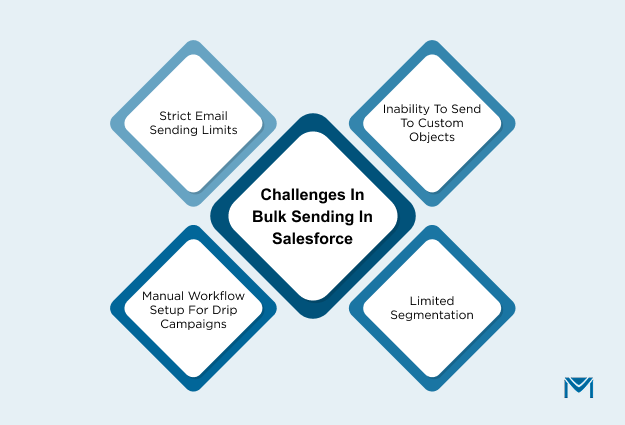
- Strict Email Sending Limits: Salesforce imposes a 5,000 emails per day limit, which restricts high-volume campaigns. This can prevent timely, wide-scale outreach during promotions or important campaigns.
- Inability to Send to Custom Objects: Salesforce only supports sending emails to standard objects like leads and contacts. You cannot send bulk emails to custom objects, limiting targeting and personalization.
- Limited Segmentation: Salesforce’s basic segmentation features don’t allow for advanced dynamic segmentation based on customer behavior or purchase history. This makes it difficult to send highly targeted emails at scale.
- Manual Workflow Setup for Drip Campaigns: Setting up complex drip campaigns for bulk emails in Salesforce requires manual configuration. Users often need third-party integrations to automate timely follow-ups and nurture leads, making it harder to maintain relevant, consistent communication at scale.
By overcoming this limitation, you can ensure that every email reaches the right person at the right time, improving both deliverability and engagement.
3. Lack of Advanced Analytics
Salesforce’s native email system offers basic tracking but lacks detailed insights into email performance, limiting your ability to optimize campaigns.
- No Real-Time Tracking: Salesforce doesn’t offer real-time engagement tracking. Marketers can’t make instant adjustments to underperforming campaigns based on real-time data.
- Limited Reporting: Salesforce provides basic open and click rates, but it lacks in-depth conversion tracking and engagement metrics. This limits your ability to analyze performance and optimize campaigns for better results.
- Basic A/B Testing: Salesforce lacks automated A/B test winner selection. Marketers must manually track results, which slows down the optimization process for future campaigns.
The more you learn from these metrics, the more you can optimize your email strategy to send better, more effective emails in the future.
4. Poor Email Deliverability
Email deliverability is a major concern when using Salesforce's native tools. The native tools offer limited functionality for managing email authentication and ensuring emails reach the inbox.
- Limited Native Authentication Support: Salesforce supports SPF, DKIM, and DMARC, but the setup is manual and not enforced. This makes it harder to ensure that emails pass authentication checks and reach the inbox.
- No Built‑In Feedback Reporting: Salesforce doesn’t provide detailed feedback on authentication failures or domain reputation issues. This makes it hard to diagnose and fix deliverability problems quickly.
- Lack of Email List Hygiene: Salesforce doesn’t offer tools for email list cleaning or validation. This can lead to high bounce rates and damage the sender's reputation.
Improving deliverability ensures your messages reach the right audience and increase engagement rates. MassMailer, as a native Salesforce integration, helps streamline email authentication and ensures better deliverability by offering advanced settings to optimize your emails for maximum inbox placement.
How MassMailer Helps You Send Better Emails in Salesforce
MassMailer is a powerful native integration for Salesforce that enhances email campaigns by improving personalization, scalability, and deliverability. It makes it easier for marketers to send better emails by automating key processes and providing advanced analytics.
1. Personalization at Scale
MassMailer allows you to create dynamic, personalized emails at scale, utilizing Salesforce data to customize each message. Instead of sending generic emails, you can customize your content based on customer behavior, previous interactions, and more.
- Merge fields like first names, product recommendations, and custom offers can be inserted directly into emails.
- Personalize content using lead status, purchase history, recent interactions, or even custom object data like product types, event status, and account tiers that Salesforce’s native tools can’t support.
- MassMailer ensures that emails are mobile-responsive, which is essential for engagement, as over 50% of emails are opened on mobile devices.
By leveraging Salesforce data, MassMailer helps deliver more targeted, engaging emails, leading to higher open rates and better customer retention.
2. Bulk Email Sending Without Sacrificing Quality
MassMailer helps you scale your email campaigns without sacrificing personalization or quality. Salesforce’s native tools are limited in bulk sending capabilities, but MassMailer integrates seamlessly to ensure high-quality outreach even for large audiences.
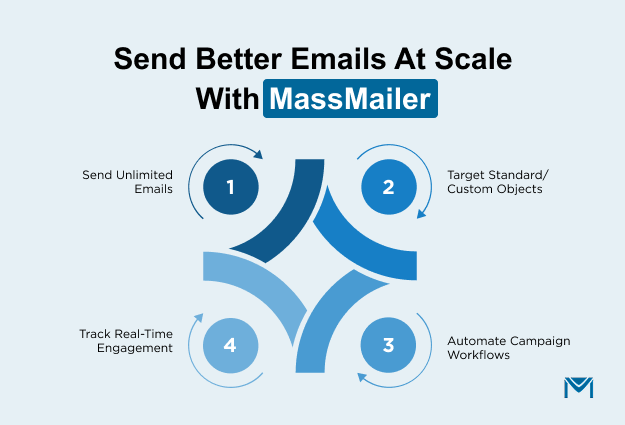
- With MassMailer, you can send unlimited emails beyond Salesforce’s daily limits directly from Salesforce CRM.
- You can send emails to standard and custom objects, enabling more flexible, data‑driven outreach.
- You can schedule campaigns and automate workflows so relevant messages go out at the right moment without manual effort.
- MassMailer tracks opens, clicks, bounces, and unsubscribes in real time, even at scale, helping you maintain quality insights on large campaigns.
With MassMailer, you can efficiently manage high-volume email sending while maintaining the personalized touch that drives engagement.
3. Email Automation for Scalability
Automation is key to scaling your email campaigns. MassMailer allows you to automate follow-up emails, drip campaigns, and nurture sequences to engage leads and customers without manual intervention.
- MassMailer automates multi-step drip campaigns, enabling you to send personalized emails automatically at various stages of the customer journey, from lead nurturing to post-sale engagement.
- MassMailer allows you to set up email triggers based on specific actions such as a lead’s interaction with your website, recent purchase, or time-based events like anniversaries. This ensures timely communication that keeps recipients engaged.
- It integrates with Salesforce Flow to automate complex workflows that can send personalized emails based on any trigger within your CRM, making sure no leads fall through the cracks.
By automating these processes, MassMailer ensures your emails are timely, relevant, and always personalized based on Salesforce data.
4. Advanced Analytics and Reporting: How to Send Better Emails in Salesforce
One of the main advantages of MassMailer is its advanced email analytics. Unlike Salesforce’s native email tools, which provide only basic metrics, MassMailer offers detailed reporting that helps you optimize your campaigns.
- You can monitor deliverability indicators like bounce trends and complaints, helping you improve sender reputation and inbox placement.
- MassMailer shows performance statistics for each campaign, letting you compare engagement across audiences and identify what’s resonating.
- By breaking down results by recipient groups or segments, you can uncover which audiences respond best and refine targeting for future sends.
With advanced reporting, MassMailer provides actionable insights that enable you to refine your strategy and continually improve email performance.
Conclusion
Improving your email campaigns within Salesforce doesn’t have to be difficult. By addressing key limitations like personalization, scalability, and deliverability, you can significantly boost engagement and drive better results.
With MassMailer, Salesforce users can seamlessly integrate advanced email automation, personalization at scale, and analytics, all while maintaining the high-quality standards needed for successful campaigns.
Ready to send better emails? Start optimizing your Salesforce email strategy today by exploring MassMailer’s powerful features. Whether you're looking to personalize emails at scale, improve deliverability, or track email performance, MassMailer offers the tools you need to succeed.
Get started with MassMailer today to see how it can transform your Salesforce email campaigns.
Frequently Asked Questions
1. How can I send better emails using Salesforce?
2. What is Send Better Email in Salesforce?
3. How do I use MassMailer for better email campaigns in Salesforce?
4. What are the best practices for email deliverability in Salesforce?
5. How can I automate personalized emails in Salesforce?
6. What are the benefits of using Send Better Email in Salesforce for bulk outreach?
Start Your Free Trial Today
Experience MassMailer the easiest way to send personalized emails from Salesforce.
Related Blogs
MassMailer Resources

About the Author

Siva Devaki 

Siva Devaki is the founder of MassMailer Inc., a tool that helps Salesforce users optimize email marketing. A passionate advocate for email marketing, Siva writes and hosts podcasts on the topic, sharing insights to help businesses drive revenue and enhance customer engagement through Salesforce email automation and tracking.