




Table of Contents
Introduction
Did you know that nearly 60% of email marketers say poor email list hygiene directly impacts their email deliverability and campaign success? As a result, if you do not manage your Salesforce email list properly, you could be losing valuable engagement without even realizing it.
As your Salesforce contact list grows, keeping records organized and segmented becomes more challenging. Without a structured system, teams risk sending irrelevant emails to the wrong contacts. Over time, this leads to missed opportunities, lower open rates, and higher bounce rates.
In this guide, we walk through how to optimize, clean, and segment your Salesforce email list for stronger performance. With the right approach, you can improve engagement, strengthen deliverability, and get more consistent results from your email campaigns.
Why Do You Need to Segment Your Salesforce Email List?
Salesforce email list segmentation is essential for ensuring your email campaigns are both effective and relevant. By dividing your Salesforce CRM users' email list into specific groups based on factors like industry, customer behavior, and engagement level, you can deliver personalized messages that significantly increase your chances of higher engagement, better deliverability, and improved conversion rates.
1. Benefits of Segmentation for Salesforce Email Lists:
- Higher Engagement: Segmentation allows you to send highly relevant content to the right audience, which leads to increased open rates and click-through rates.
- Better Deliverability: Sending targeted emails to specific groups ensures your emails avoid spam filters and are more likely to land in the inbox.
- Improved Conversions: Tailored emails drive higher conversion rates by speaking directly to the needs of your segmented audience.
2. Why Are List Emails Better Than Mass Emails in Salesforce?
List emails are far more effective than mass emails in Salesforce. The key difference lies in targeting and personalization. While mass emails are sent to your entire email list without any segmentation, list emails are sent to carefully selected groups based on segmentation criteria like industry, lead status, or customer interests.
- List emails are personalized and tailored to specific groups, making the content more relevant and engaging, resulting in better open and click-through rates.
- Mass emails tend to be less effective because they lack personalization, leading to higher bounce rates, more unsubscribes, and a higher chance of being marked as spam.
By using tools like MassMailer, you can streamline the process of creating and sending personalized list emails directly within Salesforce, ensuring your emails reach the right audience with the right message every time.
3. What is the difference between list emails and mass emails in Salesforce?
| Feature | List Email | Mass Email |
|---|---|---|
| Targeting | Sent to a specific, segmented audience | Sent to all contacts, no segmentation |
| Personalization | Highly personalized, dynamic content | Generic, one-size-fits-all approach |
| Engagement | Higher open and click-through rates | Lower engagement, higher bounce rates |
| Deliverability | Better deliverability, less likely to be marked as spam | Higher risk of spam complaints |
4. How to Segment Your Salesforce Email List for Better Results
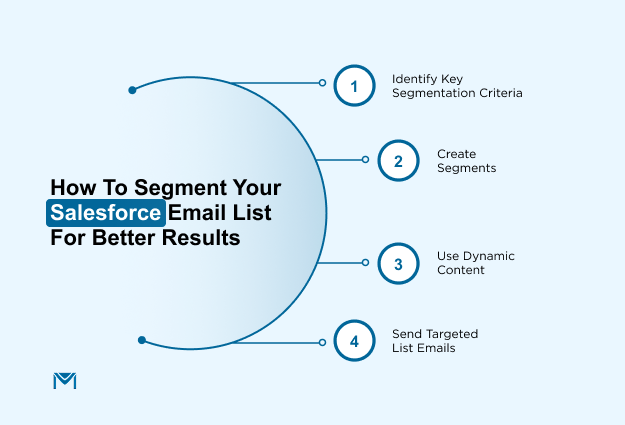
Here are the steps to segment your Salesforce email list effectively:
- Identify Key Segmentation Criteria: Divide your contacts based on industry, engagement, behavioral data, or customer lifecycle stage.
- Create Segments: Use Salesforce contact segmentation features to group your contacts accordingly.
- Use Dynamic Content: Personalize your email content based on the segment’s characteristics to increase relevance and engagement.
- Send Targeted List Emails: Once the list is segmented and the email is personalized, send the email to the right audience group and track the results for optimization.
To sum up:
- List emails are more effective than mass emails for engagement, deliverability, and conversions.
- Salesforce customer segmentation helps ensure your emails reach the right audience with the right message.
- Use Salesforce email audience lists to create personalized, targeted campaigns that drive better results.
How MassMailer Enhances Salesforce Email List Management
Listed on the Salesforce AppExchange, MassMailer is a native Salesforce email solution built to work directly within your CRM. MassMailer is designed to simplify Salesforce email list management by automating key processes like segmentation, list hygiene, and engagement tracking. It seamlessly integrates with Salesforce, ensuring that your Salesforce email list is always accurate and up to date without needing third-party tools.
1. Seamless Integration with Salesforce
By integrating directly with Salesforce, MassMailer enables smooth management of your Salesforce email list. It syncs contacts, leads, and custom objects, allowing you to manage email campaigns natively within Salesforce.
According to Erica LaCentra, Marketing Director at RCN Capital, MassMailer has made executing large-scale email marketing efforts through Salesforce simple and efficient. She shared that the easy-to-use interface and foolproof process have allowed their team to manage email campaigns seamlessly, with greater flexibility in customization and email sending options.
This experience is echoed in user reviews on Capterra, where customers frequently mention how easy MassMailer is to use inside Salesforce and how reliably it handles list-based campaigns without breaking workflows or requiring constant admin intervention.
This integration reduces manual entry, ensures data consistency, and keeps your email lists aligned with your CRM data.
2. Automating List Segmentation Based on Engagement
MassMailer takes the guesswork out of Salesforce contact segmentation. It automatically segments your email list based on key engagement metrics, such as email opens and click-through rates.
This way, you can ensure your emails are always reaching the right contacts, at the right time, with the most relevant content. Automated segmentation boosts engagement and improves the performance of your email campaigns.
3. Dynamic Data Hygiene: Cleaning and Validating Lists Automatically
Maintaining a clean Salesforce email list is essential for high deliverability. MassMailer automates data hygiene by removing invalid email addresses, managing bounces, and suppressing unsubscribed contacts.
This helps keep your list up to date, improving deliverability and ensuring your emails reach the most engaged recipients.
By automating data hygiene, MassMailer ensures your Salesforce email list stays clean and accurate, improving deliverability and ensuring your campaigns reach the right audience every time.
How to Create and Send Targeted List Emails in Salesforce with MassMailer
Creating and sending targeted emails in Salesforce is essential to drive engagement and conversion rates. With MassMailer, you can segment Salesforce email lists efficiently, create dynamic content that speaks to the needs of your audience, and track performance in real time.
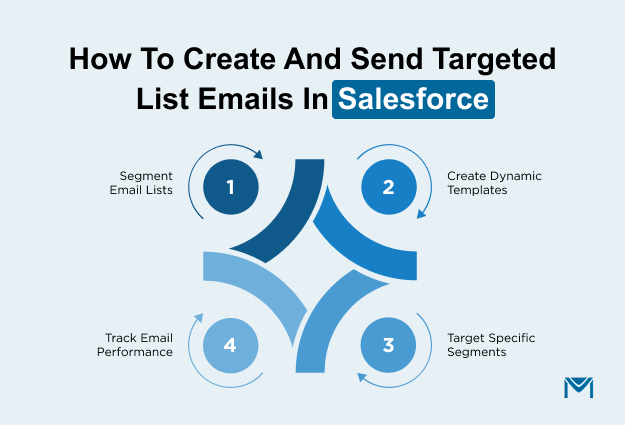
Here's a step-by-step guide on how to create and send targeted list emails using MassMailer in Salesforce.
1. Segment Your Salesforce Email List
Effective email list segmentation is crucial to ensure that your emails reach the right people. Salesforce email lists can be segmented based on criteria such as industry, lead status, and customer activity.
- Create custom list views to filter contacts based on engagement levels and behavior.
- Use Salesforce filters to automatically update and maintain segmented lists.
- Leverage Salesforce’s advanced segmentation tools to group contacts by demographics or recent interactions.
By accurately segmenting your Salesforce email list, you ensure that the content you send is relevant to each group, increasing the chances of higher engagement.
2. Create a Dynamic Email Template
Personalization is key to boosting engagement. MassMailer allows you to create dynamic email templates that automatically adjust based on recipient data from Salesforce.
- Use MassMailer’s drag-and-drop editor to build professional, responsive email templates.
- Insert dynamic content blocks like first names, company names, or recent purchases using Salesforce merge fields.
- Tailor emails for different segments to increase relevance and drive higher open rates.
By using dynamic templates, you make each email more personal, which helps drive better results for your campaigns.
3. Select the Targeted List
After creating your dynamic email template, it’s time to choose the Salesforce email list to target. MassMailer syncs seamlessly with Salesforce, making it easy to select your segmented audience.
- Choose a segment from your Salesforce custom list views.
- Review the contacts to ensure they match your campaign criteria.
- MassMailer automatically updates your Salesforce email list, keeping your audience fresh and relevant.
Thus, by selecting the correct segment, your email is sent to the right people, thereby increasing the likelihood of achieving better results.
4. Send and Track Your Emails
With your list selected and template ready, it’s time to send. MassMailer enables you to send targeted emails directly from Salesforce and track their performance.
- Send your email and track open rates, click-through rates, bounce rates, and unsubscribes.
- Use Salesforce reports to analyze how your segments interacted with the email.
- Refine future campaigns based on the tracking data provided by MassMailer.
Therefore, tracking your email performance helps optimize future campaigns, ensuring continued improvements in engagement.
Conclusion
Efficient Salesforce email list management is key to successful email marketing campaigns. With this foundation in place, MassMailerhelps automate segmentation, personalization, and data hygiene, ensuring your emails reach the right audience with the right message at the right time.
At the same time, MassMailer enables you to create targeted, dynamic emails based on engagement, track performance, and continuously optimize campaigns. By leveraging Salesforce email segmentation, dynamic content, and real-time email tracking, MassMailer helps improve open rates, click-through rates, and conversion rates, leading to more effective outreach and stronger campaign results.
So, when you’re ready to scale, MassMailer makes it easier to streamline Salesforce email list management and drive better results with every send.
To get started, sign up for a free trial and see how MassMailer can transform your email campaigns.
Frequently Asked Questions
1. How can I segment my Salesforce email list?
2. How do I import email contacts into Salesforce?
3. How can I automate email campaigns in Salesforce?
4. Can I track email performance in Salesforce?
5. How do I ensure compliance with email regulations in Salesforce?
6. What are the best tools for email list management in Salesforce?
Start Your Free Trial Today
Experience MassMailer the easiest way to send personalized emails from Salesforce.
Related Blogs
Salesforce email sync: how it works and how to fix common issues
MassMailer Resources

MassMailer Glossary
About the Author

Siva Devaki 

Siva Devaki is the founder of MassMailer Inc., a tool that helps Salesforce users optimize email marketing. A passionate advocate for email marketing, Siva writes and hosts podcasts on the topic, sharing insights to help businesses drive revenue and enhance customer engagement through Salesforce email automation and tracking.