




Table of Contents
Introduction
Email remains one of the most powerful marketing tools, yet tracking email activity in Salesforce can be a challenge. While Salesforce provides basic tracking, it often falls short in capturing detailed engagement metrics like opens, clicks, and responses. Without these insights, sales teams struggle to personalize outreach, optimize follow-ups, and measure the true effectiveness of their campaigns.
In fact, the average email open rate for marketing campaigns is 36.5%, according to Forbes, indicating the significant potential for engagement when emails are tracked effectively. However, without accurate tracking, businesses miss out on understanding which content resonates with leads, leading to missed opportunities.
This is where MassMailer comes in. By seamlessly integrating with Salesforce, it automatically logs all email interactions, whether opened, clicked, or unsubscribed, providing real-time insights and a complete view of customer engagement.
In this blog, we'll explore how MassMailer enhances email tracking, helping you personalize outreach, optimize campaigns, and improve overall sales performance.
Why Does Salesforce Email Activity Matter?
Tracking email activity within Salesforce is vital for maximizing customer engagement and optimizing sales efforts. Without comprehensive tracking, sales and marketing teams miss out on valuable insights into how leads and customers interact with their emails. Here's why it matters:
- Improved Customer Engagement: By tracking email activities like opens, clicks, and responses, businesses can gain a full picture of customer interactions. This visibility helps sales teams understand what content resonates with their audience, allowing for more relevant and timely communication.
- Optimized Follow-Ups: With email activity tracking, sales reps can ensure that follow-up emails are sent at the right time. For example, if a lead opens an email but doesn’t click on a link, it’s an opportunity for a follow-up email that is more targeted to their needs or interests.
- Actionable Insights for Marketing Campaigns: Email tracking doesn’t just help with follow-ups; it also provides valuable data on which content and subject lines perform best. This information enables marketing teams to refine their strategies and improve future campaigns.
Key Benefits of Tracking Email Activity in Salesforce
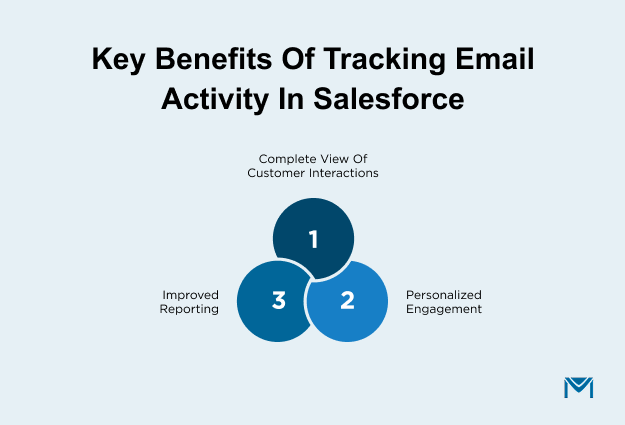
- Complete View of Customer Interactions: Email activity tracking lets you log every email sent, opened, clicked, or unsubscribed to, giving you a comprehensive view of each customer’s journey. This enables you to understand the entire interaction history, which is crucial for building stronger customer relationships and improving sales outcomes.
- Personalized Engagement: Access to detailed email history allows sales reps to send more personalized emails. By knowing which emails a lead has opened and what links they’ve clicked, sales teams can craft follow-ups that directly address the lead's interests, resulting in more effective engagement.
- Improved Reporting: With accurate email metrics such as open rates, click-through rates, and responses, businesses can analyze the success of their email campaigns. This provides clarity on campaign performance, helping teams make data-driven decisions and optimize future outreach efforts.
How MassMailer Enhances Salesforce Email Activity Tracking
MassMailer offers a comprehensive solution that fills the gaps left by Salesforce's native email activity tracking capabilities. Built as a native Salesforce application and available on the Salesforce AppExchange, MassMailer integrates directly into Salesforce to provide enhanced email tracking, real-time reporting, and detailed engagement insights.
MassMailer integrates directly into Salesforce, providing enhanced email tracking, real-time reporting, and detailed engagement insights. Here’s how MassMailer makes a difference:
1. Seamless Integration with Salesforce
MassMailer effortlessly integrates with Salesforce, syncing all email activity directly to Salesforce records like Leads, Contacts, and Opportunities. This ensures that every interaction, whether an email is opened, clicked, or unsubscribed, is logged as a Salesforce activity without requiring manual entry.
Emails sent through MassMailer are automatically recorded in Salesforce under the relevant lead, contact, or opportunity. No need for manual logging or third-party tools; everything happens in one system.
This seamless integration provides the following benefits:
- Reduces Manual Work: The integration eliminates the need for sales teams to track or log emails manually.
- Automates Email Logging: Every email interaction is automatically recorded in real-time, saving valuable time and improving data accuracy.
- Improves Sales Team Efficiency: With email activities seamlessly integrated, sales reps can focus more on selling and less on administrative tasks.
2. Advanced Email Syncing and Logging as Activities
MassMailer enhances Salesforce’s basic email tracking by providing more detailed activity logs. This includes email opens, clicks, forwards, and unsubscribes, allowing sales teams to gain deeper insights into customer engagement.
Tracking Detailed Email Engagement:
- Email Opens: Monitor which leads are engaging with your emails and how often.
- Clicks: Track which links your leads are clicking on within your emails.
- Forwards: See if your emails are being forwarded, indicating higher interest or potential referrals.
- Unsubscribes: Monitor when leads opt out of receiving your emails to refine your email strategy.
These advanced tracking features give sales teams a full picture of how each lead interacts with their email campaigns, enabling them to prioritize follow-ups and tailor their outreach based on specific customer behaviors.
3. Real-Time Reporting and Analytics for Email Activities
With MassMailer, email engagement data is available in real-time, allowing sales and marketing teams to assess campaign performance immediately. This real-time insight helps teams make quick adjustments to campaigns, improving overall engagement and results.
- Real-Time Insights:
- Track Campaign Performance Immediately: Monitor open rates, click-through rates, bounce rates, and conversion data in real-time.
- Make Data-Driven Adjustments: If a campaign isn’t performing as expected, teams can make on-the-fly changes to the messaging or timing.
These real-time insights are crucial for optimizing campaigns and ensuring that your Salesforce email marketing efforts are driving the best possible outcomes.
Let us consider a customer story:
At Bay Club, a modern-day country club with 23 locations across California, the IT team quickly encountered a limitation with Salesforce’s built-in email functionality. With campaigns requiring a higher volume of emails, they needed a solution that would provide the flexibility and performance necessary for their growing business.
After exploring various options, they found MassMailer to be the ideal fit. According to Mark Street, IT Manager at Bay Club:
“One of the things we really liked about MassMailer was the ability to control the way that we’re building the emails, whether it’s from templates or built by any one of our team members. The support and attention to detail from MassMailer, especially from Manson, were incredible. From day one, the product has performed flawlessly. The ability to control when emails are sent, whether on a timed basis or immediately, has been a game-changer for us.”
MassMailer enabled Bay Club to seamlessly integrate with Salesforce, offering the flexibility and control they needed to scale their email campaigns without hitting Salesforce’s built-in email limits. This partnership has allowed Bay Club to automate, track, and optimize email communications, improving overall engagement and operational efficiency.
How to Add Email to Activity in Salesforce with MassMailer
One of the key benefits of using MassMailer is its ability to simplify the process of logging emails as Salesforce activities. This helps maintain accurate and up-to-date records, ensuring that all customer interactions are tracked without requiring manual entry.
Below, we'll walk through how to seamlessly add emails to Salesforce activity records using MassMailer.
1. Syncing Email as Salesforce Activity: A Step-by-Step Guide
MassMailer makes it easy to sync emails to Salesforce as activities. Here’s a step-by-step guide on how you can do it:
- Open MassMailer Interface: Start by logging into your Salesforce account and accessing the MassMailer interface.
- Compose or Select an Email: Create a new email or select an existing one to track.
- Log Email as Activity: Once the email is ready to send, you can log it as an activity directly in Salesforce by selecting the appropriate option in MassMailer.
- Review and Send: After the email is synced as an activity, it will be automatically linked to the relevant lead, contact, or opportunity in Salesforce, giving you a complete record of the interaction.
This process is fully automated and ensures that all email interactions are recorded accurately in Salesforce.
2. Adding Send Email to Activity in Salesforce for Better Tracking
When an email is sent, MassMailer automatically logs it as an activity in Salesforce, without any additional steps required. This feature is key to streamlining your workflow and ensuring all customer interactions are tracked in one central location.
- Automatic Syncing of Sent Emails: Whenever an email is sent through MassMailer, it is automatically logged under the corresponding lead, contact, or opportunity in Salesforce as an activity.
- Benefits:
- No Manual Entry: Sales reps don’t need to manually log emails, ensuring accuracy and saving time.
- Better Tracking: Every sent email is tied directly to the relevant Salesforce record, ensuring that your CRM has a complete and up-to-date history of interactions.
3. Automatically Logging Email Interactions with MassMailer
MassMailer goes beyond just sending emails; it automatically logs every interaction related to email engagement, such as opens, replies, clicks, and more.
- Hands-Free Tracking: Once you send an email, MassMailer automatically tracks and logs interactions with that email, including:
- Email Opens: See when a lead opens your email.
- Replies: Track when a lead responds to your email.
- Clicks: Monitor which links in your email were clicked.
- Time-Saving Automation: This automatic logging feature reduces the workload for sales teams, allowing them to focus on engaging with leads rather than managing data. It ensures that all interactions are logged accurately and in real-time, providing up-to-date insights into customer engagement.
By automating the tracking and logging process, MassMailer improves the efficiency of your sales team. This allows reps to focus on building relationships and closing deals while keeping the CRM up to date and accurate.
Best Practices for Managing Email Activity in Salesforce Using MassMailer
Using MassMailer to track email activity in Salesforce can significantly enhance the efficiency of your sales and marketing teams. However, to get the most out of this integration, teams need to follow clear best practices. These practices optimize how Salesforce manages and tracks email activity. Here are some strategies to ensure you're leveraging MassMailer effectively.
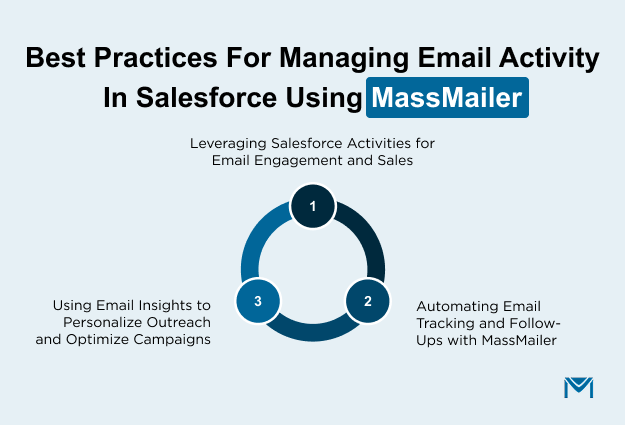
1. Leveraging Salesforce Activities for Email Engagement and Sales
Salesforce activities provide a powerful way to track and manage customer interactions, including emails. To make the most of MassMailer’s email tracking, consider these best practices:
- Segment Your Email Audience: Use Salesforce’s segmentation tools to group leads and contacts based on their behavior, interests, or stage in the sales funnel. By syncing this data with MassMailer, you can send highly targeted emails to each group. This approach improves engagement and response rates.
- Personalize Email Campaigns: Use the detailed email activity logs to personalize outreach. Knowing which emails a lead has opened and which links they have clicked shows their level of engagement. This insight allows you to craft tailored follow-ups that address their specific interests or pain points.
- Track Email History for Context: When preparing for follow-ups, reviewing a lead's complete email history in Salesforce can provide valuable context. This helps sales reps to avoid redundant messaging and create more relevant conversations.
2. Automating Email Tracking and Follow-Ups with MassMailer
Automation is key to improving efficiency and consistency in sales processes. MassMailer’s integration with Salesforce enables you to automate much of the email activity tracking and follow-up process.
- Set Up Automated Follow-Ups: Use MassMailer to automate follow-up emails based on customer engagement. For instance, if a lead opens an email but doesn't respond, MassMailer can trigger an automated follow-up email after some days.
- Triggered Emails for Non-Responders: For leads who don’t engage with the initial email, you can automate a follow-up message, which might include additional content or a call to action. This helps you maintain engagement without requiring manual effort from the sales team.
- Benefit of Automation: Automating the tracking and follow-up process not only saves time but also ensures that no lead slips through the cracks. Sales reps can focus their energy on more strategic tasks, while the system takes care of maintaining regular contact with leads.
3. Using Email Insights to Personalize Outreach and Optimize Campaigns
Email activity tracking provides a wealth of data that can be used to refine your outreach strategy. By analyzing these insights, you can continuously improve email content, timing, and targeting.
- Leverage Engagement Metrics: Use open rates, click-through rates, and reply rates to gauge the effectiveness of your Salesforce email campaigns. If certain subject lines or types of content generate higher engagement, replicate those strategies in future campaigns.
- Refine Email Copy and Timing: Insights into which emails get the best response can help you fine-tune your email copy and determine the optimal time to send emails. For example, if you find that emails sent on specific days result in higher open rates, incorporate this into your strategy.
- Personalize Based on Behavior: Use detailed data from MassMailer to tailor follow-up emails based on a lead’s interactions. If a lead clicked a link in your email about a specific product, send them a follow-up email with more information about that product. This level of personalization significantly increases the chances of conversion.
By using MassMailer’s email tracking insights, you can continuously optimize your email campaigns and have higher conversion rates.
Conclusion
Tracking email activity within Salesforce is essential for understanding customer engagement and optimizing follow-ups. While Salesforce offers basic email logging, it often lacks the depth and automation needed for seamless CRM integration. MassMailer addresses this gap by automating email syncing, providing real-time reporting, and logging all email interactions directly in Salesforce.
With MassMailer, you no longer have to worry about manual data entry or incomplete records. The system automatically captures every email interaction, including opens, clicks, replies, and unsubscribes. This streamlines your workflow, saves time, and ensures you always have accurate, up-to-date information. By leveraging these insights, you can personalize outreach, optimize email campaigns, and improve your sales process.
Ready to unlock the full potential of your Salesforce email activity tracking?
Try MassMailer today and experience how easy it is to enhance your CRM, improve engagement, and boost conversions.
Frequently Asked Questions
1. How do I track email activity in Salesforce?
2. How to Sync Gmail Emails with Salesforce?
3. Can Salesforce automatically log email activity?
4. How to fix syncing issues in Salesforce email activity?
5. How long does Salesforce keep email activity data?
Start Your Free Trial Today
Experience MassMailer the easiest way to send personalized emails from Salesforce.
Related Blogs

MassMailer Resources



MassMailer Glossary
About the Author

Siva Devaki 

Siva Devaki is the founder of MassMailer Inc., a tool that helps Salesforce users optimize email marketing. A passionate advocate for email marketing, Siva writes and hosts podcasts on the topic, sharing insights to help businesses drive revenue and enhance customer engagement through Salesforce email automation and tracking.