




Table of Contents
Introduction
Salesforce email sync connects your email inbox with Salesforce. It usually works with Gmail or Outlook. Emails and calendar events appear automatically on leads, contacts, and opportunities. When email sync works, your CRM shows a complete activity timeline. Sales teams do not need to log emails manually. When it fails, emails go missing. Records become unreliable. Follow-ups slip through the cracks.
Salesforce offers several email sync options. These include Einstein Activity Capture, Email to Salesforce, and Gmail or Outlook integrations. Each option works differently. Each stores data in a different way. These differences affect reporting, automation, and data accuracy. This guide explains how Salesforce email sync works. It shows how to set it up correctly. It also covers how to fix common problems. These include missing emails, partial syncs, duplicates, and broken activity timelines.
You will also learn where native Salesforce tools fall short. The guide explains when teams need a more reliable approach. This matters most for high-volume workflows, reporting needs, and compliance requirements.
If your Salesforce emails are not syncing correctly, start here. Use this guide to identify the root cause before changing tools or processes.
How Salesforce email sync works (EAC vs Email to Salesforce vs Gmail/Outlook)
Salesforce email sync connects Gmail or Outlook with Salesforce to log emails and calendar events. Einstein Activity Capture syncs activity automatically but stores limited data. Email to Salesforce logs emails only when users BCC or forward them. Gmail and Outlook integrations sync inbox activity, but need careful setup to work reliably.
1. Einstein Activity Capture (EAC)
EAC automatically syncs emails and calendar events from Gmail or Outlook. It captures activity metadata and displays it on the activity timeline. Data storage and reporting remain limited compared to standard Salesforce records.
2. Email to Salesforce
Email to Salesforce logs emails when users BCC or forward messages to Salesforce. Emails appear as activities on related records. Logging depends on user action and correct record matching.
3. Gmail and Outlook integrations
These integrations connect inboxes directly with Salesforce. Users can log emails, view Salesforce data, and sync calendar events. Setup requires careful configuration to avoid missing or partial syncs across users.
Each option covers basic email sync needs. None guarantees complete, automated, and report-ready email data at scale.
Why Native Salesforce Email Sync Falls Short
Salesforce’s native email sync tools, while helpful, have significant limitations that prevent them from offering a fully reliable and automated solution. These tools, like Einstein Activity Capture (EAC), Email to Salesforce, and two-way sync via Gmail/Outlook, often leave gaps in your CRM data, making email syncing less efficient and harder to manage.
1. Limitations of Einstein Activity Capture (EAC)
Einstein Activity Capture syncs emails and calendar events with Salesforce, but it has key limitations. It only captures basic email metadata (subject, sender, timestamp), not the full email body, making it unsuitable for comprehensive reporting and workflow automation. This lack of full email storage results in lost context, leading to incomplete communication history and missed opportunities.
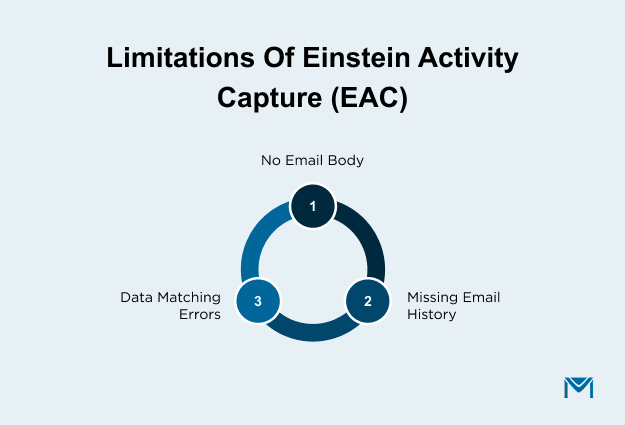
- Missing email bodies: Only metadata (subject, date, sender) is stored, not the full email content.
- No email history: If a contact’s email changes, captured emails may disappear, creating gaps.
- Inconsistent data matching: Emails may be misassigned or duplicated, causing inaccurate CRM data.
These limitations are especially problematic when advanced reporting or workflow automation is needed. Users often report that the inability to store full emails hinders the tool’s ability to provide accurate, long-term data for reporting and Salesforce integrations.
A Reddit user shared that EAC’s inability to store full emails and limited reporting made tracking communications difficult. They also mentioned that losing email history when contact emails change further confused their CRM data and sales activities.
2. Challenges with Email to Salesforce (Manual Logging)
Email to Salesforce requires manual logging by forwarding or BCC’ing emails to a unique Salesforce address. This process is time-consuming and prone to user error, especially for teams with high email volumes. Since emails are not automatically matched to Salesforce records, users must manually correct associations, leading to inconsistent data and potential CRM inaccuracies.
- Manual process: Users must remember to forward or BCC emails to Salesforce, increasing the chance of missed logs.
- No automatic matching: Emails do not automatically match to the correct Salesforce record, leading to errors.
- Lack of scalability: This method doesn’t scale well for teams with high email volumes, causing inefficiencies.
As a result, manual logging creates extra work, leading to incomplete records and decreasing the reliability of your CRM data. Teams often waste time correcting mistakes that could be avoided with an automated solution.
A Reddit user commented that Email to Salesforce’s manual process leads to missed emails and data inconsistencies. They mentioned that the lack of automatic matching makes it inefficient for teams with high email volumes
3. Two‑Way Email Sync via Gmail / Outlook Connectors
Two‑way email sync for Gmail and Outlook aims to mirror inbox emails and calendar events inside Salesforce, but it often runs into reliability and configuration issues that affect CRM data accuracy. Users frequently report that syncing all relevant email threads and calendar events consistently is difficult to set up and maintain, especially when multiple systems are involved. Furthermore, syncing connectors requires precise configuration, and even small setup differences can cause gaps in email history, incomplete activity timelines, or unexpected behavior. Because of these challenges, teams may spend time fixing email sync errors instead of focusing on sales activities.
- Setup complexity: Connector setup for two‑way sync often needs careful admin configuration before it works correctly.
- Sync inconsistencies: Not all email messages, threads, or calendar events sync reliably, leading to partial or missing data in Salesforce.
- Record matching issues: When multiple contacts or related Salesforce records share similar identifiers, emails may not match correctly, reducing CRM accuracy.
These issues can interrupt your sales workflow by leaving gaps in synced email and event data, making it harder to maintain an accurate, unified view of customer communication. Problems often arise when connectors or inbox settings don’t align exactly with Salesforce expectations.
A Reddit user and admins discuss ongoing challenges with Gmail and Outlook integrations, noting that syncing calendar and email activity reliably remains difficult without careful configuration and monitoring, especially when trying to sync both directions.
How MassMailer Solves Common Challenges in Salesforce Email Sync
MassMailer solves Salesforce email sync challenges by offering full email activity capture, including metadata and email bodies. It provides seamless two-way sync, supports high-volume syncing, and delivers detailed email tracking. This ensures accurate CRM data, better automation, and complete visibility, without manual errors or limitations.
1. Seamless Two-Way Sync with Salesforce Records
MassMailer offers two-way email sync, automatically linking inbound and outbound emails to Salesforce records, ensuring accurate data syncing without manual effort. This feature prevents data mismatches and ensures all email interactions are properly captured in Salesforce for a complete view of customer communication.
- Automatic Email Linking: Emails are automatically associated with leads, contacts, opportunities, and custom Salesforce objects.
- No Manual Logging: Eliminates the need for manually forwarding emails to Salesforce.
- Up-to-date CRM Data: Ensures that your CRM reflects real-time communication, improving sales processes and decision-making.
With seamless email integration, teams avoid missing important email interactions and maintain accurate records within Salesforce.
2. Accurate Syncing with Email Bodies + Metadata
MassMailer offers accurate syncing by capturing email metadata, such as subject, sender, timestamp, and engagement metrics (open rates, clicks, replies). This integration ensures consistent communication history and makes it easier to track and analyze email interactions directly from Salesforce.
- Full Visibility: Syncs key data points for comprehensive communication tracking.
- Email Engagement Metrics: Tracks open rates, clicks, and replies for better email activity reporting.
This full integration allows sales teams to make data-driven decisions and optimize email strategies without leaving gaps in their Salesforce records.
3. Improved Activity Tracking and Compliance for High-Volume Workflows
MassMailer supports unlimited email sends, removing the daily email limits imposed by native Salesforce tools. It also ensures compliance with email marketing regulations, including CAN-SPAM and GDPR, which is essential for businesses with large-scale email needs.
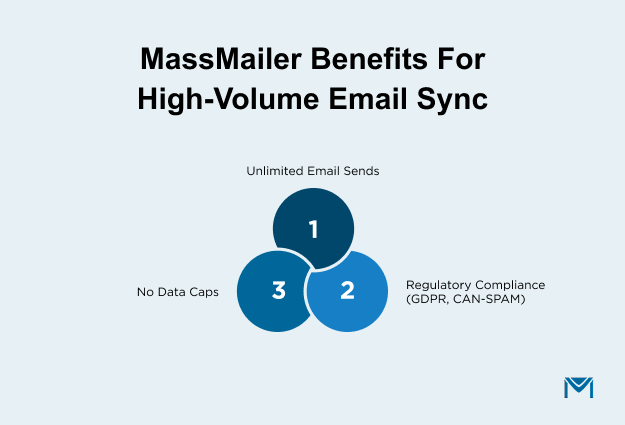
- Unlimited Email Sends: No restrictions on the number of emails sent per day.
- Compliance: Adheres to email marketing regulations for GDPR and CAN-SPAM.
- No Data Caps: Ensures that all emails are synced, preventing data loss or missed interactions.
With high-volume email syncing and compliance support, MassMailer helps you scale your email marketing without hitting limitations or compliance risks.
4. Enhanced Reporting and Analytics with MassMailer
MassMailer provides real-time email analytics within Salesforce, tracking open rates, click-through rates, bounce rates, and more. This feature enables sales teams to evaluate email campaign performance, adjust strategies, and optimize follow-ups based on engagement.
- Real-time Insights: Provides live data on email performance for better decision-making.
- Salesforce Integration: Analytics are integrated directly into Salesforce, ensuring a unified view of customer interactions.
- Actionable Metrics: Helps teams optimize campaigns based on detailed engagement metrics.
This reporting depth is also reflected in user feedback on Capterra, where customers frequently highlight clearer engagement tracking and more dependable reporting compared to native Salesforce email sync tools, especially for teams handling higher email volumes.
With enhanced reporting, sales teams can refine strategies and increase conversion rates by tailoring follow-ups to the data.
MassMailer vs. Native Salesforce Email Sync Tools
MassMailer outperforms native tools like Einstein Activity Capture and Email to Salesforce by providing full email activity sync (including metadata and engagement metrics) and ensuring reliable, automated syncing. MassMailer’s unlimited sends, real-time email tracking, and full integration with Salesforce workflows make it a superior choice for teams that need scalable email sync and advanced reporting.
- MassMailer: Full email visibility, real-time sync, unlimited sends, advanced analytics, and seamless workflow integration.
- Native Tools: Limited metadata capture, manual logging, daily send limits, and no reporting on engagement metrics.
MassMailer provides a complete solution for syncing, tracking, and reporting email activity. Hence, it is one of the best choices for teams looking to improve sales processes, data integrity, and automation.
Conclusion
Salesforce email sync can often be a challenging and time-consuming task, but MassMailer simplifies the process with seamless automation, real-time tracking, and unlimited email sends. By eliminating manual logging and addressing common issues like data mismatches and inaccurate syncing, MassMailer ensures your sales team always has accurate, up-to-date CRM data.
With advanced reporting and full integration into Salesforce, MassMailer provides complete visibility into your email activity, allowing you to make data-driven decisions that optimize sales outcomes.
Ready to take control of your Salesforce email sync? Request a demo today and see how MassMailer can help you achieve more efficient workflows, reduce manual errors, and scale your email campaigns effortlessly.
Frequently Asked Questions
1. How do I enable Salesforce email sync for specific users?
2. Does Salesforce email sync store emails permanently?
3. How do I check if my Salesforce email sync is working?
4. Why are calendar events syncing, but emails are not in Salesforce?
5. How do I stop Salesforce from syncing personal or internal emails?
6. Can Salesforce sync emails from shared inboxes?
Start Your Free Trial Today
Experience MassMailer the easiest way to send personalized emails from Salesforce.
Related Blogs
MassMailer Resources

MassMailer Glossary
About the Author

Siva Devaki 

Siva Devaki is the founder of MassMailer Inc., a tool that helps Salesforce users optimize email marketing. A passionate advocate for email marketing, Siva writes and hosts podcasts on the topic, sharing insights to help businesses drive revenue and enhance customer engagement through Salesforce email automation and tracking.