




Table of Contents
Salesforce Email Studio, part of Marketing Cloud, enables personalized, automated, and transactional email campaigns using real-time CRM and behavioral data. It integrates with Journey Builder, Automation Studio, and Einstein for targeted messaging, segmentation, and analytics, helping marketers run lifecycle, B2B, B2C, and transactional campaigns efficiently and at scale.
Introduction
Your email reports might look healthy, but the real question is whether your messages actually reflect what your customers are doing.
A user signs up, explores a feature, opens a support ticket, or reaches a renewal date, yet the emails they receive often feel generic and out of sync. That gap between customer behaviour and email communication is where deals stall, churn increases, and trust quietly erodes.
Salesforce Email Studio exists to close that gap.
Inside Salesforce Marketing Cloud, it connects CRM data, product activity, and service history directly to email sends. Campaigns stop running on static lists and start reacting to real events. A trial user gets onboarding tips, an active customer sees product updates, and an account nearing renewal receives the right reminder at the right time.
This guide explains how Salesforce Email Studio works, how it fits into the wider Marketing Cloud stack, and how teams use it for personalized, automated, and transactional email. You will also see how to set up data, build campaigns, compare it with Pardot, and apply best practices that protect deliverability and compliance.
What is Salesforce Email Studio?
Salesforce Email Studio is the email marketing engine inside Salesforce Marketing Cloud that sends personalized, automated, and transactional emails using CRM data. The platform manages subscribers through lists and data extensions.
The system triggers real-time sends through journeys and APIs. The tool uses templates, Content Builder, and AMPscript for dynamic content. The platform tracks opens, clicks, bounces, and conversions. The system supports deliverability, consent, and compliance for high-volume enterprise email programs.
Unlike standalone email tools that rely on flat contact lists, Email Studio works directly with Salesforce CRM and Marketing Cloud data. This allows every send to reflect:
- Who the customer is
- What they have done
- Where they are in the buying or usage journey
A new lead, an active user, and an account nearing renewal can all receive different messages from the same campaign because Email Studio reads their data in real time.
Email Studio also acts as the delivery engine for Journey Builder and Automation Studio. Journeys decide when a message should go out. Automations keep customer data fresh. Email Studio pulls both together and delivers the email with the right content, timing, and tracking.
This is what makes it possible to run onboarding flows, re-engagement campaigns, and transactional updates from one connected platform instead of multiple disconnected tools.
Let’s look at how to tell if Salesforce Email Studio fits your email strategy before investing in it.
1. Who should use Salesforce Email Studio, and who should not
Choosing Email Studio depends less on how many emails you send and more on how much your email strategy depends on data, timing, and segmentation.
Who Should Use Salesforce Email Studio
Salesforce Email Studio works best for teams that run complex, data-driven email programs at scale, including:
- Mid-market and enterprise teams running multiple campaigns at once, such as onboarding, promotions, renewals, and customer updates
- Teams that rely on Salesforce data, where Sales Cloud and Service Cloud activity needs to drive email messaging
- B2C brands and B2B companies running lifecycle, product-led, and account-based nurture programs
- Organisations that need advanced targeting, automation, and reporting across large audiences
These teams benefit from Email Studio’s ability to use CRM records, behavioural data, and real-time triggers to decide exactly who should receive each message.
Who it is not ideal for:
Email Studio is not built for simple or lightweight email needs. It is usually not the right fit for:
- Small teams sending basic newsletters to one or two lists
- Businesses without clean or structured customer data, which limits personalisation and segmentation
- Marketers who want a quick plug-and-play tool with no setup or data modelling
- Teams that do not use Salesforce as their main CRM
Salesforce Email Studio delivers the most value when email is part of a connected customer system. When email is treated as just a broadcast channel, simpler tools tend to work better.
With that context in mind, let’s look at the features that make Salesforce Email Studio work so well for data-driven email programs.
2. Key Features of Salesforce Email Studio
Salesforce Email Studio brings every part of email marketing into one connected workflow, which is what allows it to handle complex, data-driven campaigns at scale. Instead of treating content, audiences, and delivery as separate steps, the platform links them together so each email reflects who the customer is and what they are doing.
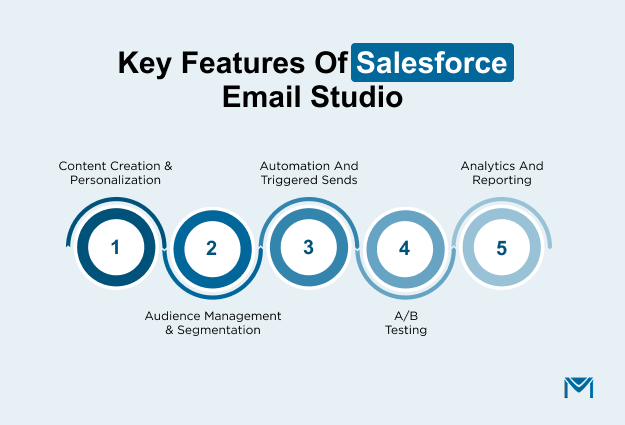
Content Creation and Personalization
The drag-and-drop editor in Content Builder allows teams to design branded emails without writing code. AMPscript adds dynamic content by pulling in subscriber and account data, which allows subject lines, images, and offers to change based on who receives the email.
Audience Management and Segmentation
Unlike simple email tools that rely on flat contact lists, Email Studio uses subscriber lists and data extensions to manage audiences.
Subscriber lists handle simple use cases, while data extensions store detailed customer and behavioural data. Marketers then use filters and SQL queries to build precise segments such as active users, inactive accounts, or customers approaching renewal.
For teams using Salesforce as their primary CRM, understanding how Salesforce email marketing works natively versus through Marketing Cloud is an important early decision.
Automation and Triggered Sends
Email Studio supports both real-time and scheduled emails. The system sends welcome messages, password resets, order confirmations, and usage alerts automatically when users take action or when data changes.
A/B testing
Using Email Studio, teams can test subject lines, email content, and calls to action directly. Each variation goes to a sample of the audience, and the winning version automatically rolls out to the rest. This makes optimisation part of everyday campaign execution rather than a separate experiment.
Analytics and reporting
Email Studio tracks opens, clicks, bounces, unsubscribes, and conversions across both campaigns and individual subscribers. Reports link directly to CRM data, so teams can see how email activity connects to pipeline, retention, and revenue.
Marketers then use these insights to refine segmentation, adjust timing, and improve content based on what drives real engagement and results.
To understand how these tools work in practice, it helps to see where Email Studio fits in the Marketing Cloud.
3. How Salesforce Email Studio Fits in Marketing Cloud
Email Studio works as part of the wider Salesforce Marketing Cloud rather than as a standalone tool.
- Journey Builder uses Email Studio messages as steps in automated customer journeys. A customer can move through onboarding, upsell, and renewal emails based on their actions without manual scheduling.
- Automation Studio keeps data extensions up to date by importing CRM and product data on a schedule. This ensures segmentation and personalisation stay accurate.
- Mobile Studio and other channels extend messaging beyond email, which allows teams to run coordinated, cross-channel engagement programs.
Together, these tools allow Salesforce Email Studio to support full customer lifecycle marketing, where every message aligns with where the customer is in their journey rather than where they were weeks ago.
Now that you understand where Email Studio fits and what it can do, let’s look at how to put all of this into action.
How to Use Salesforce Email Studio: Step‑by‑Step Tutorial
Salesforce Email Studio delivers its full value when data, content, and automation work as one connected system. When these elements stay aligned, every email reflects what customers are actually doing instead of relying on static lists or guesswork.
This structure allows teams to move from basic campaign sends to ongoing, behaviour-driven communication that supports the entire customer lifecycle.
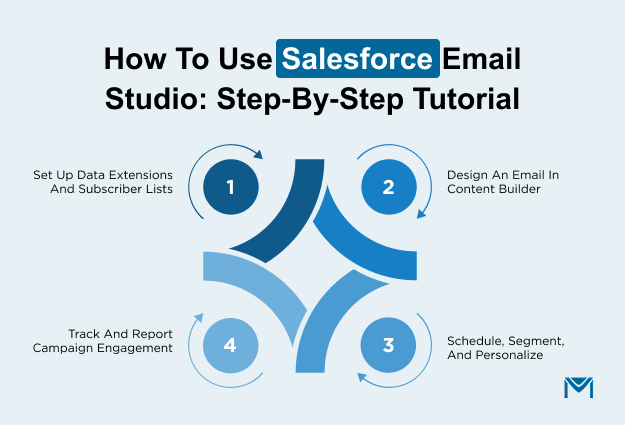
The first step is to bring order to the data that powers every campaign.
1. Setting up Data Extensions and Subscriber Lists
Everything in Email Studio starts with data.
Lists handle simple audiences such as newsletter subscribers or event attendees, while data extensions store the detailed customer and account information that powers segmentation and personalisation. These data extensions become the single source of truth for email campaigns.
A typical data extension can include:
- Email and contact details
- Account type or customer status
- Product plan or subscription tier
- Last login or recent activity
- Renewal or contract dates
Teams bring this data into Email Studio through imports and automated syncs from Salesforce and connected systems. Automation Studio keeps that data clean by removing duplicates, standardising fields, and suppressing inactive records.
As data quality improves, segmentation becomes more accurate, which directly improves how relevant each email feels. Segmentation builds on this foundation. Filters and SQL queries group customers based on real behaviour and status, such as:
- Active versus inactive users
- Trial users versus paying customers
- Accounts approaching renewal
Because these segments update automatically, campaigns stay aligned with customer changes without manual list maintenance.
2. Designing an Email in Content Builder
Once the right audience exists, Content Builder shapes how the message appears.
Teams can start with pre-built templates for speed or create custom layouts when brand control matters. Each template supports modular content blocks, which makes it easy to swap sections in and out without rebuilding the entire email.
Personalisation happens inside these blocks. Dynamic content and AMPscript allow a single campaign to show different text, images, or offers based on who receives it. This keeps messaging aligned with each customer’s context rather than forcing one version of the email on everyone.
Mobile optimisation then ensures those messages work everywhere. Content Builder previews emails across devices so teams can adjust spacing, font sizes, and button placement before sending. Strong emails also guide action through:
- Clear calls to action
- Relevant images
- Clean, scannable layouts
These elements help move readers from the inbox to the next step.
3. Scheduling, Segmentation, and Personalization
Salesforce Email Studio sends emails in two main ways.
Scheduled sends support newsletters, promotions, and announcements. Triggered sends react to customer actions such as sign-ups, purchases, or product usage changes.
Together, they allow teams to balance planned campaigns with real-time communication. Segmentation controls who receives each message, while personalisation controls what they see.
Data extensions, filters, and dynamic content work together to keep messages relevant. Einstein Send Time Optimisation adds another layer by choosing the best delivery time based on each subscriber’s past engagement, which increases the chance that emails get opened.
4. Tracking and Reporting Campaign Engagement
Every send in Email Studio produces data that feeds back into future campaigns. Teams monitor:
- Open rates
- Click-through rates
- Bounce and unsubscribe rates
- Conversions and follow-up actions
Built-in reports show how different audiences and messages perform over time. Marketers use these insights to refine subject lines, adjust content, and improve targeting.
As this feedback loop continues, Email Studio becomes a system that learns from every campaign and steadily improves how email drives engagement, retention, and revenue.
Once email campaigns start running smoothly, the real gains come from connecting them to the rest of your marketing and customer systems. Let’s understand how to connect these campaigns to the wider Marketing Cloud so every interaction stays in sync.
Integrating Email Studio with Other Marketing Cloud Tools
Salesforce Email Studio becomes far more powerful when it works alongside the rest of Marketing Cloud. On its own, it can send and track emails. When connected with Journey Builder, Automation Studio, and Einstein, it turns into a system that responds to customer behaviour in real time and adapts campaigns as those behaviours change.
1. Email Studio and Journey Builder
Journey Builder controls the customer journey, while Email Studio delivers the messages inside it. When teams connect the two, emails stop acting like one-off sends and start functioning as part of a larger, automated experience.
A typical journey might start when someone signs up for a product, makes a purchase, or opens a support case.
Journey Builder listens for that event, then tells Email Studio which email to send and when. The customer can then move through multiple steps, such as onboarding tips, feature education, upsell offers, or renewal reminders, all without manual scheduling.
Triggered emails sit at the heart of this setup. Email Studio sends messages when:
- A new user creates an account
- A customer completes a transaction
- A trial reaches a usage milestone
- An account approaches renewal
Because these triggers rely on live Salesforce and product data, the emails feel timely and relevant rather than scheduled and generic.
2. Using Einstein Features for Personalization
Einstein adds an intelligence layer on top of Email Studio that helps teams move beyond basic rules and segmentation.
Instead of sending every email at the same time, Einstein Send Time Optimisation looks at each subscriber’s past engagement and predicts when they are most likely to open. Email Studio then schedules delivery around that window.
Einstein also supports predictive analytics that help teams understand which customers are likely to engage, convert, or drop off. These predictions feed into segmentation and content selection, which means different customers can receive different messages even within the same campaign.
Together, Email Studio, Journey Builder, and Einstein create a system where:
- Journeys decide when communication should happen
- Email Studio controls what gets sent
- Einstein optimizes how and when each message appears
This combination allows teams to run personalized, automated email programs that adjust as customer behaviour changes, which is exactly what modern lifecycle marketing requires.
After seeing how Email Studio works inside Marketing Cloud, it helps to understand how it compares to other email platforms you might be considering.
Salesforce Email Studio vs Other Email Tools
The right email platform depends on how deeply email needs to connect with your customer data and business workflows. Salesforce Email Studio stands out because it treats email as part of the Salesforce ecosystem rather than a separate marketing tool.
This approach allows teams to run campaigns that react to real customer activity instead of relying on static lists or manual updates. Let’s see how Salesforce Email Studio compares with Pardot.
1. Pardot (Account Engagement) vs Salesforce Email Studio
Pardot, now called Account Engagement, focuses on B2B lead generation and sales enablement. It supports lead scoring, nurturing, and handoff to sales teams, which makes it a strong fit for organisations with long buying cycles and form-driven acquisition.
Salesforce Email Studio supports those same B2B use cases, but it also handles a much broader range of email programs. It allows teams to run:
- B2C promotions and loyalty campaigns
- SaaS onboarding and product adoption emails
- Renewal and expansion messaging
- Transactional and operational emails
This versatility comes from how Email Studio manages data and automation. While Pardot works mainly with leads and prospects, Email Studio uses data extensions that can hold customer, account, and behavioural data at scale. This allows messages to change based on product usage, account status, or service activity.
Integration also works differently. Pardot syncs data into Salesforce CRM. Email Studio operates directly on Salesforce and Marketing Cloud data, which allows emails to trigger from:
- Opportunity updates
- Account changes
- Support case activity
- Product or usage events
That deeper connection makes Email Studio better suited for lifecycle and revenue-focused communication.
2. Email Studio vs Third-Party Email Platforms
Third-party platforms like Mailchimp and HubSpot prioritize ease of use. They rely on flat contact lists, basic segmentation, and simple automation, which helps small teams launch campaigns quickly.
Salesforce Email Studio serves a different need. It connects email to:
- CRM records
- Account hierarchies
- Product and usage data
- Service and support history
This allows teams to build campaigns based on where a customer sits in their lifecycle rather than just how often they open emails. It also improves reporting because teams can link email engagement to pipeline, renewals, and retention instead of only tracking clicks.
Some teams want Salesforce-connected email without the complexity of Marketing Cloud. MassMailer fills that gap by running directly inside Salesforce. It allows users to create campaigns, manage lists, and send emails using CRM data without moving between platforms.
For organisations that already live inside Salesforce and need a simpler way to send targeted emails, MassMailer offers a more lightweight approach.
Salesforce Email Studio remains the stronger option for large-scale, multi-channel, and highly automated email programs, but MassMailer provides a practical middle ground for teams that want native integration without the full Marketing Cloud stack.
For example, UMass Boston transformed its student communication by moving to MassMailer when native Salesforce limits and manual processes slowed outreach.
After adopting MassMailer, the university eliminated send quotas, streamlined bulk outreach across advising teams, personalized campaigns using CRM data, and kept engagement metrics directly in Salesforce. This helped advisors prioritize follow-ups and keep communication consistent as outreach scaled.
Common Use Cases and Best Practices for Salesforce Email Studio
Salesforce Email Studio supports a wide range of email programs because it connects messaging directly to customer and account data. Teams use it to manage everything from high-volume promotions to precise, behaviour-driven communication.
1. Use Cases for Salesforce Email Studio
- B2C campaigns: B2C brands use Salesforce Email Studio to keep their emails aligned with how customers actually shop and engage. Retailers, subscription services, and marketplaces send product promotions, seasonal offers, and newsletters that change based on what people browse and buy.
These campaigns then feed into lifecycle programs, where welcome emails guide new users and loyalty messages keep returning customers engaged over time.
- B2B campaigns: B2B teams use Email Studio to manage lead nurturing and account-based marketing with the same level of precision.
Instead of sending one message to every lead, they build nurture flows that adapt to account size, industry, pipeline stage, and product interest. This approach keeps prospects informed while giving sales teams better context as deals move forward.
Transactional emails run through Email Studio when accuracy and timing matter. Order confirmations, shipping updates, password resets, and account alerts all rely on real-time data from Salesforce and connected systems. Because these messages reach customers at critical moments, they often achieve higher engagement than promotional emails.
Triggered campaigns extend this approach by responding to behaviour. A user who abandons a cart, stops using a feature, or reaches a usage milestone can receive a targeted follow-up that reflects exactly what just happened.
2. Best Practices for Using Salesforce Email Studio
- Email deliverability: Email success starts with inbox placement, so you need to earn trust from both subscribers and email providers.
Write clear subject lines and preheaders that match the message inside, because that consistency encourages opens and reduces spam complaints.
Keep a steady sending frequency so engagement stays high and your sender reputation stays strong. Set up SPF, DKIM, and DMARC inside Salesforce Email Studio to authenticate your domain, which helps mailbox providers recognize your emails as legitimate and improves inbox placement.
Ongoing monitoring matters just as much as initial setup a Salesforce email reputation monitor helps teams catch deliverability issues before they affect inbox placement at scale.
- Segmentation and personalisation: You improve performance when every email feels relevant to the person who receives it.
Use Salesforce data, behavioural signals, and engagement history to build segments that reflect where each customer sits in their journey.
Then use AMPscript and Einstein to tailor subject lines, content, and offers so trial users, active customers, and renewal accounts all see messages that match their needs. This approach keeps communication timely and prevents campaigns from feeling generic.
- A/B testing: You strengthen campaigns when you test rather than guess.
Use Salesforce Email Studio to compare subject lines, layouts, and calls to action so you can see what actually drives engagement. Apply the winning versions to future sends, which steadily improves results and makes every campaign more effective than the last.
- Compliance: You build trust when you respect customer preferences and follow global email regulations. Use opt-in tracking, unsubscribe links, and preference centres to give subscribers control over how and when they hear from you.
Maintain clean consent records so every message stays compliant with GDPR and CAN-SPAM, which protects both your brand and your deliverability.
Conclusion
Salesforce Email Studio turns email into a true extension of your Salesforce data.
Instead of sending generic campaigns, you can deliver messages that reflect real customer behaviour, product usage, and account activity. This allows teams to run onboarding, promotions, renewals, and transactional emails that stay aligned with where each customer is in their journey.
To get the most from Email Studio, focus on a few core steps.
Bring clean CRM and product data into data extensions. Build segments around lifecycle stages rather than broad lists. Use triggered sends and journeys to replace static campaigns with behaviour-driven communication. Track performance closely and keep refining content, timing, and targeting through testing and reporting.
If your team already works inside Salesforce but does not need the full Marketing Cloud stack, a Salesforce-native option like MassMailer gives you a faster and simpler way to run targeted, CRM-driven campaigns without leaving Salesforce.
It turns live customer data into real outreach, so you can explore how it fits into your existing Salesforce workflows without juggling tools or exports.
Frequently Asked Questions
1. What is Salesforce Email Studio used for?
2. How is Email Studio different from Marketing Cloud Journey Builder?
3. How do I send transactional emails using Salesforce Email Studio?
4. How does Email Studio handle subscriber lists and data extensions?
5. How can I personalize emails in Salesforce Email Studio?
6. How is Salesforce Email Studio priced?
Start Your Free Trial Today
Experience MassMailer the easiest way to send personalized emails from Salesforce.
Related Blogs
Salesforce Email Services: Setup, Types, and Limitations
Salesforce Cold Email in 2026: Tools, Setup Tips & Compliance Risks
Salesforce Email Notifications: Setup, Limits, and Fixes
MassMailer Resources


MassMailer Glossary
About the Author

Siva Devaki 

Siva Devaki is the founder of MassMailer Inc., a tool that helps Salesforce users optimize email marketing. A passionate advocate for email marketing, Siva writes and hosts podcasts on the topic, sharing insights to help businesses drive revenue and enhance customer engagement through Salesforce email automation and tracking.