




Table of Contents
Introduction
Have you ever checked your Salesforce email reports and thought everything was going great, only to realize later that you missed key details that could have changed your strategy? You see the opens, clicks, and bounces, but there’s a lot more happening behind the scenes.
It’s frustrating, especially when email marketing plays such a huge role in driving your results. 44% of CMOs say email marketing is essential to their overall digital marketing strategy. Missing key insights can lead to missed opportunities, and getting the right data is crucial.
Salesforce gives you the basics, but without deeper insights like email engagement over time or response patterns, you could be making decisions with incomplete data. In this post, we’ll show you how to find those hidden insights and optimize your email strategy for better, data-driven decisions that truly move the needle.
What Salesforce Email Reports Can Tell You (And What They Don’t)
Salesforce offers essential metrics like open rates, click-through rates (CTR), and bounces, which provide a snapshot of email performance. But these metrics alone don’t give you the full picture.
- Open Rates: Shows how many recipients opened your email, but doesn't tell you how engaged they are or if they took the next step.
- Click-Through Rates (CTR): Tracks how many clicked on links within your email, but it doesn't reveal whether recipients completed the desired action on your website.
- Bounces: Indicates if the email was successfully delivered, but it doesn’t provide insights on why it bounced or how to clean your email list.
These metrics are valuable for basic tracking, but they fail to provide the deeper insights needed to optimize your email strategy.
In fact, this frustration shows up repeatedly in Reddit discussions among Salesforce users, where teams describe email reporting as fragmented and hard to operationalize. Several users note that extracting meaningful email KPIs often requires stitching together multiple reports manually, which makes consistent performance tracking difficult at scale.
To fully understand performance, you need actionable data beyond the basics.
Key Data Gaps in Salesforce Email Reporting You Should Be Aware Of
Salesforce email reporting offers useful data but leaves significant gaps that can impact campaign optimization. Here's where it falls short:
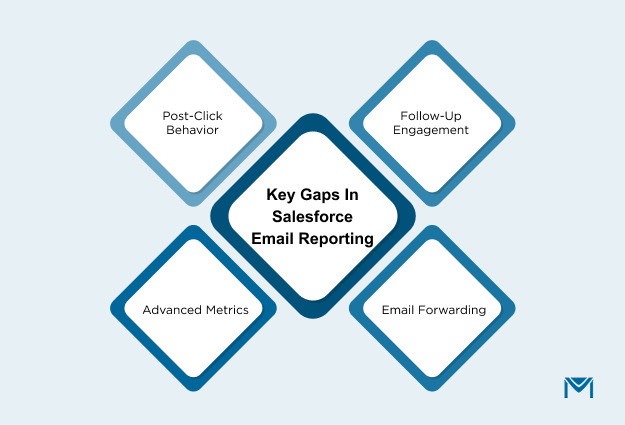
- Engagement Beyond Clicks: Salesforce tracks opens and clicks, but not post-click behavior, like how long users engage with your content or if they convert. Tools like Google Analytics or Heatmaps can track these actions and provide deeper insights into true engagement.
- Response Patterns: Salesforce doesn’t track follow-up engagement over time. Are recipients engaging less after multiple emails? Without this data, you can’t optimize email frequency or content strategy to boost long-term engagement.
- Forward Tracking: Salesforce doesn’t track if recipients forward your email. Forwarded emails often lead to referral traffic and viral growth, so it’s important to use tools that track this secondary engagement.
- Advanced Metrics: Salesforce lacks insights into email fatigue (declining engagement due to repeated exposure) and opt-out rates. These metrics help you adjust send frequency and optimize targeting to avoid overwhelming your audience.
For example, a tech company notices high open rates but low conversions. After examining Salesforce reports, they discover email fatigue is affecting follow-up engagement. Here’s how they address it:
- Track Post-Click Behavior: Integrate Google Analytics to see how long users engage on the landing page.
- Adjust Follow-Up Frequency: Modify email frequency based on recipient interactions.
- Track Forwarding: Use tools to capture viral reach and identify new customers.
- Monitor Email Fatigue: Adjust send times and frequency based on opt-out rates to prevent audience burnout.
By filling these gaps, the company could boost conversions by 25% through smarter, data-driven email strategies.
How MassMailer Enhances Salesforce Email Reporting
Salesforce provides basic email reporting, but it often lacks the depth required for meaningful optimization. MassMailer enhances Salesforce email reporting by capturing detailed email engagement data, offering real-time visibility into how recipients interact with your emails, and logging that activity directly against Salesforce records. This makes it easier to connect email performance with pipeline movement, follow-ups, and revenue outcomes.
This added clarity is also reflected in user feedback on Capterra, where customers frequently mention improved reporting accuracy and clearer visibility into opens, clicks, and engagement compared to standard Salesforce email reports.
Key Features of MassMailer’s Enhanced Reporting:
1. Email Event Tracking
MassMailer tracks 11 unique email events, including opens, clicks, unsubscribes, email forwards, and spam reports. This offers a deeper understanding of recipient engagement beyond basic opens and clicks. It helps you track true engagement and adjust your email strategy accordingly.
For example, a SaaS company running an onboarding email campaign might find that 12% of its recipients forward the email to others. Tracking this email forwarding behavior could reveal untapped audiences and suggest opportunities to optimize content for sharing, potentially increasing the reach and engagement of the campaign.
2. Real-Time Reporting
MassMailer offers real-time email performance metrics like opens, click-throughs, bounces, and unsubscribes, so you can take immediate action on campaigns. This real-time data ensures that you can optimize campaigns quickly and adjust your strategy based on performance without waiting for scheduled reports.
For example, a company running a time-sensitive product launch email campaign could use real-time insights to notice a drop in engagement after a specific send time. By adjusting the send time, they may see an improvement in open rates and click-throughs, ultimately enhancing the campaign's performance.
3. CRM Integration
MassMailer integrates seamlessly with Salesforce CRM records, logging email events into Leads, Contacts, and Campaign Members. This integration allows you to track how email engagement correlates with sales opportunities and lead progression.
By linking email opens to sales opportunities, a company might observe that leads who open three or more onboarding emails are more likely to convert into customers. This could prompt them to target highly engaged leads with more frequent follow-ups, improving their conversion rates.
MassMailer gives you the tools to track true engagement, make data-driven decisions, and optimize email campaigns for better performance.
Customizing Salesforce Reports with MassMailer Data
MassMailer not only improves email tracking but also helps you create customized Salesforce reports that provide actionable insights into your email performance.
- Link Email Events to Salesforce Records: MassMailer tracks email events (opens, clicks, unsubscribes) and associates them with Salesforce records like Leads or Contacts. This allows you to view email activity within the context of your CRM data, helping you understand how email engagement impacts sales progression.
- Create Custom Report Types: You can create custom Salesforce report types to include MassMailer’s email data. By building these custom reports, you can measure important metrics like open rates, click-through rates, bounce rates, and more, tailored to specific segments or audience groups.
- Segment and Filter Reports: Once custom reports are created, you can segment and filter the data by email performance, campaigns, or audience segments. For example, you can track how new leads engage with your emails versus long-time customers and focus on high-performance groups for further targeting.
For example, a team at an e-commerce company may create segmented reports to compare new customer engagement with repeat customer engagement. By segmenting these groups, they could identify higher engagement from new customers, allowing them to personalize content and boost engagement for this segment.
Why This Matters for Salesforce Email Reporting
Salesforce provides basic email metrics, but it lacks the granularity needed for advanced reporting and segmentation. MassMailer enhances Salesforce reporting by providing:
- Real-time email tracking and advanced email events (opens, clicks, forwards, bounces, etc.).
- Custom report generation that integrates Salesforce CRM data with email performance metrics.
- Advanced segmentation and filters for better targeting and understanding of audience engagement.
By adding MassMailer’s data to Salesforce, you can:
- Track email performance across campaigns and segments.
- Leverage CRM data for better segmentation and targeting.
- Create customized reports that directly link email engagement with sales outcomes.
If you want to dive deeper into Salesforce email reporting, check out our guide on how to optimize your Salesforce email campaigns to improve your email performance.
Best Practices for Improving Your Email Reporting Strategy
Effective email reporting is essential to refining your Salesforce email marketing strategy. Thus, by tracking the right metrics and acting on real-time insights, you can continuously improve the effectiveness of your campaigns.
1. Key Metrics You Should Be Tracking in Your Salesforce Email Reports
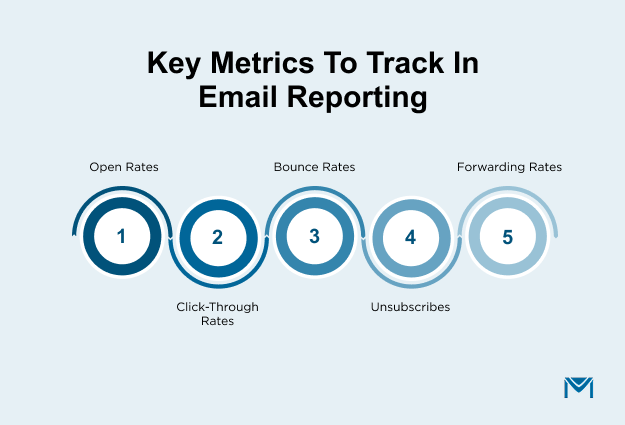
- Open Rates: Measure subject line effectiveness and initial engagement. High open rates indicate that your subject lines are effective at capturing attention.
- Click-Through Rates (CTR): Track engagement with your content. A higher CTR suggests that your email content resonates with your audience.
- Bounce Rates: A high bounce rate indicates delivery issues or list quality problems. Keep it low to ensure your emails reach their intended audience.
- Unsubscribes: Monitor this metric to identify issues with frequency or content relevance. A sudden increase in unsubscribes could signal that your emails are not aligned with recipients' interests.
- Forwarding Rates: Track how often recipients forward your emails. This is a sign of email virality and can help you expand your reach.
2. Optimizing Your Email Strategy: Data-Driven Tips to Get Better Results
To optimize your Salesforce email campaigns, use the following tips that are given below:
- Segment Your Audience: Use segmentation based on engagement metrics (opens, clicks, location) to personalize emails. Segmented and tailored emails drive better engagement and conversions.
- Monitor Engagement Patterns: Use real-time data to track how your audience engages with your emails over time. If engagement drops after several emails, consider adjusting the frequency or content to prevent email fatigue.
- A/B Test Subject Lines and CTAs: Regularly test subject lines, CTAs, and email content. Real-time A/B testing data will help you understand which elements resonate best with your audience.
- Optimize Email Frequency: Use MassMailer’s real-time tracking data to assess engagement and adjust email frequency. If engagement drops after multiple emails, reduce the sending frequency to maintain subscriber interest.
For example, 20/20 ForeSight scaled their Salesforce email marketing by 15× using MassMailer’s Salesforce integration. With advanced tracking, they gained real-time visibility into email performance and engagement patterns. By integrating email reporting and CRM data, they optimized their email strategy and achieved significant growth.
This case study illustrates how you can supercharge your email outreach by using data insights to make real-time adjustments, track engagement, and optimize email performance for better ROI.
Conclusion
You now know how crucial it is to optimize your Salesforce email reporting to gain actionable insights and make data-driven decisions. With the right metrics and strategies in place, you can have better engagement and ultimately improve ROI.
By integrating advanced email tracking, real-time insights, and reports into your Salesforce workflows, you can make informed decisions to optimize your campaigns.
If you’re ready to transform your email marketing strategy, book a free demo of MassMailer today. See how our Salesforce-native email tracking and reporting capabilities can help you with better performance and higher ROI.
Frequently Asked Questions
1. What is a Salesforce email report, and how does it work?
2. How do I track email engagement in Salesforce?
3. Can I create custom email reports in Salesforce?
4. How do I report on mass email campaigns in Salesforce?
5. What are the limitations of standard email reporting in Salesforce?
6. How can I improve email tracking in Salesforce with third-party tools?
Start Your Free Trial Today
Experience MassMailer the easiest way to send personalized emails from Salesforce.
Related Blogs
MassMailer Resources

MassMailer Glossary
About the Author

Siva Devaki 

Siva Devaki is the founder of MassMailer Inc., a tool that helps Salesforce users optimize email marketing. A passionate advocate for email marketing, Siva writes and hosts podcasts on the topic, sharing insights to help businesses drive revenue and enhance customer engagement through Salesforce email automation and tracking.