




Table of Contents
Introduction
Are you searching for a Constant Contact alternative for Salesforce because your email setup no longer fits how you use your CRM?
You connect Constant Contact to Salesforce, sync contacts, and send campaigns. It works in the beginning. But as Salesforce becomes central to pipeline tracking and reporting, gaps appear. Engagement data sits outside the CRM. Automation does not follow Opportunity stages or Flows. Reports feel split. Costs rise as contact counts grow, even if usage does not.
So the decision becomes clear: Should you keep using an integrated tool, or move to a Salesforce-native email solution?
This guide shows where the current setup starts to slow you down and helps you decide if a Salesforce-native tool like MassMailer makes more sense for your team.
If Salesforce drives your pipeline, reporting, and automation, an external email tool will eventually slow you down. This guide helps you decide when that point arrives.
Why Salesforce Users Look for a Constant Contact Alternative
Teams don’t look for a Constant Contact alternative because Salesforce is hard. They look for it when an external email tool starts slowing down their CRM workflow.
The problems usually show up in four areas: data updates, automation control, reporting visibility, and pricing structure.
Here is what breaks in practice.
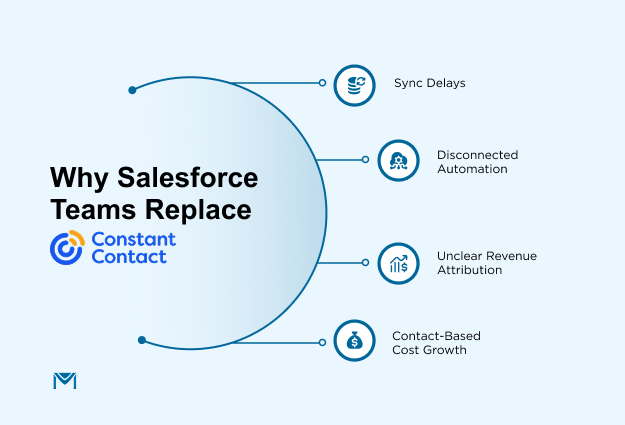
1. Data Sync Delays and CRM Fragmentation
Constant Contact and Salesforce are two separate systems.
When something changes in Salesforce, like a lead’s status or email preference, that update has to travel to Constant Contact through a connection. This does not happen instantly. It runs on scheduled updates.
Because of that:
- Someone may unsubscribe, but the change does not reflect right away
- A lead moves to a new stage, but the email list still shows old information
- Contact records may duplicate when data conflicts
- Teams double-check lists before sending
A Salesforce-native tool like MassMailer connects directly inside Salesforce. Its email sync connects directly to Salesforce records in real time. So when something changes in Salesforce, your email list updates right away.
2. Automation Outside Salesforce Workflows
Automation in Constant Contact runs inside its own platform. It follows email activity, not changes inside Salesforce.
For example:
- A deal moves forward, but no automatic email is sent
- A field updates in Salesforce, but the email system does not react
- Sales cannot see which automated emails went out without opening another tool
With a Salesforce-native tool like MassMailer, workflow automation connects directly to Flow, so when your sales process moves forward, the right message can be sent automatically and remain visible where your team already works.
3. Email Results Are Harder to Connect to Revenue
Email opens and clicks are tracked inside Constant Contact first. To use that data in Salesforce reports, it must sync back. This can create gaps.
Common problems include:
- Sales cannot see the full email history on a deal
- Revenue reports do not clearly show email impact
- Teams rely on separate dashboards
When revenue tracking happens in Salesforce, email results need to live there too. If engagement data sits outside the CRM, measuring impact takes extra work.
Email results and sales data stay in the same place. That makes it easier to see which email campaigns helped close deals.
4. Costs Increase as Your Database Grows
Constant Contact pricing is based on total contacts in your account, not on how many people you actually email.
That means you pay for:
- Inactive leads
- Old contacts are kept only for the records
- Large databases, even if you send them to a small group
As your Salesforce database grows, your monthly cost rises, even if your email activity does not. For CRM-focused teams, this connects budget to database size instead of real usage.
MassMailer keeps email segmentation inside your CRM. You select who to email using reports and filters, without maintaining a separate marketing contact list. This keeps costs and usage more aligned with how your team actually operates.
To understand the fix, we need to look at what changes when your email tool operates directly within Salesforce.
MassMailer: A Salesforce-Native Constant Contact Alternative
If the main problem with Constant Contact is separation from your CRM, the fix must remove that separation.
MassMailer runs directly within your Salesforce environment. Email activity, targeting, automation, and reporting happen in the same system your team already uses.
This practically changes daily operations.
1. Built Directly on Your Salesforce Data Model
MassMailer uses your existing CRM objects without duplicating them in another system.
- When a field changes, segmentation updates immediately because recipient selection is based on real-time reports and filtered views, similar to managing aSalesforce email list inside your CRM.
- When ownership changes, email eligibility reflects that change automatically.
- When lifecycle status updates, list inclusion adjusts at the same time without waiting for a scheduled sync.
- When someone unsubscribes, that preference is stored directly on the contact record and enforced immediately, aligned with standardSalesforce email opt-out handling.
This removes the risk of sending based on outdated information and prevents reporting mismatches between sales and marketing.
2. Automation That Responds to Business Events
MassMailer connects directly with Salesforce Flow, which allows automation to respond to real business changes instead of static lists.
- When an Opportunity moves to a new stage, the correct follow-up message can be sent automatically usingSalesforce flow email alerts logic tied to deal progression.
- When a qualification field changes, a targeted sequence can begin without manual list updates, similar to configuring aSalesforce drip campaign based on field criteria.
- When a deal owner changes, related communication can trigger immediately.
- When a record meets defined CRM filters, bulk messaging can launch directly from reports without exporting lists, supporting structuredSalesforce email automation inside your existing environment.
This keeps lifecycle communication aligned with your sales process instead of running in a separate automation system.
3. Engagement Stored Where Revenue Is Measured
MassMailer records email activity directly on the same records your team uses to manage deals.
- Because of this, sales can see who opened, clicked, or replied without switching tools. They do not need to ask marketing for updates. They can act immediately based on real engagement.
- Marketing can build email reports that combine results and pipeline movement in one dashboard. There is no need to export data or merge spreadsheets.
- As a result, leadership can review campaign impact during pipeline meetings without reconciling numbers from two systems. Engagement and deal progress appear together, which makes discussions clearer and faster.
- Attribution becomes easier to trust. When email activity sits next to deal stages and revenue value, you can see which campaigns influenced real opportunities, not just opens and clicks.
If revenue reporting lives in Salesforce, then engagement data must live there too. Otherwise, every performance review requires translation between systems.
4. Deliverability as Controlled Infrastructure
Now consider sending reliability. MassMailer gives you direct control over how your emails are sent and how your domain is protected.
- First, you can configure SPF, DKIM, and DMARC for your domain. This proves to inbox providers that your emails are legitimate and reduces the chance of landing in spam.
- Next, you can choose a dedicated IP address. This means your reputation depends only on your sending behavior, not on other companies using the same system.
- In addition, the system tracks hard and soft bounces and stores that information with each contact. This helps you remove risky addresses and keep your list clean.
- Unsubscribe requests are processed automatically and reflected immediately in future sends. This protects compliance and prevents accidental resends.
- As your volume grows, these controls become more important. Without them, inbox placement can drop, and outreach becomes less effective.
With controlled infrastructure, you reduce uncertainty and protect your sending reputation as you scale.
What to Look for in a Constant Contact Alternative for Salesforce
At this stage, the question is not about features. The question is whether the tool fits your Salesforce strategy long term.
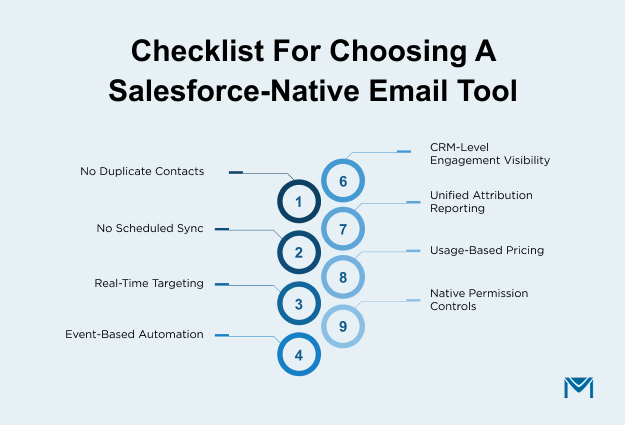
When comparing options, use this checklist:
- The platform should not duplicate your contacts in a separate marketing database outside Salesforce.
- The system should not rely on scheduled sync between two different platforms to keep data aligned.
- Email targeting should respond immediately to live record updates instead of static lists.
- Automation should trigger from deal stages, field changes, and real business events.
- Engagement activity should be visible on the same records used to manage pipeline and revenue.
- Attribution reporting should not require merging dashboards from multiple systems.
- Pricing should scale with actual sending needs rather than total stored contacts.
- Governance and access controls should follow your existing Salesforce permission structure.
If your email platform operates beside Salesforce, you manage two systems and two data structures. If it operates on the same data model, you manage one.
MassMailer works directly with your Salesforce data and processes. It does not create a second contact list, a separate automation system, or another reporting tool to manage. For teams that rely on Salesforce every day, that simpler structure makes the decision clearer.
Conclusion: Should You Replace Constant Contact in Salesforce?
If Salesforce drives your lifecycle, reporting, and revenue tracking, an external email platform will eventually create limits. Sync delays, split dashboards, and contact-based pricing become harder to justify as your CRM grows.
If you only send simple newsletters and do not rely on deal-level attribution, Constant Contact may still work.
But if your team depends on stage-based automation, unified reporting, and clean pipeline visibility, a tool aligned with your Salesforce data model is the stronger long-term choice.
MassMailer is built for Salesforce-first teams. It removes external database overhead and keeps automation, reporting, and sending aligned with your CRM.
Install MassMailer from the Salesforce AppExchange in a sandbox org to validate native reporting, Flow-based automation, and email attribution directly on your Salesforce records.
Test it with real objects, real flows, and real pipeline data before deciding whether an external email platform still makes sense.
Frequently Asked Questions
1. Can I migrate from Constant Contact to MassMailer without losing campaign data?
2. Does MassMailer require middleware to connect with Salesforce?
3. Can sales reps see email engagement without leaving Salesforce?
4. Is MassMailer suitable for high-volume B2B email sending?
5. How does MassMailer handle unsubscribe and compliance requirements?
6. Does a Salesforce-native email tool improve campaign attribution?
Start Your Free Trial Today
Experience MassMailer the easiest way to send personalized emails from Salesforce.
Related Blogs
iContact Alternative for Salesforce: Why MassMailer Fits Better

Best Pardot Alternatives for Smarter Marketing in 2025
MassMailer Resources


MassMailer Glossary
About the Author

Siva Devaki 

Siva Devaki is the founder of MassMailer Inc., a tool that helps Salesforce users optimize email marketing. A passionate advocate for email marketing, Siva writes and hosts podcasts on the topic, sharing insights to help businesses drive revenue and enhance customer engagement through Salesforce email automation and tracking.