




Table of Contents
Introduction
You can remove Salesforce email limits. But you cannot do it using native Salesforce alone.
If you’re looking for an AppExchange email app with unlimited sending, you’ve probably hit Salesforce’s daily limit. You may be splitting lists, waiting for the next day to send, or holding back campaigns because you don’t want to cross the cap.
Salesforce enforces email limits to protect shared infrastructure and maintain deliverability across tenants. That is by design. But when your team needs to send thousands or hundreds of thousands of emails from within the CRM, you need external sending infrastructure that still logs everything back into Salesforce.
That is where AppExchange email apps come in.
Salesforce’s AppExchange has surpassed 13 million installs, according to Salesforce, showing how often teams extend native capabilities when they outgrow platform constraints.
In this guide, you’ll see how unlimited sending actually works, what removes Salesforce limits safely, and how MassMailer enables high-volume email inside Salesforce without moving your data elsewhere.
How unlimited email sending works on AppExchange
Unlimited email sending on AppExchange works by moving the actual sending infrastructure outside Salesforce while keeping all activity logged inside Salesforce.
Salesforce’s native limits apply because emails are sent through Salesforce’s shared infrastructure. AppExchange email apps remove those caps by routing email through external SMTP servers, dedicated IPs, or managed sending infrastructure that is not bound by Salesforce’s daily limits.
Unlimited sending does not mean bypassing governance. It means you control the infrastructure used to send the email.
Dedicated IP vs shared infrastructure
When you remove Salesforce email limits, you are not changing Salesforce. You are changing where the email is sent from.
Salesforce caps exist because emails are sent through its shared infrastructure. AppExchange apps remove those caps by routing email through external servers. That external infrastructure can either be shared or dedicated.
1. Shared IP infrastructure
With a shared IP, your emails are sent from an IP address used by multiple customers on the same platform.
This means,
- Setup is faster because the IP is already active.
- Costs are typically lower because infrastructure is pooled.
- You do not manage IP warm-up.
- Your deliverability can be affected by other senders on the same IP.
If another sender generates high spam complaints or poor engagement, inbox placement can decline across the pool. You gain convenience but sacrifice control.
Some AppExchange apps operate only on shared pools. That simplifies onboarding but limits reputation ownership. Shared IP can work for moderate volume when inbox precision is not mission-critical.
2. Dedicated IP infrastructure
With a dedicated IP, only your organization sends email from that IP address.
This means,
- Sender reputation is based solely on your sending behavior.
- Other senders cannot impact your deliverability.
- Inbox placement becomes more predictable over time.
- You must warm the IP gradually and maintain list quality.
Dedicated infrastructure is better suited for consistent high volume or revenue-driven email programs.
MassMailer supports both shared and dedicated IP options, allowing you to match infrastructure to your volume and risk profile rather than being locked into one model.
The difference is simple: shared prioritizes convenience; dedicated prioritizes control.
Custom domains and authentication setup
Once Salesforce limits are removed, authentication becomes your main protection layer. High-volume sending without authentication will quickly damage your domain reputation.
1. Domain authentication fundamentals
To send safely at scale, your domain must include:
- SPF records that authorize sending servers.
- DKIM signatures that verify message integrity.
- DMARC policies that enforce alignment and reporting.
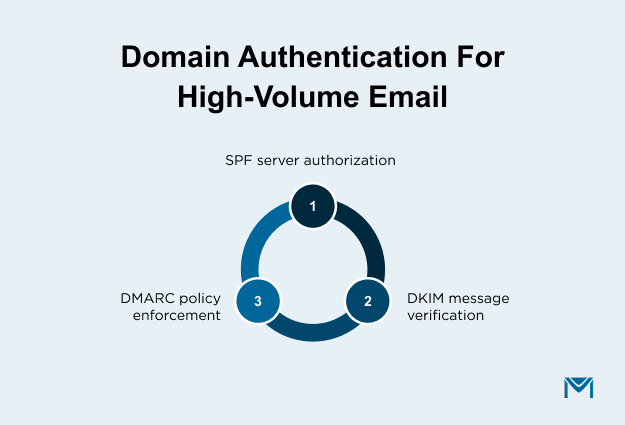
These records establish domain legitimacy with inbox providers.
Thus, without proper email authentication, messages may fail alignment checks and trigger filtering. Volume does not harm reputation by itself. Unauthenticated volume does.
MassMailer guides domain authentication and ensures sending aligns with your verified domain, reducing risk as volume increases.
When evaluating an AppExchange email app with unlimited sending, focus on infrastructure control.
Ask yourself :
- Are dedicated IP options available as volume grows?
- Is full SPF, DKIM, and DMARC alignment supported?
- Who owns the sender's reputation over time?
- Does tracking remain fully inside Salesforce records?
Unlimited sending is easy to promise. Sustainable sending depends on how infrastructure and reputation are managed.
The next step is understanding how a Salesforce-native solution structures this control without forcing you to move email operations outside your CRM.
How MassMailer enables unlimited email sending in Salesforce
MassMailer is a Salesforce AppExchange app built to remove native email sending limits while keeping campaign management inside Salesforce.
It installs directly from AppExchange and extends Salesforce’s email capacity by handling delivery through its own configured sending infrastructure. Your campaigns, lists, and engagement tracking remain inside your CRM.
Salesforce has daily limits because its native system uses shared servers. If you’ve already reviewed howSalesforce email limits work, you know those limits are built into the platform.
MassMailer changes the delivery layer. It does not change how your team uses Salesforce.
1. How sending works in MassMailer
You continue building your audience using Salesforce email reports or Campaigns.
MassMailer sends those emails through authenticated external servers. The results, such as opens, clicks, bounces, and unsubscribes, are written back to the same Lead and Contact records your team already uses.
There is no separate system to manage. If you have worked with otherSalesforce email integrations, you may have seen how data syncing between tools can create reporting gaps. MassMailer avoids that split.
Your workflow stays the same. Only the delivery engine changes.
2. How MassMailer supports deliverability at scale
Higher volume only works if your domain is set up correctly.
MassMailer supports proper authentication and sending alignment. If you are managingSalesforce email authentication or configuring yourSPF record, those settings apply directly to how MassMailer sends.
Volume increases do not protect deliverability. Proper setup does.
If inbox placement matters to your team, reviewing a detailed guide onemail deliverability in Salesforce can help you understand what actually affects results.
MassMailer works within those best practices rather than bypassing them.
3. Native extension vs external platform
When Salesforce limits become restrictive, you have two options:
- Move the email to an external platform.
- Extend Salesforce with a native sending solution.
Moving email outside Salesforce increases volume, but it introduces system separation.
You will manage campaigns in one tool and CRM records in another. Engagement data must sync between systems. Reporting often depends on reconciliation across dashboards.
Extending Salesforce keeps campaign execution and email tracking in the same environment your team already uses.
The decision comes down to this:
- Do you want higher volume with added system complexity?
- Or higher volume while keeping Salesforce as your single operational system?
MassMailer is built for the second approach.
Deliverability and compliance when sending unlimited emails in Salesforce
When you increase email volume in Salesforce, inbox placement depends on how well you control sending behavior. Higher volume increases scrutiny from mailbox providers. Stability, monitoring, and execution discipline determine whether scaling improves reach or damages reputation.
This is where structured tooling matters.
1. Domain control before increasing volume
Before sending at a higher volume, your sending domain must be properly configured and verified. If the domain setup is inconsistent, scaling can trigger filtering quickly.
MassMailer’s email verifier works with your domain settings and does not allow sending without proper configuration. Campaigns are sent using your approved domain identity, not shared system defaults.
This reduces the risk of misalignment when volume grows. Unlimited sending without domain discipline creates exposure. MassMailer enforces structured domain use before scaling.
2. Controlled scaling instead of sudden spikes
Deliverability problems often happen when volume increases too fast or when inactive contacts are included in large sends. Sudden changes signal risk to mailbox providers.
MassMailer allows you to expand volume gradually using campaign filters and segmentation rules already built in Salesforce. You can increase audience size in stages and exclude unresponsive contacts before each send.
Higher capacity should mean controlled growth, not mass blasts. MassMailer supports steady expansion rather than abrupt spikes.
3. Email logging and performance visibility
At higher volume, problems must be identified early. Complaint shifts, bounce increases, and response drops are warning signs that require action.
MassMailer logs every send, open, click, bounce, and unsubscribe directly on the related Salesforce records. This allows teams to review campaign history and contact-level activity without relying on external tools.
Clear email logging makes it easier to isolate underperforming segments and adjust future sends quickly. Scaling safely depends on both sending capacity and visible performance data. MassMailer provides both.
Comparing AppExchange email apps with unlimited sending
Not all AppExchange email apps handle unlimited sending in the same way. The real difference is how they manage campaign control, data logging, sending speed, and system complexity after limits are removed.
MassMailer vs connector-based AppExchange apps
| Decision Factor | MassMailer (Salesforce-native) | Connector-Based Apps |
|---|---|---|
| Campaign Execution | Campaigns are created and managed inside Salesforce. | Campaigns are managed in an external email platform. |
| Audience Segmentation | Uses Salesforce reports and Campaign filters directly. | Lists are often rebuilt or synced to the external tool. |
| Email Logging | Sends, opens, clicks, and bounces are logged directly on CRM records. | Email activity is synced back and may depend on integration timing. |
| Volume Control | Volume can be increased gradually using Salesforce filters and staging. | Volume settings are controlled in the external platform. |
| Operational Workflow | Extends Salesforce without changing campaign workflow. | Requires managing Salesforce and another marketing system. |
When comparing tools, focus on where campaigns are managed, how results are recorded, and how safely you can increase volume.
1. Where are campaigns created and controlled
Some AppExchange apps send Salesforce data to another platform. Campaigns are built and managed there. Salesforce only receives results after syncing. MassMailer works differently.
With MassMailer:
- You build lists using Salesforce reports and Campaigns.
- You apply filters directly inside Salesforce.
- Your schedule sends without leaving Salesforce.
- You exclude inactive or risky contacts before sending.
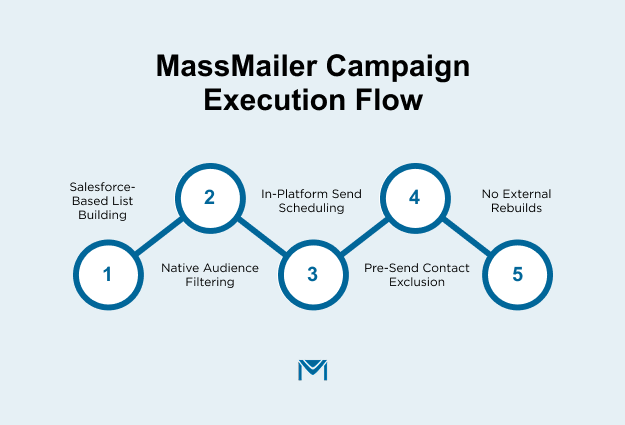
You do not need to rebuild lists in another system.
So, if your team wants Salesforce to remain the main working system, this model is more practical.
2. How is email activity recorded
Unlimited sending is not useful if results are hard to review.
With some tools, email results are stored mainly in the external platform. Salesforce receives limited or delayed updates.
MassMailer records every send, open, click, bounce, and unsubscribe directly on the related Lead and Contact records.
This allows you to:
- See full email history on each record.
- Review campaign results using Salesforce reports.
- Identify underperforming segments quickly.
- Give sales teams clear visibility without extra logins.
When volume grows, fast access to accurate data reduces risk.
3. How is sending volume controlled
At high volume, control is more important than raw capacity.
When comparing apps, ask:
- Can I increase daily volume gradually?
- Can I pause or limit campaigns quickly?
- Can I split large lists into smaller batches?
- Can I exclude segments based on past engagement?
MassMailer allows you to send drip campaigns. You can expand volume step by step instead of sending everything at once. You can filter out unresponsive contacts before each campaign.
This protects your domain while scaling.
Unlimited sending without volume control creates risk. Whereas if you have control over it, it supports stable growth.
When MassMailer is the right choice
MassMailer is the right choice when:
- Salesforce is your main campaign system.
- Daily limits are delaying execution.
- You need direct email logging on CRM records.
- You want controlled volume growth.
- You do not want to move campaigns outside Salesforce.
If your team already runs all campaigns in a separate marketing platform and only syncs data to Salesforce, a connector model may be enough.
Altogether, if you want to extend Salesforce without splitting your workflow, MassMailer is the better fit.
How quickly can you remove Salesforce email limits with MassMailer
MassMailer removes Salesforce email limits once you install the app and verify your sending domain. Installation takes just minutes, and most teams go live within one to three business days, depending on how quickly they complete domain access and internal approvals.
The process is straightforward and does not require rebuilding your campaigns.
1. Installation from AppExchange
Installing MassMailer is similar to installing any managed package in Salesforce.
The steps are:
- Click “Get It Now” from the AppExchange listing.
- Select your production or sandbox org.
- Approve package access and install.
- Assign user permissions.
The technical install usually takes less than 15 minutes.
In most cases, any delay comes from internal approval processes, not from the installation itself. You only need Salesforce admin access to complete this step.
2. Authentication configuration overview
To activate unlimited sending, your domain must be verified.
This involves generating DNS records inside MassMailer and adding them to your domain provider. Thereby, these records confirm that your domain authorizes sending through the platform.
The process typically includes:
- Generate authentication records inside the app.
- Add the provided DNS entries to your domain settings.
- Wait for DNS propagation.
- Confirm verification inside Salesforce.
DNS updates can take a few minutes to 24 hours. Once verified, higher sending limits become active. Because of this, you don't need any external system.
3. Typical time to go live
Most teams can begin sending higher volumes the same day if domain access is available.
A realistic timeline looks like this:
- App installation: less than one hour.
- DNS updates: same day if IT responds quickly.
- Internal testing and approval: one to two business days.
If your domain records are already well managed, activation is faster. Also, if domain access requires multiple approvals, then rollout may take slightly longer.
MassMailer does not require retraining users or changing campaign workflows. Your team continues working inside Salesforce while sending capacity increases.
Conclusion
If Salesforce email limits are slowing your campaigns, the problem is no longer volume. It is execution capacity. So, you need a solution that removes limits without breaking your workflow or moving campaigns outside your CRM.
MassMailer gives you unlimited sending directly inside Salesforce, with full control, structured scaling, and record-level email logging. No external campaign rebuild, fragmented reporting, or unnecessary complexity.
If your team is ready to scale outreach without sacrificing control, install MassMailer from AppExchange and activate higher sending capacity in days, not weeks.
Frequently Asked Questions
1. Can you really send unlimited emails from Salesforce?
2. Does unlimited sending affect email deliverability?
3. Do I need a dedicated IP for high-volume email in Salesforce?
4. Will MassMailer replace Salesforce Email or Marketing Cloud?
5. Can sales teams see email activity when using MassMailer?
6. How much volume can I send with MassMailer?
Start Your Free Trial Today
Experience MassMailer the easiest way to send personalized emails from Salesforce.
Related Blogs
Best Salesforce AppExchange Email App: 2026 Buyer Guide
MassMailer Resources


MassMailer Glossary
About the Author

Siva Devaki 

Siva Devaki is the founder of MassMailer Inc., a tool that helps Salesforce users optimize email marketing. A passionate advocate for email marketing, Siva writes and hosts podcasts on the topic, sharing insights to help businesses drive revenue and enhance customer engagement through Salesforce email automation and tracking.