




Table of Contents
Introduction
Salesforce, while powerful for customer relationship management, sales, and marketing communications, has limitations when it comes to email marketing. It lacks the customization and automation capabilities that many scaling marketing teams require to deliver truly personalized experiences.
According to the 2025 State of Marketing Report by HubSpot, 96% of marketers report that customized email experiences have directly increased sales, underscoring how closely personalization is tied to revenue outcomes.
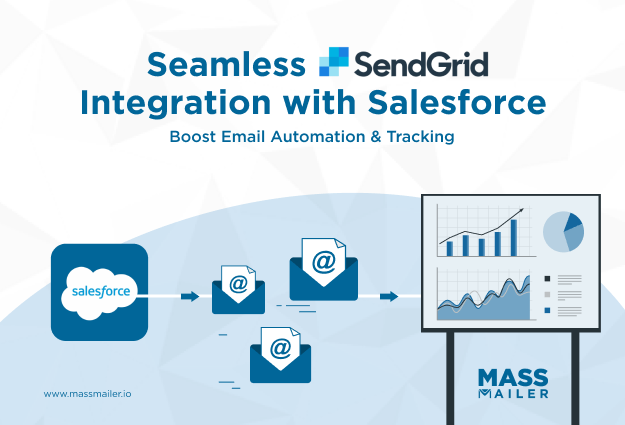
That’s why many organizations turn to tools like SendGrid to integrate with Salesforce, enabling them to customize and automate their marketing communications according to their specific needs.
SendGrid-Salesforce integration is a great choice for executing email campaigns at scale, especially for marketing. However, it does have its own set of limitations, particularly if you're looking to streamline both marketing and sales outreach.
In this blog, we’ll discuss everything about SendGrid-Salesforce integration, explore its key capabilities and limitations, and show how MassMailer can bridge the gap, tying everything together to align all your email marketing efforts seamlessly.
SendGrid-Salesforce Integration Key Capabilities
By combining SendGrid’s advanced email tools with Salesforce’s customer data, businesses can streamline email marketing, enhance automation, and improve deliverability.
1. Email Validation
When integrating SendGrid with Salesforce, email validation becomes a critical component for ensuring data quality. SendGrid’s email validation tool helps you clean your contact database by verifying the email addresses before sending.
This minimizes the risk of bounces, ensuring your emails are delivered successfully to engaged contacts. With Salesforce’s CRM data synced to SendGrid, this feature ensures that you are sending communications only to valid, deliverable addresses, improving your sender reputation and reducing hard bounces.
2. Deliverability Insights
Deliverability Insights are vital when managing high-volume email campaigns directly from Salesforce using SendGrid. Through this integration, you can access detailed reports on how well your emails are reaching their intended recipients.
SendGrid provides visibility into key performance metrics, including open rates, click-through rates, and bounce rates, allowing you to optimize your email strategy.
This level of visibility is especially important while evaluating deliverability. According to a 2024 Statista survey on Marketing Email Open rates, nearly 59% of marketers report email open rates between 20% and 50%, making opens one of the clearest indicators of whether messages are successfully reaching inboxes and resonating with recipients.
Without accurate deliverability data, it becomes difficult to understand whether lower engagement is caused by content issues or by emails failing to reach the inbox altogether.
These insights help Salesforce users understand how their customer emails are performing, improve email content based on real-time data, and make adjustments to ensure future messages have the best chance of reaching inboxes.
3. Email Automation
The Email Automation capabilities in SendGrid, when integrated with Salesforce, empower sales teams to automate personalized email sequences based on Salesforce data.
For example, you can set up workflows that automatically trigger follow-up emails after a lead interacts with your Salesforce CRM, such as after a contact is added, a form is submitted, or a deal progresses to a specific stage.
Automation allows for timely, targeted communication with prospects and customers, enhancing lead nurturing and reducing the need for manual intervention. This is particularly useful for transactional emails, welcome emails, or post-purchase follow-ups that need to be personalized.
4. Email Design & Dynamic Templates
With Email Design and Dynamic Templates, SendGrid enhances how you can create and personalize emails in Salesforce. Dynamic Templates allow you to inject dynamic data from Salesforce directly into your emails, making each message unique to the recipient.
For example, you can automatically pull customer names, purchase history, or other personalized data from Salesforce CRM into SendGrid email templates.
This integration streamlines the process of creating visually attractive, responsive emails while maintaining consistency with the branding and messaging you set in Salesforce. You can design these emails without needing deep HTML knowledge, ensuring high-quality and responsive email designs every time.
5. Email Infrastructure
The Email Infrastructure provided by SendGrid plays a significant role in handling the technical complexities of sending bulk emails from Salesforce.
By leveraging SendGrid’s robust infrastructure, Salesforce users can scale email campaigns seamlessly, whether they are sending a few transactional messages or a large volume of marketing emails. SendGrid ensures reliable delivery and high availability, even during peak sending periods.
With Salesforce as the central hub for customer data, SendGrid’s infrastructure helps optimize email delivery, maintain performance, and ensure the messages get to your customers without delays, regardless of the volume.
Limitations of SendGrid-Salesforce Integration
While integrating SendGrid with Salesforce offers numerous benefits, it's important to understand the limitations that come with this setup. These limitations can impact how effectively you manage email campaigns and customer communications.
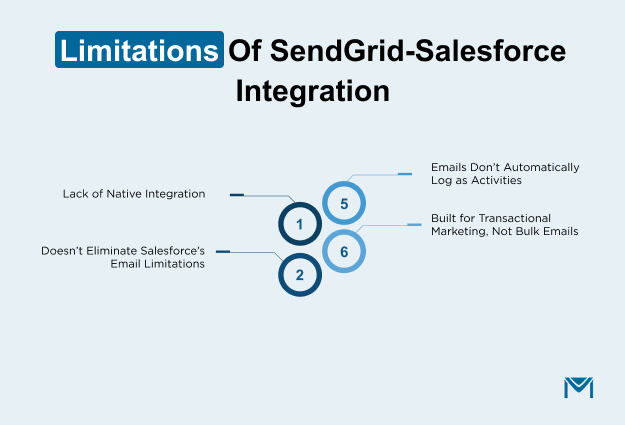
1. Lack of Native Integration
SendGrid does not offer a fully native integration within Salesforce, meaning there’s no plug-and-play functionality like Salesforce's Marketing Cloud. Instead, integration must be achieved via API or third-party tools like Zapier, Zoho Flow, and other middleware solutions.
This means that sales reps cannot fully manage or trigger SendGrid emails directly from Salesforce's standard email interface, which leads to a more complex workflow for email marketing and transactional messages.
2. Doesn’t Eliminate Salesforce’s Email Limitations
Even though SendGrid handles email sending, it does not eliminate the inherent email sending limits set by Salesforce. Salesforce’s email delivery limits, such as daily email send limits, still apply, meaning high-volume email campaigns in Salesforce can be throttled.
While SendGrid bypasses some of these limits, it does not completely overcome Salesforce's built-in restrictions on email sends or throughput.
3. Emails Don’t Automatically Log as Activities
When emails are sent via SendGrid, they don’t automatically log as activities on standard Salesforce objects like Leads, Contacts, or Opportunities.
This means the sent emails won’t show up in the activity history of those records by default, requiring manual tracking or additional configuration to sync data between systems.
For sales reps, this results in a fragmented view of customer interactions, and tracking email engagement may require extra steps or custom solutions.
UMass Boston uses MassMailer for Salesforce to manage large-scale student communications while keeping all email activity logged directly on Salesforce records. Advisors can view sent emails and engagement alongside tasks and interactions without relying on external tools or manual syncing.
This native approach gives teams a complete activity history in Salesforce, helping them coordinate follow-ups and maintain consistent communication as outreach volume grows.
4. Built for Transactional Marketing, Not Bulk Emails
SendGrid is optimized for sending transactional emails (e.g., order confirmations, password resets), but it is not designed for large-scale email marketing campaigns directly.
While it can handle bulk email sends, it is not ideal for high-volume, bulk marketing campaigns with complex segmentation, automation, and targeting that Salesforce’s Marketing Cloud offers.
For bulk email marketing with extensive segmentation, dynamic content, and deeper analytics, Salesforce’s Marketing Cloud or other specialized tools may be more suitable than SendGrid.
How MassMailer Complements SendGrid-Salesforce Integration
Unlike SendGrid, MassMailer is a native Salesforce application, seamlessly integrated into the Salesforce ecosystem.
While the SendGrid-Salesforce integration enables essential email functionalities like sending transactional emails and automating certain processes, it doesn't offer a comprehensive, all-in-one solution.
If you want to manage your email campaigns end-to-end from a single platform, without the need for API integrations or real-time operations happening across multiple systems, MassMailer is the ideal choice.
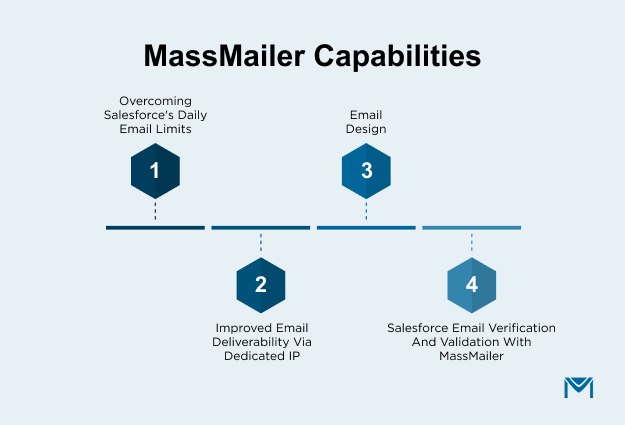
1. Overcoming Salesforce's Daily Email Limits
One of the most notable restrictions of Salesforce is the daily cap on mass emails, which is set at 5,000 emails per day. For businesses running large-scale campaigns, this can be a major obstacle.
MassMailer solves this issue by allowing you to send unlimited emails directly from Salesforce, without worrying about daily limits.
By integrating seamlessly with Salesforce, MassMailer eliminates the need for workarounds or third-party tools. With MassMailer, businesses can reach every contact, lead, or custom object in their Salesforce database without restrictions.
The ability to send unlimited emails empowers businesses to scale their email marketing efforts and send targeted campaigns to a much larger audience. Moreover, MassMailer offers the added benefit of real-time tracking for key metrics such as opens, clicks, bounces, and unsubscribes.
2. Improved Email Deliverability via Dedicated IP
MassMailer enhances your email marketing efforts by offering dedicated IPs, a key feature that significantly improves email deliverability.
When sending large volumes of emails through Salesforce, using a dedicated IP helps maintain a strong sender reputation, ensuring that your emails reach the inbox rather than the spam folder.
By utilizing a dedicated IP with MassMailer, you gain full control over your email deliverability. Unlike shared IPs, where your sending reputation is affected by others’ actions, a dedicated IP ensures that only your sending practices impact deliverability.
This is especially important for high-volume senders, as it helps avoid the risk of poor delivery performance due to spam complaints or blacklisting associated with other users.
MassMailer’s seamless integration with Salesforce allows you to send emails through your dedicated IP directly from the CRM. Whether you're sending transactional emails, marketing campaigns, or newsletters, this feature ensures that your messages consistently land in recipients' inboxes.
3. Email Design
MassMailer offers a simple yet powerful Email Template Builder that integrates directly with Salesforce. This tool enables you to create professional, mobile-responsive emails without any coding or design skills.
- Drag-and-Drop Editor: Easily build content-rich emails with a WYSIWYG editor. Customize text, images, buttons, and more, starting from scratch or using pre-built templates.
- Mobile Responsive: Automatically ensures your emails look great on both desktop and mobile devices, providing a seamless experience for all users.
- Pre-Made Templates: Access professionally designed templates that can be quickly customized to match your brand and messaging.
- Native to Salesforce: Create, send, and track emails directly within Salesforce, avoiding external tools and ensuring smooth integration with your CRM data.
- Customizable Content Elements: Add interactive elements like text boxes, buttons, images, and social media links to enhance engagement.
With MassMailer, you can design beautiful, effective emails quickly, improving both engagement and deliverability, all while staying within the Salesforce ecosystem.
4. Salesforce Email Verification and Validation with MassMailer
Managing thousands of contacts in Salesforce is powerful, but over time, records can become outdated or inaccurate. People change jobs, emails expire, and typos happen.
Sending emails to these invalid addresses leads to high bounce rates, which can damage your sender reputation and decrease deliverability. As a result, fewer emails reach real people, and you waste resources on sending to incorrect addresses.
With MassMailer, you can verify emails in real-time or in bulk directly within Salesforce, ensuring your email lists are always up to date. There’s no need for manual list management, spreadsheets, or third-party tools.
The integration works natively within Salesforce, keeping your data clean and reliable. Key features include:
- Real-time or Bulk Verification: Validate emails as records are created or in bulk across any Salesforce object.
- Identify Invalid Addresses: Instantly flag risky, disposable, or duplicate emails to avoid sending to bad addresses.
- Automate Verification: Set automated verification processes for new records or at the campaign stage to ensure data is clean before sending.
- Better Deliverability: Minimize hard bounces and maintain a healthy sender reputation for higher inbox placement.
SendGrid vs MassMailer
| Aspect | SendGrid | MassMailer (with Salesforce) |
|---|---|---|
| Type of Solution | Email delivery platform with APIs | Native Salesforce email application |
| Salesforce Integration | Requires API setup or third‑party connectors | Built‑in native integration |
| Setup Complexity | Medium to high (needs developers/connector) | Low (configurable within Salesforce) |
| Email Sending Limits | Depends on plan, not tied to Salesforce limits | Unlimited sends regardless of Salesforce's daily caps |
| Email Types | Strong for transactional & API‑driven sends | Full spectrum: transactional, marketing, drip sequences |
| Automation | API‑based or via external tools (Zapier, etc.) | Native workflow automation using Process Builder/Flow |
| Templates & Design | Uses SendGrid templates outside Salesforce | Drag‑and‑drop editor inside Salesforce |
| Deliverability Tools | Deliverability insights, dedicated IP (plan dependent) | Dedicated IP, domain authentication, and deliverability features |
| Email Validation | External or additional tools required | Built‑in real‑time & bulk verification |
| Tracking & Analytics | Strong tracking but external to Salesforce | Open/click/bounce/unsubscribe inside Salesforce |
| Activity Logging in Salesforce | Not automatic; needs custom sync | Automatic logging in Salesforce records |
| User Experience | Separate UI / external portal | Seamless within the Salesforce interface |
| Best For | Dev‑centric teams needing a scalable email API | Salesforce teams need an end‑to‑end email solution |
| Use Case Strength | High‑volume transactional & API sends | CRM‑centric campaigns & deep Salesforce workflows |
| Data Centralization | Requires sync between platforms | All data remains inside Salesforce CRM |
Conclusion
SendGrid is a solid choice for businesses with small teams and limited operational needs. It excels in transactional email delivery and integrates well with Salesforce for basic email automation.
However, as your team and campaigns scale, you may find the need for a more comprehensive solution.
In this case, MassMailer, either on its own or in combination with SendGrid, provides a seamless, native Salesforce experience that allows you to manage email campaigns end-to-end, without the complexity of external integrations or real-time operations.
For growing teams looking for advanced functionality, MassMailer is the better fit.
Discover how MassMailer seamlessly integrates with Salesforce to simplify your email operations.
Contact us today for a live demo and see firsthand how MassMailer can transform your email campaigns and enhance your Salesforce experience!
Frequently Asked Questions
1. How does SendGrid integrate with Salesforce for email tracking?
2. What is the difference between SendGrid API and Salesforce Flow integration?
3. Can you automate email workflows in Salesforce with SendGrid?
4. How do I set up SendGrid’s API in Salesforce?
5. Does SendGrid Salesforce integration support dynamic email templates?
6. What are the common issues with SendGrid Salesforce integration?
Start Your Free Trial Today
Experience MassMailer the easiest way to send personalized emails from Salesforce.
Related Blogs
MassMailer Resources



About the Author

Siva Devaki 

Siva Devaki is the founder of MassMailer Inc., a tool that helps Salesforce users optimize email marketing. A passionate advocate for email marketing, Siva writes and hosts podcasts on the topic, sharing insights to help businesses drive revenue and enhance customer engagement through Salesforce email automation and tracking.