




Table of Contents
Introduction
Salesforce emails rely on an SPF record to authenticate the sender and reach external inboxes reliably. If SPF is missing or misconfigured, Salesforce messages can fail delivery or be flagged as spoofed by recipient mail servers.
This guide shows exactly what to check and configure for a Salesforce SPF record, including how to add Salesforce safely to an existing SPF setup and avoid changes that break other email senders.
Most Salesforce environments already use multiple tools to send email. The steps here focus on control and safety so you can authorize Salesforce without disrupting Google Workspace, Microsoft 365, marketing platforms, or custom systems already sending on your domain.
If you want the correct Salesforce SPF record without reading the full guide, here is the exact answer.
- Recommended Salesforce SPF value: include:_spf.salesforce.com
- Important: Your domain can have only one SPF record. Do not create a second one for Salesforce.
- Where it goes: Add the Salesforce include to your existing v=spf1 TXT record.
- Placement rule: Insert it before ~all or -all in the record.
- When it takes effect: DNS propagation typically completes within minutes to 24 hours.
What is a Salesforce SPF record, and why does it matter?
A Salesforce SPF record is a DNS authorization that tells receiving mail servers which systems are allowed to send email on behalf of your domain when emails originate from Salesforce. Without this authorization, recipient servers cannot reliably verify that Salesforce is permitted to send using your domain.
In practical terms, a Salesforce SPF record confirms three things:
- Salesforce is an approved sender for your domain, even though it is not your primary mail host.
- Recipient servers can distinguish legitimate Salesforce emails from spoofed or forged messages.
- Your domain maintains baseline deliverability and sender reputation when Salesforce sends externally.
When this authorization is missing or unclear, enterprise teams commonly see external delivery failures, increased spam filtering, or security teams flagging Salesforce email as a spoofing risk.
What SPF record does Salesforce recommend?
Salesforce recommends including its official SPF domain in your existing SPF record so recipient mail servers can verify that Salesforce is authorized to send email on behalf of your domain. This is the only SPF authorization Salesforce supports for standard email sending.
In practice, this means adding Salesforce’s recommended SPF include value to your current SPF record, not creating a second SPF record. Most enterprise domains already have SPF in place, so the goal is to extend it safely without disrupting other senders.
Before updating your SPF record, keep these rules in mind:
- A domain can have only one SPF record. Salesforce must be merged into it, not published separately.
- Salesforce’s authorization belongs inside the existing v=spf1 record, before the final all mechanism.
Official Salesforce SPF includes a statement
Salesforce’s recommended SPF includes the value:
include:_spf.salesforce.com
This is the authoritative include Salesforce publishes for its email-sending infrastructure. It represents Salesforce’s approved sending IP ranges and is designed to stay current as Salesforce updates its infrastructure over time.
Salesforce SPF record example you can copy
The following shows a valid example SPF record when Salesforce is the only system sending email for the domain:
v=spf1 include:_spf.salesforce.com ~all
This example is provided for reference only. If your domain already has an SPF record, you should modify the existing record to add include:_spf.salesforce.com, rather than publishing this as a second SPF record.
How does an SPF record work in Salesforce?
When Salesforce sends an email, the receiving mail server checks your domain’s SPF record to confirm that Salesforce is authorized to send on behalf of your domain. If the check passes, the message is treated as legitimate. If it fails, the server may distrust the sender's identity.
At a high level, the flow looks like this:
- Salesforce sends an email that uses your domain in the From address.
- The receiving server looks up your domain’s SPF record.
- The server verifies whether Salesforce is listed as an approved sender for that domain.
This process does not change how Salesforce sends email. It determines how external systems decide whether to trust the sender identity tied to your domain.
How Salesforce sends email on your domain
Salesforce typically sends email as an authorized third party, not as your primary mail server. Even though the message originates from Salesforce infrastructure, it appears to come from your domain to recipients.
Because Salesforce is not your mail host, receiving servers cannot assume it is allowed to send for your domain. SPF fills that gap by explicitly granting Salesforce permission to send on your behalf. Without that authorization, enterprise teams often see Salesforce email treated as unverified, even when everything inside Salesforce appears to be configured correctly.
Why does Salesforce require an SPF record?
Salesforce requires an SPF record so receiving mail servers can verify that Salesforce is authorized to send email on behalf of your domain. This protects sender reputation, aligns with modern email authentication standards, and is required for reliable external delivery.
In enterprise environments, Salesforce sends email from its own infrastructure while using your domain identity. SPF provides the authorization layer that external systems expect. Without it, recipient servers cannot confidently trust the sender, even when the email content and Salesforce configuration are otherwise correct.
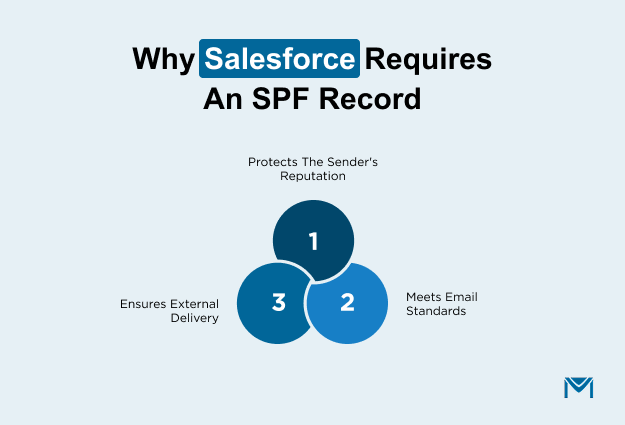
From an operational standpoint, SPF supports three core needs:
- Sender reputation protection: Salesforce helps prevent unauthorized use of your domain name in outbound email.
- Standards compliance: SPF is a baseline requirement alongside DKIM and DMARC in modern email security frameworks.
- External deliverability: Many receiving systems require SPF alignment before accepting messages from third-party platforms like Salesforce.
1. Email spoofing prevention in Salesforce
SPF helps prevent spoofing by allowing receiving servers to confirm that Salesforce is an approved sender for your domain. If an unauthorized system attempts to send email using your domain, SPF allows the recipient to detect and distrust that message.
This matters because Salesforce emails often carry business-critical content. Without SPF, those messages are easier to impersonate, which increases security risk and erodes trust with recipients.
2. Impact of missing or incorrect SPF on deliverability
When SPF is missing or incorrect, Salesforce emails commonly land in spam folders, get rejected, or fail silently at external recipients. Internal tests may still succeed, which can delay detection and create false confidence.
These issues tend to surface faster in higher-volume Salesforce sending scenarios, including when teams extend Salesforce email capabilities with platforms like MassMailer, because external mail servers enforce authentication more strictly as volume increases.
How do you add or update an SPF record for Salesforce?
To add or update an SPF record for Salesforce, you modify your domain’s existing SPF entry to authorize Salesforce as a permitted sender. The objective is to extend what already exists, not to create a duplicate record that invalidates SPF and disrupts email delivery.
At a high level, enterprise teams follow this process:
- Confirm whether the sending domain already has an SPF record.
- If an SPF record exists, update that single record to authorize Salesforce.
- If no SPF record exists, publish one SPF record for the domain.
The most common failure at this stage is duplication. Publishing more than one SPF record on the same domain causes receiving mail servers to treat SPF as invalid, even if each record appears correct on its own.
1. Where to add the SPF record in DNS
SPF is always published as a TXT record in DNS for the domain used in the email’s From address. Receiving mail servers query this TXT record to determine which systems are allowed to send email for that domain.
Two basics matter in Salesforce environments:
- Root domain: Most Salesforce emails use the primary corporate domain, so SPF usually applies at the root level.
- Subdomains: Some organizations isolate Salesforce sending on a subdomain to limit risk, but SPF still lives as a TXT record for that subdomain.
2. How to update an existing SPF record safely
SPF allows only one record per domain, which is why adding Salesforce incorrectly is such a common source of breakage.
A safe update follows these principles:
- Keep the existing SPF record intact.
- Add Salesforce authorization to the same record.
- Do not remove other authorized senders unless you intend to stop them from sending email.
For example, if your domain already authorizes Google Workspace, Salesforce should be added to the same SPF record, not published separately:
v=spf1 include:_spf.google.com include:_spf.salesforce.com ~all
This example shows Salesforce added to an existing Google Workspace SPF record. Do not create a second SPF record for Salesforce.
This step is especially critical in Salesforce environments that send email at scale, such as those using Salesforce-native tools like MassMailer. At higher volumes, SPF misalignment surfaces quickly as delivery failures rather than remaining a hidden configuration issue. Teams that align SPF with broader Salesforce email authentication practices tend to detect and correct sender authorization problems earlier, before they impact campaigns or workflows.
3. How long do Salesforce SPF changes take to work
SPF changes do not apply instantly. They depend on DNS propagation and caching behavior across the internet.
In practice:
- Updates often appear within minutes.
- Some receiving servers continue using cached records for several hours.
- Enterprise teams typically allow up to 24 hours before concluding that a change did not apply.
Waiting refers to external mail systems refreshing their DNS view, not to any delay inside Salesforce itself.
What are common Salesforce SPF errors, and how do you fix them?
Most Salesforce SPF issues fall into a small set of repeatable misconfigurations that cause receiving mail servers to distrust your sender identity. The fixes are usually straightforward once you map cause → outcome → direction to correct, without reworking your entire email setup.
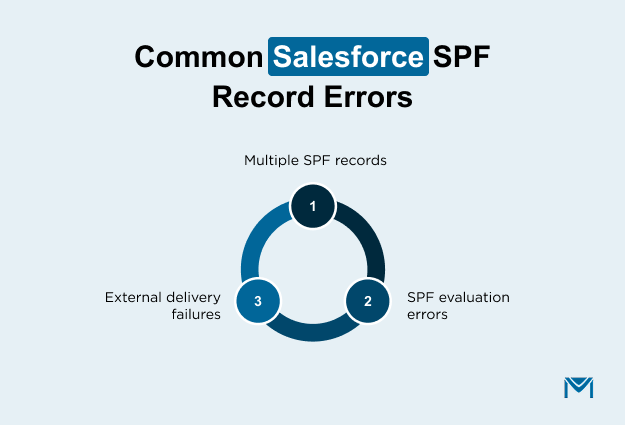
At a high level, enterprise teams most often encounter:
- Duplicate SPF records on the same domain
- SPF evaluation errors triggered during recipient checks
- External delivery failures that do not appear in internal testing
1. Multiple SPF records on one domain
This is the most common SPF mistake in Salesforce environments. SPF allows only one record per domain.
What causes it
- Publishing a new SPF record to “add Salesforce” instead of updating the existing one
- Separate teams managing DNS changes independently
What happens
- Receiving servers stop SPF evaluation altogether
- Salesforce emails appear unauthenticated, even if the values are correct
How to fix it
- Keep a single SPF record
- Merge Salesforce authorization into that record
- Remove any additional SPF entries for the same domain
2. SPF permerror and temperror explained
These errors indicate that receiving servers could not complete SPF evaluation.
What they mean
- permerror: The SPF record is structurally invalid or too complex to evaluate
- temperror: The receiving server could not retrieve all required SPF information at the time of delivery
Common Salesforce-related causes
- Teams create overly complex SPF records when they stack multiple third-party senders
- Teams send Salesforce emails while DNS changes are still in progress
- Infrastructure updates that temporarily disrupt SPF lookups
Fix direction
- Simplify and consolidate SPF authorization
- Avoid unnecessary sender additions
- Allow time for DNS changes to stabilize before sending at scale
SPF 10-DNS-lookup limit (a common hidden cause)
SPF allows a maximum of 10 DNS lookups during evaluation. If a receiving server exceeds this limit, SPF fails with a permanent error.
Salesforce-heavy email stacks often hit this limit because each third-party sender adds lookups. The Salesforce authorization “include:_spf.salesforce.com” counts as one lookup toward the limit.
When the limit is exceeded, receiving servers stop SPF evaluation, which causes Salesforce emails to fail authentication even if the record appears correct.
3. Salesforce emails are failing external delivery
A frequent symptom of SPF issues is that Salesforce emails appear to work internally but fail when sent outside your organization.
Why this happens
- Internal mail systems often bypass strict authentication checks
- External recipients enforce SPF more aggressively before accepting third-party senders like Salesforce
What to check
- Whether Salesforce is authorized in the SPF record for the From domain
- Whether recent DNS changes have fully propagated
These issues surface faster in higher-volume Salesforce sending scenarios, including when teams use Salesforce-native platforms like MassMailer, where bounce handling and delivery feedback make SPF-related failures immediately visible instead of silently ignored.
One verified G2 reviewer described this operational clarity directly, noting that MassMailer was “incredibly easy to use” and that its tight Salesforce integration helped their team execute large-scale email campaigns more efficiently, making delivery issues easier to identify and act on early.
What is the difference between SPF, DKIM, and DMARC in Salesforce?
SPF, DKIM, and DMARC each validate a different part of how Salesforce emails are authenticated by receiving mail servers. Salesforce relies on all three together to establish sender authorization, message integrity, and consistent handling when authentication fails.
| Protocol | What it verifies | What it does not do | Why it matters in Salesforce |
|---|---|---|---|
| SPF | Confirms Salesforce is allowed to send email on behalf of your domain | Does not validate message content or integrity | Authorizes Salesforce as a legitimate third-party sender |
| DKIM | Verifies the message was not altered and is cryptographically linked to your domain | Does not control which systems are allowed to send | Protects Salesforce emails from tampering and impersonation |
| DMARC | Defines how receivers handle failed SPF or DKIM checks and provides reporting | Does not authenticate by itself | Enforces consistent treatment of unauthenticated Salesforce email |
SPF alone is insufficient because it only answers who is allowed to send. It does not confirm message integrity or tell receiving servers how to respond when authentication fails. Enterprise teams see Salesforce emails filtered or rejected when they configure SPF, but do not set up DKIM or DMARC.
Salesforce email delivery depends on all three protocols working together. SPF authorizes Salesforce as a sender, DKIM validates the message itself, and DMARC ties those results into enforcement and reporting that external mail systems trust.
Conclusion
A Salesforce SPF record is a foundation for reliable email delivery, sender trust, and secure communication as Salesforce email volume increases. When SPF is missing, duplicated, or misaligned, Salesforce emails often fail silently, especially with external recipients, creating risk and wasted troubleshooting effort.
As teams scale Salesforce email, SPF must work alongside DKIM and DMARC, with enough visibility to catch issues before they impact campaigns or sales outreach. At that stage, authentication stops being theoretical and becomes operational.
This is where Salesforce-native sending platforms like MassMailer fit naturally. By combining authenticated sending, delivery feedback, bounce handling, and scalable email execution inside Salesforce, MassMailer helps teams operate with confidence instead of assumptions.
If Salesforce email performance matters to your business, book a MassMailer demo to see how authenticated, high-volume email sending works in practice within your Salesforce environment.
Frequently Asked Questions
1. Does Salesforce require an SPF record to send emails?
2. What happens if I add Salesforce as a second SPF record?
3. Can Salesforce emails work without SPF if DKIM is enabled?
4. Why do Salesforce emails work internally but fail externally?
5. Do I need a separate SPF record for each Salesforce org?
6. How often does Salesforce change its SPF requirements?
Start Your Free Trial Today
Experience MassMailer the easiest way to send personalized emails from Salesforce.
Related Blogs


MassMailer Resources




About the Author

Siva Devaki 

Siva Devaki is the founder of MassMailer Inc., a tool that helps Salesforce users optimize email marketing. A passionate advocate for email marketing, Siva writes and hosts podcasts on the topic, sharing insights to help businesses drive revenue and enhance customer engagement through Salesforce email automation and tracking.