




Table of Contents
Introduction
Salesforce email archiving is the process of securely storing and managing email communications within the Salesforce platform. It ensures that all emails sent and received through Salesforce are saved for future reference, compliance, and easy retrieval when needed.
Salesforce email archiving is essential for businesses that need to comply with industry regulations and maintain organized records. It helps ensure that important email data is securely stored, easily accessed, and protected from loss.
However, there are challenges and limitations to Salesforce email archiving. In this blog, we will discuss these limitations, how to overcome them, and how MassMailer can help streamline and enhance your email archiving process for better efficiency and compliance.
Challenges and Limitations of Salesforce Email Archiving
While Salesforce email archiving provides a streamlined solution for managing and securing email data, it’s not without its hurdles. For many businesses, the native archiving features might not be enough to fully address compliance, storage, and retrieval needs.
As you explore the nuances of Salesforce email archiving, you'll uncover several limitations that can impact efficiency and security.
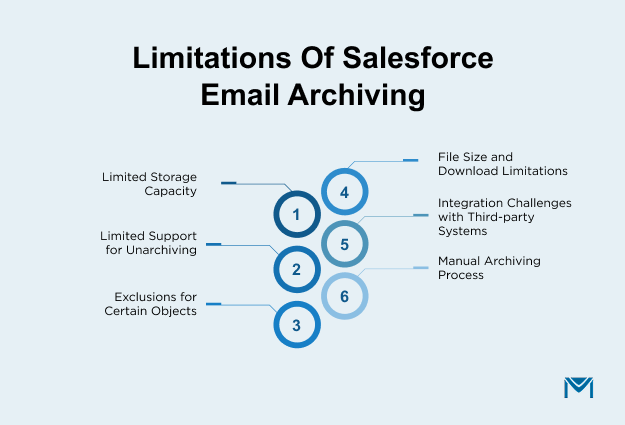
1. Limited Storage Capacity
Salesforce’s native email archiving solution may come with storage limitations, especially for organizations that deal with large volumes of emails. A single archive policy in Salesforce is restricted to a maximum of 2 million root records.
If your organization handles more than this volume, you’ll need to create multiple archive policies scheduled at different times to avoid conflicts. This could result in additional costs if you need to purchase extra storage or face restrictions on how much data can be archived.
2. Limited Support for Unarchiving
Unarchiving is available only for root objects. If your email data is part of a larger structure, such as when emails are linked to certain objects like inactive accounts or case team members, you may not be able to retrieve those records once archived.
Additionally, unarchived embedded images in email messages may fail to display correctly, as links to images become broken once the email is restored
3. Exclusions for Certain Objects
Salesforce’s archive feature does not support archiving for several types of objects. These include:
- Big Objects
- ContentDocument links to a ContentVersion with a file type of SNOTE (which can affect content notes containing images)
- Orders with an Active status
- Non-deletable objects
- ActivityFieldHistory objects (for unarchiving or exporting)
These exclusions may limit the flexibility of Salesforce’s native archiving functionality for certain use cases, especially in complex environments with diverse data types.
4. File Size and Download Limitations
When exporting files from the archive, Salesforce imposes a file size limit of 5GB for standard internet connections. Files exceeding this size will need to be exported to external storage services like AWS S3. Also, downloads are limited to 15 minutes, which can be an issue if the file is large or the internet connection is slow.
5. Integration Challenges with Third-party Systems
Salesforce’s email archiving may not integrate seamlessly with other systems or third-party archiving tools, making it harder to maintain a unified data management strategy. For businesses that use multiple communication platforms, this lack of integration can quickly lead to fragmented data and operational inefficiencies.
According to the 2025 Connectivity Benchmark Report by Mulesoft, business application volumes within organizations have increased by nearly 10% in the past year, surpassing 1,000 applications on average.
Despite this growth, only about 29% of enterprise applications are integrated, leaving the majority of systems isolated and creating data silos. In environments like this, adding another third-party email or archiving tool without native integration can further complicate data access, compliance, and visibility across systems.
As a result, teams often struggle to maintain a single source of truth for email records and customer interactions, increasing the operational overhead required to manage and reconcile data across disconnected platforms.
6. Manual Archiving Process
Although Salesforce offers automated archiving to some extent, there are still manual steps involved in archiving specific emails or attachments, particularly if they need to be sorted, categorized, or indexed. This can lead to inefficiency and increased chances of human error.
Ways to Archive Emails in Salesforce
Depending on your business needs, industry regulations, and the volume of emails you manage, the right archiving method can vary.
Whether you’re looking for a simple, native solution or a more robust, third-party tool for compliance, there are several options to consider.
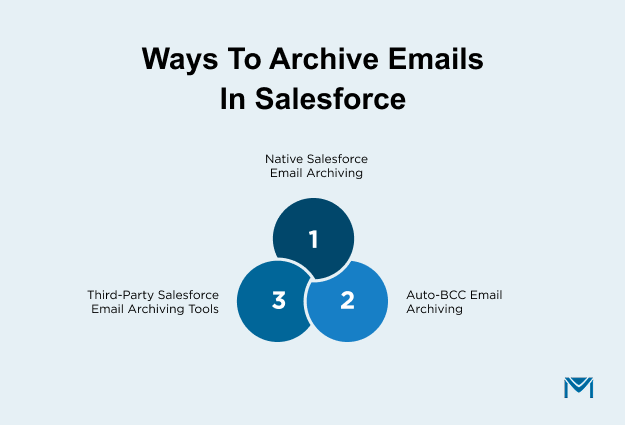
1. Native Salesforce email archiving options
Salesforce typically handles email archiving through the Email Studio feature in Marketing Cloud. When teams enable this feature, businesses can selectively archive copies of emails sent through the platform.
Salesforce stores these email messages in EML format on an enhanced FTP site associated with the account. Teams configure the process through a setting in the Send Classification, which applies to both commercial and transactional sends.
After Salesforce sends emails, the system archives them daily into zip files, and each archive includes a manifest for easy reference.
Key characteristics
- EML format: Salesforce archives emails in EML (Electronic Mail) format, a text-based format native to Mail Transfer Agents (MTAs).
- FTP storage: Salesforce stores archived emails on an enhanced FTP site and keeps them securely off-platform for reference.
- Attachments included: Salesforce archives emails sent with attachments and includes those attachments in the EML file.
- Compression: Salesforce compresses archived files using the DEFLATE compression method to reduce file size.
Limitations
- Send speed impact: Emails sent with archiving enabled experience slower send speeds, and Salesforce does not apply Service Level Agreements (SLAs) to these sends.
- Duration: Salesforce stores archived files for a maximum of 21 days before deleting them, which makes this option unsuitable for long-term storage needs.
- Limited searchability: Salesforce does not index archived emails, so users cannot search archived messages natively. Teams must use a third-party tool to index and search files after export.
- Attachment and image handling: Salesforce archives email attachments with the message, but does not include images within the archive. Instead, the system stores only the original image references, which prevents direct image retrieval.
- No full message header: Salesforce excludes the full email header when converting files from EML to HTML, which limits the metadata available for audits or investigations.
- PII considerations: Archived emails may contain personally identifiable information (PII), which makes this feature unsuitable for emails that use tokenized sending, field-level encryption, or strict data privacy controls.
Salesforce email archiving works best for short-term, operational email storage and tracking, but it does not support comprehensive, long-term compliance or audit requirements.
How MassMailer Bypasses these Limitations
- EML Format and Storage: While Salesforce archives emails in EML format and stores them on an FTP site, this solution is often too basic for businesses that need a more comprehensive archiving strategy. MassMailer captures Salesforce emails automatically, preserving metadata and content in a centralized, searchable system.
- Retention Limitations: Salesforce archives emails for a maximum of 21 days before deletion, which is unsuitable for long-term compliance or retention needs. MassMailer, on the other hand, offers customizable retention policies, ensuring data is stored as long as required, with the ability to meet industry-specific regulatory requirements.
- Attachment Handling: Salesforce archiving supports attachments, but images within emails are excluded. MassMailer captures emails in their entirety, including images and attachments, and prevents data loss that is critical for compliance and auditing purposes.
2. Auto-BCC email archiving
Auto-BCC (Blind Carbon Copy) email archiving in Salesforce captures a copy of every outbound email sent from Salesforce, including both CRM and marketing emails.
The system then stores archived copies in a centralized location, making them easy to access for compliance reviews, audits, and future reference.
Key Characteristics
Automatic archiving: Auto-BCC captures every outbound email automatically, without requiring any extra steps from users.
Reliability: Auto-BCC eliminates the risk of missed emails caused by human error, such as forgetting to log a message or add a BCC recipient.
Comprehensive coverage: Auto-BCC applies to both transactional and commercial emails, including marketing campaigns and sales correspondence.
Centralized storage: The system stores all archived emails in a single, centralized location, allowing teams to retrieve them quickly for compliance, audits, or reference.
Auto-BCC Email Archiving in Salesforce with MassMailer
In MassMailer, Auto-BCC email archiving allows businesses to automatically archive outbound emails by blind-copying (BCC) them to a designated email address or system.
By configuring the Global BCC email in the MassMailer Setup, all emails sent via Salesforce can be automatically captured and archived.
The system securely and consistently stores a copy of every email sent from Salesforce without requiring any manual intervention.
Once you complete the setup, you select the BCC email address in the Outreach Wizard under Sender Options.
MassMailer then automatically archives all emails sent through Salesforce, including marketing, transactional, and sales-related messages, for future reference, compliance, or auditing.
Key Characteristics:
Automated process: MassMailer automates email archiving by adding a BCC address to every outbound Salesforce email and removes the need for manual logging.
Global BCC configuration: You configure the Global BCC address in the MassMailer Setup, and it applies across all email communications, ensuring that no important email is missed.
Reliability: The archiving feature captures and stores all emails sent through Salesforce Campaigns, MassMailer Outreach, or Salesforce flows without relying on user actions.
- Seamless Integration: MassMailer is a native-Salesforce application, offering an effortless way to archive emails directly from the Salesforce platform without additional steps or third-party tools.
3. Third-party Salesforce email archiving tools
Third-party email archiving solutions integrate with Salesforce to provide a more robust, compliant, and feature-rich alternative to the native email archiving methods.
These solutions typically archive all Salesforce emails, both outbound and inbound, in compliance with regulatory standards such as HIPAA, FINRA, and GDPR.
By using third-party services, businesses securely store emails, retrieve them easily, and search them efficiently, often with added features such as legal holds and advanced search capabilities.
These tools generally operate outside of Salesforce but integrate seamlessly with the platform to capture emails at various touchpoints.
Third-party email archiving solutions typically offer a range of features, including automatic archiving of emails in formats such as EML, PDF, or MSG, along with secure, cloud-based storage.
These solutions also support advanced indexing, automate compliance, and manage retention policies, preserving emails for the required duration and making them easy to access during audits or legal reviews.
Salesforce Email Archiving with MassMailer Third-party Integrations
MassMailer seamlessly integrates with third-party email archiving solutions, enhancing Salesforce email management and ensuring compliance with regulatory requirements.
By connecting MassMailer with systems like Global Relay Archive, organizations can ensure that all Salesforce email communications are automatically captured and stored in a secure, tamper-proof archive.
This integration creates real-time, high-quality records. It gives businesses access to structured conversations and actionable insights for audits and investigations.
MassMailer’s integration preserves Salesforce email data with automated audit trails. It also supports WORM-compliant storage for strict retention and legal requirements.
With this integration, businesses can store Salesforce email data alongside other communication types. These include chat, social media, and voice communications in one unified archive.
Key Characteristics of MassMailer’s Third-Party Integration
- Real-time data capture: MassMailer archives Salesforce email communications in real time and creates tamper-proof records suitable for legal and compliance audits.
- Unified Data Management: MassMailer integrates with third-party systems like Global Relay Archive to store and manage email data alongside other business communications, creating a centralized repository for all communications.
- Advanced Search and Analytics: Integration with third-party tools enables granular search capabilities and advanced data analytics. Users can search and filter emails by sender, recipient, or date, and visualize trends and patterns in archived communications.
- Customizable Retention Policies: Businesses can set flexible retention terms and enforce defensible deletion policies that align with industry regulations, ensuring compliance across all archived email communications.
Keener Financial Planning uses MassMailer to ensure outbound Salesforce CRM emails are captured and archived in line with regulatory requirements. By automatically archiving Salesforce emails and integrating with compliant third-party archiving systems, the firm maintains audit-ready communication records without relying on manual logging. This approach helps support regulatory reviews, retention policies, and consistent compliance workflows. MassMailer documents similar compliance-focused Salesforce email archiving workflows across financial services, healthcare, and non-profit organizations.
Email archival solutions for Salesforce
Global Relay is a widely used archiving solution. However, it is not always practical for every organization. Cost, integration complexity, and evolving communication needs often push teams to evaluate alternative tools.
1. Global Relay
Global Relay is one of the most trusted email archiving platforms for regulated industries. It provides an all-in-one solution for capturing and managing communications data at scale. The platform supports Salesforce email archiving across CRM and marketing workflows. It preserves email content with full metadata, conversation context, and legal hold support.
Global Relay helps organizations meet SEC, FINRA, MiFID II, and other regulatory requirements.
Key capabilities include:
Unified, cloud-native archive: Stores Salesforce emails in a secure, AI-ready archive with identity and access controls.
eDiscovery and legal hold: Enables legal teams to preserve records and prevent deletion during audits or litigation.
AI-powered analytics: Helps teams identify risky conversations and analyze communication trends.
Audit-ready records: Encrypts every archived email using AES and RSA keys with integrity checks and audit logs.
Granular retention policies: Supports flexible retention, jurisdiction-aware storage, and policy-based data segregation.
Global Relay also provides private workspaces and custom workflows. These features support real-time collaboration across compliance, legal, and HR teams.
MassMailer integration
MassMailer routes Salesforce outbound emails directly into Global Relay’s archive. This captures emails from sales, service, and marketing teams automatically. The integration classifies emails and makes them searchable for audits and investigations. It supports WORM-compliant retention, dynamic tagging, and identity-mapped storage.
2. Smarsh
Smarsh is a well-established alternative to Global Relay. It serves regulated organizations that require strong compliance and supervision capabilities. Smarsh supports Salesforce email archiving for Sales Cloud, Marketing Cloud, and Pardot. Organizations can capture emails in a compliant, tamper-proof manner.
Smarsh captures Salesforce email content directly from the source using journaling. This preserves messages in their original format and maintains the chain of custody. The platform stores archived emails, attachments, and images in an immutable archive. It supports fast search, supervision, and legal discovery.
Smarsh also provides message directionality and identity management across channels. It applies encryption in transit and at rest.
3. Proofpoint
Proofpoint is a widely adopted alternative to Global Relay. It supports enterprise-grade compliance, archiving, and supervision across digital communications. The Intelligent Compliance platform helps organizations manage regulatory risk and data retention at scale. Regulated industries commonly use the platform.
Proofpoint captures communications across email, social media, and collaboration tools. It preserves full conversational context for accurate review and investigation. The platform prioritizes scalability and reduced operational overhead. Organizations can manage growing data volumes without straining IT teams.
Proofpoint includes high-performance search, legal hold, and export tools. These features support eDiscovery and litigation readiness. The platform simplifies compliance with SEC, FINRA, and IIROC requirements. Advanced supervision features use machine learning to reduce false positives.
These capabilities help compliance teams focus on high-risk communications and improve review efficiency.
4. Mimecast
Mimecast Cloud Archive helps businesses store, manage, and retrieve email and collaboration data securely. It supports evolving regulatory and legal requirements. Mimecast captures emails, attachments, and collaboration data. It stores content in a secure, searchable archive for audits and legal discovery.
The platform prioritizes easy access for IT, Legal, Compliance, and HR teams. This enables faster responses to regulatory inquiries. Mimecast handles large and growing data volumes effectively. It helps organizations manage unstructured data securely.
The platform protects archived data from accidental or malicious loss. It encrypts data in transit and at rest. Mimecast retains data based on configurable compliance policies.
Conclusion
When compliance teams can retrieve emails quickly and confidently, audits become manageable instead of disruptive.
If your organization sends high-volume outbound Salesforce emails or operates in a regulated environment, reliable email archiving becomes critical. MassMailer helps centralize outbound Salesforce CRM emails, support compliance workflows, and reduce reliance on manual logging.
Ready to strengthen your Salesforce email archiving strategy? Explore how MassMailer supports compliant, audit-ready Salesforce email archiving.
This is the simplest way to improve email retention, reduce compliance risk, and stay prepared for audits without slowing your Salesforce teams.
Frequently Asked Questions
1. Is Salesforce email archiving mandatory for compliance?
2. Does Salesforce automatically retain emails long-term?
3. What types of emails should be archived in Salesforce?
4. Can archived Salesforce emails be searched during audits?
5. How long should Salesforce emails be retained?
6. What is the difference between Salesforce email backup and email archiving?
Start Your Free Trial Today
Experience MassMailer the easiest way to send personalized emails from Salesforce.
Related Blogs
Salesforce SPF Record: Setup, Recommended Value, and Common Errors
Salesforce Email Encryption: How It Works, Setup & Limitations
MassMailer Resources


About the Author

Siva Devaki 

Siva Devaki is the founder of MassMailer Inc., a tool that helps Salesforce users optimize email marketing. A passionate advocate for email marketing, Siva writes and hosts podcasts on the topic, sharing insights to help businesses drive revenue and enhance customer engagement through Salesforce email automation and tracking.