




Table of Contents
Introduction
Salesforce is a powerful tool, but when it comes to outbound email, things don’t always go as smoothly as they should. You might find yourself hitting email send limits, dealing with delivery failures, or struggling to track campaign results. If these challenges sound familiar, you’re not alone.
In this guide, we’ll walk you through the most common issues with Salesforce outbound email, like exceeding daily send limits, email bounces, and poor deliverability. You’ll learn how to configure your Salesforce email settings, manage sending limits, and troubleshoot delivery failures effectively.
We’ll also cover how to optimize email tracking so you can measure campaign performance and make adjustments where needed. By the end of this blog, you’ll have everything you need to fix email delivery issues and improve your Salesforce email setup, ensuring your emails always reach their destination without frustration.
Why Troubleshooting Salesforce Outbound Email Is Important
Troubleshooting Salesforce outbound email is crucial for ensuring that your emails are delivered successfully and that your communication with customers remains effective. Without resolving common email issues, you risk missed opportunities, poor email reputation, and inaccurate campaign tracking.
Fixing these issues will improve your email deliverability, engagement, and overall campaign success.
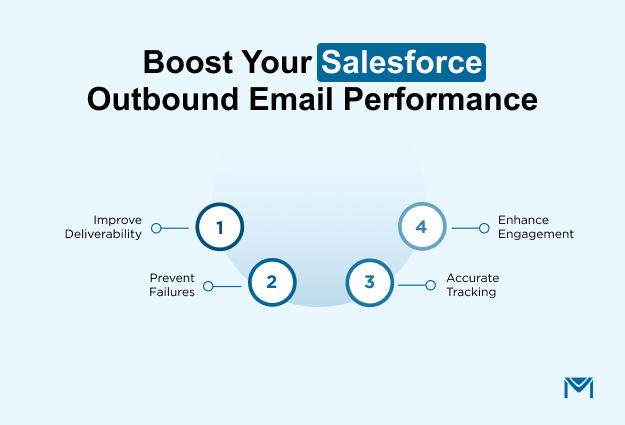
- Improves email deliverability: Emails that aren’t properly authenticated (SPF, DKIM) are likely to land in spam folders or be blocked by email servers. Troubleshooting email authentication ensures that your emails pass necessary checks and land in recipients' inboxes, leading to higher open rates.
- Prevents sending failures: Issues like exceeding daily email limits or misconfigured workflow triggers can stop emails from being sent entirely. Troubleshooting these limits and triggers ensures that emails are sent without interruption, even during high-volume campaigns or automated notifications.
- Enhances email tracking accuracy: Misconfigured tracking settings lead to inaccurate metrics. If you're not tracking open rates, click-through rates, or bounces correctly, campaign optimization becomes impossible. Troubleshooting tracking settings ensures reliable performance data that leads to better decision-making and optimized campaigns.
- Boosts campaign engagement: Fixing issues like bounce-backs, delayed emails, and low deliverability directly impacts open rates, click rates, and conversion rates. By improving these aspects, your campaigns will see higher engagement from customers and prospects, ultimately driving better results for your business.
Addressing email limits, authentication errors, and tracking problems ensures smooth communication and optimized email performance, ultimately improving campaign success and customer satisfaction.
Managing Salesforce Outbound Email Limits And Restrictions
Managing Salesforce outbound email limits is essential for running successful email campaigns and ensuring that your messages are delivered on time. Without managing these limits, you risk email delivery failures, workflow disruptions, and missed opportunities.
Understanding the restrictions in Salesforce and actively monitoring your usage will help you avoid these challenges and maintain a smooth communication process.
1. Understanding Daily Email Send Limits in Salesforce
Salesforce imposes daily email send limits based on your license type. For example:
- Enterprise and Developer Editions allow up to 5,000 emails per day.
- Essentials and Professional Editions limit you to 500 emails per day.
Exceeding these limits causes emails to stop sending, resulting in delays or missed communication. Monitoring daily email usage ensures you stay within the cap and keep your campaigns on track.
If a marketing team unknowingly exceeds the 5,000-email cap, the campaign will halt before reaching all recipients. This can lead to missed engagement and lower conversion rates. By regularly tracking email usage, you can prevent this from happening and ensure your campaigns run smoothly.
2. License-Based Restrictions And How They Affect Your Email Sends
Your Salesforce license determines how many emails you can send through workflow rules, email alerts, and mass emails. Even higher-tier licenses like Enterprise Edition have daily caps that limit the number of emails you can send.
For example, even though Salesforce’s official daily limit for external email sends is 5,000 per org, smaller editions often hit practical limits earlier during high-volume campaigns or automated workflows. A customer service team using Salesforce Essentials could easily exceed the daily cap while sending automated ticket updates.
This would delay notifications and ultimately impact customer satisfaction. By understanding and managing these limitations, the team can ensure that timely updates are delivered without disruptions.
3. Mass Email Restrictions And Limitations
In addition to daily email limits, Salesforce also has restrictions on mass email sends. These are typically based on the number of recipients or the email volume. Salesforce imposes mass email limits to prevent spam and ensure smooth system operation.
If you plan to send large-scale campaigns, it’s essential to understand the mass email restrictions in your Salesforce edition. For instance, if you're sending emails to thousands of contacts in Salesforce Essentials, this means you’ll need to split their newsletter list into multiple batches, prolonging the campaign and potentially delaying communication with subscribers.
4. How To Monitor Your Email Usage In Salesforce
Salesforce provides an email usage report under Email Administration in Setup. This allows you to track the number of emails you’ve sent daily and avoid exceeding the limits. You can also use the Deliverability Dashboard to monitor real-time email performance.
A sales team can use the email usage report to monitor how many emails they’ve sent in a given day. If they’re nearing the limit, they can adjust their follow-up strategy to avoid missing any critical interactions with prospects.
By managing Salesforce outbound email limits and actively tracking your email usage, you can prevent delivery failures and keep your communication seamless. If you’re looking for more efficient email tracking and increased email deliverability, consider using the right tool to optimize your email strategy.
Tools like MassMailer offer advanced features to help you scale your email campaigns while staying within Salesforce’s limits.
How to Choose the Right Tool for Managing Salesforce Outbound Email
Choosing the right tool for managing Salesforce outbound email is crucial for improving campaign effectiveness, scalability, and performance. To make the right decision, here are the key questions you should ask when evaluating email management tools:
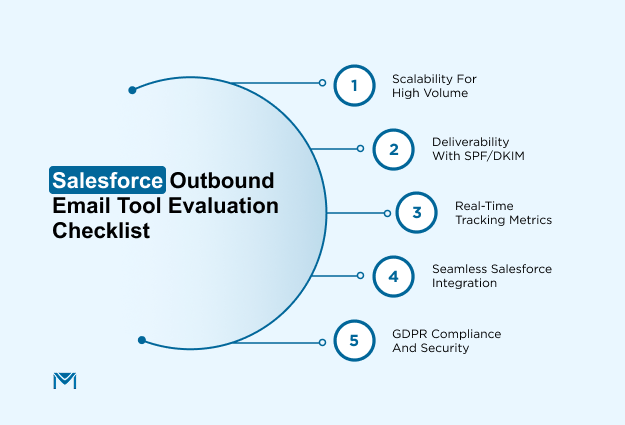
Key questions to consider:
- Does the tool scale with your business?
Ensure the tool can handle high-volume email sends and automated workflows without running into daily limits.
- How does the tool impact email deliverability?
Look for features like SPF and DKIM integrations to improve inbox placement and reduce bounce rates.
- Can the tool provide advanced tracking?
Choose a tool that gives you access to real-time metrics like open rates, click-through rates, and conversion data.
- How easily does the tool integrate with Salesforce?
The tool should allow seamless integration with Salesforce to automate email workflows and track performance directly within the CRM.
- Does the tool comply with security standards?
Ensure the tool is GDPR-compliant, provides data encryption, and has proper user permissions to protect sensitive customer data.
Thus, by carefully weighing these criteria, you can select a tool that strengthens your Salesforce email strategy, improves campaign performance, and scales with your business needs.
Some tools on the market satisfy these requirements and extend Salesforce’s native capabilities. For example, customers such as RCN Capital, Advanced Portfolio Management, and The Heartland Institute have successfully used MassMailer to overcome limitations around send volume and user flexibility while benefiting from easier template management and advanced analytics.
How MassMailer Enhances Salesforce Outbound Email
MassMailer extends Salesforce’s native email capabilities by removing send limits, improving inbox placement, and delivering powerful insights and automation—all without leaving your CRM. These enhancements help teams scale communication, improve engagement, and make smarter decisions with real‑time data.
1. Overcoming Salesforce email send limits
Salesforce’s built‑in mass email features cap the number of emails you can send per day, which becomes a barrier for high‑volume outreach like newsletters, promotions, or automated campaigns.
MassMailer removes these constraints, letting you send unlimited emails to standard and custom objects directly from Salesforce without hitting Salesforce’s daily send limit. This makes it possible to run large campaigns and automated workflows without interruptions.
2. Boosting email deliverability and reducing bounce rates
MassMailer improves email deliverability through built‑in features that protect your sender reputation. It supports email verification to clean lists before sending, reducing bounces by up to 98%, and offers domain authentication (like SPF and DKIM). These help messages land in the inbox instead of the spam folders. These features work together to improve deliverability, protect engagement, and maintain consistent communication performance.
3. Advanced email tracking and reporting features
Salesforce’s native email tracking is often limited to basic activity logs, making it difficult to understand real engagement. MassMailer fills this gap by providing detailed, real-time metrics such as total and unique opens, clicks, bounces, unsubscribes, and spam complaints, all recorded directly within Salesforce. Teams can analyze performance by campaign, sender, object, or timeframe and push insights to reports and dashboards for ongoing optimization.
This depth of visibility is also reflected in user feedback on Capterra, where customers consistently highlight clearer engagement tracking and more reliable reporting compared to Salesforce’s native tools, especially when running higher-volume or recurring campaigns.
4. Drag‑and‑drop email creation and automation
MassMailer includes a built‑in email template builder that lets users design professional, responsive email templates without coding. You can schedule sends, personalize content using Salesforce fields, and automate sequences using Salesforce Flow or Process Builder. These capabilities streamline campaign setup and reduce reliance on external tools while keeping all activity tied directly to Salesforce workflows.
5. Native Salesforce integration and unified engagement data
MassMailer integrates natively with Salesforce, ensuring every send, open, click, and reply stays linked to the relevant records without manual syncing or external connectors. This gives teams a unified view of customer interactions, improves collaboration across sales and marketing, and keeps all engagement insights in one place.
Tools like MassMailer help you scale outbound email efforts, improve deliverability, and measure performance more deeply than Salesforce alone allows, supporting everything from ongoing customer communication to large‑scale campaigns.
Conclusion
Choosing the right tool for Salesforce outbound email is essential for improving campaign performance and scalability. By focusing on scalability, email deliverability, advanced tracking, and seamless Salesforce integration, businesses can enhance email effectiveness and drive better results.
So, if you're facing limitations with Salesforce email management, MassMailer provides the ideal solution to overcome send limits, improve deliverability, and gain detailed tracking insights. Trusted by businesses like RCN Capital and The Heartland Institute, MassMailer offers a robust solution to scale your email campaigns efficiently.
Ready to take your Salesforce email strategy to the next level? Try MassMailer today and see how it can help streamline your email workflows, improve engagement, and drive better results for your business!
Frequently Asked Questions
1. How do I send mass emails in Salesforce?
2. What are Salesforce outbound email limits?
3. How do I set up email authentication in Salesforce?
4. What are the best practices for Salesforce outbound emails?
5. How do I troubleshoot Salesforce outbound email issues?
6. How to monitor outbound email performance in Salesforce?
Start Your Free Trial Today
Experience MassMailer the easiest way to send personalized emails from Salesforce.
Related Blogs
Salesforce Email Services: Setup, Types, and Limitations
Salesforce Cold Email in 2026: Tools, Setup Tips & Compliance Risks
MassMailer Resources

MassMailer Glossary
About the Author

Siva Devaki 

Siva Devaki is the founder of MassMailer Inc., a tool that helps Salesforce users optimize email marketing. A passionate advocate for email marketing, Siva writes and hosts podcasts on the topic, sharing insights to help businesses drive revenue and enhance customer engagement through Salesforce email automation and tracking.