




Table of Contents
Introduction
Salesforce is often the starting point for sales teams running email outreach or nurture campaigns. It already stores lead and contact data, tracks activity, and supports day-to-day sales workflows, making it a natural place to send follow-ups and manage ongoing communication.
What’s less clear is how Salesforce email outreach actually works in practice. Some teams use it successfully for one-to-one outreach and light nurturing, while others struggle to manage follow-ups, track engagement, or scale campaigns without friction. The difference usually comes down to how Salesforce’s native email capabilities are used and where their limits begin.
If you’re searching for Salesforce email outreach, you’re likely looking for practical guidance. This guide explains how to send outreach and nurture emails in Salesforce, what the platform supports natively, and how to recognize when your current approach is working well versus when it starts to break down.
How Salesforce email outreach works in practice
Salesforce email outreach works by letting sales teams send emails directly from lead and contact records, log each interaction automatically, and manage follow-ups inside the CRM. This approach keeps outreach, nurture activity, and engagement history in one place, which helps teams stay organized and avoid missed follow-ups.
Salesforce works best for one-to-one outreach and light nurture campaigns, where context, timing, and relationship history matter. When teams understand how Salesforce’s native email tools function, they can use them effectively and recognize when added structure becomes necessary.
1. Native Salesforce email capabilities for outreach and nurturing
Salesforce supports email outreach through built-in email tools that connect with Gmail or Outlook. These tools focus on personalized communication rather than campaign-style sending.
Core capabilities include:
- Sending one-to-one emails from lead, contact, and opportunity records.
- Using email templates with merge fields for basic personalization.
- Creating tasks and reminders to manage follow-ups.
- Viewing the complete email history directly on CRM records.
This setup works well for relationship-driven outreach, early prospecting, and deal follow-ups. Sales reps can review past conversations before sending new emails, which improves relevance and response quality.
As outreach volume grows, managing templates and follow-ups manually becomes harder. At this point, some teams add Salesforce-native email tools like MassMailer to support structured sending, reusable templates, and controlled bulk outreach while keeping Salesforce as the system of record.
2. How Salesforce tracks and logs email outreach activity
Salesforce tracks email outreach by logging sent emails, replies, and timestamps as activities on the correct record. This tracking creates a clear communication timeline that sales reps and managers can rely on.
Salesforce consistently logs:
- Sent emails and replies
- Subject lines and send times
- Associations with leads, contacts, and opportunities
- Follow-up tasks linked to email activity
This visibility helps teams avoid duplicate outreach and maintain clean handoffs. It works best for tracking communication history, not detailed engagement analysis.
3. Personalization options available in Salesforce email outreach
Salesforce supports personalization through merge fields and reusable email templates. These features help sales reps tailor messages while staying efficient.
Common personalization options include:
- Contact and account details such as name, company, and role
- Opportunity or deal-specific fields
- Shared templates that support consistent messaging
Personalization works best when CRM data stays accurate and current. Salesforce makes basic personalization simple, but results depend on clean data and disciplined usage.
Teams that want stronger personalization across larger outreach volumes often rely on Salesforce-native tools such as MassMailer, which supports personalized bulk emails using CRM fields while maintaining individual activity records inside Salesforce.
Salesforce email outreach delivers the best results when teams align their approach with the platform’s strengths. Next, we’ll cover how to execute outreach and nurture campaigns effectively in Salesforce, including follow-ups, timing, and engagement tracking in real sales workflows.
How do sales teams execute email outreach and nurture campaigns in Salesforce?
Salesforce executes email outreach and nurture campaigns through one-to-one emails, task-based follow-ups, and email engagement tracking inside the CRM. This approach relies on defined rep workflows rather than heavy Salesforce email automation, which makes it effective for controlled, relationship-driven outreach.
When teams follow a clear process, Salesforce supports consistent email outreach and nurturing. When execution becomes ad hoc, results vary. The steps below show how sales teams run outreach reliably inside Salesforce.
1. Sending one-to-one outreach emails from Salesforce
Salesforce supports one-to-one email outreach by allowing reps to send emails directly from lead and contact records. This keeps outreach tied to active conversations, CRM context, and complete email history.
To execute one-to-one outreach effectively:
- Start from the lead or contact record to maintain full CRM email tracking.
- Use short email templates that allow room for personal notes.
- Review recent activity before sending to avoid duplicate outreach.
This approach works best for early prospecting, warm introductions, and deal-stage follow-ups, where personalization and relevance matter more than volume.
As outreach volume increases, sending emails individually can slow execution. At this stage, some teams use Salesforce-native tools like MassMailer to send personalized bulk emails in small batches while preserving individual activity records. This improves speed without moving email outreach outside Salesforce.
2. Managing follow-ups and nurture emails in Salesforce
Salesforce manages follow-up emails and nurture campaigns through tasks, reminders, and simple workflow logic. Instead of sequence-based automation, Salesforce email outreach depends on planned actions that reps complete over time.
A reliable Salesforce nurture process includes:
- Creating a follow-up task after each outreach email.
- Scheduling reminders based on lead stage or last contact date.
This model works well for longer sales cycles and account-based outreach, where timing and context influence outcomes. However, it relies on consistent execution across the team.
When reps manage many active leads, manual follow-up tracking increases the risk of missed or delayed touches. Some teams use MassMailer to introduce Salesforce emailautomation for follow-ups based on CRM fields while keeping full visibility and rep control inside Salesforce.
3. Tracking and interpreting email engagement metrics
Salesforce helps teams assess email engagement and outreach performance by linking email activity to lead and opportunity progress. Rather than relying only on send volume, teams evaluate effectiveness through CRM-linked outcomes.
Key Salesforce email engagement signals include:
- Replies that move a lead or opportunity forward.
- Follow-up completion rates across reps.
- Stage changes after outreach or nurture emails.
These signals help teams adjust timing, messaging, and prioritization. They also highlight which leads deserve immediate attention.
For teams that need deeper Salesforce email engagement tracking, such as open and click data, Salesforce-native tools like MassMailer surface these insights directly on CRM records. This allows reps to prioritize engaged leads without leaving Salesforce or disrupting existing workflows.
Common challenges teams face with Salesforce email outreach
Salesforce email outreach often breaks down when teams try to scale beyond one-to-one communication without adding structure. While Salesforce works well for basic outreach and nurturing, several challenges appear as email volume, follow-ups, and reporting needs increase.
Understanding these challenges helps teams adjust their approach early instead of reacting after performance drops.
1. Deliverability and email sending limits
Salesforce email outreach faces deliverability challenges when teams send higher volumes of emails in short periods. Salesforce enforces daily sending limits, and inbox providers closely monitor sender behavior.
Common issues include:
- Emails are landing in spam due to poor domain reputation.
- Throttling that slows down sends during busy periods.
- Inconsistent inbox placement across recipients.
These problems usually appear when teams move from low-volume outreach to regular follow-ups and nurture emails. At this stage, teams need better control over sending pace and email health.
Some teams use Salesforce-native tools like MassMailer to manage sending limits, apply email authentication, and monitor delivery signals while keeping outreach activity inside Salesforce. This helps reduce risk without moving to a separate outreach system.
2. Limited sequencing and follow-up control
Salesforce does not offer native multi-step email sequences designed for outreach. Instead, it relies on tasks, reminders, and manual follow-ups.
Salesforce research shows that sales reps spend only 28% of their time actively selling, with the rest of their week consumed by administrative work.
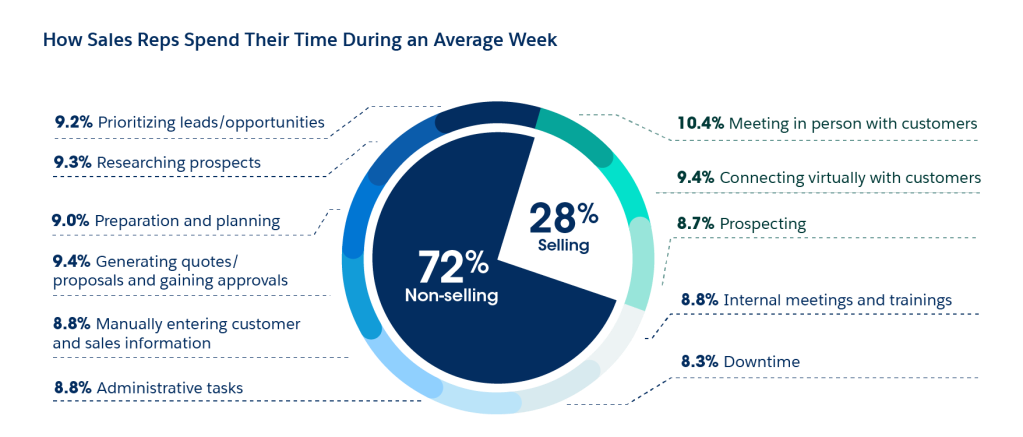
Because Salesforce email outreach depends heavily on manual follow-ups and task management, increased outreach volume adds operational overhead and makes consistent email execution harder to sustain.
This creates challenges such as:
- Missed follow-ups when reps manage many leads.
- Inconsistent nurture timing across the team.
- Difficulty standardizing outreach workflows.
These issues matter most in longer sales cycles, where timing and consistency influence outcomes. Without structure, even well-written emails lose impact.
To reduce this risk, some teams use MassMailer to automate follow-up emails based on Salesforce fields like lead stage or last activity date. This adds structure while keeping reps in control of messaging and timing. If you want to see how teams do this, here’s a walkthrough.
3. Reporting and attribution gaps
Salesforce tracks email activity well, but it offers limited insight into how outreach drives engagement over time. Teams often struggle to connect emails to outcomes clearly.
Common reporting gaps include:
- Limited visibility into which emails get attention
- Difficulty comparing outreach performance across reps
- Lack of clarity on which follow-ups influence progression
Because of this, teams may rely on assumptions instead of data-driven decisions. This slows improvement and creates uneven performance.
Some teams address this by using MassMailer to track open and click data directly on Salesforce records. This gives reps clearer signals about which leads to prioritize without adding reporting complexity.
When Salesforce email outreach delivers the best results
Salesforce email outreach works well when sales teams run moderate-volume outreach and nurture campaigns that rely on CRM context, personalization, and consistent follow-ups rather than heavy automation.
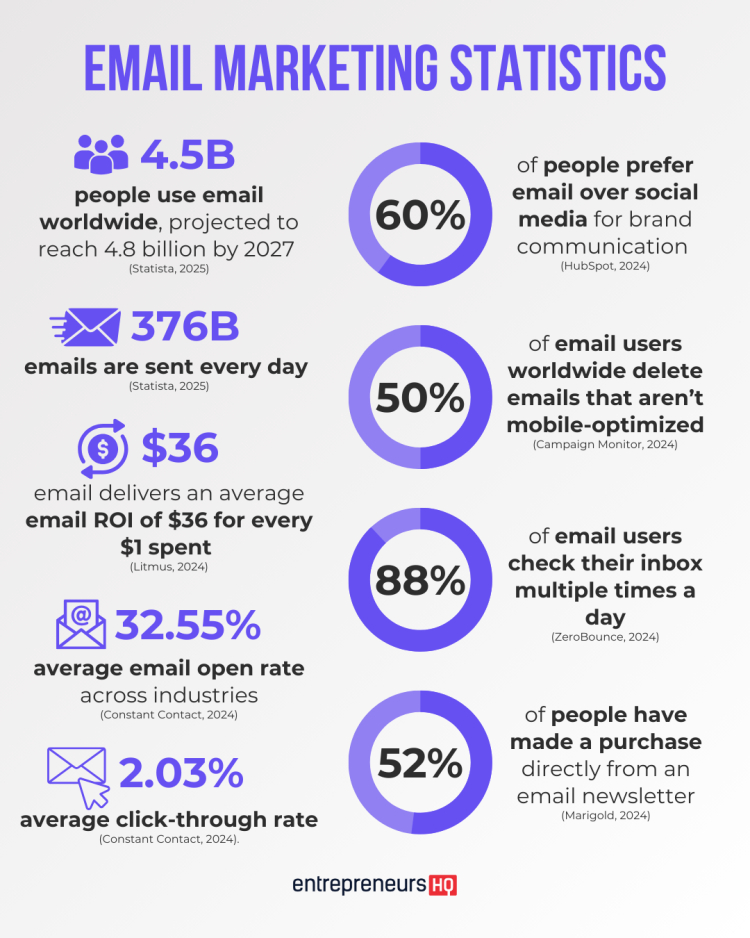
Industry benchmarks often cite returns of more than $36 for every dollar spent, which is why teams that rely on Salesforce email outreach focus on execution quality rather than volume.
Salesforce is a strong fit for email outreach when:
- Outreach focuses on one-to-one or small-batch emails tied to leads, contacts, or opportunities.
- Nurture campaigns rely on manual follow-ups and reminders instead of complex sequences.
- Personalization matters more than scale, especially in a relationship-driven sales cycle.
- Teams want email activity, follow-ups, and engagement history logged directly in Salesforce.
- Sales reps manage outreach alongside pipeline work inside a single system.
- Outreach volume stays within Salesforce email sending limits.
This approach favors control, visibility, and context, which helps teams maintain message quality and timing as deals progress.
Next, we’ll look at when Salesforce email outreach starts to break down, including the signals that show when manual structure is no longer enough.
When Salesforce email outreach stops scaling effectively
Salesforce email outreach starts to break down when teams scale outreach and nurture efforts without added structure, visibility, or control. At this point, manual follow-ups and basic tracking no longer support consistent execution.
Common signals include:
- Missed follow-ups as tasks accumulate.
- Outreach volume approaching Salesforce email sending limits.
- Delayed or skipped nurture emails.
- Limited visibility into team-wide outreach performance.
- No clear signal to prioritize engaged leads.
- Reports that fail to connect emails to progress.
These signals indicate increased outreach complexity, not platform failure.
How breakdown signals show up in practice
The table below summarizes where Salesforce email outreach begins to strain and what teams typically need next.
| Outreach need | What Salesforce handles well | Where friction appears |
|---|---|---|
| Follow-up management | Task-based reminders | Missed or late follow-ups |
| Nurture campaigns | Manual, rep-driven touches | Inconsistent timing |
| Email tracking | Activity history | Limited engagement insight |
| Outreach scale | One-to-one or small batches | Sending limits, throttling |
| Rep prioritization | CRM context | No clear next-best action |
In the Vulcan Humanizes Salesforce Bulk Email Communications with MassMailer podcast, a financial services team shares how traditional one-to-one Salesforce outreach became difficult to sustain as follow-ups increased.
By extending Salesforce with MassMailer, the team introduced controlled bulk sending while keeping messages personalized and fully logged on individual CRM records. The discussion highlights how teams can scale Salesforce email outreach without losing context, relevance, or visibility.
When multiple gaps appear together, outreach becomes harder to manage, and results vary by rep.
What teams usually look for next
At this stage, teams typically need to:
- Add structure to follow-ups while keeping rep control.
- See opens and clicks inside Salesforce.
- Send personalized bulk emails with individual activity records.
- Improve team-level visibility into outreach performance.
Some teams address these needs with Salesforce-native tools like MassMailer, which adds structured follow-ups, engagement tracking, and controlled bulk sending while keeping Salesforce as the system of record.
When these breakdown signals appear, the goal is clarity, not replacement. Next, we’ll compare Salesforce email outreach with sales engagement platforms to explain how different approaches handle scale, automation, and visibility.
Salesforce email outreach compared with sales engagement platforms
Salesforce email outreach and sales engagement platforms support different outreach needs. It focuses on contextual, rep-driven outreach inside the CRM, while sales engagement platforms focus on automation, sequencing, and scale.
The table below highlights the key differences.
| Area | Salesforce email outreach | Sales engagement platforms |
|---|---|---|
| Primary focus | One-to-one outreach and basic nurture inside CRM | Automated, multi-step outreach at scale |
| Email sending model | Manual or small-batch sends | Large-volume, sequence-driven sends |
| Follow-up management | Tasks and reminders | Automated sequences and triggers |
| Personalization | CRM field-based personalization | Dynamic, rule-based personalization |
| Email tracking | Activity history | Detailed engagement analytics |
| Rep prioritization | CRM context | Engagement-based scoring |
| Outreach visibility | Individual rep activity | Team-wide performance dashboards |
| Best suited for | Relationship-driven sales, longer cycles | High-volume prospecting and SDR teams |
This comparison shows that Salesforce email outreach works best when teams value context, control, and visibility over automation. Sales engagement platforms work better when volume and speed drive results.
Some teams bridge this gap by extending Salesforce email outreach with Salesforce-native tools like MassMailer, which add structured sending, engagement tracking, and controlled bulk outreach while keeping Salesforce as the system of record.
Conclusion
Salesforce email outreach works best when teams focus on personalized, relationship-driven communication and keep activity tied to CRM context. For one-to-one outreach and light nurture campaigns, Salesforce’s native email tools provide the visibility and control that many sales teams need.
As outreach volume grows, however, manual follow-ups, limited engagement signals, and Salesforce email sending constraints can make execution harder to manage. These challenges typically signal the need for more structure and insight rather than a full shift to an external sales engagement platform.
MassMailer extends Salesforce email outreach by enabling personalized bulk sending, structured follow-ups, and open and click tracking directly inside Salesforce. This allows teams to scale outreach while keeping Salesforce as the system of record and preserving individual activity history.
If you’re evaluating how to improve Salesforce email outreach without disrupting existing workflows or moving communication outside the CRM, MassMailer is worth reviewing alongside Salesforce’s native email capabilities.
Frequently Asked Questions
1. When does Salesforce email outreach start to face deliverability issues?
2. When should teams automate follow-up emails in Salesforce?
3. When does Salesforce email outreach stop scaling efficiently?
4. When are Salesforce’s native email tools sufficient?
5. When does email engagement tracking beyond activity history matter?
6. When should teams consider extending Salesforce email outreach?
Start Your Free Trial Today
Experience MassMailer the easiest way to send personalized emails from Salesforce.
Related Blogs
MassMailer Resources



MassMailer Glossary
About the Author

Siva Devaki 

Siva Devaki is the founder of MassMailer Inc., a tool that helps Salesforce users optimize email marketing. A passionate advocate for email marketing, Siva writes and hosts podcasts on the topic, sharing insights to help businesses drive revenue and enhance customer engagement through Salesforce email automation and tracking.