




Table of Contents
Introduction
Marketing teams often run into the same problem: siloed systems. Campaigns live in one tool, customer data in another, and sales in yet another. The result is inefficiency with duplicated work, missed opportunities, and reporting that never quite tells the full story.
When marketing and sales operate in silos, the customer experience suffers and growth slows.
According to a 2025 Forrester report, companies using integrated systems cut redundant campaigns, eliminate wasted effort, and focus on programs that drive measurable gains in revenue, retention, and customer satisfaction.
In other words, efficiency improves when systems and teams work together instead of apart.
For many organizations, this conversation starts with Marketo and Salesforce. Both are widely used, but without integration, they leave gaps in lead management, sales visibility, and performance tracking. The catch is that connecting them is a complex, expensive process that many teams underestimate.
This blog breaks down what Marketo Salesforce integration is, how to set it up, what challenges to expect, and the alternatives if the complexity isn’t worth it.
What is Marketo?
Marketo is a marketing automation platform that helps businesses run multichannel campaigns, nurture leads, and score prospects based on behavior. It provides tools for email marketing, customer segmentation, and personalized engagement. It also tracks performance and measures ROI through analytics and reporting.
Marketo supports sales and marketing alignment by connecting campaign data with customer records. It enables scalable automation for lead generation and customer retention.
What is Marketo Salesforce integration?
Marketo Salesforce integration is the process of connecting Marketo Engage with Salesforce CRM to sync leads, contacts, accounts, campaigns, and opportunities. The integration enables bidirectional data flow for core objects and real-time updates on marketing and sales activities.
Marketo Salesforce integration improves lead management by aligning marketing engagement with sales pipelines. It provides unified visibility, accurate reporting, and better collaboration between teams. The setup uses a Salesforce sync user, field mapping, and continuous monitoring to ensure data accuracy and reliability. It also requires Salesforce Enterprise or Unlimited edition to work at all.
How to set up Marketo Salesforce integration: Step-by-step guide
Setting up Marketo Salesforce integration requires careful planning, the right permissions, and structured validation to ensure both platforms communicate without errors.
Companies that rush setup often face sync failures, duplicate records, and data governance issues that take longer to resolve than if they had prepared thoroughly. The following steps outline a structured approach.
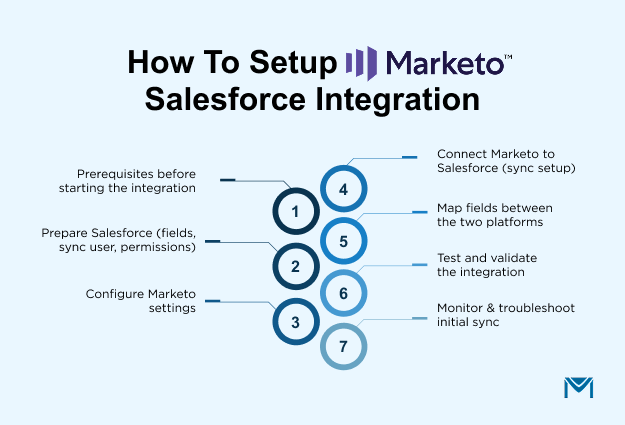
1. Prerequisites before starting the integration
Before adjusting any settings, confirm a few critical prerequisites.
- Salesforce must be the Enterprise or Unlimited edition because lower editions lack the API capacity required for Marketo sync.
- Your Marketo subscription should explicitly include CRM sync functionality.
- You also need a dedicated Salesforce Sync User. This account acts as the bridge between both systems and isolates integration activity from individual user credentials.
- Ensure you have administrator-level access in both Marketo and Salesforce so you can manage permissions, create custom fields, and adjust security settings.
Skipping these prerequisites is one of the most common causes of failed integrations. For example, if a sync user lacks the ability to edit opportunities or campaigns, Marketo will not be able to update Salesforce, leading to data gaps that frustrate both sales and marketing teams.
2. Step 1: Prepare Salesforce (fields, sync user, permissions)
Preparation in Salesforce is the foundation of a smooth integration.
- Start by creating the Salesforce Sync User with a profile that grants API access. This user should not be a personal account, since disabling or deleting that person would break the sync.
- Next, create custom fields that Marketo relies on for lead management, such as Lead Score, Acquisition Program, and Acquisition Date. These fields allow marketing teams to pass critical context about how and where leads were acquired, which sales teams then see directly inside Salesforce.
It is also essential to configure read and write access for Leads, Contacts, Accounts, and Campaigns. Without the correct access levels, updates will fail silently, leaving records unsynchronized.
3. Step 2: Configure Marketo settings
Once Salesforce is ready, move into Marketo.
- Navigate to Admin > CRM > Salesforce to begin the connection.
- Enter your Salesforce credentials along with the security token to authenticate the sync.
- From there, you can map standard fields such as Email, First Name, Last Name, and Company.
This step creates the handshake between systems. If authentication is misconfigured or if security tokens are missing, Marketo cannot establish communication with Salesforce. Carefully confirming each setting ensures data passes seamlessly.
4. Step 3: Connect Marketo to Salesforce (sync setup)
With the foundations in place, you can now initiate the sync.
- In Marketo, enable Salesforce sync, authorize access with the Sync User’s API credentials, and start the initial synchronization.
- Avoid creating new records in either platform, as changes may not appear until the full sync completes.
Companies with large data volumes often schedule their initial syncs overnight or during low-traffic periods to minimize disruption. Monitoring the progress of this first synchronization is crucial to identifying whether records flow as expected.
5. Step 4: Map fields between the two platforms
Field mapping is one of the most sensitive parts of the integration. Marketo fields must align with their Salesforce equivalents, including both standard and custom fields. If a field type in Salesforce is a picklist while the equivalent field in Marketo is text, sync errors will occur. Careful auditing and alignment prevent this.
Another decision point is whether fields should flow both ways or one way. For example, you may want lead scores from Marketo to update Salesforce, but not allow Salesforce users to overwrite those values. Organizations that set clear rules for field ownership, whether marketing or sales, control the data, maintain cleaner and more reliable records.
6. Step 5: Test and validate the integration
After mapping, validate that everything works correctly before going live.
- Create a test lead in Marketo and confirm it appears in Salesforce.
- Then update that record in Salesforce and ensure the changes flow back into Marketo.
Testing bi-directional sync in this way provides assurance that your mappings and permissions are working.
Think of this as the quality assurance stage. Companies that skip validation often discover issues only after hundreds or thousands of records are out of sync. Correcting errors at that scale is far more costly and time-consuming than catching them early during controlled testing.
7. Step 6: Monitor and troubleshoot initial sync
Even after successful validation, the first few days of live sync require close observation.
- In Marketo, monitor the “Last Synced” status and review the Sync Error Logs regularly. These logs highlight failed records, missing fields, or permission-related problems.
- Deduplicate records in Salesforce and Marketo before scaling the sync further, as duplicates are a primary cause of reporting inaccuracies.
Continuous monitoring ensures data accuracy, improves trust in the system, and prevents breakdowns that can derail sales and marketing alignment.
Treat Marketo-Salesforce integration as an evolving process, not a one-time project. The more disciplined your setup, the fewer issues you’ll face as your data, campaigns, and teams scale.
Why Marketo Salesforce integration is harder than most teams expect
Marketo Salesforce integration is a strong enabler for sales and marketing alignment, but it comes with notable challenges. Below are the key drawbacks companies face when adopting this integration.
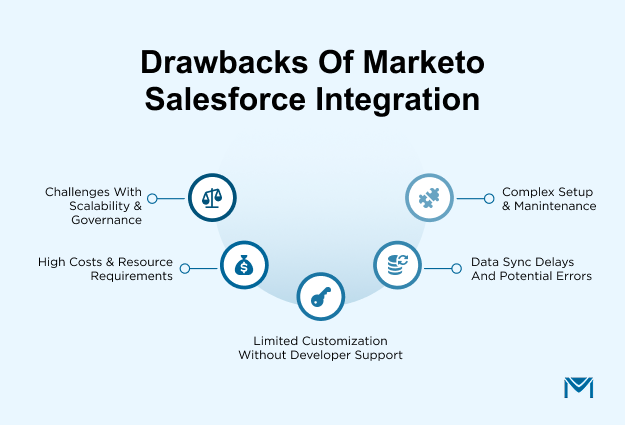
Complexity of setup and maintenance
Integrating Marketo with Salesforce involves configuring multiple systems, mapping dozens of fields, and assigning the correct permissions across both platforms. The setup requires a sync user, API authentication, and continuous monitoring to ensure that new fields or objects introduced in Salesforce are reflected in Marketo.
Non-technical teams often find this overwhelming, as the process goes far beyond a basic plug-and-play connection. Industry practitioners frequently recommend involving a certified Salesforce or Marketo administrator to avoid configuration errors. Without this expertise, small mistakes such as incorrect field mapping can disrupt lead flow and delay sales follow-up.
A user shared a real example of this issue where he was struggling with campaign sync. Everything looked fine at first: the fields were mapped, the sync backlog was clear, and smart lists were pulling in Salesforce data. But when they tried to sync programs with Salesforce campaigns, the process failed with a cryptic error: “CANNOT_INSERT_UPDATE_ACTIVATE_ENTITY.”
It turned out the issue was about async Salesforce and Marketo permissions. The sync user simply didn’t have full write access to campaigns and campaign member fields. Once the Salesforce admin adjusted those permissions, the integration started working as expected.
That small misconfiguration highlights how fragile the setup can be. Even when the systems seem connected, one overlooked setting can derail the entire process, leaving marketing and sales out of sync until the problem is solved.
Data sync delays and potential errors
The integration does not operate in true real time. Data syncs occur in cycles that can take several minutes, which means large updates across leads, contacts, or campaigns may not reflect immediately.
For organizations running time-sensitive campaigns, this lag can create confusion when sales teams expect instant visibility. Sync errors are also common when field types do not match or when records are missing required values.
Inconsistent data slows down response times and undermines trust in the system. Companies often find themselves dedicating additional time to monitoring error logs and reconciling mismatched records, especially during high-volume campaign launches.
A similar challenge was shared by one Salesforce user who noticed over twenty duplicate leads from a single company flooding into their system at the Pre-MQL stage. The leads weren’t following their normal qualification process and were being assigned round-robin to owners instead of moving through BDR review.
The root concern was whether syncing old Salesforce records into Marketo and then back again would overwrite existing data or create entirely new records.
Experienced users explained that Marketo stores the CRM ID of each record, so in theory, it updates the original rather than duplicating it. But as others pointed out, duplicate problems still emerge when upstream processes manipulate fields like email addresses or when lifecycle rules aren’t enforced consistently.
In cases like this, even though the platforms are designed to prevent duplication, one small misconfiguration in data handling can quickly snowball into sync delays, mismatches, and record clutter, exactly the kind of issues that erode confidence in the integration.
Limited customization without developer support
Marketo and Salesforce both offer extensive flexibility, but customizing their integration often requires technical expertise. Configurations beyond the default setup may call for Salesforce Apex coding or the use of the Marketo API.
For example, if a business wants to sync custom objects or apply advanced lead routing rules, standard configuration is not enough. Relying on developers adds cost and slows down implementation cycles, making it harder for marketing teams to make quick adjustments.
Organizations without in-house development capacity often need external consultants, further raising the complexity of ongoing maintenance.
High costs and resource requirements
Marketo is already a premium marketing automation platform, and when combined with Salesforce, the total cost of ownership increases. The integration consumes Salesforce API calls, which can become expensive if data volumes are large.
On top of software costs, companies need trained administrators or consultants to manage the setup and resolve ongoing sync issues. Smaller businesses may find these costs unsustainable, especially when the integration requires continuous adjustments as new campaigns, fields, or processes are introduced.
Adobe does not publish Marketo pricing, so you only find out the cost after a sales call. Add Salesforce Enterprise licensing, admin time, and consultant fees, and the total spend adds up fast
The financial commitment is not limited to licensing but extends to long-term human resource investment.
This frustration echoed in a community discussion where a Salesforce admin, new to Marketo, shared their frustration with licensing and resource demands. Their boss suggested reusing an existing integration account to save on licenses, but Marketo’s documentation pushed for a dedicated sync user.
The dilemma was clear: cut costs up front, or risk syncing every available field into Marketo, bloating the system with data they didn’t need. Others in the thread warned that while reusing accounts looks cheaper, it often creates a maintenance nightmare with hidden costs in consulting hours, data clean-up, and troubleshooting when no one can tell which system changed what.
Challenges with scalability and governance
As organizations grow, so does the complexity of their data ecosystem. A rising number of leads, contacts, and campaigns can strain the integration, leading to backlogs or increased sync failures.
Without strong data governance policies, duplicate records become a recurring issue, complicating reporting and sales handoffs. For example, if the same lead exists multiple times in Salesforce and Marketo, engagement data may be split across records, making it difficult to measure ROI accurately.
Scaling the integration requires not only technical adjustments but also clear governance frameworks for field ownership, deduplication practices, and error management. Without this discipline, integration that once supported growth can become a bottleneck.
Acknowledging these drawbacks early allows you to plan workarounds, invest in governance, and prevent the integration from becoming a bottleneck instead of a growth driver.
Best alternative to Marketo Salesforce integration
Companies with smaller teams or simpler workflows often look for alternatives that provide streamlined functionality without the heavy administrative overhead.
Choosing the right alternative involves evaluating practical factors that affect setup, budget, scalability, and compliance.
Criteria to evaluate alternatives
Ease of setup
One of the biggest pain points with Marketo Salesforce integration is the lengthy configuration process involving sync users, field mapping, and API tokens.
Alternatives should minimize technical steps so that teams can begin executing campaigns quickly. Native Salesforce apps, for example, often install directly within the CRM, eliminating the need for external connectors.
This reduces the risk of configuration errors and allows marketing teams to become productive faster without depending heavily on IT resources.
Cost predictability
Marketo is an enterprise-level tool, and when paired with Salesforce, the total cost of ownership increases due to licensing fees, API call usage, and ongoing administrative costs.
Alternatives should provide transparent, predictable pricing models that scale appropriately with usage. This matters especially for mid-market companies that need marketing automation but cannot commit to enterprise-level spend.
Predictable costs allow organizations to budget confidently without worrying about hidden fees tied to data volumes or system complexity.
Native compatibility
Integration between two separate platforms often introduces sync delays or data mismatches. Alternatives that are natively built for Salesforce avoid these issues because they operate directly within the CRM environment.
For example, an app designed for Salesforce can manage campaigns, track engagement, and update records in real time without relying on a synchronization cycle. Native compatibility also simplifies governance, as all data resides in one system rather than moving back and forth between multiple platforms.
Support and compliance
Strong customer support is critical when evaluating alternatives, since marketing automation directly impacts lead management and revenue operations. Teams should confirm whether vendors provide responsive assistance and detailed documentation.
In addition, compliance with standards such as GDPR and CCPA is non-negotiable, especially for organizations managing sensitive customer data. Alternatives must demonstrate robust data protection and privacy features, ensuring that marketing and sales processes meet regulatory requirements while maintaining trust with customers.
The right alternative should not only simplify setup but also future-proof your marketing and sales alignment. Scalability, cost control, and compliance need to stay front and center in the decision-making process.
Why MassMailer is the best alternative to Marketo Salesforce integration
MassMailer is often seen as a strong alternative because it operates as a native Salesforce application. Unlike Marketo, which requires a separate platform and a complex synchronization process, MassMailer works entirely within Salesforce.
This removes many of the setup and maintenance challenges that businesses encounter when trying to align two different systems.
| Feature | Marketo | MassMailer |
|---|---|---|
| Salesforce edition needed | Enterprise or Unlimited only | All editions |
| Setup | Requires sync user, API config, and field mapping | Installs directly from AppExchange |
| Data sync | Runs on a cycle every 5 minutes | Real-time, data stays inside Salesforce |
| Email sending limits | Subject to Salesforce 5,000/day cap | No daily sending cap |
| Campaign tracking | In Marketo, separate from Salesforce | Inside Salesforce |
| Ongoing admin | Needs dedicated admin or consultant | Lower maintenance, no external sync to monitor |
| Pricing | Custom, contact Adobe | Transparent subscription, see pricing page |
Tired of managing a sync that breaks every time something changes in Salesforce?
MassMailer runs inside Salesforce, so there is nothing to sync and nothing to break.Book a free demo and see it working in your own Salesforce environment.
Conclusion
Marketo Salesforce integration works, but it is not simple, and it is not cheap. The real question is whether the complexity is worth it for the way your team actually works. Integration is powerful, but it comes with ongoing trade-offs in complexity, cost, and governance. The best decision happens when businesses evaluate not only the technical capabilities but also the operational realities behind adoption.
Marketing automation done right has proven benefits. Research shows it delivers a 12.2% reduction in marketing overhead and boosts sales productivity by 14.5%, largely by cutting manual effort and freeing teams to focus on higher-value work. That’s the efficiency benchmark organizations should measure their integration choices against.
Think of integration as a strategic choice rather than a default one. If your organization needs the advanced automation of Marketo and can support the resources it demands, the investment may be justified. If your priority is agility, cost control, and reducing friction between marketing and sales, native Salesforce solutions like MassMailer can deliver that alignment more directly.
The takeaway is simple: success is not about choosing Marketo or its alternatives, but about ensuring your marketing and sales systems actually help your teams move faster, stay aligned, and create measurable business impact.
If the complexity of Marketo Salesforce integration feels overwhelming, explore smarter alternatives that save time and reduce costs.
Book a free demo of MassMailer today and see how a native Salesforce solution can simplify campaigns, improve collaboration, and deliver results without the headaches.
Frequently Asked Questions
How long does it take to set up Marketo Salesforce integration?
What objects are synced between Marketo and Salesforce?
Is Marketo Salesforce integration free?
Do I need developer support for the integration?
How do I troubleshoot sync errors in Marketo Salesforce integration?
What is the best alternative to Marketo Salesforce integration?
Start Your Free Trial Today
Experience MassMailer the easiest way to send personalized emails from Salesforce.
Related Blogs
MassMailer Resources



About the Author

Siva Devaki 

Siva Devaki is the founder of MassMailer Inc., a tool that helps Salesforce users optimize email marketing. A passionate advocate for email marketing, Siva writes and hosts podcasts on the topic, sharing insights to help businesses drive revenue and enhance customer engagement through Salesforce email automation and tracking.