
Table of Contents
Introduction
Salesforce Email Services are native capabilities that let Salesforce receive, process, and act on emails automatically. The platform converts inbound emails into structured actions such as creating records, updating cases, routing requests, and triggering workflows.
Email services support Apex-based automation, Email-to-Case, and outbound notifications. Teams use Salesforce Email Services to automate support intake, approvals, and system-driven communication while keeping email processing inside Salesforce governance and security boundaries.
The platform supports a variety of email communication patterns, such as routing inbound service requests, triggering approval workflows, sending real-time notifications, and handling large volumes of structured email inputs from partners or automated systems.
However, Salesforce Email Services come with several technical and operational constraints. These include daily email volume limits, Apex governor restrictions, a lack of built-in retry mechanisms, and limited visibility into processing outcomes.
In this blog, we’ll walk through how Salesforce Email Services work, the different types available, their key limitations, and when it makes sense to use native features versus external email integrations.
Types of Salesforce Email Services
Salesforce offers multiple ways to send, receive, and process emails, each designed for a specific level of automation, customization, and scale.
Understanding these different types is essential before choosing an approach, since the right option depends on whether you’re automating support requests, triggering custom logic, or managing high‑volume outbound workflows.
Below, we break down the main types of Salesforce email services and where each one fits best.
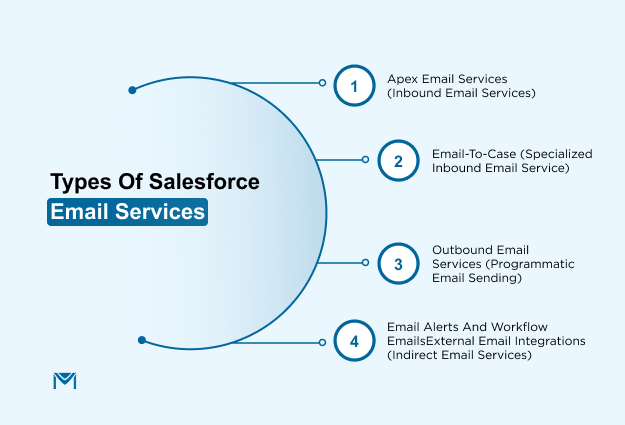
1. Apex Email Services (Inbound Email Services)
Apex Email Services are the most configurable form of inbound email automation within Salesforce. They enable the platform to receive emails at a dedicated service address and trigger custom Apex logic that processes the message in real time.
This flexibility makes them ideal for use cases where unstructured or semi-structured email data must be parsed, validated, and acted on programmatically.
At the core of an Apex Email Service is a developer-defined Apex class that implements the Messaging.InboundEmailHandler interface. When a message is received, Salesforce extracts the subject, body, headers, and attachments, then invokes the handleInboundEmail method of the specified class.
From there, developers can write business logic to transform the email into records, log information, trigger workflows, or even send follow-up communications.
Pain points addressed
- Manual entry from email sources: Apex services eliminate the need for agents or staff to review inboxes and manually enter data.
- Shared inbox fragmentation: Instead of relying on Outlook or Gmail rules, teams can centralize and route messages intelligently using logic written in Salesforce.
- Attachment handling gaps: Native tools like Email-to-Case don’t handle attachments well, especially when associations to records need to be rule-driven. Apex logic can handle MIME parsing, file association, and validation.
- Security and governance: Apex services support IP restriction, sender domain validation, and rejection logic, making them suitable for controlled environments.
Because Apex handlers run under Salesforce’s governor limits, developers must also design defensively, handling errors, avoiding excessive DML or SOQL operations, and capturing failures in logs or fallback queues.
2. Email-to-Case (Specialized Inbound Email Service)
Email-to-Case is a built-in feature of Salesforce Service Cloud designed to automatically convert incoming customer emails into Case records.
It offers a declarative, low-code way for support teams to streamline case creation and route customer inquiries efficiently, without writing custom Apex logic.
Email-to-Case is most valuable for support environments where customers email directly into shared inboxes (such as support@company.com or helpdesk@domain.com).
Instead of relying on agents to manually triage these messages, Salesforce automatically creates Cases, assigns them to queues or agents, and initiates workflows.
For example, if a company receives high volumes of technical support emails, Email-to-Case can parse the subject or sender domain to route hardware issues to one team and software issues to another. This ensures faster resolution and reduces misrouting.
Email-to-Case is a strong fit when:
- Your team handles general support queries via email
- You want fast, rules-based routing of tickets without custom code
- You need to log customer issues and track SLAs within Service Cloud
- You don’t require deep customization of email parsing or attachment processing
However, if your business requires validation of data within the email body, intelligent routing based on attachment content, or transformation of email data into non-Case records (such as Opportunities or custom objects), Apex Email Services are better suited.
3. Outbound Email Services (Programmatic Email Sending)
While Salesforce Email Services primarily refer to inbound processing, outbound messaging plays an equally important role in automation workflows. Outbound Email Services enable Salesforce to send emails automatically in response to specific triggers using Apex or Flows.
These capabilities are commonly used in tandem with inbound services to complete closed-loop processes, such as responding to support tickets or confirming the creation of new records.
At the technical level, the core method used for sending emails is Messaging.sendEmail(), which supports plain-text and HTML templates, dynamic content generation, and multi-recipient messaging.
Programmatic email sending, while powerful, is constrained by several platform limits that teams must account for:
- Daily email limits: Salesforce enforces per-org and per-license email limits, which vary depending on edition. Hitting these limits can result in emails not being sent or queued without warning.
- Governor limits: In Apex, each transaction can only call sendEmail() up to 10 times. This means large-scale batch operations may require batching logic or asynchronous execution.
- Monitoring and tracking: Native tools do not provide open rates or click tracking. If email performance metrics are required, teams often integrate with tools like Marketing Cloud, Pardot, or external platforms.
Additionally, Messaging.sendEmail() does not provide a retry mechanism for failed sends. If an email fails due to an invalid address or system issue, it must be logged and retried manually or via a custom job.
4. Email Alerts and Workflow Emails
Email Alerts and Workflow Emails are declarative tools within Salesforce that allow administrators to send automated outbound emails without writing code.
These services are typically used to notify users, customers, or stakeholders when specific conditions are met within a record or process.
Though not technically part of the Apex-based email services family, they play a crucial role in outbound communication and remain one of the most widely implemented forms of email automation in Salesforce orgs.
These declarative email services are commonly used in:
- Internal alerts: Notifying account executives when a high-value lead is assigned or reminding service agents of overdue Cases.
- Customer communications: Sending welcome emails, order confirmations, or status updates as part of onboarding or support flows.
- Reminder notifications: Alerting users about contract renewals, SLA breaches, or tasks due soon.
Because these alerts can be configured entirely within the Salesforce UI, they are particularly helpful for teams that lack developer resources but still need scalable communication workflows.
While email alerts are fast to configure and low-maintenance, they come with a few constraints:
- Static templates: Dynamic personalization is limited. If message content needs to vary significantly, Apex or external tools may be more appropriate.
- One template per alert: You can’t choose between templates based on runtime conditions without using Flow logic or custom branching.
- No read tracking: Native email alerts don’t provide insights into whether an email was opened, clicked, or delivered successfully.
- Outbound only: These tools cannot process replies or perform any kind of inbound logic. If your workflow depends on two-way communication, consider Apex Email Services or integrating with external tools.
5. External Email Integrations (Indirect Email Services)
While Salesforce offers a range of native email capabilities, many organizations eventually hit functional ceilings. These include limitations on daily send volumes, a lack of engagement analytics, and limited support for advanced personalization or campaign management.
To address these constraints, businesses often turn to external email platforms that integrate with Salesforce to extend functionality and scale. These tools complement Salesforce Email Services by enabling high-volume, trackable communication from within or alongside your CRM workflows.
External email services are ideal when:
- You need to send more emails than Salesforce’s native limits allow
- You want to monitor email performance metrics (opens, clicks, bounces)
- You require more sophisticated HTML templates, segmentation, or send-time optimization
- Your team needs to run multi-step journeys or drip campaigns
- You need centralized control over sender domains and IP health
They are also particularly useful for organizations consolidating both marketing and transactional communications under a unified infrastructure, while keeping Salesforce as the system of record.
When connecting external platforms to Salesforce, consider:
- API vs managed package: Some tools use the Salesforce API, while others offer managed packages inside Salesforce. Choose based on your admin skill set and scalability needs.
- Data residency and compliance: For regulated industries, confirm where email data is stored and how it’s logged for compliance.
- Governor limit impact: Native integrations like MassMailer are designed to stay within Salesforce governor limits. API-based tools may need batch design or async jobs.
- Two-way sync needs: Ensure the system can push back delivery results (opens, bounces, unsubscribes) into Salesforce records, for full-cycle reporting.
How Salesforce Email Services Work
Before diving into the technical components, it helps to understand the overall flow, how an email enters Salesforce, how it’s evaluated, and how it ultimately triggers automation.
Inbound Email Processing Architecture
Every email service in Salesforce is assigned a unique address, such as custom-service@xyzabc.apex.salesforce.com. When someone sends an email to that address, Salesforce captures the message, extracts metadata like headers and body content, and invokes a pre-defined Apex handler class.
That Apex class, custom-written by a developer, then determines what happens next. It can parse attachments, extract fields from the body, validate senders, and execute actions like creating tasks, updating records, or pushing notifications.
The email is not stored permanently by default, which also means your logic must capture and persist any needed information. Attachments must be parsed and saved intentionally. This gives you full control but also full responsibility.
Role of Apex Email Services
The backbone of this process is the Apex class that implements the Messaging.InboundEmailHandler interface. Developers override the handleInboundEmail method to define custom logic.
Here’s what a typical Apex Email Service might do:
- Parse the sender’s email address
- Check if the subject line contains a case number
- Look for keywords in the email body
- Store attachments in a related object
- Create or update a case record in Salesforce
This programmability is what sets Apex Email Services apart from simpler tools like Email Alerts or Email-to-Case. You’re not confined to templated workflows because you write the logic, define the behavior, and control the outcome.
Limitations of Salesforce Email Services
While Salesforce Email Services offer robust functionality for automating inbound and outbound email workflows, they come with architectural, operational, and scaling limitations that teams must plan around, especially in high-volume, multi-team environments.
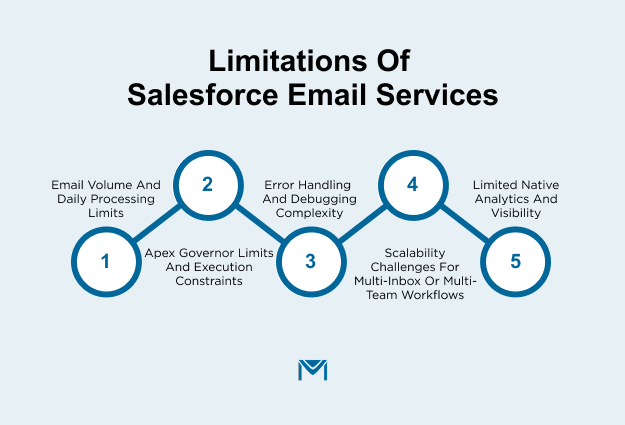
1. Email Volume and Daily Processing Limits
Salesforce imposes strict daily email limits based on your edition and licensing tier. Standard orgs typically allow up to 5,000 emails per day for Apex email services and outbound email functions, but this can quickly become a bottleneck for support teams or automated approval systems that rely heavily on email input.
If your system processes thousands of messages daily, from customer inquiries to partner updates, you may encounter message rejections once the threshold is exceeded.
Salesforce does not queue or defer these excess messages. They are dropped unless managed externally. Organizations handling bulk email inputs often implement message throttling logic, staggered processing windows, or turn to native-compatible tools like MassMailer.
MassMailer removes these limitations by enabling unlimited email sending directly from Salesforce. It’s designed for teams that outgrow standard limits and need to scale reliably.
With MassMailer, you can run campaigns, send transactional or operational emails to any object, and track performance, all within Salesforce.
2. Apex Governor Limits and Execution Constraints
Apex Email Services operate within the same runtime context as standard Apex code and must adhere to strict governor limits. These include:
- Heap size limit of 10 MB per transaction
- Maximum CPU time of 10 seconds
- 100 SOQL queries per transaction
- 10 DML statements per transaction
These constraints become a challenge when handling unstructured emails, large attachments, or workflows that span multiple objects and logic branches.
For instance, parsing a 5 MB PDF attachment, extracting data, and creating multiple related records may exceed the limits unless you pre-process and segment the logic into asynchronous jobs or batch classes.
Teams need to architect defensively, using lightweight parsing techniques, governor-safe patterns, and fallback error logging to avoid service interruptions.
For teams regularly dealing with file-heavy email workflows, tools like MassMailer offer a native alternative. MassMailer lets you send and manage attachments directly from Salesforce without hitting governor limits associated with Apex-based file processing.
You can attach files from Salesforce Files, Documents, or even dynamically from related records, ensuring each recipient receives the right content with minimal logic load.
This reduces the need for custom Apex code to handle attachments and avoids resource-heavy email processing routines that can fail silently when limits are breached.
3. Error Handling and Debugging Complexity
Inbound email failures do not always surface cleanly. If an email handler class throws an exception during processing, the original sender might never know the message failed. There is no default retry logic or out-of-the-box alerting system for email processing errors.
This creates operational risk in critical workflows. To mitigate this, many Salesforce teams build custom logging objects that track errors by timestamp, handler, and failure reason.
Others use Platform Events or custom exception frameworks to notify admins in real time when an inbound email fails, especially for high-impact use cases like case creation, approval workflows, or order intake.
4. Scalability Challenges for Multi-Inbox or Multi-Team Workflows
Salesforce requires a unique email service address for each Apex handler class. This setup works well for isolated use cases but becomes complex when multiple departments (e.g., support, legal, sales ops) each need their own inbound logic, parsing rules, or attachments.
Over time, this leads to:
- Dozens of email service addresses
- Multiple Apex classes with overlapping logic
- High maintenance effort to test and deploy changes safely
To scale responsibly, organizations must enforce naming conventions, handler governance, and change management protocols. They may also adopt wrapper classes or service registries to centralize logic and reduce redundancy.
5. Limited Native Analytics and Visibility
Salesforce does not provide dashboards or prebuilt reports for monitoring email service performance. There is no native visibility into:
- How many emails were processed successfully today
- Which handlers encountered exceptions
- Processing time per message
- Number or size of attachments handled
This blind spot can delay incident detection and resolution, especially in regulated environments or customer-facing workflows.
To close the gap, teams often create custom objects to log each email transaction, including metadata such as sender, subject, processing time, and success status.
For teams that want deeper insight without building custom infrastructure, MassMailer offers built-in email monitoring and analytics directly within Salesforce.
With MassMailer, you can track open rates, bounce rates, click-throughs, unsubscribes, and spam reports, turning email activity into measurable performance metrics. This visibility is critical when scaling email workflows or validating SLAs across customer support or marketing operations.
Conclusion
Whether you’re automating customer support, handling operational requests, or building custom logic for specific workflows, these services offer direct integration with your CRM and allow full control over how email data is routed, parsed, and stored.
Salesforce Email Services are a good fit for:
- Teams managing inbound requests like support, onboarding, or approvals
- Organizations with predictable, structured email inputs
- Admins and developers are comfortable with Apex-based automation
- Workflows that require real-time email-to-record actions
- Use cases where email volume stays within Salesforce limits
For scenarios that demand higher scale, advanced deliverability controls, or more robust analytics, native services may fall short.
In these cases, third-party tools and integrations offer better performance, flexibility, and monitoring features that go beyond what Salesforce natively provides.
Consider external tools or integrations when:
- Your email volume consistently exceeds platform or governor limits
- You need advanced tracking, bounce management, or deliverability analytics
- Emails must be sent as part of complex marketing or transactional workflows
- Teams require user-friendly templates or campaign-level automation
Choosing the right approach comes down to balancing control, complexity, and scale. When in doubt, blending native features with specialized integrations often delivers the best of both worlds.
Ready to move beyond Salesforce email limits?
Book a MassMailer demo to see how you can send unlimited emails, track engagement, and manage campaigns directly inside Salesforce without workarounds or custom code.
Frequently Asked Questions
1. What is an Apex Email Service in Salesforce?
2. Are Salesforce Email Services inbound or outbound?
3. Do Salesforce Email Services support attachments?
4. Is Salesforce Email Services secure?
5. When should I avoid using Salesforce Email Services?
Start Your Free Trial Today
Experience MassMailer the easiest way to send personalized emails from Salesforce.
Related Blogs
Salesforce Cold Email in 2026: Tools, Setup Tips & Compliance Risks
Salesforce Email Notifications: Setup, Limits, and Fixes
Salesforce Email Studio: A Practical Guide for Marketers and Admins
MassMailer Resources


MassMailer Glossary
About the Author

Siva Devaki 

Siva Devaki is the founder of MassMailer Inc., a tool that helps Salesforce users optimize email marketing. A passionate advocate for email marketing, Siva writes and hosts podcasts on the topic, sharing insights to help businesses drive revenue and enhance customer engagement through Salesforce email automation and tracking.