
Table of Contents
Introduction
Salesforce excels at managing leads, tracking activities, and maintaining a single source of truth across the sales funnel. Naturally, many teams assume it can also support cold email outreach without much friction.
That assumption is where reality sets in. Teams using Salesforce quickly run into limitations when they try to use it for cold emailing. Daily send limits, weak deliverability controls, lack of sequencing, and minimal engagement insights make it difficult to scale outbound without workarounds.
What works well for logging emails and handling warm follow-ups starts to break down when applied to high‑volume, first‑touch outreach.
In this blog, we’ll break down what Salesforce can and cannot do for cold email, where teams struggle the most, and how to use Salesforce effectively for outbound without hurting deliverability or losing visibility.
Can you send cold emails with Salesforce?
Salesforce does allow users to send outbound emails, but it is not designed to manage cold email outreach at scale. The platform supports basic one-to-one emailing through contact and lead records, which is helpful for individual follow-ups or nurturing existing relationships.
However, cold outreach, defined as initiating contact with leads who have no prior engagement with your brand, requires a different set of capabilities that go beyond what Salesforce provides out of the box.
The core issue is that Salesforce does not offer native support for sequencing, scheduling, or automation features required for sending multi-step cold email campaigns. Reps cannot build a cadence of follow-up messages that trigger based on recipient behavior, such as no reply or email open.
Without that functionality, outbound teams must rely on inefficient manual workflows or fragmented tools that fail to sync effectively with the CRM.
Moreover, Salesforce limits daily email sends and lacks the infrastructure needed to support deliverability safeguards like automated domain warmup, bounce detection, and inbox placement optimization.
These are essential for cold outreach, especially when prospecting into high-volume enterprise accounts where reputation and response rates matter.
You can send cold emails using Salesforce, but the platform lacks the built-in infrastructure, scalability, and safeguards required to do it well. For anything beyond manual, low-volume outreach, integrating with a purpose-built tool is necessary.
Native Salesforce cold emailing capabilities
Salesforce offers foundational email capabilities that can support basic sales communication workflows, but its native functionality is geared more toward lead engagement than cold outreach.
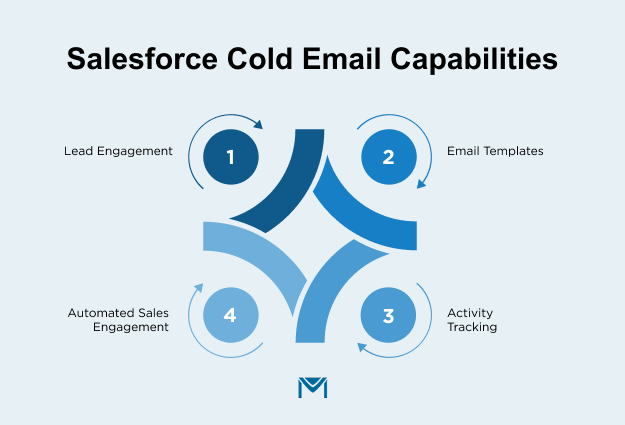
1. Lead Engagement
Sales reps can send individual emails directly from contact or lead records. This one-to-one approach is often used for warm leads, such as following up after a discovery call or responding to a form submission.
It’s manual by design and lacks the automation features required for handling hundreds of new leads entering the funnel weekly.
2. Email Templates
Salesforce also provides standard email templates that help maintain message consistency across a team. These templates can include dynamic fields for personalization, such as first name or company name, and are useful for ensuring brand voice.
However, they’re not optimized for split testing subject lines or tracking reply rates, which are essential when refining cold email messaging.
3. Activity Tracking
For activity tracking, Salesforce Inbox allows sales reps to monitor email opens and link clicks. While this provides visibility into initial engagement, it’s limited in scope.
There’s no built-in system to detect replies, log intent, or adapt outreach based on recipient behavior, functions that outbound teams rely on when fine-tuning campaign performance.
4. Automated Sales Engagement
Salesforce Sales Engagement (previously known as High Velocity Sales) adds light automation capabilities such as task queues and basic cadences. It allows reps to create semi-structured outreach flows, but teams use these best for warm leads already in the pipeline.
The feature set lacks conditional branching, adaptive messaging, and deliverability controls that outbound teams expect from dedicated email sequencing tools.
Lastly, Salesforce logs email activity against the contact or lead record, supporting better visibility and reporting. This helps align outreach history across marketing, sales, and customer success.
However, Salesforce does not automatically categorize emails by stage, campaign, or reply type without custom workflows or external integrations.
These features support warm engagement and CRM hygiene, but not cold email workflows. For teams running targeted outbound campaigns to new prospects, Salesforce’s native email tools do not support automation, compliance enforcement, or deliverability optimization.
To fill these gaps, most teams integrate Salesforce with dedicated outbound platforms that handle the cold email execution while syncing back activity for tracking and attribution.
Salesforce cold email limitations
While Salesforce is a powerful CRM for managing lead and customer data, it lacks the capabilities needed for running effective, scalable cold email campaigns.
These limitations become increasingly apparent as outbound teams move beyond one-off emails and into structured prospecting workflows.
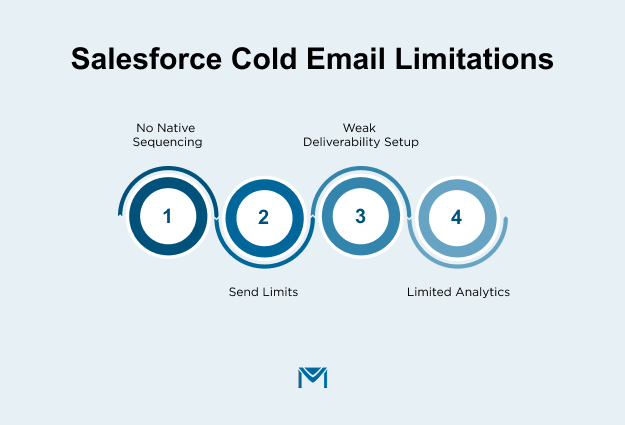
1. No native sequencing
Salesforce does not support multi-step email cadences out of the box. This is a significant barrier for outbound teams that rely on multi-touch workflows to engage cold prospects across a series of emails over time.
Without sequencing, reps are forced to rely on task reminders or manual sending, which slows down outreach, increases inconsistency, and reduces the overall volume of touchpoints.
Sales Engagement offers basic cadence functionality, but it lacks the conditional logic, branching, and reply-based triggers found in dedicated outbound platforms like Outreach or Salesloft.
2. Send limits
Salesforce enforces daily email sending limits based on the user license and edition. These limits are generally low and apply to both marketing and transactional messages.
In cold email contexts, where reps might be reaching out to dozens or even hundreds of new leads per day, these caps quickly become a blocker. Exceeding the limits can result in errors, message delays, or deliverability warnings.
Additionally, Salesforce’s infrastructure isn’t optimized for high-volume outreach, which can further risk email performance when approaching these thresholds.
3. Weak deliverability setup
Salesforce email deliverability depends heavily on external domain configuration. To avoid spam filters, senders must properly set up SPF, DKIM, and DMARC records, which requires coordination with DNS providers and sometimes IT teams.
Even with those in place, Salesforce does not offer inbox placement monitoring or bounce management tools to diagnose and improve deliverability.
Unlike platforms such as MassMailer, Salesforce provides no built-in warm-up schedules, sending reputation monitoring, or spam trap detection. For cold email campaigns, where inbox placement can determine success or failure, this is a major shortfall.
4. Limited analytics
Salesforce offers basic open and click tracking through features like Inbox, but it does not support the more advanced analytics needed to optimize cold outreach.
There is no automatic detection of replies, no insight into bounce types (hard vs. soft), and no support for A/B testing subject lines or content variations. Cold email campaigns require granular feedback loops to adjust messaging and improve response rates.
Without reply tracking and performance segmentation, teams lose visibility into what’s working and why, making it difficult to improve or scale efforts.
These limitations don’t mean Salesforce is unusable for outbound efforts, but they highlight why most cold email programs fail to scale when relying solely on the platform.
The most effective teams treat Salesforce as a system of record and extend its functionality with external tools built for cold outreach execution, ensuring deliverability, compliance, and performance optimization across the funnel.
Salesforce-MassMailer Integration for Cold Emailing
MassMailer is a native Salesforce email solution that enables teams to send, automate, and track high‑volume emails directly inside Salesforce without hitting native send limits.
It extends Salesforce’s email capabilities with features like email verification, deliverability controls, workflow‑based alerts, and detailed engagement tracking, making it suitable for cold email, campaigns, and operational outreach while keeping all activity tied to CRM records.
1. Improve deliverability
Salesforce makes it easy to send emails, but it does very little to protect deliverability once volume increases. There is no native support for domain warm‑up, no visibility into sender reputation, and limited control over how bounces or spam complaints are handled.
As a result, cold email programs often degrade quietly. Mailbox providers filter, block, or ignore messages long before teams realize there’s a problem.
Instead of treating deliverability as an external concern, MassMailer handles it directly inside Salesforce.
Teams send emails from dedicated IPs instead of shared infrastructure, helping them establish and protect sender reputation over time.
They authenticate domains using SPF, DKIM, and DMARC, reducing the chance that mailbox providers flag outbound messages.
MassMailer also addresses the operational gaps Salesforce leaves behind. Teams validate email addresses before sending to reduce hard bounces, and they automate bounce handling and unsubscribe management to prevent repeat delivery issues.
Teams track engagement data such as opens, clicks, and bounces in real time, giving them early signals when deliverability starts to slip.
By managing reputation, authentication, and list quality natively within Salesforce, MassMailer improves inbox placement without forcing teams to juggle external tools or lose CRM visibility.
2. Clean your list before cold emails go out
Cold email campaigns often underperform not because of bad messaging, but because of bad data. Invalid, outdated, or typo-filled email addresses increase bounce rates, trigger spam filters, and hurt sender reputation, especially when targeting B2B lists at scale.
Salesforce stores contact data, but it doesn’t verify whether those emails are still valid or safe to send.
This is where many outbound teams introduce pre-send verification steps. Tools like MassMailer allow users to verify every email address directly inside Salesforce with no exports, no separate platforms.
Emails can be validated in bulk or in real time as leads are created or updated. Risky addresses, including invalid formats, role-based emails, or known spam traps, can be flagged and excluded before a campaign is launched.
This proactive cleanup reduces hard bounces, improves inbox placement, and ensures reps spend time on leads that can actually respond. Over time, it helps preserve domain reputation and avoid the long-term penalties that come with repeated sends to bad addresses.
3. Use alerts to catch cold leads before they slip
In cold outreach, the small signals often matter most. A lead who opens your email twice, clicks a link, or updates their job title is showing interest, but if those signals don’t trigger immediate action, the opportunity fades.
Native Salesforce alerts are limited, hard to customize, and often fail to notify the right people at the right time.
MassMailer changes this by enabling real-time, customizable email alerts built directly within Salesforce. Teams can trigger alerts from any object, standard or custom, based on engagement signals like opens, clicks, or lead score changes.
These alerts can go to internal reps, managers, or external recipients, and they’re fully tracked inside the CRM.
For example, if a lead clicks a pricing link but doesn’t reply, MassMailer can automatically send an internal alert to the assigned rep with context, timing, and contact info so the rep doesn’t have to dig through logs or dashboards.
Alerts can be personalized with merge fields, scheduled for follow-up reminders, or repeated based on workflow logic.
This allows sales teams to prioritize outreach in real time, act when intent is high, and avoid missed follow-ups, all without relying on manual monitoring or report building. For cold email programs, it’s a small automation that creates a meaningful edge.
4. Automate more touchpoints, not more busywork
Cold outreach rarely ends with a single email. Most replies happen after multiple follow-ups, but as volumes grow, manual follow-up becomes inconsistent, and personalization starts to slip.
This challenge compounds in complex B2B sales processes, where buyers rarely move forward in a straight line. According to a 2022 Gartner Survey on B2B Buyer Journeys, buyers often loop through stages at least once, creating multiple interaction points before a decision is made.
Each of these moments creates a potential touchpoint that can either move the conversation forward or be missed entirely.
Salesforce doesn’t natively adapt outreach based on real-time signals like engagement, lead status, or inactivity without significant customization or external workflows.
MassMailer helps fill that gap by embedding automation directly into Salesforce. Teams trigger follow-up messages when specific conditions occur, such as leads opening emails without replying, clicking a call-to-action without converting, or staying inactive for a set number of days.
Teams can tie these triggers to Salesforce fields, workflow updates, or campaign logic, ensuring every message is timely and contextual.
Instead of sending the same cadence to every contact, MassMailer allows you to vary messaging based on behavior. For example, teams can send a second-touch email that acknowledges a clicked link or trigger a re-engagement message when a lead’s score drops below a set threshold.
Everything stays logged and tracked inside Salesforce, from engagement history to alert delivery. This keeps sales reps informed and follow-ups on point, without adding new tools or manual tasks.
It’s how high-performing teams scale cold email without losing relevance or letting good leads go cold.
Conclusion
Salesforce still supports cold emailing when teams limit the scope and set clear expectations. It works best in scenarios like:
- Sales teams send low-volume, high-intent outreach emails manually, writing each message themselves
- One‑to‑one follow‑ups after events, inbound inquiries, or referrals
- Teams that need basic email logging and CRM visibility, rather than automation
- Use cases where compliance and record‑keeping matter more than scale
As soon as cold email becomes a repeatable growth motion, the requirements change. At that point, most teams start looking beyond native Salesforce functionality:
- When outreach volume increases, and daily send limits become a blocker
- Teams need email verification and bounce prevention before launching campaigns
- When follow‑ups must adapt to opens, clicks, or inactivity
- When deliverability, reputation, and inbox placement become ongoing concerns
- When teams need alerts, automation, and engagement data without manual tracking
This distinction matters because email is not a side channel anymore. According to the Email Marketing Benchmarks 2022 Report by Gartner, 44% of Chief Marketing Officers say email marketing is essential to their overall marketing strategy.
That importance puts pressure on execution. Salesforce provides structure and data integrity, but cold emailing requires additional layers of control, timing, and insight to perform consistently.
If Salesforce cold email feels limiting, see how teams extend it without losing control or visibility.
Book a MassMailer demo to explore deliverability, verification, and engagement workflows that run natively inside Salesforce.
Frequently Asked Questions
1. Can I send mass cold emails directly from Salesforce?
2. How to bypass Salesforce mass email limitations?
3. Can Salesforce Sales Engagement be used for cold email?
4. Can I build cold email cadences inside Salesforce?
5. What happens if I exceed Salesforce’s daily email limits?
6. Does Salesforce support inbox placement monitoring for cold email?
Start Your Free Trial Today
Experience MassMailer the easiest way to send personalized emails from Salesforce.
Related Blogs
Salesforce Email Notifications: Setup, Limits, and Fixes
Salesforce Email Studio: A Practical Guide for Marketers and Admins
MassMailer Resources

MassMailer Glossary
About the Author

Siva Devaki 

Siva Devaki is the founder of MassMailer Inc., a tool that helps Salesforce users optimize email marketing. A passionate advocate for email marketing, Siva writes and hosts podcasts on the topic, sharing insights to help businesses drive revenue and enhance customer engagement through Salesforce email automation and tracking.